I have a problem i cant access my c drive at all, after sharing it with another computer i decided it was not a good idea to share my c drive so i disable it by choosing do not share with everyone but i am also not sure what i must have done during that process because now i cant access the c drive even tho my computer name shows up as the administrator its been 4 days now that i am having this problem please help
Hello and welcome EMMAMSHANA now do this
BOOTABLE UBUNTU
Make a bootable Ubuntu disk Download Ubuntu Desktop | Download | Ubuntu
Set the BIOS to boot from the optical when the machine boots it will show you a screen with TRY or INSTALL > select TRY not INSTALL
When it is finished - it takes very little time you will get a screen like in the pic .
Open the drive you want > User and dig down until you get to the data / settings you may be able to copy / paste the material you want to an external source or other installed drive doing this.
I am not sure if it will but I have recovered tons of data etc using this method both on "dead" or just plain drives that you cannot get data from using Windows.
Now as you will have the internet you can run some scans on the drive while in Ubuntu
Now if nothing else you should be able to retrieve data and put it on a stick or other external drive.
Attachments
UBUNTU SCREEN X2.PNG
272.7 KB
· Views: 0
My Computer
Computer type
PC/Desktop
Computer Manufacturer/Model Number
Own build (new) Desk1 / Asus ROG Win 7 / Desk2 1st build
OS
Desk1 7 Home Prem / Desk2 10 Pro / Main lap Asus ROG 10 Pro 2 laptop Toshiba 7 Pro Asus P2520 7 & 10
One other Desktop (tester) and spare Toshba laptop both with SSD's
Running Kaspersky 2016 ISS on all machines config'd identically
Logitec audio stereo systems on each machine (x3)
Canon MG5250MFC
Router/modem TP-Link running WPA2SK
Adding to ICIT2LOL's excellent advice, how does the hard-drive show up in the BIOS screen? Did you by chance earlier create any Windows rescue and/or repair usb sticks or DVDs? On another computer, you can create a usb or dvd boot containing one of any number of real good free partition managers, so that you just might be able to fix "c drive" which is really called c partition -- unless the whole hard-drive is one big C
My Computer
Computer type
PC/Desktop
Computer Manufacturer/Model Number
Antec desktop; Acer Aspire laptops
OS
Windows 7 Professional 64-bit
CPU
Desktop i5; Acers i5 & i7
Memory
desktop 16GB; 1 Acer 8GB & 1 Acer 16GB
Hard Drives
1TB split into 2 equal partitions [OS and data] usable by RJS
Internet Speed
AT&T DSL
Browser
FF, GChrome, msIE
Other Info
Windows 7 Firewall, Emsisoft AM/AV, MSE [scan-only], SpywareBlaster, Ruiware/BillP combine
Yes as Roland says mate it does need to be seen have some idea of what is partitioned on that drive.
Just as a by the by just where it that drive installed right now?? because reading your original post it could be seen as still in the other machine. Plus just why did you "share it"
My Computer
Computer type
PC/Desktop
Computer Manufacturer/Model Number
Own build (new) Desk1 / Asus ROG Win 7 / Desk2 1st build
OS
Desk1 7 Home Prem / Desk2 10 Pro / Main lap Asus ROG 10 Pro 2 laptop Toshiba 7 Pro Asus P2520 7 & 10
One other Desktop (tester) and spare Toshba laptop both with SSD's
Running Kaspersky 2016 ISS on all machines config'd identically
Logitec audio stereo systems on each machine (x3)
Canon MG5250MFC
Router/modem TP-Link running WPA2SK
thank you so much for the advise ICIT2LOL will this also help me to have access to my C drive ? because it sounds like this is to recover data and i just want to be able to access my C drive again
"Try to enter safe mode, login as "Administrator" (enable that account first if it is currently disabled). Then right click C:\ drive, click Properties. Navigate to Security Tab, then click Advanced. Go to Owner tab, then change the ownership to "Administrator" first. Then, grant permissions like these to these users [CMIIW]: Authenticated Users: Read, execute, write, modify,
Administrators: Full Control
TrustedInstaller: Full Control
SYSTEM: Full Control
Users: Read, execute Finally, change the owner once more to "TrustedInstaller"."
I more than happy to say thank you so much jumanji my problem of not being able to access c Drive has been solved by following the procedure you gave me thank you so much
Glad that that Microsoft solution worked for you and that I could lead you to that . Enjoy the ride on Seven Forums..
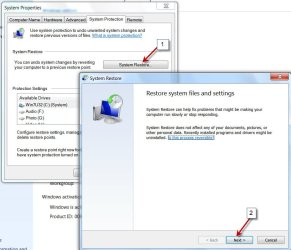
In future, before you make any changes to the System parameters, make sure to create a System Restore point. In case of any mishap, in most situations, you should be able to restore the system and resolve the issue.
Thank you so much jumanji for the advise could you give me the procedures on how to create a System Restore point so that in future i can do it i never done it before

 please help