Can't access network pc (2 nic)

Master Exploder

New member
Local time
10:23 PM
Messages
9
Hey there.

This week I got this problem with my network connections, I can't access a network pc. Even though I can see it on the explorer, I get the 0x80070035 error whenever I try to access it. About two days ago everything was working ok, I was able to access both computers with no problem at all but this last Win update must have done something to my conn.

I'm running Win 7 Ultimate on both comps, my main's MB is an Asus striker extreme and it has two nic's, one is connected to a cable modem (thomson thg540) and another to my second comp, all connections are wired.

What happened so far:
The connection between my two comps used to be an unidentified connection when it used to work strangely, after this whole problem started my secondary comp lost its internet connection but was still able to access my main comp, my main lost its ability to connect to my secondary even if I could see it in the explorer giving me the 0x80070035 error as you can see below.

Error
Untitled2.jpg


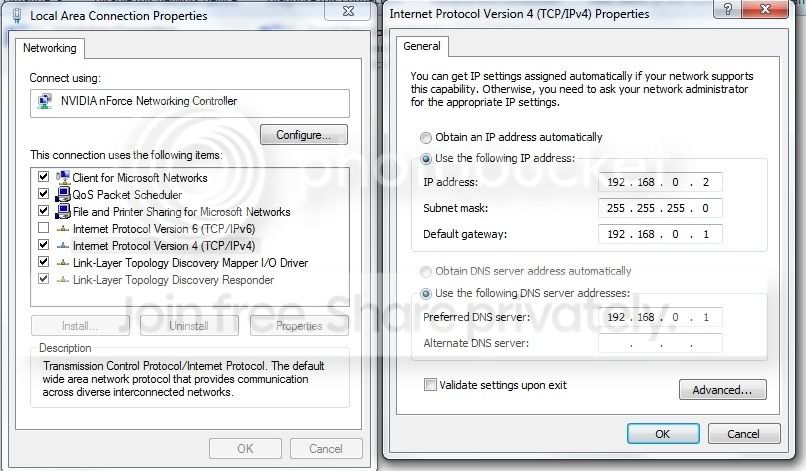
I checked their IP adresses and noticed they both had 169.254.xxx.xxx adresses so I googled the problem for a bit and gave both pcs a static IP like you can see below.

Main pc
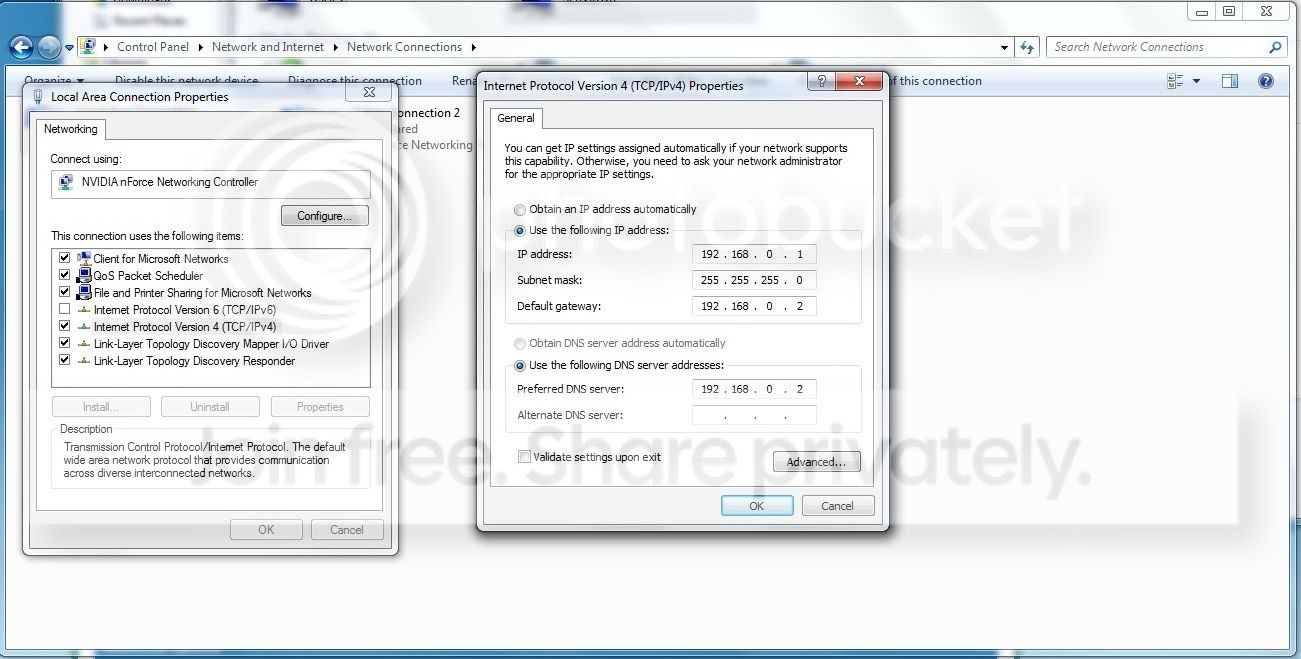
Untitled-4.jpg


Second pc
Untitled3.jpg


After I did this my secondary comp was able to access my main and get internet access but my main still wasn't able to access my secondary comp through Win explorer, it still gives me the 0x80070035 error. I've checked all services and whatnot and everything seems to be working ok, I have the same workgroup in both comps, sharing settings are set properly, sharing privileges are set properly, win firewalls are down, no anti virus software installed, when I ping my second pc no packets are lost.

So the problem persists and I have no idea on what to do next...

If any of you guys could give me a hand with this I'd appreciate it.

Cheers
M E
 

My Computer

OS
Windows 7
CPU
Intel Core2quad q9450
Motherboard
Asus Striker Extreme
Memory
4 Gb OCZ ddr 2 800mhz
Graphics Card(s)
XFX 8800gt 512mb Alpha dog
Sound Card
Supremefx
Monitor(s) Displays
Samsung SyncMaster 2023Nw
Hard Drives
Western digital 250 gb sata
PSU
Nox 600W
Hi Master Exploder, just by looking at your default gateways. You have two pcs, one connected to modem and the to first Pc's second NIC.

Why did you put in two different gateways? Also your default gateway should be in theory have the first IP. In the second image, you pc IP is 0.2 and your gate is 0.1, this would not work i don't think.

What i would do is, allow the main PC to obtain IP through DHCP. Get it connected to the internet first. Then once that's done. Look at the ipconfig /all details. You could then set manual ip using the appropriate gateway to the second pc.

The connection between the main PC and second Pc via cable is no different to cross-over cabling. Refer to my tut in sig, for connecting between two pcs.
 

My Computer

Computer Manufacturer/Model Number
Lenovo ThinkPad T60
OS
Windows 7 Ultimate 64Bit
CPU
GenuineIntel Intel(R) Core(TM) DuoCore T2400 @ 1.83GHz
Motherboard
Intel(R) 82801G (ICH7 Family)
Memory
2.00 GB
Graphics Card(s)
Mobile Intel(R) 945 Express Chipset
Sound Card
SoundMAX Integrated Digital HD Audio
Monitor(s) Displays
ThinkPad Display
Screen Resolution
1400x1050
Hard Drives
100Gb SATA
Keyboard
Standard Keyboard
Mouse
HID-compliant Mouse
Internet Speed
Cable Broadband - 54Mbps
Other Info
Intel(R) PRO/1000 PL Network Connection
11a/b/g Wireless LAN Mini PCI Express Adapter
Thanks for the reply Aem, as I said in my first post I have two comps, my main comp has two nic, one connects to my secondary comp and the other to a cable modem.

I used diferent gateways because if I don't I get an unidentified conn. That's the only reason... My second comp gets internet access and can access my main, my main comp gets internet access but can't access my second comp.
 

My Computer

OS
Windows 7
CPU
Intel Core2quad q9450
Motherboard
Asus Striker Extreme
Memory
4 Gb OCZ ddr 2 800mhz
Graphics Card(s)
XFX 8800gt 512mb Alpha dog
Sound Card
Supremefx
Monitor(s) Displays
Samsung SyncMaster 2023Nw
Hard Drives
Western digital 250 gb sata
PSU
Nox 600W
I have added to my first reply. From what i can tell, the connection between your main Pc and the second Pc is a cross-over. What you should do is to make sure you get the main pc up and working the way it should. I prefer bridging for internet sharing between two connections, which you will have after you create that "cross-over" connection.

Btw, your modem is your gateway for the main Pc. I'm not sure if you put in another gateway for the second NIC that it would work (for the connection between main Pc and second pc).
 

My Computer

Computer Manufacturer/Model Number
Lenovo ThinkPad T60
OS
Windows 7 Ultimate 64Bit
CPU
GenuineIntel Intel(R) Core(TM) DuoCore T2400 @ 1.83GHz
Motherboard
Intel(R) 82801G (ICH7 Family)
Memory
2.00 GB
Graphics Card(s)
Mobile Intel(R) 945 Express Chipset
Sound Card
SoundMAX Integrated Digital HD Audio
Monitor(s) Displays
ThinkPad Display
Screen Resolution
1400x1050
Hard Drives
100Gb SATA
Keyboard
Standard Keyboard
Mouse
HID-compliant Mouse
Internet Speed
Cable Broadband - 54Mbps
Other Info
Intel(R) PRO/1000 PL Network Connection
11a/b/g Wireless LAN Mini PCI Express Adapter
Try this setup.

Modem <===>PC1 NIC 1(IP through DHCP)

PC1 NIC 2( Ip = 192.168.1.6, subnet=255.255.255.0, Gateway = 192.168.1.1)
||
||
||
\/
PC2 NIC ( IP = 192.168.1.8, subnet=255.255.255.0, Gateway = 192.168.1.1)

See if you can now ping PC1 to PC2
 

My Computer

Computer Manufacturer/Model Number
Lenovo ThinkPad T60
OS
Windows 7 Ultimate 64Bit
CPU
GenuineIntel Intel(R) Core(TM) DuoCore T2400 @ 1.83GHz
Motherboard
Intel(R) 82801G (ICH7 Family)
Memory
2.00 GB
Graphics Card(s)
Mobile Intel(R) 945 Express Chipset
Sound Card
SoundMAX Integrated Digital HD Audio
Monitor(s) Displays
ThinkPad Display
Screen Resolution
1400x1050
Hard Drives
100Gb SATA
Keyboard
Standard Keyboard
Mouse
HID-compliant Mouse
Internet Speed
Cable Broadband - 54Mbps
Other Info
Intel(R) PRO/1000 PL Network Connection
11a/b/g Wireless LAN Mini PCI Express Adapter
I was always able to ping pc 2 with my setup.

I tried your setup and pc2 lost internet connection and now has unidentified network between pc 2 and pc1. The setup I had was running fine except for the fact that I can't access pc 2 through Windows explorer even though I can see it.

Still have the same problem.

Thanks for the reply anyway.
 

My Computer

OS
Windows 7
CPU
Intel Core2quad q9450
Motherboard
Asus Striker Extreme
Memory
4 Gb OCZ ddr 2 800mhz
Graphics Card(s)
XFX 8800gt 512mb Alpha dog
Sound Card
Supremefx
Monitor(s) Displays
Samsung SyncMaster 2023Nw
Hard Drives
Western digital 250 gb sata
PSU
Nox 600W
Uninstall Windows Updates

If you suspect that Windows updates caused this problem than why not uninstall recent updates and see if it fixes the problem?

Also, if you were using Homegroups to share with you will need to renable IPv6 in network properties.
 

Attachments

  • Uninstall updates.PNG
    Uninstall updates.PNG
    43.9 KB · Views: 109

My Computer

Computer type
PC/Desktop
Computer Manufacturer/Model Number
Home built
OS
Windows 7 Ult, Windows 8.1 Pro,
CPU
Q9650-4.275GHz, E8600 4.5GHz, E6750-3.8GHz
Motherboard
Evga 780i FTW
Memory
G.Skill PC2 9600 1200Mhz 5 5 5 15 2T
Graphics Card(s)
GTX480
Sound Card
Asus Xonar D2
Monitor(s) Displays
HannsG
Screen Resolution
1680X1050
Hard Drives
GSkill Phoenix Pro 120GB SSD
PSU
ThermalTake Toughpower 1000Watt modular
Case
ThermalTake XaserV
Cooling
Xigmatek S1283
Keyboard
Logitech G15
Mouse
Logitech G9
Internet Speed
T1
@ Chev, I did a system restore to a time prior to the update and everything worked fine that's why I suspected the update was the reason for this damn problem but when I uninstalled the update it didn't fix it only the Sys restore did for some reason and that restore point is gone so I can't restore my comp again...

@AEm Didn't notice your previous posts, gonna test them out and see what happens, stay tuned!

Tks for the replies everyone.
 

My Computer

OS
Windows 7
CPU
Intel Core2quad q9450
Motherboard
Asus Striker Extreme
Memory
4 Gb OCZ ddr 2 800mhz
Graphics Card(s)
XFX 8800gt 512mb Alpha dog
Sound Card
Supremefx
Monitor(s) Displays
Samsung SyncMaster 2023Nw
Hard Drives
Western digital 250 gb sata
PSU
Nox 600W
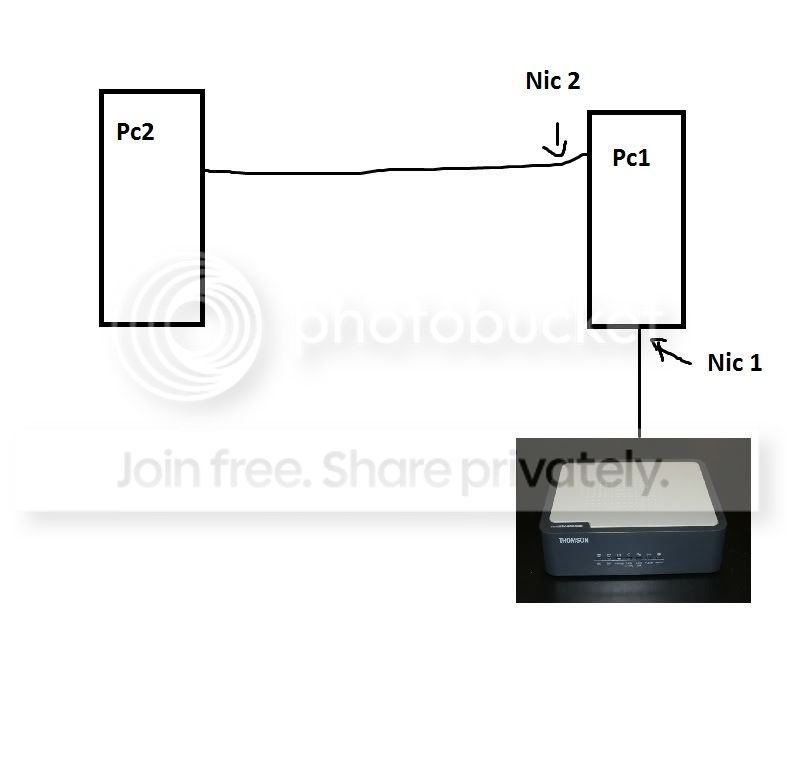
Some visual aids to make sure you guys understand how my conn is setup.

Conn.jpg


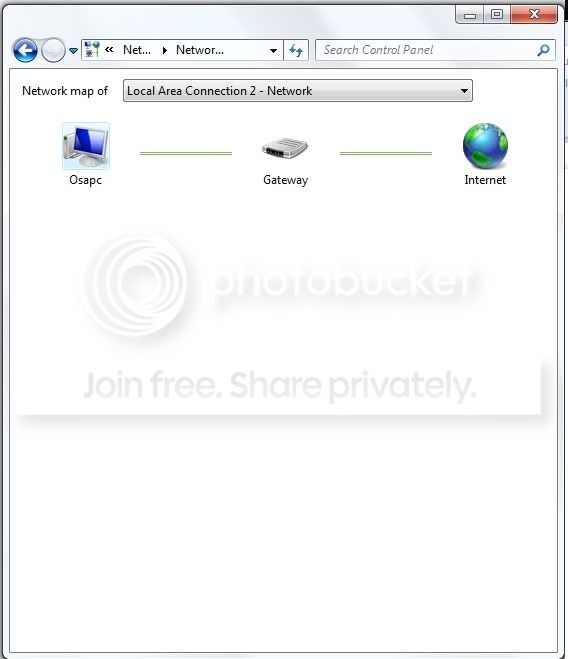
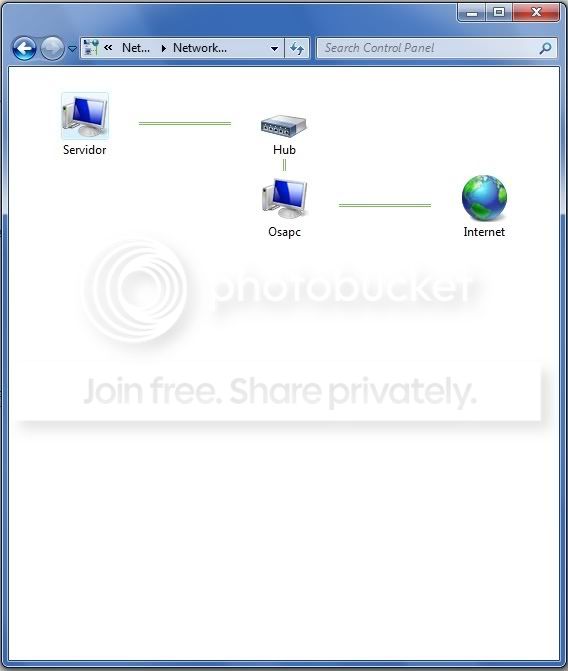
And the network maps.
Pc1 nic 1(internet)
map1.jpg


Pc1 nic 2 (pc 2 conn)
map2.jpg


Current situation: I have internet on both my pcs so internet conn is not the problem.

My problem is that I can access pc 1 from pc 2 from the win explorer but I can't access pc 2 from pc 1 and I get the 0x80070035 error.

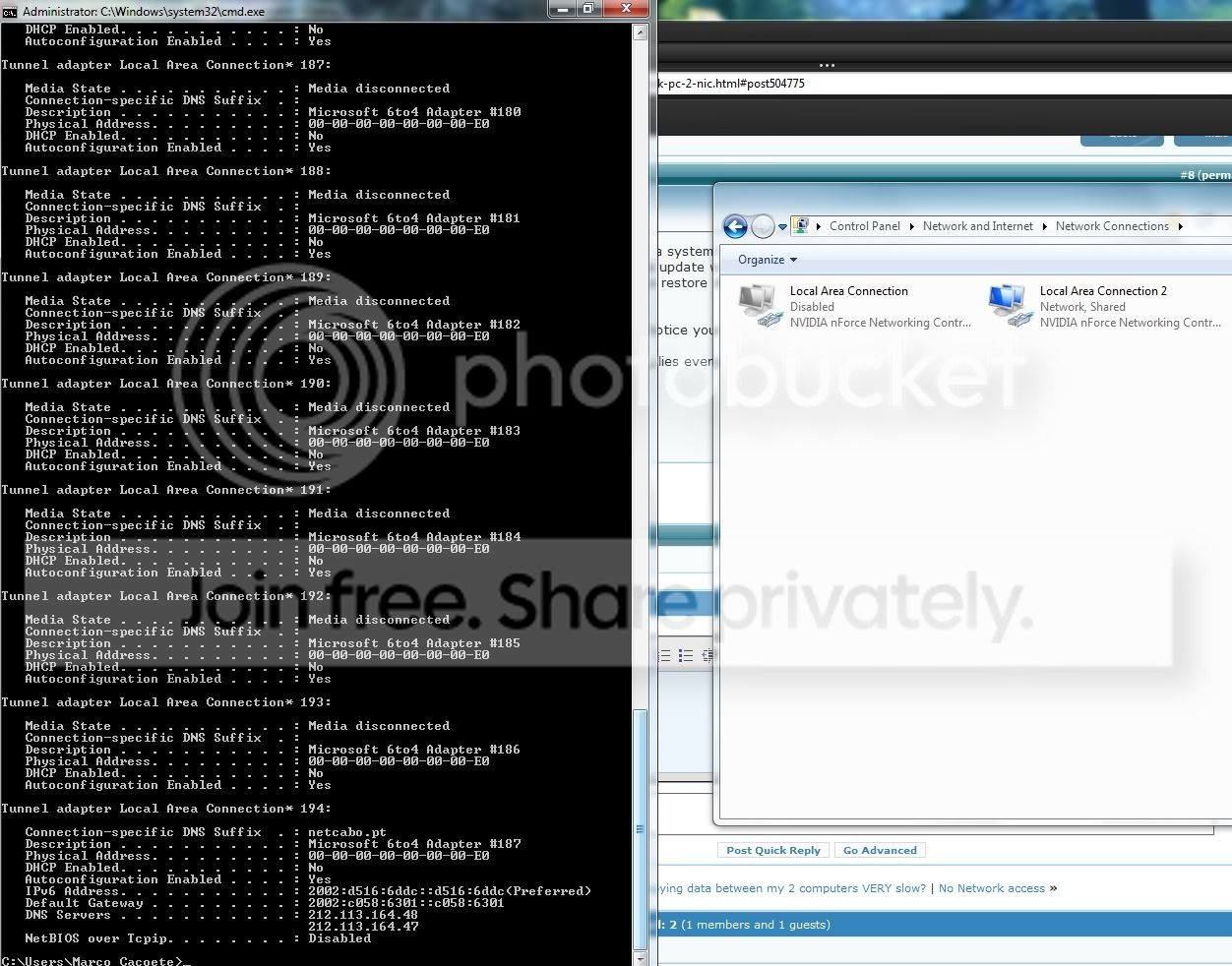
@ AEM - Ok so I ran Ipconfig /all and this was all I got, the only thing I had connected at this time was my internet on pc1.

Untitled5.jpg


Not sure where to go from here, hope you guys can make something out of this.

Cheers
M E
 

My Computer

OS
Windows 7
CPU
Intel Core2quad q9450
Motherboard
Asus Striker Extreme
Memory
4 Gb OCZ ddr 2 800mhz
Graphics Card(s)
XFX 8800gt 512mb Alpha dog
Sound Card
Supremefx
Monitor(s) Displays
Samsung SyncMaster 2023Nw
Hard Drives
Western digital 250 gb sata
PSU
Nox 600W
Once again, if you are using Homegroups for sharing you need to enable IPv6. It won't work without it. You are using ICS with your dual NIC set up. If you don't have ICS enabled you should do so. It looks like the connection is shared so that might be done already. You might try a network bridge also. Although I'm not sure why you wouldn't just use a regular old router for all this?

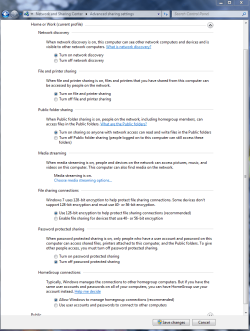
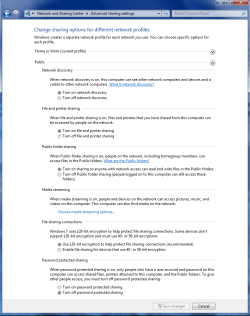
You might want to check in the Advance Sharing settings to make sure everything is like the picture below. Sometimes they change by themselves apparently.
 

Attachments

  • Home or work homegroup enable.PNG
    Home or work homegroup enable.PNG
    45 KB · Views: 82
  • public sharing enabled all.PNG
    public sharing enabled all.PNG
    39.7 KB · Views: 63

My Computer

Computer type
PC/Desktop
Computer Manufacturer/Model Number
Home built
OS
Windows 7 Ult, Windows 8.1 Pro,
CPU
Q9650-4.275GHz, E8600 4.5GHz, E6750-3.8GHz
Motherboard
Evga 780i FTW
Memory
G.Skill PC2 9600 1200Mhz 5 5 5 15 2T
Graphics Card(s)
GTX480
Sound Card
Asus Xonar D2
Monitor(s) Displays
HannsG
Screen Resolution
1680X1050
Hard Drives
GSkill Phoenix Pro 120GB SSD
PSU
ThermalTake Toughpower 1000Watt modular
Case
ThermalTake XaserV
Cooling
Xigmatek S1283
Keyboard
Logitech G15
Mouse
Logitech G9
Internet Speed
T1
Network

kinda going around the house to get to the barn here I agree a router would make a lot more sense here
 

My Computer

Computer Manufacturer/Model Number
Custom Built
OS
Windows 7 Ultimate 32 bit
CPU
AMD Athlon 64 X2 4200+ Overclocked to 3.0Ghz
Motherboard
Biostar TF560 A2+
Memory
2 Gigs of G.Skill DDR2 800
Graphics Card(s)
HIS ATI Radeon HD 2600 Pro With IceQ cooler
Sound Card
6.1 Channel Sound Blaster Live 24 Bit
Monitor(s) Displays
Dual 20.5 " LG Flatrons W2052TO
Screen Resolution
1152x864
Hard Drives
Dual 36 Gig 10,000 RPM Raptors
PSU
430 watt Seasonic 80%+ Dual 12v Rails 2x80mm fans
Case
CHIEFMAX YA-5X
Cooling
4-80mm case fans 1-140mm case fan freezer 64 Pro CPU cooler
Keyboard
Saitek Eclipse II
Mouse
A4Tech wireless battery free optical scroll mouse
Internet Speed
1.5 meg down 384 up
Other Info
Logisys LED fan/light controller and dual 16" LED sticks mounted inside top of case all fans are LED all lighting is blue
DVD RW and CD RW both and Memory card reader
@Chev

I'm not using homegroups for sharing. ICS is indeed already on, I tried a network bridge but it didn't go so well, maybe because I'm not that experienced in setting that up.

I'm not using a router because as of last week everything was working without a problem so I know that my setup works without needing to buy a router if I have two nics why not use them right?
 

My Computer

OS
Windows 7
CPU
Intel Core2quad q9450
Motherboard
Asus Striker Extreme
Memory
4 Gb OCZ ddr 2 800mhz
Graphics Card(s)
XFX 8800gt 512mb Alpha dog
Sound Card
Supremefx
Monitor(s) Displays
Samsung SyncMaster 2023Nw
Hard Drives
Western digital 250 gb sata
PSU
Nox 600W
Try this setup.

Modem <===>PC1 NIC 1(IP through DHCP)

PC1 NIC 2( Ip = 192.168.1.6, subnet=255.255.255.0, Gateway = 192.168.1.1)
||
||
||
\/
PC2 NIC ( IP = 192.168.1.8, subnet=255.255.255.0, Gateway = 192.168.1.1)

See if you can now ping PC1 to PC2

PC2 will not get Internet connectivity without a software network bridge.


Once again, if you are using Homegroups for sharing you need to enable IPv6. It won't work without it. You are using ICS with your dual NIC set up. If you don't have ICS enabled you should do so. It looks like the connection is shared so that might be done already. You might try a network bridge also. Although I'm not sure why you wouldn't just use a regular old router for all this?

You might want to check in the Advance Sharing settings to make sure everything is like the picture below. Sometimes they change by themselves apparently.

A regular router would be easier, but lets entertain his request.

@Chev

I'm not using homegroups for sharing. ICS is indeed already on, I tried a network bridge but it didn't go so well, maybe because I'm not that experienced in setting that up.

I'm not using a router because as of last week everything was working without a problem so I know that my setup works without needing to buy a router if I have two nics why not use them right?

Your setup will work. This is what needs to happen though.

The PC1 to router network segment is likely 192.168.0.x.

ICS will assign a separate network segment for PC1's second NIC and PC2, likely 192.168.1.x.


Normally, ICS will prevent file sharing between PC1 and PC2 because they are on different network segments. That's the normal behavior. So what you are seeing right now is normal. :(


To restore file sharing and still keep internet connectivity on both machines, you'll have to use a software network bridge.

That is a multi step process.

  1. Turn off ICS
  2. Go to advanced adapter settings under Network Sharing Center on PC1
  3. Select advanced adapter settings
  4. Select NIC 1 and NIC 2 and right click one of them
  5. Select "bridge network connections"
  6. Make sure both PCs are on "automatically obtain IP settings"

What is going to happen is that PC1 and PC2 will be on the same network segment and thus be able to share files now. And PC1 will forward internet connectivity to PC2. Try this.

You may run into problems where PC2 will not be able to get a IP address. You'll know because if you IPCONFIG on PC2, you'll get a 169.x.x.x. In that case what is happening is that PC1 isn't forwarding the DHCP requests and acknowledgements, which sometimes happens because Windows is retarded. In that case, you need to assign static IP addresses. If your router is 192.168.0.1 (make sure by pinging it), then assign PC1 (192.168.0.2) and PC2 (192.168.0.3). The subnet mask will be the same on both (255.255.255.9) along with the gateway and DNS settings (192.168.0.1).

Hope that helps.
 

My Computer

OS
Windows 7
I mentioned using a network bridge earlier but the Op thinks if ICS worked before it should work again which makes at least some sense.
 

My Computer

Computer type
PC/Desktop
Computer Manufacturer/Model Number
Home built
OS
Windows 7 Ult, Windows 8.1 Pro,
CPU
Q9650-4.275GHz, E8600 4.5GHz, E6750-3.8GHz
Motherboard
Evga 780i FTW
Memory
G.Skill PC2 9600 1200Mhz 5 5 5 15 2T
Graphics Card(s)
GTX480
Sound Card
Asus Xonar D2
Monitor(s) Displays
HannsG
Screen Resolution
1680X1050
Hard Drives
GSkill Phoenix Pro 120GB SSD
PSU
ThermalTake Toughpower 1000Watt modular
Case
ThermalTake XaserV
Cooling
Xigmatek S1283
Keyboard
Logitech G15
Mouse
Logitech G9
Internet Speed
T1
Hey guys, thanks for the help.

I figured this was taking too much time and was frustrating me so I decided to format my windows partition and now everything is working like it used to. I have my two nics auto configured and network and internet sharing and everything is running perfect (except for homegroups which I never used so...), so no router needed like I said.

I think I can format and get all my progs back running in less time than it would take for me to get this to work with configs so I'm happy to fix it this way :D.

Again thanks for the help.

Cheers
M E
 

My Computer

OS
Windows 7
CPU
Intel Core2quad q9450
Motherboard
Asus Striker Extreme
Memory
4 Gb OCZ ddr 2 800mhz
Graphics Card(s)
XFX 8800gt 512mb Alpha dog
Sound Card
Supremefx
Monitor(s) Displays
Samsung SyncMaster 2023Nw
Hard Drives
Western digital 250 gb sata
PSU
Nox 600W
That is the good thing about Win7 is you can reinstall it in a matter of minutes. Sometimes that is the easy way to fix things.
 

My Computer

Computer type
PC/Desktop
Computer Manufacturer/Model Number
Home built
OS
Windows 7 Ult, Windows 8.1 Pro,
CPU
Q9650-4.275GHz, E8600 4.5GHz, E6750-3.8GHz
Motherboard
Evga 780i FTW
Memory
G.Skill PC2 9600 1200Mhz 5 5 5 15 2T
Graphics Card(s)
GTX480
Sound Card
Asus Xonar D2
Monitor(s) Displays
HannsG
Screen Resolution
1680X1050
Hard Drives
GSkill Phoenix Pro 120GB SSD
PSU
ThermalTake Toughpower 1000Watt modular
Case
ThermalTake XaserV
Cooling
Xigmatek S1283
Keyboard
Logitech G15
Mouse
Logitech G9
Internet Speed
T1
Oh yes, I've figured that out myself. And with sites like ninite I can just create a setup with all my common progs and install them in minutes. Then I hop on opera and load my settings and I'm good to go. The only thing that takes a bit more time is reinstalling my games but It's all good.
 

My Computer

OS
Windows 7
CPU
Intel Core2quad q9450
Motherboard
Asus Striker Extreme
Memory
4 Gb OCZ ddr 2 800mhz
Graphics Card(s)
XFX 8800gt 512mb Alpha dog
Sound Card
Supremefx
Monitor(s) Displays
Samsung SyncMaster 2023Nw
Hard Drives
Western digital 250 gb sata
PSU
Nox 600W
Yup the games take awhile to reinstall but it's easier than tracking down some obscure problem that you could spend hours trying to fix. Glad you got it working.
 

My Computer

Computer type
PC/Desktop
Computer Manufacturer/Model Number
Home built
OS
Windows 7 Ult, Windows 8.1 Pro,
CPU
Q9650-4.275GHz, E8600 4.5GHz, E6750-3.8GHz
Motherboard
Evga 780i FTW
Memory
G.Skill PC2 9600 1200Mhz 5 5 5 15 2T
Graphics Card(s)
GTX480
Sound Card
Asus Xonar D2
Monitor(s) Displays
HannsG
Screen Resolution
1680X1050
Hard Drives
GSkill Phoenix Pro 120GB SSD
PSU
ThermalTake Toughpower 1000Watt modular
Case
ThermalTake XaserV
Cooling
Xigmatek S1283
Keyboard
Logitech G15
Mouse
Logitech G9
Internet Speed
T1
Thanks.

Obscure is the right word, having stuff suddenly stop working for no apparent reason...bah
 

My Computer

OS
Windows 7
CPU
Intel Core2quad q9450
Motherboard
Asus Striker Extreme
Memory
4 Gb OCZ ddr 2 800mhz
Graphics Card(s)
XFX 8800gt 512mb Alpha dog
Sound Card
Supremefx
Monitor(s) Displays
Samsung SyncMaster 2023Nw
Hard Drives
Western digital 250 gb sata
PSU
Nox 600W
Odd that a reformat solved the problem. I predict he'll be back.
 

My Computer

OS
Windows 7
Back
Top