JavaScript is disabled. For a better experience, please enable JavaScript in your browser before proceeding.
You are using an out of date browser. It may not display this or other websites correctly.
You should upgrade or use an
alternative browser .
Cant access Printer Network Server
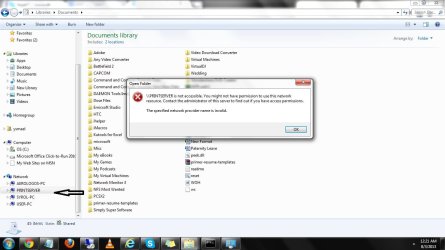
I need help with these. I am connected to the home group but I cant access the print server.
123.jpg
90.2 KB
· Views: 5
Computer type Laptop Computer Manufacturer/Model Number Asus OS Windows 7 x64 CPU Intel (R) Core TM i7 CPU @ 2.7ghz Motherboard ASUS Memory 8.00 gb Graphics Card(s) Built in Antivirus Kaspersky Browser Google Chrome
I don't understand why people are using home groups.. Just use a password and it will work..
Computer type PC/Desktop Computer Manufacturer/Model Number Custom build OS Windows 7 Professional 64bit CPU Intel core i7 950 stock Motherboard AsRock x58 Extreme 3 Memory 6x2GB corsair @ 1600 Mhz Graphics Card(s) Nvidia GeForce GTX 460 1GB Sound Card Integrated VIA chip Monitor(s) Displays BenQ G2420HDB Screen Resolution 1920x1080 Hard Drives Corsair Force F60 SSD (C:) PSU Corsair VX 550W Case Cooler Master Haf X Cooling Corsair H100 Keyboard Microsoft Sidewinder X4 Mouse Razer Deathadder Internet Speed 20 Down 2 Up ADSL Telia Antivirus Microsoft security essentials Browser Firefox
New member
Member
VIP
Thread Starter
Its for admin rights that he/she can read and access files. Other than that, what steps should I do?
Computer type Laptop Computer Manufacturer/Model Number Asus OS Windows 7 x64 CPU Intel (R) Core TM i7 CPU @ 2.7ghz Motherboard ASUS Memory 8.00 gb Graphics Card(s) Built in Antivirus Kaspersky Browser Google Chrome
I need help with these. I am connected to the home group but I cant access the print server.
I don't see any machines listed under the Homegroup icon so it doesn't look like you have a Homegroup set up. Homegroups doesn't really figure into this. I get the same error message when I try to access my Print server but it works fine.
Homegroups is actually very useful if you know how to use it, most don't.
To access the printer properties you should try going to the Control Panel then to Devices and Printers.
Have you tried to install the Printer drivers onto each machine that needs to access it?
Did you allow for Printer and Device sharing when you set up the Homegroup?
Computer type PC/Desktop Computer Manufacturer/Model Number Home built OS Windows 7 Ult, Windows 8.1 Pro, CPU Q9650-4.275GHz, E8600 4.5GHz, E6750-3.8GHz Motherboard Evga 780i FTW Memory G.Skill PC2 9600 1200Mhz 5 5 5 15 2T Graphics Card(s) GTX480 Sound Card Asus Xonar D2 Monitor(s) Displays HannsG Screen Resolution 1680X1050 Hard Drives GSkill Phoenix Pro 120GB SSD PSU ThermalTake Toughpower 1000Watt modular Case ThermalTake XaserV Cooling Xigmatek S1283 Keyboard Logitech G15 Mouse Logitech G9 Internet Speed T1
New member
Member
VIP
Thread Starter
Sorry I think I mislead you. The printer installer is located at the print server. The one with arrow. I cant open the print server computer. That error is pops out. Yes and yes about the home group settings.
Computer type Laptop Computer Manufacturer/Model Number Asus OS Windows 7 x64 CPU Intel (R) Core TM i7 CPU @ 2.7ghz Motherboard ASUS Memory 8.00 gb Graphics Card(s) Built in Antivirus Kaspersky Browser Google Chrome
Sorry I think I mislead you. The printer installer is located at the print server. The one with arrow. I cant open the print server computer. That error is pops out. Yes and yes about the home group settings.
Yes I have my Printer server set up the same way and I can't access it in the way which you are describing.
I'm not sure exactly what you are trying to do but you need to access the print server through the Control Panel.
Computer type PC/Desktop Computer Manufacturer/Model Number Home built OS Windows 7 Ult, Windows 8.1 Pro, CPU Q9650-4.275GHz, E8600 4.5GHz, E6750-3.8GHz Motherboard Evga 780i FTW Memory G.Skill PC2 9600 1200Mhz 5 5 5 15 2T Graphics Card(s) GTX480 Sound Card Asus Xonar D2 Monitor(s) Displays HannsG Screen Resolution 1680X1050 Hard Drives GSkill Phoenix Pro 120GB SSD PSU ThermalTake Toughpower 1000Watt modular Case ThermalTake XaserV Cooling Xigmatek S1283 Keyboard Logitech G15 Mouse Logitech G9 Internet Speed T1
New member
Member
VIP
Thread Starter
I need to access and install the printer on my side. It does not show up on add printer
Computer type Laptop Computer Manufacturer/Model Number Asus OS Windows 7 x64 CPU Intel (R) Core TM i7 CPU @ 2.7ghz Motherboard ASUS Memory 8.00 gb Graphics Card(s) Built in Antivirus Kaspersky Browser Google Chrome
I need to access and install the printer on my side. It does not show up on add printer
When you install the drivers it should find the Printer on the network, sometimes it's best to install a new Printer through the USB port then after it's installed set it up as a network printer through an Ethernet connection or WiFi.
Computer type PC/Desktop Computer Manufacturer/Model Number Home built OS Windows 7 Ult, Windows 8.1 Pro, CPU Q9650-4.275GHz, E8600 4.5GHz, E6750-3.8GHz Motherboard Evga 780i FTW Memory G.Skill PC2 9600 1200Mhz 5 5 5 15 2T Graphics Card(s) GTX480 Sound Card Asus Xonar D2 Monitor(s) Displays HannsG Screen Resolution 1680X1050 Hard Drives GSkill Phoenix Pro 120GB SSD PSU ThermalTake Toughpower 1000Watt modular Case ThermalTake XaserV Cooling Xigmatek S1283 Keyboard Logitech G15 Mouse Logitech G9 Internet Speed T1
New member
Member
VIP
Thread Starter
Can i just download the printer driver and model instead?
Computer type Laptop Computer Manufacturer/Model Number Asus OS Windows 7 x64 CPU Intel (R) Core TM i7 CPU @ 2.7ghz Motherboard ASUS Memory 8.00 gb Graphics Card(s) Built in Antivirus Kaspersky Browser Google Chrome
New member
Member
VIP
Thread Starter
I mean, I cant set up another printer. It will confused the other users. We only need to have one printer server and the one existing I cant access it.
Computer type Laptop Computer Manufacturer/Model Number Asus OS Windows 7 x64 CPU Intel (R) Core TM i7 CPU @ 2.7ghz Motherboard ASUS Memory 8.00 gb Graphics Card(s) Built in Antivirus Kaspersky Browser Google Chrome
New member
Member
VIP
Thread Starter
Computer type Laptop Computer Manufacturer/Model Number Asus OS Windows 7 x64 CPU Intel (R) Core TM i7 CPU @ 2.7ghz Motherboard ASUS Memory 8.00 gb Graphics Card(s) Built in Antivirus Kaspersky Browser Google Chrome