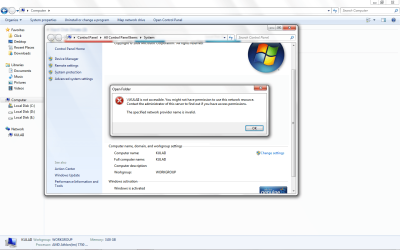
Can't access the same computer on Network.

useletters

New member
Local time
6:43 AM
Messages
16
I can't access the same computer on the network explorer. So basically, PC1 can't access PC1, yes PC1, on the network explorer. Let me show you a picture.
 

Attachments

  • Untitled-1.png
    Untitled-1.png
    166.6 KB · Views: 33

My Computer

Computer Manufacturer/Model Number
BIOSTAR group
OS
Windows 7 Ultimate(32 bit)
CPU
Dual Core AMD Athlon Black Edition 7750, 2.7GHz/KUMA
Motherboard
Biostar MCP6P M2+
Memory
3 GB DDR2
Graphics Card(s)
ATI Radeon HD 5550 PCS+ 512mb DDR5
Monitor(s) Displays
19" ViewSonic - VA1918wm.
Screen Resolution
1440 x 900
Hard Drives
1TB SATA3, WDC WD10 EALX-009BA0 SCSI
PSU
HEC Raptor 500W Dual 12v rail
Keyboard
a4tech
Mouse
a4tech
Hello useletters,

Did you setup a Homegroup?
Home sweet homegroup: Networking the easy way in Windows 7

If you have a Security or Firewall Software, pls. disable it for now. If you are using Windows built-in Firewall, make sure to exclude File and Printer sharing.

In addition to the link please create the same UserName and Password on both computers.

Alternatively, try accessing the shared folder or Drive this way:
Click on the Windows Orb, type \\ComputerName\SharedFolderName press enter, also the Computer Name can be replaced by an IP Address.
 

My Computer

Computer Manufacturer/Model Number
Lenovo Desktop/Samsung Laptop
OS
Win7 & Win8 64bit
CPU
Intel i5
Internet Speed
Charter-20 Mbps
Antivirus
Avast
Browser
FF, IE9 and Chrome
Back
Top