Solved Can't access Wifi Modem Settings Page?

Uly5

New member
Local time
12:46 AM
Messages
16
Hi,

I just recently got Fibre Internet (upgrade from Cable) and a new Wifi Modem (From ISP).

I am trying to access my Wifi modems settings /gateway page ie 192.168.0.1

I want to change my password etc from the stock one my ISP gave me.

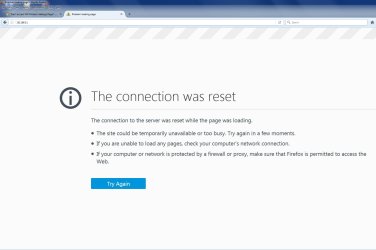
When I type that into my search bar at the top of my search engine (Firefox) I get: The connection was reset?

My internet works perfectly...I can visit websites and download with no issues at a good speed.

I can access my wifi modems settings / gateway page on my tablet and my laptop...just not my main PC.

I have tried Firefox, Google and IE on my PC...none of them work.

The first day I got the Fiber Internet installed I was able to access the wifi modems settings / gateway page on my pc with no problems but no since then.

I am using Win 7

Any Ideas?
 

My Computer

Computer type
PC/Desktop
Computer Manufacturer/Model Number
Custom Build
OS
Windows 7 Home Premium 64bit
CPU
Intel i7-2600k @3.4 GHz
Motherboard
Asus P8Z68-V LE
Memory
2 x 8 GB GB Corsair Vengence 1600mhz DDR3
Graphics Card(s)
Nvidia 8800 GT
Hard Drives
1 TB Western Digital Caviar Green
Antivirus
Kaspersky Internet Security 2015
Browser
Mozilla Firefox
dont forget you have 2 URL search options on FF, basic and location bar,
IT CAN ONLY be accessed via the location bar, check your customisation settings.

Roy
 

My Computer

Computer type
PC/Desktop
Computer Manufacturer/Model Number
medionl/Aspire 6930G/acer x55a
OS
W7 home premium 32bit/W7HP 64bit/w10 tp insider ring
CPU
E5300 dual core
Motherboard
medion MS7366
Memory
3gb
Graphics Card(s)
Nvidia Geforce 7100 Nforce 630i
Monitor(s) Displays
avixc
Internet Speed
n (isp resticted to 72)
Antivirus
mse/pands
Browser
palemoon
Other Info
Belkin Fd7050 n USB using Railink RT2870 drivers, more upto date
Yep as I said, it worked on the day one install by putting 192.168.0.1 in the location bar in Firefox. I also today put 192.168.0.1 in my tablet Firefox...which worked, Laptop Google Chrome...Which worked and even in my PS4 Browser which worked. It's just my PC which won't work with Firefox, Internet Explorer or Google.

I have tried so many things today to try to fix it from others on the net that have posted in the past and nothing has worked.
 

Attachments

  • Connection Reset.jpg
    Connection Reset.jpg
    299.9 KB · Views: 2

My Computer

Computer type
PC/Desktop
Computer Manufacturer/Model Number
Custom Build
OS
Windows 7 Home Premium 64bit
CPU
Intel i7-2600k @3.4 GHz
Motherboard
Asus P8Z68-V LE
Memory
2 x 8 GB GB Corsair Vengence 1600mhz DDR3
Graphics Card(s)
Nvidia 8800 GT
Hard Drives
1 TB Western Digital Caviar Green
Antivirus
Kaspersky Internet Security 2015
Browser
Mozilla Firefox
Please ignore this post.


Look for the reset button, using a fine pin (safety pin), do Press+Hold for more than 10 second.
This will reset the setting, and access is not issue, leave it.
Do note at the login page, do nothing, meaning do not change the default User Name & password, leave blank.
Just click the Login button.
Actually this is DLink router, but since the same brand, should not a problem.

Remember for login to the DLink page, you must connect with the LAN cable.

Wireless would not work. (Are you using this to login.)

And you method to use other devices may clash with each other.
That is why it said "Connection was reset", meaning could be you are using other devices and keep on access the DLink default address.

Do the reset with the device is ON.
Then after reset, restart the device, and all other devices connected to it.

Suggest you to unable all the devices on wifi and lan connection.
Just ONE connection, that is the PC.
Again, not to use other devices to do the reset again, as this may conflict, hence show error.

Hope you get it right.
 

My Computer

Computer type
Laptop
Computer Manufacturer/Model Number
Toshiba L630 and L735
OS
Windows 7 x64
Hard Drives
240 GB SSD
Sorry, my earlier post you may not understand.

1. Turn off all devices, as you had mentioned.

2. Ensure your modem is ON, then look for the reset button (behind or below).
Use a pin or safety pin, push right in -> Press+Hold for more than 10 second (say 15 sec).

3. After pressing the reset complete, switch off the modem, and then switch on.

4. Ensure no other devices, phone, etc are connected to wifi. Meaning turn off the wifi.

5. ONLY Connect with the LAN cable between the computer to the modem (wired). 1 connection

6. Input the address on the browser. -> 192.168.0.1

7. At the Login page, do nothing -> Do not input any characters on both the User Name and Password.
By default, after reset, there will not be username and password required.
Click on the Login

8. Do you necessary preferences.

After the settings is completed, you can reconnects other devices.
 

My Computer

Computer type
Laptop
Computer Manufacturer/Model Number
Toshiba L630 and L735
OS
Windows 7 x64
Hard Drives
240 GB SSD
Hi Eric. Followed your steps and it didn't work.Still getting "The connection was reset" Screen.
 

My Computer

Computer type
PC/Desktop
Computer Manufacturer/Model Number
Custom Build
OS
Windows 7 Home Premium 64bit
CPU
Intel i7-2600k @3.4 GHz
Motherboard
Asus P8Z68-V LE
Memory
2 x 8 GB GB Corsair Vengence 1600mhz DDR3
Graphics Card(s)
Nvidia 8800 GT
Hard Drives
1 TB Western Digital Caviar Green
Antivirus
Kaspersky Internet Security 2015
Browser
Mozilla Firefox
Any other ideas?
 

My Computer

Computer type
PC/Desktop
Computer Manufacturer/Model Number
Custom Build
OS
Windows 7 Home Premium 64bit
CPU
Intel i7-2600k @3.4 GHz
Motherboard
Asus P8Z68-V LE
Memory
2 x 8 GB GB Corsair Vengence 1600mhz DDR3
Graphics Card(s)
Nvidia 8800 GT
Hard Drives
1 TB Western Digital Caviar Green
Antivirus
Kaspersky Internet Security 2015
Browser
Mozilla Firefox
This may sound weird but it is worth a try.
Go to google.com and type "what is my ip?". Google will tell you your Ip address. Now put the IP in the address bar(you may use IE) and click enter. This should open your modem logon page.
If that fails you can try-
192.168.1.1
192.168.10.1
192.168.1.10
 

My Computer

Computer type
Laptop
Computer Manufacturer/Model Number
Samsung
OS
Windows 7 Home Premium x64
CPU
Samsung
Motherboard
Samsung
Memory
Samsung
Graphics Card(s)
NVIDIA
Hard Drives
Samsung
Antivirus
ESET NOD32
Browser
Internet Explorer
Have you tried: 192.168.100.1?
 

My Computer

Computer type
PC/Desktop
Computer Manufacturer/Model Number
custom build
OS
Windows 7 Professional 64bit
CPU
Intel i7-5960X
Motherboard
EVGA X99 Classified
Memory
64GB Corsair Dominator 2400MHz
Graphics Card(s)
3 EVGA GTX980's
Sound Card
on board
Monitor(s) Displays
3 Dell E2715H 27"
Screen Resolution
1920x1080 (5760x1080)
Hard Drives
Samsung 950 Pro 1TB M.2 SSD,
Western Digital Black 2TB HDD's x5
Western Digital Black 1TB HDD's x3
PSU
Corsair AX1200i
Case
Corsair 750D
Cooling
Corsair H110i GT
Keyboard
Corsair K70
Mouse
Corsair M45
Internet Speed
250 down/10 up
Antivirus
Microsoft Security Essentials
Browser
IE 11, Google Chrome
Beowulf 1 & Havoc I tried all those suggestions and it didn't work.

Google gave me some weird public IP address which didn't work.

I know my Router / Modem is 192.168.0.1....It worked on the 1st install day. I was going to change my password then but was too tired so I was going to do it the next morning. That's when I started getting the "The connection was reset" error. I can get on with 192.168.0.1 on my Tablet, Laptop end even my PS4. My ISP manual has instructions using 192.168.0.1 to get to the modem logon screen. I know my Modems ip is 192.168.0.1 thru ipconfig and network watcher also. I really don't think it's the IP address. The error message "The connection was reset" is supposed to mean that it's connecting but then gets reset for some reason. I feel like something...some program on my pc might be blocking the connection?? I have turned off Kaspersky but that didn't work. I have tried so many other things that I can't remember everything I have done. It's a strange problem.
 

My Computer

Computer type
PC/Desktop
Computer Manufacturer/Model Number
Custom Build
OS
Windows 7 Home Premium 64bit
CPU
Intel i7-2600k @3.4 GHz
Motherboard
Asus P8Z68-V LE
Memory
2 x 8 GB GB Corsair Vengence 1600mhz DDR3
Graphics Card(s)
Nvidia 8800 GT
Hard Drives
1 TB Western Digital Caviar Green
Antivirus
Kaspersky Internet Security 2015
Browser
Mozilla Firefox
Someone on my ISP's help Forum suggested to "Clear all your temp internet files restart the router and computer and see what happens."

This worked :-)

I had tried Firefox's Clear Temp Internet files / Cache a few days ago but I used CCleaner and Firefox's Temp Files / Cache cleaner today and this time it has worked.
 

My Computer

Computer type
PC/Desktop
Computer Manufacturer/Model Number
Custom Build
OS
Windows 7 Home Premium 64bit
CPU
Intel i7-2600k @3.4 GHz
Motherboard
Asus P8Z68-V LE
Memory
2 x 8 GB GB Corsair Vengence 1600mhz DDR3
Graphics Card(s)
Nvidia 8800 GT
Hard Drives
1 TB Western Digital Caviar Green
Antivirus
Kaspersky Internet Security 2015
Browser
Mozilla Firefox
So today I go to 192.168.0.1 and "The connection was reset" error has come back!

I did exactly what I did yesterday to fix it and it didn't work!

So I completely deleted all cookies, cache etc with CCleaner and I still get "The connection was reset" error!!
 

My Computer

Computer type
PC/Desktop
Computer Manufacturer/Model Number
Custom Build
OS
Windows 7 Home Premium 64bit
CPU
Intel i7-2600k @3.4 GHz
Motherboard
Asus P8Z68-V LE
Memory
2 x 8 GB GB Corsair Vengence 1600mhz DDR3
Graphics Card(s)
Nvidia 8800 GT
Hard Drives
1 TB Western Digital Caviar Green
Antivirus
Kaspersky Internet Security 2015
Browser
Mozilla Firefox
Go to Control Panel\Network and Internet\Network and Sharing Center
Click on hyperlinked Local Area Network >Properties>TCP/IPv4>Properties
WARNING: Note down the current IPv4 config before trying any of this.
Use the following-
IP address: 192.168.0.100
subnet mask: 255.255.255.0
Default gateway: 192.168.0.1
Preferred DNS:192.168.0.1
Alternate DNS:-Blank
If this does not work try-
IP address: 192.168.0.100
subnet mask: 255.255.255.0
Default gateway: 192.168.0.1
Preferred DNS:61.0.0.5
Alternate DNS: 61.1.96.69
If this does not work try-
IP address: 192.168.0.100
subnet mask: 255.255.255.0
Default gateway: 192.168.0.1
Preferred DNS:61.0.0.5
Alternate DNS: 61.1.96.71
If this does not work try-
IP address: 192.168.0.100
subnet mask: 255.255.255.0
Default gateway: 192.168.0.1
Preferred DNS:8.8.8.8
Alternate DNS: 8.8.4.4
If nothing of the above shows up your modem page by typing 192.168.0.1 restore the setting that you noted down.
 

My Computer

Computer type
Laptop
Computer Manufacturer/Model Number
Samsung
OS
Windows 7 Home Premium x64
CPU
Samsung
Motherboard
Samsung
Memory
Samsung
Graphics Card(s)
NVIDIA
Hard Drives
Samsung
Antivirus
ESET NOD32
Browser
Internet Explorer
So I have deleted all cookies in Firefox within Firefox (Not with CCleaner) and since I have done that I have had no issues with the "The connection was reset" error.

Fingers crossed it has been fixed!

Thanks for all your help guys :-)

Much appreciated!

Uly.
 

My Computer

Computer type
PC/Desktop
Computer Manufacturer/Model Number
Custom Build
OS
Windows 7 Home Premium 64bit
CPU
Intel i7-2600k @3.4 GHz
Motherboard
Asus P8Z68-V LE
Memory
2 x 8 GB GB Corsair Vengence 1600mhz DDR3
Graphics Card(s)
Nvidia 8800 GT
Hard Drives
1 TB Western Digital Caviar Green
Antivirus
Kaspersky Internet Security 2015
Browser
Mozilla Firefox
Back
Top