Solved Cant Access WIndows XP Machine form 7. Asks for a password [LAN]

saffat

New member
Local time
8:48 PM
Messages
10
hello,

I am using Windows 7 64bit. I have another XP machine in my LAN. Windows 7 can see the Xp machine in the network tab. But when I try to access it, it prompts for a user name and password.

I've tried setting up a password in my XP machine. Still when i try to connect to the xp machine from 7, i get window prompting for password.

I've been seen different threads but still no luck.

Thanks in advanced :)
 

My Computer My Computer

Computer type
PC/Desktop
OS
Windows 7 Ultimate x64
CPU
i5 3470
Motherboard
Gigabyte B75 HD3
Memory
4 GB 1600 MHZ
Graphics Card(s)
GTX 650
Monitor(s) Displays
Samsung SA300
Please post a screenshot of that message.
Can you enter a valid win7 username and password there? What response do you get then?
 

My Computer My Computer

Computer type
Laptop
Computer Manufacturer/Model Number
ACER ASPIRE 5742G
OS
Microsoft Windows 7 Home Premium 64-bits 7601 Multiprocessor Free Service Pack 1
CPU
Intel(R) Core(TM) i3 CPU M 370 @ 2.40GHz
Motherboard
Acer Aspire 5742G
Memory
4,00 GB
Graphics Card(s)
ATI Mobility Radeon HD 5400 Series
Sound Card
(1) AMD High Definition Audio Device (2) Realtek High Defi
Screen Resolution
1366 x 768 x 32 bits (4294967296 colors) @ 60 Hz
Hard Drives
WDC WD5000BEVT-22ZAT0
1.PNG

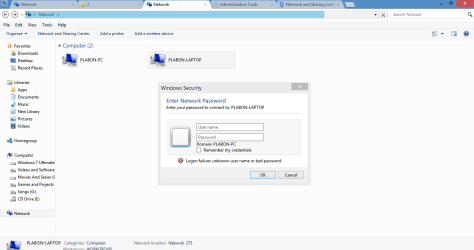
Here is the screenshot. [Ps. its a windows 8 theme]

I have turned of "password protected file sharing" in control panel
 

My Computer My Computer

Computer type
PC/Desktop
OS
Windows 7 Ultimate x64
CPU
i5 3470
Motherboard
Gigabyte B75 HD3
Memory
4 GB 1600 MHZ
Graphics Card(s)
GTX 650
Monitor(s) Displays
Samsung SA300

My Computer My Computer

Computer type
Laptop
Computer Manufacturer/Model Number
ACER ASPIRE 5742G
OS
Microsoft Windows 7 Home Premium 64-bits 7601 Multiprocessor Free Service Pack 1
CPU
Intel(R) Core(TM) i3 CPU M 370 @ 2.40GHz
Motherboard
Acer Aspire 5742G
Memory
4,00 GB
Graphics Card(s)
ATI Mobility Radeon HD 5400 Series
Sound Card
(1) AMD High Definition Audio Device (2) Realtek High Defi
Screen Resolution
1366 x 768 x 32 bits (4294967296 colors) @ 60 Hz
Hard Drives
WDC WD5000BEVT-22ZAT0
Thanks very much for the reply

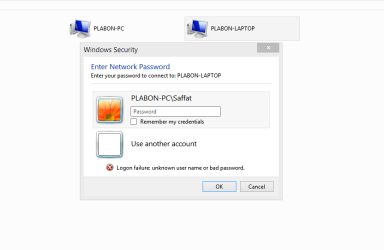
I have no password for my user account in windows 7. So I put my usename "saffat" and kept the password blank. Then this happens
Capture.PNG
 

My Computer My Computer

Computer type
PC/Desktop
OS
Windows 7 Ultimate x64
CPU
i5 3470
Motherboard
Gigabyte B75 HD3
Memory
4 GB 1600 MHZ
Graphics Card(s)
GTX 650
Monitor(s) Displays
Samsung SA300
You entered Saffat as username (I think). That defaults to PLABON-PC\Saffat.

It's PABLON-Laptop where you should logon!!
so fill in:
user: PABLON-Laptop\aUserThatExistsOnPABLON-Laptop
The password of that user.
 

My Computer My Computer

Computer type
Laptop
Computer Manufacturer/Model Number
ACER ASPIRE 5742G
OS
Microsoft Windows 7 Home Premium 64-bits 7601 Multiprocessor Free Service Pack 1
CPU
Intel(R) Core(TM) i3 CPU M 370 @ 2.40GHz
Motherboard
Acer Aspire 5742G
Memory
4,00 GB
Graphics Card(s)
ATI Mobility Radeon HD 5400 Series
Sound Card
(1) AMD High Definition Audio Device (2) Realtek High Defi
Screen Resolution
1366 x 768 x 32 bits (4294967296 colors) @ 60 Hz
Hard Drives
WDC WD5000BEVT-22ZAT0
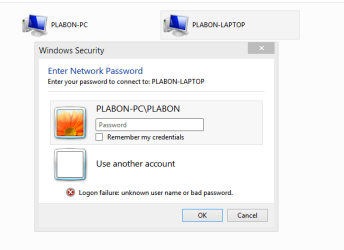
SO my laptops user name is "Plabon". i've entered it and it has no password so i've kept it blank. Still no connection

Capture.PNG
 

My Computer My Computer

Computer type
PC/Desktop
OS
Windows 7 Ultimate x64
CPU
i5 3470
Motherboard
Gigabyte B75 HD3
Memory
4 GB 1600 MHZ
Graphics Card(s)
GTX 650
Monitor(s) Displays
Samsung SA300
user: PABLON-Laptop\aUserThatExistsOnPABLON-Laptop
 

My Computer My Computer

Computer type
Laptop
Computer Manufacturer/Model Number
ACER ASPIRE 5742G
OS
Microsoft Windows 7 Home Premium 64-bits 7601 Multiprocessor Free Service Pack 1
CPU
Intel(R) Core(TM) i3 CPU M 370 @ 2.40GHz
Motherboard
Acer Aspire 5742G
Memory
4,00 GB
Graphics Card(s)
ATI Mobility Radeon HD 5400 Series
Sound Card
(1) AMD High Definition Audio Device (2) Realtek High Defi
Screen Resolution
1366 x 768 x 32 bits (4294967296 colors) @ 60 Hz
Hard Drives
WDC WD5000BEVT-22ZAT0
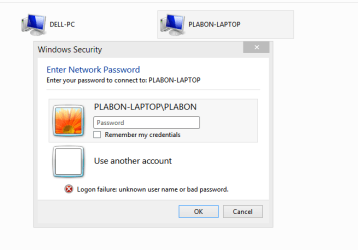
Well, I've entered "PLABON-LAPTOP/PLABON" and then this comes up
Capture.PNG
 

My Computer My Computer

Computer type
PC/Desktop
OS
Windows 7 Ultimate x64
CPU
i5 3470
Motherboard
Gigabyte B75 HD3
Memory
4 GB 1600 MHZ
Graphics Card(s)
GTX 650
Monitor(s) Displays
Samsung SA300

My Computer My Computer

Computer type
Laptop
Computer Manufacturer/Model Number
ACER ASPIRE 5742G
OS
Microsoft Windows 7 Home Premium 64-bits 7601 Multiprocessor Free Service Pack 1
CPU
Intel(R) Core(TM) i3 CPU M 370 @ 2.40GHz
Motherboard
Acer Aspire 5742G
Memory
4,00 GB
Graphics Card(s)
ATI Mobility Radeon HD 5400 Series
Sound Card
(1) AMD High Definition Audio Device (2) Realtek High Defi
Screen Resolution
1366 x 768 x 32 bits (4294967296 colors) @ 60 Hz
Hard Drives
WDC WD5000BEVT-22ZAT0
Click "use other account". follow on screen instructions
 

My Computer My Computer

Computer type
Laptop
Computer Manufacturer/Model Number
ACER ASPIRE 5742G
OS
Microsoft Windows 7 Home Premium 64-bits 7601 Multiprocessor Free Service Pack 1
CPU
Intel(R) Core(TM) i3 CPU M 370 @ 2.40GHz
Motherboard
Acer Aspire 5742G
Memory
4,00 GB
Graphics Card(s)
ATI Mobility Radeon HD 5400 Series
Sound Card
(1) AMD High Definition Audio Device (2) Realtek High Defi
Screen Resolution
1366 x 768 x 32 bits (4294967296 colors) @ 60 Hz
Hard Drives
WDC WD5000BEVT-22ZAT0
Sorry.

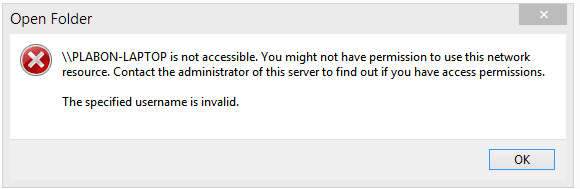
After using backslash this coems up.
Capture.PNG
i have no password set on the XP machine. Blank password returns an error. I've also set a password and tried to login again but it shows the same error
 

My Computer My Computer

Computer type
PC/Desktop
OS
Windows 7 Ultimate x64
CPU
i5 3470
Motherboard
Gigabyte B75 HD3
Memory
4 GB 1600 MHZ
Graphics Card(s)
GTX 650
Monitor(s) Displays
Samsung SA300
"use other account" returns the same error when I put usename and blank pasword
 

My Computer My Computer

Computer type
PC/Desktop
OS
Windows 7 Ultimate x64
CPU
i5 3470
Motherboard
Gigabyte B75 HD3
Memory
4 GB 1600 MHZ
Graphics Card(s)
GTX 650
Monitor(s) Displays
Samsung SA300
Are you sure you entered the correct username and password? Try to logon on winxp with that username and password. Don't use a blank password!
 

My Computer My Computer

Computer type
Laptop
Computer Manufacturer/Model Number
ACER ASPIRE 5742G
OS
Microsoft Windows 7 Home Premium 64-bits 7601 Multiprocessor Free Service Pack 1
CPU
Intel(R) Core(TM) i3 CPU M 370 @ 2.40GHz
Motherboard
Acer Aspire 5742G
Memory
4,00 GB
Graphics Card(s)
ATI Mobility Radeon HD 5400 Series
Sound Card
(1) AMD High Definition Audio Device (2) Realtek High Defi
Screen Resolution
1366 x 768 x 32 bits (4294967296 colors) @ 60 Hz
Hard Drives
WDC WD5000BEVT-22ZAT0
Try turning off simple file sharing on the XP machine > http://support.microsoft.com/kb/307874/en-us

Be sure that the time/date settings are in sync for these machines to share correctly.

You can also try using the IP of the XP machine instead of the user name, c refers to the standard C: drive.
For example
\\192.168.0.75\c


There are also local security policy adjustments you can make on the XP machine, This assumes you have XP Pro which included the Local Security Policy, for example:
  1. Go to Control Panel | Performance and Maintenance | Administrative Tools | Local Security Policy.
  2. Expand Local Policies | Security Options.
  3. Double-click Accounts: Limit local account use of blank passwords to console login only, which is enabled by default. Disable this option and click OK.
This is an ongoing problem with many possible solutions, most of which are included in the following link so good luck on finding the correct solution. Suggest reading through the entire thread as there are many different solutions listed but there is no telling which one might work. :)


Windows 7 ask's "enter network password" when accessing - Microsoft Community
 

My Computer My Computer

Computer type
PC/Desktop
Computer Manufacturer/Model Number
Home built
OS
Windows 7 Ult, Windows 8.1 Pro,
CPU
Q9650-4.275GHz, E8600 4.5GHz, E6750-3.8GHz
Motherboard
Evga 780i FTW
Memory
G.Skill PC2 9600 1200Mhz 5 5 5 15 2T
Graphics Card(s)
GTX480
Sound Card
Asus Xonar D2
Monitor(s) Displays
HannsG
Screen Resolution
1680X1050
Hard Drives
GSkill Phoenix Pro 120GB SSD
PSU
ThermalTake Toughpower 1000Watt modular
Case
ThermalTake XaserV
Cooling
Xigmatek S1283
Keyboard
Logitech G15
Mouse
Logitech G9
Internet Speed
T1
When trying to access XP shares from a Windows 7 or 8 PC, be sure you have both computers on the same workgroup. As I understood you do not want password protect the sharing, following these instructions to the letter will let you access XP shares from your Windows 7 PC. A more extensive tutorial here: http://www.sevenforums.com/tutorials/53830-file-sharing-between-xp-w7-vice-versa.html

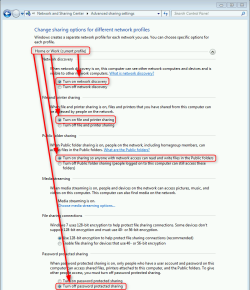
First Windows 7, check that network discovery and file & printer sharing are turned on and password protected sharing off (under Home or Work section in Advanced Sharing Settings):

2014-01-03_00h02_52.png

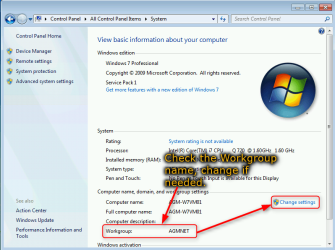
Open Control Panel > System, check the name of the workgroup, change it if you want to:

2014-01-03_00h20_25.png

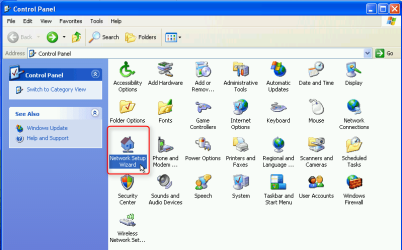
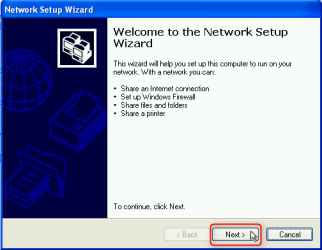
Now the XP. Open the Control Panel, run Network Setup Wizard:

2014-01-02_23h12_05.png

Click Next:

2014-01-02_23h13_33.png

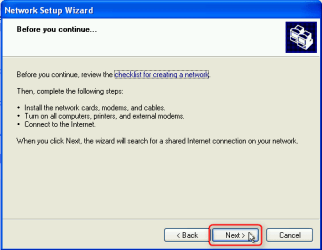
Click Next:

2014-01-02_23h14_33.png

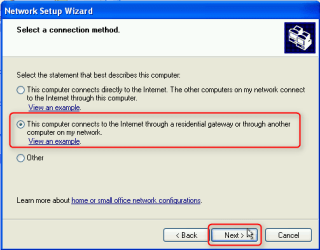
Assuming all your computers are directly connected to router and do not share the network connection, select This computer connects to the Internet through the residential gateway... and click Next:

2014-01-02_23h15_44.png

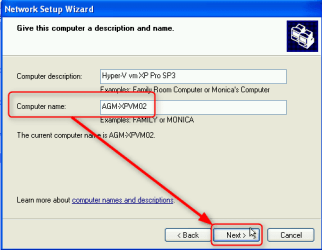
Check the computer name, change if you want to, click Next:

2014-01-02_23h16_54.png

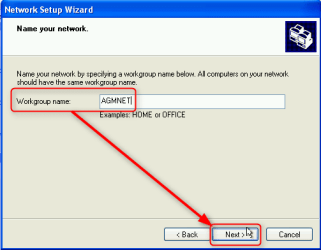
Check the name of the workgroup. It is important that the XP and 7 belong to the same workgroup so give here the name of the workgroup your Windows 7 PC belongs to:

2014-01-02_23h18_01.png

Select Turn on file and printer sharing, click Next:

2014-01-02_23h19_06.png

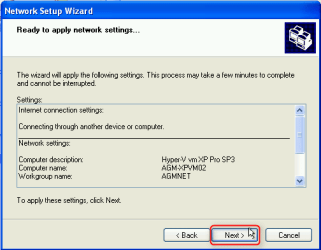
Review your settings, click Next:

2014-01-02_23h20_34.png

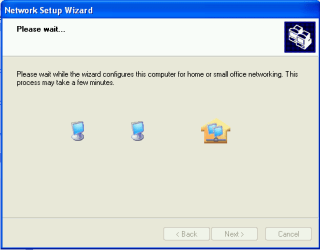
XP sets the network settings as ordered, also allowing shares through Windows firewall. This might take a minute or two:

2014-01-02_23h21_17.png

When ready select Just finish the wizard, click Next:

2014-01-02_23h21_58.png

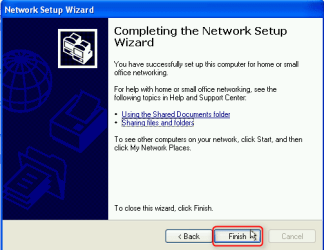
Click Finish:

2014-01-02_23h22_57.png

Reboot the XP computer.

You should now be able to access your XP shares from Windows 7, and 7 shares from XP.

Kari
 

My Computer My Computer

Computer type
Laptop
Computer Manufacturer/Model Number
HP ENVY 17-1150eg
OS
Windows 10 Pro x64 EN-GB
CPU
1.6 GHz Intel Core i7-720QM Processor
Memory
6 GB
Graphics Card(s)
ATI Mobility Radeon HD 5850 Graphics
Sound Card
Beats sound system with integrated subwoofer
Monitor(s) Displays
17" laptop display, 22" LED and 32" Full HD TV through HDMI
Screen Resolution
1600*900 (1), 1920*1080 (2&3)
Hard Drives
Internal: 2 x 500 GB SATA Hard Disk Drive 7200 rpm
External: 2TB for backups, 3TB USB3 network drive for media
Cooling
As Envy runs a bit warm, I have it on a Cooler Master pad
Keyboard
Logitech diNovo Media Desktop Laser (bluetooth)
Mouse
Logitech Performance Mouse MX
Internet Speed
50/10 Mbps VDSL
Antivirus
Windows Defender 4.3.9431.0
Browser
Maxthon 3.5.2., IE11
Thanks everyone for your replies. The last soultion with Xp's Network setup wizard worked :) [Solved]
 

My Computer My Computer

Computer type
PC/Desktop
OS
Windows 7 Ultimate x64
CPU
i5 3470
Motherboard
Gigabyte B75 HD3
Memory
4 GB 1600 MHZ
Graphics Card(s)
GTX 650
Monitor(s) Displays
Samsung SA300
You are welcome, good to hear it worked :).
 

My Computer My Computer

Computer type
Laptop
Computer Manufacturer/Model Number
HP ENVY 17-1150eg
OS
Windows 10 Pro x64 EN-GB
CPU
1.6 GHz Intel Core i7-720QM Processor
Memory
6 GB
Graphics Card(s)
ATI Mobility Radeon HD 5850 Graphics
Sound Card
Beats sound system with integrated subwoofer
Monitor(s) Displays
17" laptop display, 22" LED and 32" Full HD TV through HDMI
Screen Resolution
1600*900 (1), 1920*1080 (2&3)
Hard Drives
Internal: 2 x 500 GB SATA Hard Disk Drive 7200 rpm
External: 2TB for backups, 3TB USB3 network drive for media
Cooling
As Envy runs a bit warm, I have it on a Cooler Master pad
Keyboard
Logitech diNovo Media Desktop Laser (bluetooth)
Mouse
Logitech Performance Mouse MX
Internet Speed
50/10 Mbps VDSL
Antivirus
Windows Defender 4.3.9431.0
Browser
Maxthon 3.5.2., IE11
Silly me, I figured that using the network set up wizard in XP was a given that everybody surely must know about by now?

I was trying to track down potential problems rather than pointing out something so glaringly obvious.

The part where it says "network set up wizard" should be a dead giveaway. :confused:
 

My Computer My Computer

Computer type
PC/Desktop
Computer Manufacturer/Model Number
Home built
OS
Windows 7 Ult, Windows 8.1 Pro,
CPU
Q9650-4.275GHz, E8600 4.5GHz, E6750-3.8GHz
Motherboard
Evga 780i FTW
Memory
G.Skill PC2 9600 1200Mhz 5 5 5 15 2T
Graphics Card(s)
GTX480
Sound Card
Asus Xonar D2
Monitor(s) Displays
HannsG
Screen Resolution
1680X1050
Hard Drives
GSkill Phoenix Pro 120GB SSD
PSU
ThermalTake Toughpower 1000Watt modular
Case
ThermalTake XaserV
Cooling
Xigmatek S1283
Keyboard
Logitech G15
Mouse
Logitech G9
Internet Speed
T1
Silly me, I figured that using the network set up wizard in XP was a given that everybody surely must know about by now?

I was trying to track down potential problems rather than pointing out something so glaringly obvious.

The part where it says "network set up wizard" should be a dead giveaway. :confused:
You are right, of course.

My point in posting the detailed instructions was "If everything else fails, try the most obvious and logical approach" :).
 

My Computer My Computer

Computer type
Laptop
Computer Manufacturer/Model Number
HP ENVY 17-1150eg
OS
Windows 10 Pro x64 EN-GB
CPU
1.6 GHz Intel Core i7-720QM Processor
Memory
6 GB
Graphics Card(s)
ATI Mobility Radeon HD 5850 Graphics
Sound Card
Beats sound system with integrated subwoofer
Monitor(s) Displays
17" laptop display, 22" LED and 32" Full HD TV through HDMI
Screen Resolution
1600*900 (1), 1920*1080 (2&3)
Hard Drives
Internal: 2 x 500 GB SATA Hard Disk Drive 7200 rpm
External: 2TB for backups, 3TB USB3 network drive for media
Cooling
As Envy runs a bit warm, I have it on a Cooler Master pad
Keyboard
Logitech diNovo Media Desktop Laser (bluetooth)
Mouse
Logitech Performance Mouse MX
Internet Speed
50/10 Mbps VDSL
Antivirus
Windows Defender 4.3.9431.0
Browser
Maxthon 3.5.2., IE11
Back
Top