Can't activate windows firewall

soluicius

New member
Local time
8:22 PM
Messages
17
Hi everyone
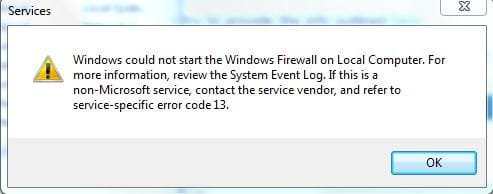
I can't activate windows firewall..
I get this error( see atachment)
 

Attachments

  • Capture.JPG
    Capture.JPG
    19.2 KB · Views: 18

My Computer

OS
Windows 7 Ultimate
CPU
Intel Core 2 DUO T9400 2.53 GHz
Memory
4 GB RAM
Graphics Card(s)
Ati Radeon 3650 HD
Monitor(s) Displays
Generic PnP Monitor
Screen Resolution
1920x1080
Are you using another firewall. If you are it will turn off Windows firewall.
 

My Computer

Computer type
PC/Desktop
Computer Manufacturer/Model Number
Home made Desktop
OS
Windows 10 Pro. 64/ version 1709 Windows 7 Pro/64
CPU
Intel i7-6800K @ 4.3
Motherboard
ASUS X-99 Deluxe II
Memory
Corsair Platinum 16 gig @2400
Graphics Card(s)
EVGA GTX 1070 OC
Monitor(s) Displays
Asus 27" LED LCD/VE278Q
Screen Resolution
1920-1080 or 1280-720 HDMI
Hard Drives
INTEL SSD 730-240 Gb Sata 3.0/
PSU
EVGA Platium 1200W
Case
Phanteks Luxe Tempered Glass 8 fans/ one radiator
Cooling
XSPC/ Water Cooled CPU
Keyboard
Das 4 Professional
Mouse
Logitech M705/MX Anywhere 2-S
Internet Speed
100 mbits
Antivirus
Microsoft Security Essentials/ Malwarebytes Premium 3.0/ SAS
Browser
I.E. 11 default/Firefox/ ISP Time Warner Cable/Spectrum
Other Info
LG BluRay Burner/
Sound system-KLipsch-THX/
Icy Dock ssd Hot Swap bays.
no... i don't use any other windows firewall:|
 

My Computer

OS
Windows 7 Ultimate
CPU
Intel Core 2 DUO T9400 2.53 GHz
Memory
4 GB RAM
Graphics Card(s)
Ati Radeon 3650 HD
Monitor(s) Displays
Generic PnP Monitor
Screen Resolution
1920x1080

My Computer

Computer Manufacturer/Model Number
Samsung NP550P5C-S02IN
OS
Windows 7 Ultimate - 64-bit | Windows 8 Pro - 64-bit
CPU
Intel® Core™ i7 Processor 3,610QM (2.30Hz, 6MB L3 Cach
Memory
8 GB
Graphics Card(s)
NVIDIA® GeForce® GT 650M 2GB Graphics, Optimus™ techno
Sound Card
SoundAlive™ JBL 3 Speakers (With sub-Woofer)
Monitor(s) Displays
39.62cm (15.6) SuperBright 300nit HD+ LED Display
Screen Resolution
1,600 x 900, Anti-Reflective
Hard Drives
1TB S-ATA II Hard Drive (5,400RPM)
i have followed that steps.. here is the log
 

My Computer

OS
Windows 7 Ultimate
CPU
Intel Core 2 DUO T9400 2.53 GHz
Memory
4 GB RAM
Graphics Card(s)
Ati Radeon 3650 HD
Monitor(s) Displays
Generic PnP Monitor
Screen Resolution
1920x1080
Hi there,

Seems like SLWGA.dll (Software Licensing Windows Genuine Advantage ) in the system32 folder seems to be corrupted. Download Malwarebytes : Free anti-malware, anti-virus and spyware removal download and go to Safe Mode and run a complete scan.

Once that's done

Go to Start under search type in Regedit
There go to Computer and Right click and Click on Export
Under File name type in Regback

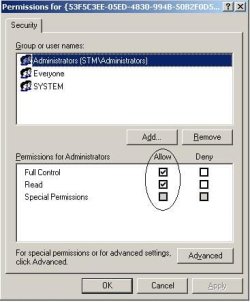
You have to give permission to the following keys
:

HKEY_LOCAL_MACHINE\SYSTEM\CurrentControlSet\Services\SharedAccess\Epoch
HKEY_LOCAL_MACHINE\SYSTEM\CurrentControlSet\Services\SharedAccess\Parameters\FirewallPolicy
HKEY_LOCAL_MACHINE\SYSTEM\CurrentControlSet\Services\SharedAccess\Defaults\FirewallPolicy
HKEY_LOCAL_MACHINE\SYSTEM\CurrentControlSet\Services\Dhcp
HKEY_LOCAL_MACHINE\SYSTEM\CurrentControlSet\Services\Dhcp\Configurations
HKEY_LOCAL_MACHINE\SYSTEM\CurrentControlSet\Services\DPS\Parameters

To give permission


  1. Right click the key, and click Permissions.
  2. Make sure Locations is selected to be the local computer.
  3. In the "Enter the object names to select field, type "NT SERVICE\mpssvc". Then click "Check name."
  4. Click OK.
  5. Then select the account which appears in the list, and add the appropriate permission for it.
  6. When this is done, click OK.
Make sure you have click mark under Allow "Full control" for all the Permissions.

Reg.JPG
 

My Computer

Computer Manufacturer/Model Number
Samsung NP550P5C-S02IN
OS
Windows 7 Ultimate - 64-bit | Windows 8 Pro - 64-bit
CPU
Intel® Core™ i7 Processor 3,610QM (2.30Hz, 6MB L3 Cach
Memory
8 GB
Graphics Card(s)
NVIDIA® GeForce® GT 650M 2GB Graphics, Optimus™ techno
Sound Card
SoundAlive™ JBL 3 Speakers (With sub-Woofer)
Monitor(s) Displays
39.62cm (15.6) SuperBright 300nit HD+ LED Display
Screen Resolution
1,600 x 900, Anti-Reflective
Hard Drives
1TB S-ATA II Hard Drive (5,400RPM)
done the scan(see atachment for the log)

problem with permissions with this:
HKEY_LOCAL_MACHINE\SYSTEM\CurrentControlSet\Services\DPS\Parameters
Error: Acces denied.
:|
 

Attachments

My Computer

OS
Windows 7 Ultimate
CPU
Intel Core 2 DUO T9400 2.53 GHz
Memory
4 GB RAM
Graphics Card(s)
Ati Radeon 3650 HD
Monitor(s) Displays
Generic PnP Monitor
Screen Resolution
1920x1080
Seems like it found infection on your system. I'll ask a security expert to look at the logs again.

Thanks,
Captain
 

My Computer

Computer Manufacturer/Model Number
Samsung NP550P5C-S02IN
OS
Windows 7 Ultimate - 64-bit | Windows 8 Pro - 64-bit
CPU
Intel® Core™ i7 Processor 3,610QM (2.30Hz, 6MB L3 Cach
Memory
8 GB
Graphics Card(s)
NVIDIA® GeForce® GT 650M 2GB Graphics, Optimus™ techno
Sound Card
SoundAlive™ JBL 3 Speakers (With sub-Woofer)
Monitor(s) Displays
39.62cm (15.6) SuperBright 300nit HD+ LED Display
Screen Resolution
1,600 x 900, Anti-Reflective
Hard Drives
1TB S-ATA II Hard Drive (5,400RPM)
Backdoor Warning
Your computer has multiple infections, including a Backdoor.
A backdoor is a software program that gives an attacker unauthorized access to a machine and the means for remotely controlling the machine without the user's knowledge.
A backdoor compromises system integrity by making changes to the system that allow it to by used by the attacker for malicious purposes unknown to the user.
Typically it's installed without user interaction through security exploits, and can severely compromise system security.
Such infections may open illicit network connections, use polymorphic tactics to self-mutate, disable security software, modify system files, and install additional malware.
These backdoor infections may also collect and transmit personally identifiable information, without your consent and severely degrade the performance and stability of your computer.
A backdoor infection can give intruders complete control of your computer, logs your keystrokes, obtain passwords, steal personal information, etc.

You are strongly advised to do the following:
  • Disconnect the computer from the Internet and from any networked computers until it is cleaned.
  • Call all your banks, financial institutions, credit card companies and inform them that you may be a victim of identity theft
    and put a watch on your accounts. If you don't mind the hassle, change all your account numbers.
  • From a clean computer, change all your passwords
    (ISP login password, your email address(es) passwords, financial accounts, PayPal, eBay, Amazon, any online activity you perform, requiring a username and password).
    Do NOT change your passwords from this computer as the attacker will be able to get all the new passwords and transaction records.
  • Back up all your important data except programs. The programs can be reinstalled back from the original disc or from the Net.

Due to its backdoor functionality, your computer is very likely to have been compromised and there is no way that it can be trusted again.
Many experts in the security community believe that once infected with this type of trojan, the best course of action would be to do a reformat and re-installation of the operating system (OS).
This decision will have to be made by you...

To help you understand more, please take some time to read the following articles:
When should I re-format and reinstall my OS
What are Remote Access Trojans and why are they dangerous
How do I respond to a possible identity theft and how do I prevent it
How and Where to backup your files
Restoring your backups

Please let me know how you would like to proceed.
Thanks
 

My Computer

Computer Manufacturer/Model Number
Dell Studio 15
OS
Windows 7 Ultimate 64 bit
Ok... i will re-formate my OS :D thx very much :)
 

My Computer

OS
Windows 7 Ultimate
CPU
Intel Core 2 DUO T9400 2.53 GHz
Memory
4 GB RAM
Graphics Card(s)
Ati Radeon 3650 HD
Monitor(s) Displays
Generic PnP Monitor
Screen Resolution
1920x1080
You're welcome
 

My Computer

Computer Manufacturer/Model Number
Dell Studio 15
OS
Windows 7 Ultimate 64 bit
Back
Top