
Can't add folder on network share to library

I think there have been several different threads on this.

The whole idea of Libraries is great but why oh why does Microsoft fall into these traps every time -- come up with a great idea then leave out some basic USEFUL features.

Sharing libraries across networks SHOULD BE 100% seamless. However indexing on Windows is a bit of a half baked solution for MIXED MACHINE networks.

Windows computers on the network could update via however windows indexing works - either by running some command on the local or remote machine -- I'm not a tech windows internals so I don't know the exact mechanism but something would need to trigger an update to keep the "Library folders" in sync.

Now on Samba what would you need to execute to update the library directories that would be created on the windows machines. The task would have to be started FROM THE WINDOWS server.

The "bog standard" NFS system managed all this in the "classical way" -- if you added a SAMBA share then it was immedaitely available to ALL the machines in the network.

However a new Windows share would have to be added manually to your SAMBA config and the SAMBA system re-started if you needed to acess the new Windows share on a 'NIX machine.

So although I think MS should have implemented this differently it's not actually too different to what happens now with "Classical Shares".

Cheers
jimbo
 

My Computer My Computer

Computer type
PC/Desktop
Computer Manufacturer/Model Number
Custom built, several laptops HP/ASUS
OS
Linux CENTOS 7 / various Windows OS'es and servers
CPU
Intel i7 Intel i5
Memory
8GB, 16GB
Graphics Card(s)
On Motherboard
Sound Card
Realtek HD audio
Monitor(s) Displays
Apple Cinema display, Samsung LCD
Screen Resolution
1920 X 1080
Hard Drives
4 X 1TB SATA
Mouse
Toshiba wireless laser
Internet Speed
> 20MB up
Libraries are based on virtual folder technology which need indexing for working. It's not a basic link as the favorites pan in the explorer
It's easy to docs yourself on the "how it work" ;) you can find many article explaining the libraries feature.
I.e:
http://windowsteamblog.com/blogs/developers/default.aspx

By the way, without indexing ability (server side via WDS4.0 or local side) files cannot be added to the libraries.

But if you are 32bit user you can use the UNCFAT patch for WDS, which allow to index Network or FAT drive. I tried it on Vista 32bit, it works well but it's really not seamless than indexing native NTFS files. Perfs are reduced, new files and modified files are not indexed as quick as the "native mode", etc

Myself I have a Samba file and I cannot add network share on libraries (UNCFAT is only 32bit, and i use 64bit). But I tried to install Windows Home Server on a virtual Machine on my Debian Server… and guess what! Tadaaaa all work really fine.
You can have WHS in trial version (30 day via home server website, 120day via connect), that's what I've done

And when the server disappears, the data is simply not available or even better not visible?!


I can answer: If the server is not available, or the client not connected on the server, the data you put on the libraries are just not visible. At the time the connexion with the server is ON, you'll see immediately the data back.
 

My Computer My Computer

OS
Vista H.P. SP1 x32 Seven RC x64
CPU
Q6600 @ 3.4Ghz
Motherboard
GA-EP45-DS3L
Memory
4Go PC2-6400
Graphics Card(s)
8500GT @ 700/500
Sound Card
Audigy Platinium
Monitor(s) Displays
Mitsubishi Diamond Pro 920 + Mitsubishi Diamond Pro 720
Screen Resolution
1600x1200 twice
Hard Drives
Hitachi 160Go
Maxtor 160Go (system drive)
Maxtor 200Go in Antec MX-1 EC external box (eSATA-USB2.0)
PSU
Corsair VX550W
Case
Thermaltake Xaser III
Cooling
Watercooling (CPU, GPU, HDD, NB)
Keyboard
MS Wireless Multimedia 6000 V2.0
Mouse
IntellEye Explorer 3.0
Internet Speed
ADSL 18Mbit/s/1Mbit/s
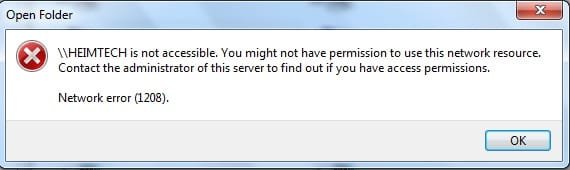
I have also this type of problem, I get an error when I want to open my nas
is there a solution for this problem
 

Attachments

  • error.jpg
    error.jpg
    13.4 KB · Views: 173

My Computer My Computer

Computer Manufacturer/Model Number
Asus eee 1000h
OS
Build 7229
CPU
intel atom n270 @ 1.6 GHz
Motherboard
asus eee 1000h
Memory
2 GB
Graphics Card(s)
intel mobile 945 express
Sound Card
realtek hight definition audio
Screen Resolution
1024*600
Hard Drives
160GB
Internet Speed
6 Mbit
Libraries are based on virtual folder technology which need indexing for working. It's not a basic link as the favorites pan in the explorer
It's easy to docs yourself on the "how it work" ;) you can find many article explaining the libraries feature.
I.e:
http://windowsteamblog.com/blogs/developers/default.aspx

By the way, without indexing ability (server side via WDS4.0 or local side) files cannot be added to the libraries.
Thank you for that, i think we already have noticed it ;)

But if you are 32bit user you can use the UNCFAT patch for WDS, which allow to index Network or FAT drive. I tried it on Vista 32bit, it works well but it's really not seamless than indexing native NTFS files. Perfs are reduced, new files and modified files are not indexed as quick as the "native mode", etc
Ui thanks for the info, unfortunately i am using samba @ 64bit linux aswell.

Myself I have a Samba file and I cannot add network share on libraries (UNCFAT is only 32bit, and i use 64bit). But I tried to install Windows Home Server on a virtual Machine on my Debian Server… and guess what! Tadaaaa all work really fine.
You can have WHS in trial version (30 day via home server website, 120day via connect), that's what I've done
Fine. But i installed Debian, not Windows and i had my reasons for that..

I can answer: If the server is not available, or the client not connected on the server, the data you put on the libraries are just not visible. At the time the connexion with the server is ON, you'll see immediately the data back.
Thanks. This is exactly what i need, if the library would work -.-

Can't understand it really; why it's so hard to implement a library for "usual" *nix shares? I mean, foobar2k, vlc, even mediaplayer, acdsee and so on can scan my shares without any problems..

btw, when i move my documents, the folder icon is gone. I know it's set in the ini, but the path is pointet at %systemdrive%->system32 and so on; Can i use custom (or better the 'right' windows-) icons?

This all isn't as easy as i thought :D

@Sempie
This is a rights problem, can you add your username in the web interface of the nas?

Best regards
 

My Computer My Computer

OS
Windows 7 RC 1
Ui thanks for the info, unfortunately i am using samba @ 64bit linux aswell.

Fine. But i installed Debian, not Windows and i had my reasons for that..


I think you did not understand what I mean.

The UNCFAT patch is for Windows Desktop search under the windows client. It has nothing to do with the linux server, it's a client side plugin ;)

So if you are not using Seven 64bit you can install the Patch on it and then add and network drive to the index.

As you I have a linux file server with Debian, under Vista 32bit I have the plugin installed which allow me to index the files shared by the server.

See there:
http://support.microsoft.com/kb/918996/en-us
 

My Computer My Computer

OS
Vista H.P. SP1 x32 Seven RC x64
CPU
Q6600 @ 3.4Ghz
Motherboard
GA-EP45-DS3L
Memory
4Go PC2-6400
Graphics Card(s)
8500GT @ 700/500
Sound Card
Audigy Platinium
Monitor(s) Displays
Mitsubishi Diamond Pro 920 + Mitsubishi Diamond Pro 720
Screen Resolution
1600x1200 twice
Hard Drives
Hitachi 160Go
Maxtor 160Go (system drive)
Maxtor 200Go in Antec MX-1 EC external box (eSATA-USB2.0)
PSU
Corsair VX550W
Case
Thermaltake Xaser III
Cooling
Watercooling (CPU, GPU, HDD, NB)
Keyboard
MS Wireless Multimedia 6000 V2.0
Mouse
IntellEye Explorer 3.0
Internet Speed
ADSL 18Mbit/s/1Mbit/s
*tilt*

yep. misunderstood you; thought i'd be a plugin for the WHS server in the virtual machine.

But im using Seven 64bit :D so no chance so far : /


Does anybody know whats with my icons? ;)

Thank you
 

My Computer My Computer

OS
Windows 7 RC 1
Guys, I've noticed that if you go into <rootdrive>:\Users\<username> and then go into the properties of the appropriate folder you wish to add libraries to, you can change the location of these folders to a non-indexed network share :)
 

My Computer My Computer

OS
Win 7
Guys, I've noticed that if you go into <rootdrive>:\Users\<username> and then go into the properties of the appropriate folder you wish to add libraries to, you can change the location of these folders to a non-indexed network share :)


This folders (Users specific folders) are not libraries folders.
This are the same folder than under XP or Vista ("My Docs," My pictures", etc)
Indeed, you can move them where you want... But if you move them on an "non-indexed" location they will not be able to be put on a librarie.

BTW, putting user specific folders on an network share is not a really good idea. If the network share is down, Windows will not like it, and you will not be able to boot the system until the network link is UP
 

My Computer My Computer

OS
Vista H.P. SP1 x32 Seven RC x64
CPU
Q6600 @ 3.4Ghz
Motherboard
GA-EP45-DS3L
Memory
4Go PC2-6400
Graphics Card(s)
8500GT @ 700/500
Sound Card
Audigy Platinium
Monitor(s) Displays
Mitsubishi Diamond Pro 920 + Mitsubishi Diamond Pro 720
Screen Resolution
1600x1200 twice
Hard Drives
Hitachi 160Go
Maxtor 160Go (system drive)
Maxtor 200Go in Antec MX-1 EC external box (eSATA-USB2.0)
PSU
Corsair VX550W
Case
Thermaltake Xaser III
Cooling
Watercooling (CPU, GPU, HDD, NB)
Keyboard
MS Wireless Multimedia 6000 V2.0
Mouse
IntellEye Explorer 3.0
Internet Speed
ADSL 18Mbit/s/1Mbit/s
This folders (Users specific folders) are not libraries folders.
This are the same folder than under XP or Vista ("My Docs," My pictures", etc)
Indeed, you can move them where you want... But if you move them on an "non-indexed" location they will not be able to be put on a librarie.

BTW, putting user specific folders on an network share is not a really good idea. If the network share is down, Windows will not like it, and you will not be able to boot the system until the network link is UP

They DO seem to appear in the 'Library' sections within Win7 though :S

Later versions of Windows (Vista and 7) seem to boot fine if these shares are not available on the server, they just display an empty folder as a result. I've only placed these folders on a home network so users can access their docs throughout the house without using a domain :)
 

My Computer My Computer

OS
Win 7
Work-around

There is a way to add a network share to a library. However, it will not be indexed.

Basically, you create a local directory, then add it to your library, then deleted the directory and create a symlink in it's place.

It is described in Method 2 in this tutorial, and it worked great for me.

Hope this helps,
kmyhre
 

My Computer My Computer

OS
Windows7
I have also this type of problem, I get an error when I want to open my nas
is there a solution for this problem

this thread may have a solution for your problem -http://www.sevenforums.com/network-internet/8303-cant-connect-samba-share-via-name-ip-works.html
 

My Computer My Computer

OS
Windows 7
I think there is a MAJOR problem here. Microsoft have clearly not checked out compatibility with XP/2000 in a domain environment which means corporates will treat it the same as Vista - ie: JUNK! As a professional IT consultant, I am evaluating Windows 7 on a corporate basis and it looks like a big NO! NO! Apart from the fixable(?) bugs, there is a major education issue which SMEs and corporates will be unwilling to address. I think Microsoft need to go back to the drawing board.
 

My Computer My Computer

Computer Manufacturer/Model Number
Dell Optiplex GX620
OS
Windows 7
CPU
Pentium 4
Memory
3Gb
Sound Card
yes
Has there been any progress made on this issue?

I've been testing out Win7 Pro x64 and the search functionality is driving me nuts. On non-indexed locations, you can only use 2 search filters, and if you want to search in more than one folder you have to select them manually from the explorer tree (rather then simply typing them in which I do on XP). I frequently perform searches on different folders located on 4-6 networked drives on a server running XP, so this can be very time consuming.

I can't add the network drives to a library because I can't index them - I've tried every method described in this thread. The symlink trick kind of worked - it allowed me to add them to a library, but I get zero results when I try to search it, regardless of what I type in the search field.
 

My Computer My Computer

Computer Manufacturer/Model Number
Custom
OS
Win7 x64 SP1
CPU
Intel Core i5-2500K
Motherboard
Asus P8P67 Pro
Memory
2 x 4GB G.Skill RipJaws DDR3-1333
Graphics Card(s)
Powercolor Radeon HD 5850
Monitor(s) Displays
BenQ V2400W, BenQ G2200W
Screen Resolution
1920x1200, 1920x1080
Hard Drives
Intel X25-M G2 80GB
Hitachi Deskstar 7K1000.C 1TB
PSU
Seasonic S12II 500W
Case
Cooler Master Centurion 590
Cooling
Xigmatek HDT-S1283
Easy fix - revert to XP and remove the program Windows Search 4.
 

My Computer My Computer

Computer Manufacturer/Model Number
Dell Optiplex GX620
OS
Windows 7
CPU
Pentium 4
Memory
3Gb
Sound Card
yes
Surely Microsoft can't be so incompetent as to leave out a feature far more needed now than years back for XP usage. Home and business networked drives are...almost fundamental now. There must be a solution to index networked drives??
 

My Computer My Computer

OS
win7
Network Shares

Unfortunately, Microsoft seem to be forgetting the big advantages of Windows - ease of use in corporate as well as home environments.

They seem to think home users need mollycoddling, but the end results are an OS which is becoming increasingly unfriendly and cumbersome.

My kids are quite happy with networked shares and drives, so I think it is time Microsoft should stop treating adults as idiots.
 

My Computer My Computer

Computer Manufacturer/Model Number
Dell Optiplex GX620
OS
Windows 7
CPU
Pentium 4
Memory
3Gb
Sound Card
yes
A solution - Win7 Library Tool

Indexing a large network share is not always practical. I have written a tool to allow you to add network locations (mapped drives and UNC paths) without them having to be indexed. And it provides some additional features like backup/restore of library sets. You can download it for free (+ WPF source) here:

Win7 Library Tool Zorn Software
http://zornsoftware.talsit.info/?p=3
 

My Computer My Computer

OS
WIndows 7
Faxedhead, you are kinda missing the point. You COULD index a network drive on XP and Vista, even years back with slower networks and CPUs. It's coming up on 2010 and Microsoft TAKES AWAY a feature that's even more useful now-- they don't allow you to index a networked drive which can store valuable shared docs etc. Nor does Microsoft discuss this anywhere.

Your tool offered makes no sense. I can already map a networked drive easily on Win7. I just can't index it. Problem statement is very simple, a lot of people on this thread don't seem to grasp it though.

For what it's worth, there seems to be an undocumented work-around. Run WDS4.0 on the networked drive and Win7 clients seem to use the networked computer's search engine to do the work. So now I can search a library that includes a networked drive.
 

My Computer My Computer

OS
win7
Faxedhead, you are kinda missing the point. You COULD index a network drive on XP and Vista, even years back with slower networks and CPUs. It's coming up on 2010 and Microsoft TAKES AWAY a feature that's even more useful now-- they don't allow you to index a networked drive which can store valuable shared docs etc. Nor does Microsoft discuss this anywhere.

Your tool offered makes no sense. I can already map a networked drive easily on Win7. I just can't index it. Problem statement is very simple, a lot of people on this thread don't seem to grasp it though.

For what it's worth, there seems to be an undocumented work-around. Run WDS4.0 on the networked drive and Win7 clients seem to use the networked computer's search engine to do the work. So now I can search a library that includes a networked drive.

I completely agree - indexing is the way to go when it comes to file management, and it's crazy that you need to make your files available 'offline' (i.e. create a local copy) in order to do that in 7. However consider these two points:

  1. If your network drive is on a linux box, you are still screwed, WDS4.0 will not help afaik (please correct me if i am wrong).
  2. Whilst search is useful, it is enough for many people to just have 'quick access' by adding commonly used folders to libraries. Many people actually organise their files quite well, meaning they know where things live, and only occassionally have to resort to search. If you do this with network drives you have no way of grouping them into a category or providing icons, default save location and other features that libraries provide.
 

My Computer My Computer

OS
WIndows 7
I completely agree - indexing is the way to go when it comes to file management, and it's crazy that you need to make your files available 'offline' (i.e. create a local copy) in order to do that in 7. However consider these two points:

  1. If your network drive is on a linux box, you are still screwed, WDS4.0 will not help afaik (please correct me if i am wrong).

Is there any solution in town, or in tow, like in SP1 or SP2...?

Shall we file an petition about this...? : )
 

My Computer My Computer

OS
Windows 7
Back
Top