Can't assign hotkey to desktop shortcut

dancing leaves

New member
Local time
8:03 AM
Messages
10
I had a desktop shortcut to an application, and a working hotkey assigned to it. Today I noticed it was missing. Not sure what happened and can't find the shortcut in the recycle bin.


So, I created a new shortcut to start the application on the desktop and tried to assign the same hotkey sequence. The window blinks quickly but no error message is displayed and the hotkey is not assigned.


If you have any ideas on how to fix this, please let me know. Thanks!
 

My Computer My Computer

At a glance

Windows 7 Professional SP1 64-bit
Computer type
Laptop
OS
Windows 7 Professional SP1 64-bit
Before you click on Apply or OK...

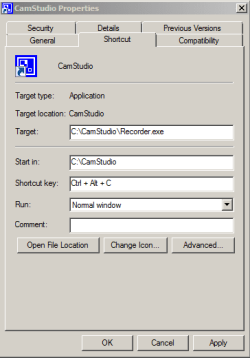
...please provide a screenshot of the shortcut's Properties

...a screenshot something like this:

Capture.PNG
 

My Computer My Computer

At a glance

W7 Pro SP1 64biti78GBIntel HD Graphics
Computer type
Laptop
Computer Manufacturer/Model Number
Employer provided Dell Latitude
OS
W7 Pro SP1 64bit
CPU
i7
Memory
8GB
Graphics Card(s)
Intel HD Graphics
Hard Drives
crappy SSD
Antivirus
Employer mandated Symantec Endpoint Protection
Browser
Pale Moon 64bit, IE11 64bit & Chrome 64bit
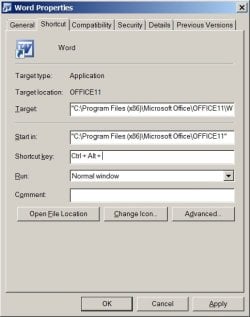
Here it is. I'm not sure it will be helpful. I can put my cursor in the shortcut key field. I can hold down the Ctrl and Shift keys and they will appear in the field. Then I press the w key and the window loses focus and the field goes back to displaying "None". The image shows Ctrl + Alt apparently because I'm using Alt + PrtSc to get a pic.
 

Attachments

  • hotkeyProblem.jpg
    hotkeyProblem.jpg
    40.3 KB · Views: 16

My Computer My Computer

At a glance

Windows 7 Professional SP1 64-bit
Computer type
Laptop
OS
Windows 7 Professional SP1 64-bit
It sounds like Ctrl + Shift + W is currently assigned to to some other shortcut. Perhaps the original shortcut has been moved/hidden off screen. Look at your desktop via Windows (file) Explorer. Also look in C:\Users\Public\
 

My Computer My Computer

At a glance

W7 Pro SP1 64biti78GBIntel HD Graphics
Computer type
Laptop
Computer Manufacturer/Model Number
Employer provided Dell Latitude
OS
W7 Pro SP1 64bit
CPU
i7
Memory
8GB
Graphics Card(s)
Intel HD Graphics
Hard Drives
crappy SSD
Antivirus
Employer mandated Symantec Endpoint Protection
Browser
Pale Moon 64bit, IE11 64bit & Chrome 64bit
There are about 50 items on the desktop. C:\Users\Public\ has about a dozen folders. What am I looking for, exactly?

Ctrl + Shift + W was assigned to the Word shortcut that went missing. If it was somehow hidden (how does that even happen), but the computer "knows" enough to not assign it again, why doesn't Ctrl + Shift + W open Word? I'd expect at least an error message.
 

My Computer My Computer

At a glance

Windows 7 Professional SP1 64-bit
Computer type
Laptop
OS
Windows 7 Professional SP1 64-bit
Poking around, trying to figure out what's going on. Noticed that 2 other shortcuts I had on the desktop are gone. They did not have assigned hotkeys. Very curious.
 

My Computer My Computer

At a glance

Windows 7 Professional SP1 64-bit
Computer type
Laptop
OS
Windows 7 Professional SP1 64-bit
I'm not sure what happened to the shortcuts - maybe some of them are corrupted. Perhaps CHKDSK will help.
 

My Computer My Computer

At a glance

W7 Pro SP1 64biti78GBIntel HD Graphics
Computer type
Laptop
Computer Manufacturer/Model Number
Employer provided Dell Latitude
OS
W7 Pro SP1 64bit
CPU
i7
Memory
8GB
Graphics Card(s)
Intel HD Graphics
Hard Drives
crappy SSD
Antivirus
Employer mandated Symantec Endpoint Protection
Browser
Pale Moon 64bit, IE11 64bit & Chrome 64bit
This may help. Lists all shortcut files with a hotkey set.
 

Attachments

My Computer My Computer

At a glance

Windows 10, Windows 8.1 Pro, Windows 7 Profes...
Computer type
PC/Desktop
OS
Windows 10, Windows 8.1 Pro, Windows 7 Professional, OS X El Capitan
Back
Top