Can't assign static IP...

N7AS

Old Duffer
Member
Local time
5:21 PM
Messages
54
Location
Prescott, AZ
I am having trouble setting a static ip for my computer (ipv4). After I enter all the values, I get this error...

error-1.jpg


The IP that I want to use is not being used. Any idea how to fix this?
 

My Computer

Computer type
PC/Desktop
Computer Manufacturer/Model Number
Custom Build
OS
Windows 7 Professional x64
CPU
AMD FX-8320 8-Core 3.50 Ghz
Motherboard
GIGABYTE GA-990FXA-UD3
Memory
16GB Corsair Vengeance
Graphics Card(s)
NVIDIA GeForce GTX660 2GB
Sound Card
NVIDIA HD 7.1 Channel ON-Board
Monitor(s) Displays
DELL ST2421L
Screen Resolution
192-x1080
Hard Drives
Corsair Force GS 128GB SSD
TOSHIBA DT01ACA200 2TB
PSU
EVGA SuperNOVA NEX750B 80 PLUS Bronz Modular
Case
Corsair Carbide Series 400R Mid-Tower
Cooling
Asetek 570LX Liquid Cooling w/240mm Radiator & Dual 120mm Fa
Keyboard
Microsoft Arc Wireless
Mouse
Logitech M325 Wireless
Internet Speed
105 Gbits/s
Antivirus
Avast
Browser
Google Chrome
Other Info
AeroCool V12XT TouchScreen Fan Control
Please upload the output of ipconfig /all to us here

start>search>cmd>right click and run as admin>ipconfig /all
 

My Computer

Computer Manufacturer/Model Number
HP Pavillion dv-7 1005 Tx
OS
Win 8 Release candidate 8400
CPU
[email protected]
Memory
4 gigs
Graphics Card(s)
Nvidia 9600M
Sound Card
HD built-in
Monitor(s) Displays
17" Wxga
Screen Resolution
1440x900
Cooling
none
Internet Speed
45Mb down 5Mb up
Just reading that message alone suggests that your wireless adapter is using the IP address. When attempting to configure your static IP manually, which device are you clicking on in the Network Connections screen?
If you have a wireless card installed then chances are you will have two entries here; one for the wireless card and one for the onboard network socket which in your case is most likely not in use but will still appear as a device.


Follow the above advice though and post the ipconfig details for further analysis.
 

My Computer

Computer Manufacturer/Model Number
Custom
OS
Windows 7 Ultimate 64-bit
CPU
AMD Phenom II X4 955 Black OC'ed 4.0GHz
Motherboard
Asus M5A88-V EVO
Memory
8GB Mushkin Enhanced Silverline (2x4GB) 1333
Graphics Card(s)
XFX Radeon HD6870 1024MB GDDR5 OC'ed 945MHz; 1151MHz
Sound Card
Soundblaster X-Fi Xtreme PCIe
Monitor(s) Displays
32" Hannspree SE32LMNB
Screen Resolution
1920 x 1080
Hard Drives
250GB Hitachi Deskstar (OS); 2TB Western Digital Elements
PSU
650W XFX XXX Edition 80PLUS Bronze Modular
Case
Cougar 6GR1 Evolution
Cooling
Corsair H60 p/p 120mm; Zalman VF3000A; x4 120mm; x1 140mm
Keyboard
Logitech G510
Mouse
CM Storm Sentinel Advance Zero-G
Internet Speed
Not fast enough :I
Other Info
No matter what your specs, my PC is better.
OK, Here it is... BTW.. I connect via ethernet and not via wireless card...

------------------------------------------------
Microsoft Windows [Version 6.1.7601]
Copyright (c) 2009 Microsoft Corporation. All rights reserved.

C:\Users\Grant>ipconfig /all

Windows IP Configuration

Host Name . . . . . . . . . . . . : Grant-PC
Primary Dns Suffix . . . . . . . :
Node Type . . . . . . . . . . . . : Hybrid
IP Routing Enabled. . . . . . . . : No
WINS Proxy Enabled. . . . . . . . : No

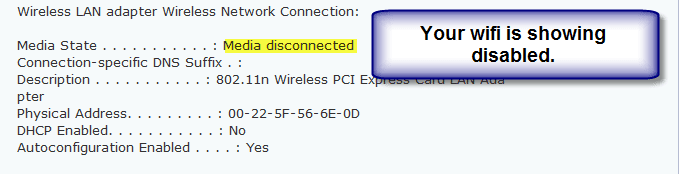
Wireless LAN adapter Wireless Network Connection:

Media State . . . . . . . . . . . : Media disconnected
Connection-specific DNS Suffix . :
Description . . . . . . . . . . . : 802.11n Wireless PCI Express Card LAN Ada
pter
Physical Address. . . . . . . . . : 00-22-5F-56-6E-0D
DHCP Enabled. . . . . . . . . . . : No
Autoconfiguration Enabled . . . . : Yes

Ethernet adapter Local Area Connection:

Connection-specific DNS Suffix . :
Description . . . . . . . . . . . : NVIDIA nForce Networking Controller
Physical Address. . . . . . . . . : 00-21-97-4D-ED-FC
DHCP Enabled. . . . . . . . . . . : Yes
Autoconfiguration Enabled . . . . : Yes
Link-local IPv6 Address . . . . . : fe80::442b:1d41:8015:fb4a%11(Preferred)
IPv4 Address. . . . . . . . . . . : 192.168.1.116(Preferred)
Subnet Mask . . . . . . . . . . . : 255.255.255.0
Lease Obtained. . . . . . . . . . : Saturday, April 14, 2012 3:22:56 AM
Lease Expires . . . . . . . . . . : Sunday, April 15, 2012 3:22:56 AM
Default Gateway . . . . . . . . . : 192.168.1.1
DHCP Server . . . . . . . . . . . : 192.168.1.1
DHCPv6 IAID . . . . . . . . . . . : 234889623
DHCPv6 Client DUID. . . . . . . . : 00-01-00-01-16-DC-4F-28-00-21-97-4D-ED-FC

DNS Servers . . . . . . . . . . . : 192.168.1.1
NetBIOS over Tcpip. . . . . . . . : Enabled

Tunnel adapter isatap.{C1341A06-D052-4E87-8D87-6F200F529D96}:

Media State . . . . . . . . . . . : Media disconnected
Connection-specific DNS Suffix . :
Description . . . . . . . . . . . : Microsoft ISATAP Adapter
Physical Address. . . . . . . . . : 00-00-00-00-00-00-00-E0
DHCP Enabled. . . . . . . . . . . : No
Autoconfiguration Enabled . . . . : Yes

Tunnel adapter isatap.{596E94B5-C46B-4AFF-BCB0-6CC3BD784690}:

Media State . . . . . . . . . . . : Media disconnected
Connection-specific DNS Suffix . :
Description . . . . . . . . . . . : Microsoft ISATAP Adapter #2
Physical Address. . . . . . . . . : 00-00-00-00-00-00-00-E0
DHCP Enabled. . . . . . . . . . . : No
Autoconfiguration Enabled . . . . : Yes

Tunnel adapter Teredo Tunneling Pseudo-Interface:

Connection-specific DNS Suffix . :
Description . . . . . . . . . . . : Teredo Tunneling Pseudo-Interface
Physical Address. . . . . . . . . : 00-00-00-00-00-00-00-E0
DHCP Enabled. . . . . . . . . . . : No
Autoconfiguration Enabled . . . . : Yes
IPv6 Address. . . . . . . . . . . : 2001:0:4137:9e76:ce8:1d6d:3f57:fe8b(Prefe
rred)
Link-local IPv6 Address . . . . . : fe80::ce8:1d6d:3f57:fe8b%15(Preferred)
Default Gateway . . . . . . . . . : ::
NetBIOS over Tcpip. . . . . . . . : Disabled

C:\Users\Grant>
------------------------------------------------
 

My Computer

Computer type
PC/Desktop
Computer Manufacturer/Model Number
Custom Build
OS
Windows 7 Professional x64
CPU
AMD FX-8320 8-Core 3.50 Ghz
Motherboard
GIGABYTE GA-990FXA-UD3
Memory
16GB Corsair Vengeance
Graphics Card(s)
NVIDIA GeForce GTX660 2GB
Sound Card
NVIDIA HD 7.1 Channel ON-Board
Monitor(s) Displays
DELL ST2421L
Screen Resolution
192-x1080
Hard Drives
Corsair Force GS 128GB SSD
TOSHIBA DT01ACA200 2TB
PSU
EVGA SuperNOVA NEX750B 80 PLUS Bronz Modular
Case
Corsair Carbide Series 400R Mid-Tower
Cooling
Asetek 570LX Liquid Cooling w/240mm Radiator & Dual 120mm Fa
Keyboard
Microsoft Arc Wireless
Mouse
Logitech M325 Wireless
Internet Speed
105 Gbits/s
Antivirus
Avast
Browser
Google Chrome
Other Info
AeroCool V12XT TouchScreen Fan Control
I am having trouble setting a static ip for my computer (ipv4). After I enter all the values, I get this error...
The IP that I want to use is not being used. Any idea how to fix this?


If your wireless card was working at one time and the router assigned an IP to it then the router would have a memory of this, this is where Windows is getting it's information from. Resetting the router would clear the memory in that case.

If you want to use DHCP plus a static IP, then the static IP you use needs to be outside the range of IP addresses that the router uses for DHCP. For instance the range on my DHCP is 192.168.0.100-192.168.0.199 so a static IP would need to be either above or below 100 and 199.

You might be better off going into the router's set up page at "192.168.1.1" and switch over from DHCP to static IP's. You should be able to assign IP's from there or Windows.
 
Last edited:

My Computer

Computer type
PC/Desktop
Computer Manufacturer/Model Number
Home built
OS
Windows 7 Ult, Windows 8.1 Pro,
CPU
Q9650-4.275GHz, E8600 4.5GHz, E6750-3.8GHz
Motherboard
Evga 780i FTW
Memory
G.Skill PC2 9600 1200Mhz 5 5 5 15 2T
Graphics Card(s)
GTX480
Sound Card
Asus Xonar D2
Monitor(s) Displays
HannsG
Screen Resolution
1680X1050
Hard Drives
GSkill Phoenix Pro 120GB SSD
PSU
ThermalTake Toughpower 1000Watt modular
Case
ThermalTake XaserV
Cooling
Xigmatek S1283
Keyboard
Logitech G15
Mouse
Logitech G9
Internet Speed
T1
Have you turned on the wifi? If it is a laptop there is a usual key combo to enable it.
 

Attachments

  • 1.png
    1.png
    6.6 KB · Views: 12

My Computer

Computer Manufacturer/Model Number
HP Pavillion dv-7 1005 Tx
OS
Win 8 Release candidate 8400
CPU
[email protected]
Memory
4 gigs
Graphics Card(s)
Nvidia 9600M
Sound Card
HD built-in
Monitor(s) Displays
17" Wxga
Screen Resolution
1440x900
Cooling
none
Internet Speed
45Mb down 5Mb up
To Zig: He said he's connecting through ethernet, so it's a good job the wifi is disconnected in this case ;)

Chev: That's assuming he has a specific router. Some Belkins are 192.128.2.1; some Netgears 0.1 and some Linksys 1.1; at least the models I've had of each.
 

My Computer

Computer Manufacturer/Model Number
Custom
OS
Windows 7 Ultimate 64-bit
CPU
AMD Phenom II X4 955 Black OC'ed 4.0GHz
Motherboard
Asus M5A88-V EVO
Memory
8GB Mushkin Enhanced Silverline (2x4GB) 1333
Graphics Card(s)
XFX Radeon HD6870 1024MB GDDR5 OC'ed 945MHz; 1151MHz
Sound Card
Soundblaster X-Fi Xtreme PCIe
Monitor(s) Displays
32" Hannspree SE32LMNB
Screen Resolution
1920 x 1080
Hard Drives
250GB Hitachi Deskstar (OS); 2TB Western Digital Elements
PSU
650W XFX XXX Edition 80PLUS Bronze Modular
Case
Cougar 6GR1 Evolution
Cooling
Corsair H60 p/p 120mm; Zalman VF3000A; x4 120mm; x1 140mm
Keyboard
Logitech G510
Mouse
CM Storm Sentinel Advance Zero-G
Internet Speed
Not fast enough :I
Other Info
No matter what your specs, my PC is better.
To Zig: He said he's connecting through ethernet, so it's a good job the wifi is disconnected in this case ;)

Chev: That's assuming he has a specific router. Some Belkins are 192.128.2.1; some Netgears 0.1 and some Linksys 1.1; at least the models I've had of each.

I'm not assuming anything because his ipconfig showed the default gateway as 192.168.1.1, pretty straight forward in this case. :)
 

My Computer

Computer type
PC/Desktop
Computer Manufacturer/Model Number
Home built
OS
Windows 7 Ult, Windows 8.1 Pro,
CPU
Q9650-4.275GHz, E8600 4.5GHz, E6750-3.8GHz
Motherboard
Evga 780i FTW
Memory
G.Skill PC2 9600 1200Mhz 5 5 5 15 2T
Graphics Card(s)
GTX480
Sound Card
Asus Xonar D2
Monitor(s) Displays
HannsG
Screen Resolution
1680X1050
Hard Drives
GSkill Phoenix Pro 120GB SSD
PSU
ThermalTake Toughpower 1000Watt modular
Case
ThermalTake XaserV
Cooling
Xigmatek S1283
Keyboard
Logitech G15
Mouse
Logitech G9
Internet Speed
T1
I'm not assuming anything because his ipconfig showed the default gateway as 192.168.1.1, pretty straight forward in this case. :)

That is a very good point!
 

My Computer

Computer Manufacturer/Model Number
Custom
OS
Windows 7 Ultimate 64-bit
CPU
AMD Phenom II X4 955 Black OC'ed 4.0GHz
Motherboard
Asus M5A88-V EVO
Memory
8GB Mushkin Enhanced Silverline (2x4GB) 1333
Graphics Card(s)
XFX Radeon HD6870 1024MB GDDR5 OC'ed 945MHz; 1151MHz
Sound Card
Soundblaster X-Fi Xtreme PCIe
Monitor(s) Displays
32" Hannspree SE32LMNB
Screen Resolution
1920 x 1080
Hard Drives
250GB Hitachi Deskstar (OS); 2TB Western Digital Elements
PSU
650W XFX XXX Edition 80PLUS Bronze Modular
Case
Cougar 6GR1 Evolution
Cooling
Corsair H60 p/p 120mm; Zalman VF3000A; x4 120mm; x1 140mm
Keyboard
Logitech G510
Mouse
CM Storm Sentinel Advance Zero-G
Internet Speed
Not fast enough :I
Other Info
No matter what your specs, my PC is better.
Back
Top