cant backup my data anymore?

My Computer My Computer

Computer type
PC/Desktop
OS
Windows 7 64 Bit
CPU
Intel Core i5 4670K 3.4GHz Socket LGA 1150
Motherboard
MSI Z87-G41 PC Mate Socket LGA 1150 ATX Intel Motherboard
Memory
8GB
Graphics Card(s)
ATI HD 6950
Sound Card
ASUS GTX760-DC2OC-2GD5
Hard Drives
1TB
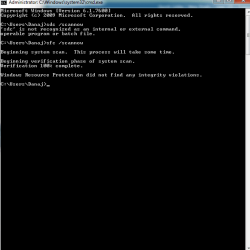
try run SFC /SCANNOW

hope that can help. and advise it, so we know the progress.
 

My Computer My Computer

Computer Manufacturer/Model Number
built up
OS
windows 7
CPU
Phenom II AMD Dragon 3.5Ghz
Memory
DDR3 4GB
Graphics Card(s)
ATI Radeon 512Mb
Monitor(s) Displays
HP L1506
Screen Resolution
1152 x 864
Hard Drives
WDC 1 TB SATA-II Green Power
Keyboard
HP wireless keyboard
Mouse
HP Optic
Internet Speed
1GB
monster,
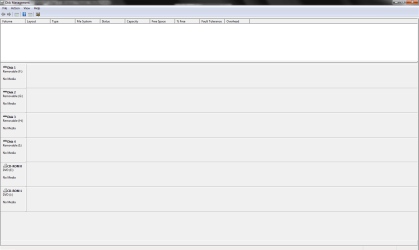
I find your disk management snapshot very strange.

try following:
WIN key |type DISKMGMT.MSC | Enter key

Take a snapshot and post.
 

My Computer My Computer

Computer Manufacturer/Model Number
Toshiba Satellite S875D-S7239 laptop
OS
MS Windows 7 Ultimate SP1 64-bit
CPU
AMD A10-4600M
Motherboard
AMD Pumori (Socket FT1)
Memory
6.00 GB Dual-Channel DDR3 @ 798MHz (11-11-12-28)
Graphics Card(s)
AMD Radeon HD 7660G
Sound Card
High Definition Audio Device
Monitor(s) Displays
Generic PnP Monitor (1600x900@60Hz)
Screen Resolution
1600x900@60Hz
Hard Drives
SSD 119GB Corsair CSSD-V128GB2 ATA Device
Keyboard
Standard PS/2 Keyboard
Mouse
HP Wireless Optical Mobile Mouse Model FHA-3410
Internet Speed
What the local pub, local coffee shop offers.
Other Info
Optical Drive:MATSHITA BD-CMB UJ160B ATA Device


Also have an Asus ha1002xp netbook with Win 7 Ultimate installed.
  • Like
Reactions: ryo
yes it is very strange. anyway heres the posts
 

Attachments

  • Untitled.png
    Untitled.png
    16.9 KB · Views: 11
  • Untitled2.png
    Untitled2.png
    8.5 KB · Views: 15

My Computer My Computer

Computer type
PC/Desktop
OS
Windows 7 64 Bit
CPU
Intel Core i5 4670K 3.4GHz Socket LGA 1150
Motherboard
MSI Z87-G41 PC Mate Socket LGA 1150 ATX Intel Motherboard
Memory
8GB
Graphics Card(s)
ATI HD 6950
Sound Card
ASUS GTX760-DC2OC-2GD5
Hard Drives
1TB
Monster,
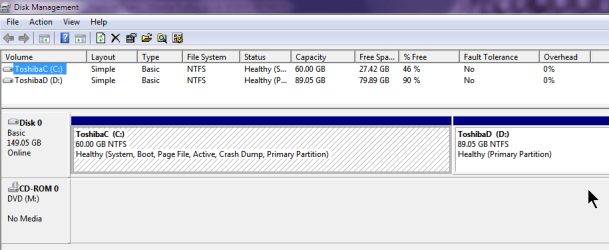
I don't know what you have done but I'm including a snapshot from my laptop. You will notice, of course, that I don't have any USB drives or memory sticks connected at the time of the snapshot.

Under the circumstances, my recommendation is to take PuppyLinux CD and boot from that. Use Puppy Linux to save off any data dear to you heart. After exiting from PuppyLinux, then disconnect all external drives and memory sticks and do a fresh install of Win7. I've also included a procedure to clean up your present hard disk.


[FONT=&quot]CLEAN A HARD DISK PRIOR TO WINDOWS 7 INSTALL[/FONT]

LEAVE THE DVD TRAY OPEN
Ø Turn on your computer. The purpose of this is so that the DVD door can be opened.
Ø Open the DVD door.
Ø Turn off the computer with the DVD door open.

BOOT FROM YOUR WINDOWS 7 DVD AND GO TO A COMMAND PROMPT
Ø Insert the Windows 7 DVD and close the DVD door.
Ø Power on your computer.
Ø When that very first dialog appears where you would normally push the NEXT button, then use the SHIFT + F10 key combo to get to a command prompt.
Ø The command prompt will be X:>


USE THE DISKPART PROGRAM TO “CLEAN” THE HARD DISK
Type the commands shown, hitting the Enter key after each.

Do not proceed to the next command until the current command is finished.

· DISKPART (the command prompt will change to DISKPART>)
· LIST DISK (this will list the disks present)
· SELECT DISK 0 (assuming disk zero is the desired hard disk)
· DETAIL DISK (this will show you info regarding the disk you selected)
· CLEAN ALL (this is the command to write zeros to entire disk)
· EXIT(this will exit you from the DiskPart program)
· EXIT(this will exit you back to the Windows 7 install program)
 

Attachments

  • DiskMgmt.png
    DiskMgmt.png
    15.1 KB · Views: 6

My Computer My Computer

Computer Manufacturer/Model Number
Toshiba Satellite S875D-S7239 laptop
OS
MS Windows 7 Ultimate SP1 64-bit
CPU
AMD A10-4600M
Motherboard
AMD Pumori (Socket FT1)
Memory
6.00 GB Dual-Channel DDR3 @ 798MHz (11-11-12-28)
Graphics Card(s)
AMD Radeon HD 7660G
Sound Card
High Definition Audio Device
Monitor(s) Displays
Generic PnP Monitor (1600x900@60Hz)
Screen Resolution
1600x900@60Hz
Hard Drives
SSD 119GB Corsair CSSD-V128GB2 ATA Device
Keyboard
Standard PS/2 Keyboard
Mouse
HP Wireless Optical Mobile Mouse Model FHA-3410
Internet Speed
What the local pub, local coffee shop offers.
Other Info
Optical Drive:MATSHITA BD-CMB UJ160B ATA Device


Also have an Asus ha1002xp netbook with Win 7 Ultimate installed.
alright man ill try it in a few minutes. right now im backing up all my data so it might take a while. as soon as i can ill follow ur steps and tell u how it turned out
 

My Computer My Computer

Computer type
PC/Desktop
OS
Windows 7 64 Bit
CPU
Intel Core i5 4670K 3.4GHz Socket LGA 1150
Motherboard
MSI Z87-G41 PC Mate Socket LGA 1150 ATX Intel Motherboard
Memory
8GB
Graphics Card(s)
ATI HD 6950
Sound Card
ASUS GTX760-DC2OC-2GD5
Hard Drives
1TB
monster,
here's the next step:
[FONT=&quot]PARTITION A HARD DISK PRIOR TO WINDOWS 7 INSTALL[/FONT]

LEAVE THE DVD TRAY OPEN
Ø Turn on your computer. The purpose of this is so that the DVD door can be opened.
Ø Open the DVD door.
Ø Turn off the computer with the DVD door open.

BOOT FROM YOUR WINDOWS 7 DVD AND GO TO A COMMAND PROMPT
Ø Insert the Windows 7 DVD and close the DVD door.
Ø Power on your computer.
Ø When that very first dialog appears where you would normally push the NEXT button, then use the SHIFT + F10 key combo to get to a command prompt.
Ø The command prompt will be X:>


USE THE DISKPART PROGRAM TO PREPARE AND PARTITION THE HARD DISK
Type the commands shown, hitting the Enter key after each.

Do not proceed to the next command until the current command is finished.

· DISKPART (the command prompt will change to DISKPART>)
· LIST DISK (list the disks present)
· SELECT DISK 0 (assuming disk zero is the desired hard disk)
· DETAIL DISK (show you info regarding the disk you selected)
· CLEAN (write zeros to first and last sectors on disk)
· CREATE PARTITION PRIMARY SIZE=256644
(
create a 256 gig primary partition)
(256644 = 1024 x 256 1 Gig=1024 Megs)

· CREATE PARTITION PRIMARY SIZE=513288
(
create a 512 gig primary partition)
(513288 = 1024 x 512 1 Gig=1024 Megs)

· CREATE PARTITION PRIMARY
(create a partition occupying the remainder)

You now have three partitions on your disk.
Next you need to:
Ø Declare one partition as the “system” partition
Ø Format each of the partitions
Ø Assign a drive letter to the partitions.
You can mix the operations up. You just need to complete them all.


· SELECT PARTITION 1
· ACTIVE (make this the system partition)
· FORMAT FS=NTFS (format the partition)
· ASSIGN (next available drive letter is assigned)
·
· SELECT PARTITION 2
· FORMAT FS=NTFS (format the partition)
· ASSIGN (next available drive letter is assigned)
·
· SELECT PARTITION 3
· FORMAT FS=NTFS (format the partition)
· ASSIGN (next available drive letter is assigned)
·
· LIST PARTITION (to see what you have wrought)
·
·
· EXIT (this will exit you from the DiskPart program)
· EXIT (this will exit you back to the Windows 7 install
program)

 

My Computer My Computer

Computer Manufacturer/Model Number
Toshiba Satellite S875D-S7239 laptop
OS
MS Windows 7 Ultimate SP1 64-bit
CPU
AMD A10-4600M
Motherboard
AMD Pumori (Socket FT1)
Memory
6.00 GB Dual-Channel DDR3 @ 798MHz (11-11-12-28)
Graphics Card(s)
AMD Radeon HD 7660G
Sound Card
High Definition Audio Device
Monitor(s) Displays
Generic PnP Monitor (1600x900@60Hz)
Screen Resolution
1600x900@60Hz
Hard Drives
SSD 119GB Corsair CSSD-V128GB2 ATA Device
Keyboard
Standard PS/2 Keyboard
Mouse
HP Wireless Optical Mobile Mouse Model FHA-3410
Internet Speed
What the local pub, local coffee shop offers.
Other Info
Optical Drive:MATSHITA BD-CMB UJ160B ATA Device


Also have an Asus ha1002xp netbook with Win 7 Ultimate installed.
well look at you mister fix-it

thanks a bunch man appreciate all the help and step by step instruction. worked like a charm
 

Attachments

  • Untitled.png
    Untitled.png
    161.5 KB · Views: 12

My Computer My Computer

Computer type
PC/Desktop
OS
Windows 7 64 Bit
CPU
Intel Core i5 4670K 3.4GHz Socket LGA 1150
Motherboard
MSI Z87-G41 PC Mate Socket LGA 1150 ATX Intel Motherboard
Memory
8GB
Graphics Card(s)
ATI HD 6950
Sound Card
ASUS GTX760-DC2OC-2GD5
Hard Drives
1TB
nice job..glad hear it... :)
 

My Computer My Computer

Computer Manufacturer/Model Number
built up
OS
windows 7
CPU
Phenom II AMD Dragon 3.5Ghz
Memory
DDR3 4GB
Graphics Card(s)
ATI Radeon 512Mb
Monitor(s) Displays
HP L1506
Screen Resolution
1152 x 864
Hard Drives
WDC 1 TB SATA-II Green Power
Keyboard
HP wireless keyboard
Mouse
HP Optic
Internet Speed
1GB
monster,
Great! Glad to hear that all is well now. Give us a yell when the next bump in the road appears.
 

My Computer My Computer

Computer Manufacturer/Model Number
Toshiba Satellite S875D-S7239 laptop
OS
MS Windows 7 Ultimate SP1 64-bit
CPU
AMD A10-4600M
Motherboard
AMD Pumori (Socket FT1)
Memory
6.00 GB Dual-Channel DDR3 @ 798MHz (11-11-12-28)
Graphics Card(s)
AMD Radeon HD 7660G
Sound Card
High Definition Audio Device
Monitor(s) Displays
Generic PnP Monitor (1600x900@60Hz)
Screen Resolution
1600x900@60Hz
Hard Drives
SSD 119GB Corsair CSSD-V128GB2 ATA Device
Keyboard
Standard PS/2 Keyboard
Mouse
HP Wireless Optical Mobile Mouse Model FHA-3410
Internet Speed
What the local pub, local coffee shop offers.
Other Info
Optical Drive:MATSHITA BD-CMB UJ160B ATA Device


Also have an Asus ha1002xp netbook with Win 7 Ultimate installed.
Back
Top