
Can't Backup

gbadgley

New member
Local time
6:05 PM
Messages
12
Widows 7 64 bit 1T HD

When I first installed all my software I did an system image backup. I tried to do another on the same HD and it tried, but eventually gave me a 'backup unsuccessful'. I tired again, same thing.

So, I ran Chkdisc in Windows (system errors and bad sectors) and defraged. Then I did basically the same thing using System Mechanic a third party utility. It got almost to the end (500G) but quit with just a few gigs to go.

Help!
 

My Computer

OS
Microsoft Windows 7 Professional 64-bit 7601 Multiprocessor Free Service Pack 1
CPU
Intel(R) Core(TM) i7 CPU 960 @ 3.20GHz
Motherboard
ASUSTeK Computer INC. P6X58-E PRO
Memory
12.00 GB
Graphics Card(s)
NVIDIA GeForce GT 440
Sound Card
(1) NVIDIA High Definition Audio (2) NVIDIA High Definitio
Screen Resolution
1176 x 664 x 32 bits (4294967296 colors) @ 60 Hz
Hard Drives
(1) ST31000524AS ATA Device (2) Generic- Compact Flash USB Device (3) Generic- MS/MS-Pro USB Device (4) Generic- SD/MMC USB Device (5) Generic- SM/xD-Picture USB Device (6) WD Ext HDD 1021 USB Device
My Computer

Computer Manufacturer/Model Number
HP Pavilion Elite 495UK
OS
Windows 7 Ultimate SP1 64-Bit
CPU
Intel Core i7 870 @ 2.93GHz
Motherboard
MSI 2A9C (CPU1)
Memory
8Gb Dual-Channel DDR3 @ 664MHz
Graphics Card(s)
nVidia GeForce GTX 460 1024MB dedicated RAM
Sound Card
Realtek HD Audio
Monitor(s) Displays
HP2310i
Screen Resolution
1920 x 1080
Hard Drives
1x1954GB Hitachi HDS22020ALA 330 (RAID), 1x1954GB Hitachi External for backup and storage
PSU
460W
Case
HP Elite
Cooling
Air cooled
Keyboard
Logitech K750 solar-powered keyboard
Mouse
Logitech Wireless M180 mouse
Internet Speed
2Mb
Other Info
Pure Avanti Flow Internet Radio with iPod Dock, 64Gb iPod, HP USB Speakers, Sony MDR-V500 Headphones, Sony Vaio F-Series Laptop
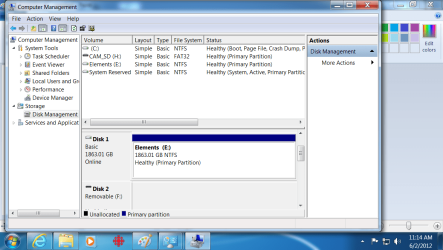
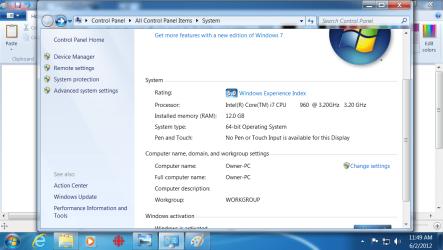
Well, I can get the system specs easily enough but that will take me a day to post. But I swap external drives all the time, and how do I give you a screenshot?
 

My Computer

OS
Microsoft Windows 7 Professional 64-bit 7601 Multiprocessor Free Service Pack 1
CPU
Intel(R) Core(TM) i7 CPU 960 @ 3.20GHz
Motherboard
ASUSTeK Computer INC. P6X58-E PRO
Memory
12.00 GB
Graphics Card(s)
NVIDIA GeForce GT 440
Sound Card
(1) NVIDIA High Definition Audio (2) NVIDIA High Definitio
Screen Resolution
1176 x 664 x 32 bits (4294967296 colors) @ 60 Hz
Hard Drives
(1) ST31000524AS ATA Device (2) Generic- Compact Flash USB Device (3) Generic- MS/MS-Pro USB Device (4) Generic- SD/MMC USB Device (5) Generic- SM/xD-Picture USB Device (6) WD Ext HDD 1021 USB Device
My Computer

Computer Manufacturer/Model Number
HP Pavilion Elite 495UK
OS
Windows 7 Ultimate SP1 64-Bit
CPU
Intel Core i7 870 @ 2.93GHz
Motherboard
MSI 2A9C (CPU1)
Memory
8Gb Dual-Channel DDR3 @ 664MHz
Graphics Card(s)
nVidia GeForce GTX 460 1024MB dedicated RAM
Sound Card
Realtek HD Audio
Monitor(s) Displays
HP2310i
Screen Resolution
1920 x 1080
Hard Drives
1x1954GB Hitachi HDS22020ALA 330 (RAID), 1x1954GB Hitachi External for backup and storage
PSU
460W
Case
HP Elite
Cooling
Air cooled
Keyboard
Logitech K750 solar-powered keyboard
Mouse
Logitech Wireless M180 mouse
Internet Speed
2Mb
Other Info
Pure Avanti Flow Internet Radio with iPod Dock, 64Gb iPod, HP USB Speakers, Sony MDR-V500 Headphones, Sony Vaio F-Series Laptop
Can't backup

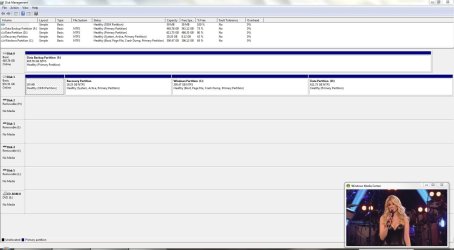
Okay, cool. Seems I can't read properly. Give me a few days.
 

My Computer

OS
Microsoft Windows 7 Professional 64-bit 7601 Multiprocessor Free Service Pack 1
CPU
Intel(R) Core(TM) i7 CPU 960 @ 3.20GHz
Motherboard
ASUSTeK Computer INC. P6X58-E PRO
Memory
12.00 GB
Graphics Card(s)
NVIDIA GeForce GT 440
Sound Card
(1) NVIDIA High Definition Audio (2) NVIDIA High Definitio
Screen Resolution
1176 x 664 x 32 bits (4294967296 colors) @ 60 Hz
Hard Drives
(1) ST31000524AS ATA Device (2) Generic- Compact Flash USB Device (3) Generic- MS/MS-Pro USB Device (4) Generic- SD/MMC USB Device (5) Generic- SM/xD-Picture USB Device (6) WD Ext HDD 1021 USB Device
Screenshot 2.png
 

My Computer

OS
Microsoft Windows 7 Professional 64-bit 7601 Multiprocessor Free Service Pack 1
CPU
Intel(R) Core(TM) i7 CPU 960 @ 3.20GHz
Motherboard
ASUSTeK Computer INC. P6X58-E PRO
Memory
12.00 GB
Graphics Card(s)
NVIDIA GeForce GT 440
Sound Card
(1) NVIDIA High Definition Audio (2) NVIDIA High Definitio
Screen Resolution
1176 x 664 x 32 bits (4294967296 colors) @ 60 Hz
Hard Drives
(1) ST31000524AS ATA Device (2) Generic- Compact Flash USB Device (3) Generic- MS/MS-Pro USB Device (4) Generic- SD/MMC USB Device (5) Generic- SM/xD-Picture USB Device (6) WD Ext HDD 1021 USB Device
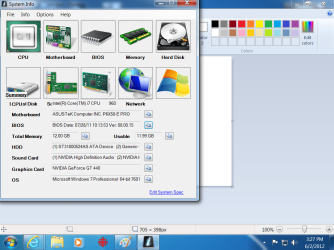
Can't backup

Okay, Seavixen, not sure if this is fully expanded or not. I'll work on the specs.
 

My Computer

OS
Microsoft Windows 7 Professional 64-bit 7601 Multiprocessor Free Service Pack 1
CPU
Intel(R) Core(TM) i7 CPU 960 @ 3.20GHz
Motherboard
ASUSTeK Computer INC. P6X58-E PRO
Memory
12.00 GB
Graphics Card(s)
NVIDIA GeForce GT 440
Sound Card
(1) NVIDIA High Definition Audio (2) NVIDIA High Definitio
Screen Resolution
1176 x 664 x 32 bits (4294967296 colors) @ 60 Hz
Hard Drives
(1) ST31000524AS ATA Device (2) Generic- Compact Flash USB Device (3) Generic- MS/MS-Pro USB Device (4) Generic- SD/MMC USB Device (5) Generic- SM/xD-Picture USB Device (6) WD Ext HDD 1021 USB Device
Can't backup

Screeprint3.png

You can't just want this, so as there is so much there, what exactly do you want?
 

My Computer

OS
Microsoft Windows 7 Professional 64-bit 7601 Multiprocessor Free Service Pack 1
CPU
Intel(R) Core(TM) i7 CPU 960 @ 3.20GHz
Motherboard
ASUSTeK Computer INC. P6X58-E PRO
Memory
12.00 GB
Graphics Card(s)
NVIDIA GeForce GT 440
Sound Card
(1) NVIDIA High Definition Audio (2) NVIDIA High Definitio
Screen Resolution
1176 x 664 x 32 bits (4294967296 colors) @ 60 Hz
Hard Drives
(1) ST31000524AS ATA Device (2) Generic- Compact Flash USB Device (3) Generic- MS/MS-Pro USB Device (4) Generic- SD/MMC USB Device (5) Generic- SM/xD-Picture USB Device (6) WD Ext HDD 1021 USB Device
Can't backup

Oh, I see you have given me a system info link too. Let me work on it.
 

My Computer

OS
Microsoft Windows 7 Professional 64-bit 7601 Multiprocessor Free Service Pack 1
CPU
Intel(R) Core(TM) i7 CPU 960 @ 3.20GHz
Motherboard
ASUSTeK Computer INC. P6X58-E PRO
Memory
12.00 GB
Graphics Card(s)
NVIDIA GeForce GT 440
Sound Card
(1) NVIDIA High Definition Audio (2) NVIDIA High Definitio
Screen Resolution
1176 x 664 x 32 bits (4294967296 colors) @ 60 Hz
Hard Drives
(1) ST31000524AS ATA Device (2) Generic- Compact Flash USB Device (3) Generic- MS/MS-Pro USB Device (4) Generic- SD/MMC USB Device (5) Generic- SM/xD-Picture USB Device (6) WD Ext HDD 1021 USB Device

My Computer

Computer Manufacturer/Model Number
HP Pavilion Elite 495UK
OS
Windows 7 Ultimate SP1 64-Bit
CPU
Intel Core i7 870 @ 2.93GHz
Motherboard
MSI 2A9C (CPU1)
Memory
8Gb Dual-Channel DDR3 @ 664MHz
Graphics Card(s)
nVidia GeForce GTX 460 1024MB dedicated RAM
Sound Card
Realtek HD Audio
Monitor(s) Displays
HP2310i
Screen Resolution
1920 x 1080
Hard Drives
1x1954GB Hitachi HDS22020ALA 330 (RAID), 1x1954GB Hitachi External for backup and storage
PSU
460W
Case
HP Elite
Cooling
Air cooled
Keyboard
Logitech K750 solar-powered keyboard
Mouse
Logitech Wireless M180 mouse
Internet Speed
2Mb
Other Info
Pure Avanti Flow Internet Radio with iPod Dock, 64Gb iPod, HP USB Speakers, Sony MDR-V500 Headphones, Sony Vaio F-Series Laptop
Can't backup

Screenshot4.png

This should do it. I'll work on the specs.
 

My Computer

OS
Microsoft Windows 7 Professional 64-bit 7601 Multiprocessor Free Service Pack 1
CPU
Intel(R) Core(TM) i7 CPU 960 @ 3.20GHz
Motherboard
ASUSTeK Computer INC. P6X58-E PRO
Memory
12.00 GB
Graphics Card(s)
NVIDIA GeForce GT 440
Sound Card
(1) NVIDIA High Definition Audio (2) NVIDIA High Definitio
Screen Resolution
1176 x 664 x 32 bits (4294967296 colors) @ 60 Hz
Hard Drives
(1) ST31000524AS ATA Device (2) Generic- Compact Flash USB Device (3) Generic- MS/MS-Pro USB Device (4) Generic- SD/MMC USB Device (5) Generic- SM/xD-Picture USB Device (6) WD Ext HDD 1021 USB Device
Can't backup

Okay, I ran the automatic version, as instructed in the systems info link, and the specifications are saved somewhere in the forum???
 

My Computer

OS
Microsoft Windows 7 Professional 64-bit 7601 Multiprocessor Free Service Pack 1
CPU
Intel(R) Core(TM) i7 CPU 960 @ 3.20GHz
Motherboard
ASUSTeK Computer INC. P6X58-E PRO
Memory
12.00 GB
Graphics Card(s)
NVIDIA GeForce GT 440
Sound Card
(1) NVIDIA High Definition Audio (2) NVIDIA High Definitio
Screen Resolution
1176 x 664 x 32 bits (4294967296 colors) @ 60 Hz
Hard Drives
(1) ST31000524AS ATA Device (2) Generic- Compact Flash USB Device (3) Generic- MS/MS-Pro USB Device (4) Generic- SD/MMC USB Device (5) Generic- SM/xD-Picture USB Device (6) WD Ext HDD 1021 USB Device
Specifications1.png


Is that satisfactory?
 

My Computer

OS
Microsoft Windows 7 Professional 64-bit 7601 Multiprocessor Free Service Pack 1
CPU
Intel(R) Core(TM) i7 CPU 960 @ 3.20GHz
Motherboard
ASUSTeK Computer INC. P6X58-E PRO
Memory
12.00 GB
Graphics Card(s)
NVIDIA GeForce GT 440
Sound Card
(1) NVIDIA High Definition Audio (2) NVIDIA High Definitio
Screen Resolution
1176 x 664 x 32 bits (4294967296 colors) @ 60 Hz
Hard Drives
(1) ST31000524AS ATA Device (2) Generic- Compact Flash USB Device (3) Generic- MS/MS-Pro USB Device (4) Generic- SD/MMC USB Device (5) Generic- SM/xD-Picture USB Device (6) WD Ext HDD 1021 USB Device
Are you saying chkdsk on disk 0 and disk 1 showed no errors? and did you do a full scan (yes it takes ages!)?

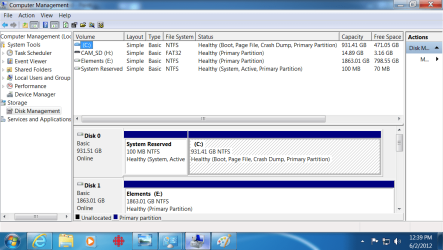
Your C: partition is using 460GB. If you are doing an image and file/folder backup then your backup will be much larger. Also you could have difference images on your backup drive stored in shadow storage. The bottom line is you may be running out of backup disk space.
I consider 460GB far too big to effectively image on a routine basis. I would partition C: and create a third partition for data. I would make the new C: ~200GB and contain OS all installed programs.
I would also make single images using the "Create a system image" button and NOT part of your backup schedule. You can rename images to say "WindowsImageBackup_6_3_12" and make a new one. You can shift delete them. If renamed back to "WindowsImageBackup" in the root of a partition Windows will allow you to restore it.
Then you can consider other excellent free software like Macrium Reflect.
 

My Computer

Computer type
PC/Desktop
Computer Manufacturer/Model Number
Own build
OS
Windows 7x64 Home Premium SP1
CPU
Intel i7 2600k
Motherboard
ASUS P8Z68 Deluxe
Memory
G.Skill Ripjaws (DDR3-1600) 2x4GB
Graphics Card(s)
Nvidia GeForce GTS 450; Intel HD Graphics 3000(GT2+)
Monitor(s) Displays
Dell Ultrasharp IPS panel U2311H, Samsung SyncMaster P2350
Screen Resolution
1920x1080
Hard Drives
Samsung 850 Pro SSD 256GB, Samsung SSD 840 120GB, Seagates 1TB Barracuda ST31000528AS x2
PSU
Seasonic M12II 520W
Case
Lian Li Lancool PC-K60
Cooling
Case: 1x120mm, 3x140mm CPU: Hyper 212+
Keyboard
Logitech MK520 (wireless)
Mouse
Logitech MK520
Internet Speed
6-7 Mbps
Antivirus
Norton Security Premium, Malwarebytes on 2 (MSE on 3rd PC)
Browser
FireFox
Other Info
Audio: Logitech Z523 2.1
Can't backup

Thanks for the help. In response, yes I did the full scan. But let me get this straight. You are saying I possibly don't have enough space, because there may be some in shadow storage? Isn't there a way to determine this, because geez it is showing 800 G's free? This is a new drive, and there was always almost a gig of free space. Yes I will follow your direction on backup, because 500 g's too backup on a regular basis for me is just too time consuming. I will be backing up just data, but I'm still scratching my head on a shadow storage that possibly can't be determined? I'll do some research here, as I really not all that experienced in handling large amounts of data like this Thanks again for the input.
 

My Computer

OS
Microsoft Windows 7 Professional 64-bit 7601 Multiprocessor Free Service Pack 1
CPU
Intel(R) Core(TM) i7 CPU 960 @ 3.20GHz
Motherboard
ASUSTeK Computer INC. P6X58-E PRO
Memory
12.00 GB
Graphics Card(s)
NVIDIA GeForce GT 440
Sound Card
(1) NVIDIA High Definition Audio (2) NVIDIA High Definitio
Screen Resolution
1176 x 664 x 32 bits (4294967296 colors) @ 60 Hz
Hard Drives
(1) ST31000524AS ATA Device (2) Generic- Compact Flash USB Device (3) Generic- MS/MS-Pro USB Device (4) Generic- SD/MMC USB Device (5) Generic- SM/xD-Picture USB Device (6) WD Ext HDD 1021 USB Device

My Computer

Computer Manufacturer/Model Number
BGC (Bob's Garage Crew)
OS
win 7 X64 Ultimate SP1
CPU
I3770K
Motherboard
Asus P8Z77-V Deluxe
Memory
G Skill F3-14900CL9-4GBXL x 4
Graphics Card(s)
NVIDIA GeForce GTX670 + Intel 4000
Sound Card
Realtek HD 5.1 (MOB)
Monitor(s) Displays
Asus VW224T (1)
Screen Resolution
1920 x 1080
Hard Drives
SATA Corsair Force GT 2.5" 180GB (System) Sata 3
OCZ Vertex3 120GB
OCZ Vertex 2 120GB 2.5" SATA II
ST31000524AS 1000.2GB
WD15EARS (External)
PSU
CoolerMaster 1000 Watt
Case
CoolerMaster HAF X
Cooling
CPU -- CoolerMaster 520N
Keyboard
MS Wireless 3000 V2
Mouse
MS Wireless 3000 V2
Internet Speed
Cable
Antivirus
Norton Internet Security
Browser
IE9
Other Info
AMI Bios 1805
OC'd 3%
If you are using the Windows default backup as opposed to "Let me choose" Windows will create an image and a file/folder backup which in your case could exceed the free HDD space.
 

My Computer

Computer type
PC/Desktop
Computer Manufacturer/Model Number
Own build
OS
Windows 7x64 Home Premium SP1
CPU
Intel i7 2600k
Motherboard
ASUS P8Z68 Deluxe
Memory
G.Skill Ripjaws (DDR3-1600) 2x4GB
Graphics Card(s)
Nvidia GeForce GTS 450; Intel HD Graphics 3000(GT2+)
Monitor(s) Displays
Dell Ultrasharp IPS panel U2311H, Samsung SyncMaster P2350
Screen Resolution
1920x1080
Hard Drives
Samsung 850 Pro SSD 256GB, Samsung SSD 840 120GB, Seagates 1TB Barracuda ST31000528AS x2
PSU
Seasonic M12II 520W
Case
Lian Li Lancool PC-K60
Cooling
Case: 1x120mm, 3x140mm CPU: Hyper 212+
Keyboard
Logitech MK520 (wireless)
Mouse
Logitech MK520
Internet Speed
6-7 Mbps
Antivirus
Norton Security Premium, Malwarebytes on 2 (MSE on 3rd PC)
Browser
FireFox
Other Info
Audio: Logitech Z523 2.1
Windows Backup will also fail if you manually select folders and/or libraries for backup and then later delete a folder that was included in a library or a folder specified separately. Check your backup selections and verify manual entries and libraries. The backup is very picky.

Took me a while to figure out why my backups were failing. I had deleted an extraneous "Recorded TV" folder that just happened to be "included" in a library. :o All I did was un-include it from the library and the backups ran ok.
 
Last edited:

My Computer

Computer type
PC/Desktop
Computer Manufacturer/Model Number
Built 2/11/2011
OS
Windows 7 Pro-x64
CPU
i7-2600 3.4GHz - 3.8GHz Turbo
Motherboard
Intel DH67BL-B3
Memory
8Gb - 2x4GB, Muskin 991770 PC3-1333
Graphics Card(s)
Integrated Intel HD 2000
Sound Card
Integrated Intel 10.1 HD, RealTek ALC892
Monitor(s) Displays
Asus LCD VH222H, Haier HL24XSL2a
Screen Resolution
1920x1080, 1920x1080
Hard Drives
Crucial SSD C300-128Gb,
Western Digital WD5002AALX - 500Gb,
Western Digital WD7501AALS - 750Gb
PSU
Seasonic 650W 80+ Gold Modular
Case
Rosewill Defender
Cooling
Stock CPU, Four 120mm case fans, PCH fan added
Keyboard
Logitech EX100 Y-RBH94 Wireless
Mouse
Logitech EX100 M-RCE95 Wireless
Internet Speed
3.0/1.5 Mbs
Antivirus
Microsoft Security Essentials
Browser
Microsoft Internet Explorer 11
Other Info
Antec Veris Premier-Multimedia IR Station,
Cyber Accoustics-3602 Speakers,
AFT XM-5U Card Reader,
Hauppauge TV-HVR-2250,
Sony LX300 USB Turntable
Can't backup

Okay, thanks for everybodies input. Let me digest all this, and go over the tut. Thanks for everyones help. Cheers.
 

My Computer

OS
Microsoft Windows 7 Professional 64-bit 7601 Multiprocessor Free Service Pack 1
CPU
Intel(R) Core(TM) i7 CPU 960 @ 3.20GHz
Motherboard
ASUSTeK Computer INC. P6X58-E PRO
Memory
12.00 GB
Graphics Card(s)
NVIDIA GeForce GT 440
Sound Card
(1) NVIDIA High Definition Audio (2) NVIDIA High Definitio
Screen Resolution
1176 x 664 x 32 bits (4294967296 colors) @ 60 Hz
Hard Drives
(1) ST31000524AS ATA Device (2) Generic- Compact Flash USB Device (3) Generic- MS/MS-Pro USB Device (4) Generic- SD/MMC USB Device (5) Generic- SM/xD-Picture USB Device (6) WD Ext HDD 1021 USB Device
Ownership

You can check this when you get time.
Once I had trouble with Win 7 backup. It would run fine and then at the very end fail. The only message was something like "Win could not complete the backup". In the end I found that the directory it was trying to back up to (the one configured) had changed access rights. I had to set the security settings till backup could access from my user account. I had made no changes to cause this. Gremlins at work.
 

My Computer

Computer Manufacturer/Model Number
BGC (Bob's Garage Crew)
OS
win 7 X64 Ultimate SP1
CPU
I3770K
Motherboard
Asus P8Z77-V Deluxe
Memory
G Skill F3-14900CL9-4GBXL x 4
Graphics Card(s)
NVIDIA GeForce GTX670 + Intel 4000
Sound Card
Realtek HD 5.1 (MOB)
Monitor(s) Displays
Asus VW224T (1)
Screen Resolution
1920 x 1080
Hard Drives
SATA Corsair Force GT 2.5" 180GB (System) Sata 3
OCZ Vertex3 120GB
OCZ Vertex 2 120GB 2.5" SATA II
ST31000524AS 1000.2GB
WD15EARS (External)
PSU
CoolerMaster 1000 Watt
Case
CoolerMaster HAF X
Cooling
CPU -- CoolerMaster 520N
Keyboard
MS Wireless 3000 V2
Mouse
MS Wireless 3000 V2
Internet Speed
Cable
Antivirus
Norton Internet Security
Browser
IE9
Other Info
AMI Bios 1805
OC'd 3%
Back
Top