Can't Boot Computer (Media Test Failure)

es0terik

New member
Local time
4:55 PM
Messages
17
Yesterday while watching an online baseball stream and simultaneously browsing facebook, my computer randomly gave me an error message. Unfortunately I don't remember what the message was about. What I do remember is that I immediately opened a new firefox tab and searched up the error. I clicked on the first link, and the OP was talking about how he had received the error and shortly after, his computer shut down. Almost on cue, my computer crashed and restarted itself.

Ever since then, I can't boot up my computer properly.

I turn on the computer, I see the first two screens that I always see (BIOS screen and then the 'Detecting eSATA drives' screen). After this it goes to the third screen, which I also always see. But this is where the problem is.

First it loads all that code crap that I never understand. Then, like always it gives me these two lines: 'Verifying DMI Pool Data....'

And then 'Boot from CD'. This always happens. But regularly from here it just boots up and goes to the Windows loading screen.

Now, on the same screen, it starts giving me error messages.

NVIDIA Boot Agent 253.0543
Copyright (C) 2001-2008 NVIDIA Corporation
Copyright (C) 1997-2009 Intel Corporation
PXE-E61: Media test failure, check cable
PXE-M0F: Exiting NVIDIA Boot Agent

NVIDIA Boot Agent 253.0543
Copyright (C) 2001-2008 NVIDIA Corporation
Copyright (C) 1997-2009 Intel Corporation
PXE-E61: Media test failure, check cable
PXE-M0F: Exiting NVIDIA Boot Agent

NVIDIA Boot Agent 253.0543
Copyright (C) 2001-2008 NVIDIA Corporation
Copyright (C) 1997-2009 Intel Corporation
PXE-E61: Media test failure, check cable
PXE-M0F: Exiting NVIDIA Boot Agent

NVIDIA Boot Agent 253.0543
Copyright (C) 2001-2008 NVIDIA Corporation
Copyright (C) 1997-2009 Intel Corporation
PXE-E61: Media test failure, check cable
PXE-M0F: Exiting NVIDIA Boot Agent
DISK BOOT FAILURE, INSERT SYSTEM DISK AND PRESS ENTER

That's exactly what I get.

Before, I was also getting the error message 'PXE-E53: No Boot Filename Received' prior to the media test failure message. After I unplugged and replugged my internal hard drive (some forums were saying to check the cables for the hard drive) the first error dissapeared.

I have a Windows 7 Ultimate 64-Bit OS. I bought the computer second-hand off a guy who was selling it online. He didn't have any of the CDs, so my copy of Windows 7 is burned (though I do have the CD still).

Before yesterday it was working fine.

All I want to do is to be able to get into the computer (Hard Drive) once, so that I can backup all my files and then I'd reinstall Windows 7 from scratch.

Does anybody have any idea how I can fix these errors, or at least somehow get onto my user account? Any help would be greatly appreciated.
 

My Computer

OS
Windows 7 Ultimate x64
Additional Info:

I tried to run the installation disk.

The first option in the recovery package said that it would look for repairs, and once it was done told me to restart the computer. Didn't fix anything.

I can't do a System Restore because I can't select my operating system, and I cant revert to an older System Image because apparently I don't have any.
 

My Computer

OS
Windows 7 Ultimate x64
PXE-E61: Media test failure, check cable
PXE-M0F: Exiting NVIDIA Boot Agent
This means your computer boot order is messed up or your hard drive has gone bad and it's trying to boot from the network.

You should be able to disable network boot in BIOS Setup.

While there, check the Boot Priority/order/sequence.
Also check to see if your hard drive is being recognized any more.
 

My Computer

Computer type
PC/Desktop
Computer Manufacturer/Model Number
Lenovo IdeaCenter 450
OS
Windows 10 Pro X64
CPU
Intel Quad Core i7-4770 @ 3.4Ghz
Memory
16.0GB PC3-12800 DDR3 SDRAM 1600 MHz
Graphics Card(s)
Intel Integrated HD Graphics
Sound Card
Realtek HD Audio
Monitor(s) Displays
HP 22" LCD
Screen Resolution
1680 x 1050
Hard Drives
250GB Samsung EVO SATA-3 SSD
2TB Seagate ST2000DM001 SATA-2
1.5TB Seagate ST3150041AS SATA
Keyboard
Dell USB
Mouse
Lenovo USB
Internet Speed
Cable via Road Runner 3MB Upload, 30MB Download
Antivirus
Windows Defender, MBAM Pro, MBAE
Browser
Seamonkey
Other Info
UEFI/GPT
PLDS DVD-RW DH16AERSH
Sorry I forgot to point that out. Hard Drive is recognized in the BIOS, I also checked the sequence already. First I used my computers settings which were 'Hard Drive, Hard Drive, Nothing'. I don't know why it was like that, I only have one HDD. Then I defaulted the settings, tried that, didn't work. Now I've put Hard drive as the first option in the sequence again and it hasn't made a difference.

I don't believe Network is in the boot sequence.

Could it be possible at all that this was caused by a virus? Because those stream sites had a lot of pop ups and ads. I'd much rather it be a virus than a hardware problem, though both ways I really don't want to lose my data.
 

My Computer

OS
Windows 7 Ultimate x64
Very unlikely a virus will affect your BIOS.

Try this.

Power down
Unplug power cord
Open computer case and remove the CMOS RTC battery (about the size of quarter)
Press and hold the power button for 10-15 seconds. This allows all capacitors to drain
Put the battery back, plug the power cord in and power up

You should get a CMOS checksum error and a press f1 to continue f2 to enter setup message.
Press F2.
Load defaults, set date/time, check all other settings, save and exit.

See if that helps.
 

My Computer

Computer type
PC/Desktop
Computer Manufacturer/Model Number
Lenovo IdeaCenter 450
OS
Windows 10 Pro X64
CPU
Intel Quad Core i7-4770 @ 3.4Ghz
Memory
16.0GB PC3-12800 DDR3 SDRAM 1600 MHz
Graphics Card(s)
Intel Integrated HD Graphics
Sound Card
Realtek HD Audio
Monitor(s) Displays
HP 22" LCD
Screen Resolution
1680 x 1050
Hard Drives
250GB Samsung EVO SATA-3 SSD
2TB Seagate ST2000DM001 SATA-2
1.5TB Seagate ST3150041AS SATA
Keyboard
Dell USB
Mouse
Lenovo USB
Internet Speed
Cable via Road Runner 3MB Upload, 30MB Download
Antivirus
Windows Defender, MBAM Pro, MBAE
Browser
Seamonkey
Other Info
UEFI/GPT
PLDS DVD-RW DH16AERSH
I couldn't find anything like that in my computer. Maybe it's there but its covered up by something? Is that possible?

Because I have two nVidia GTX 260 Video Cards, a Corsair 850W Power Supply and an extra fan cooling system, all of which are pretty big things. The motherboard is an EVGA 780i.
 

My Computer

OS
Windows 7 Ultimate x64
All computers have the CMOS battery. It may be behind something but it's there.

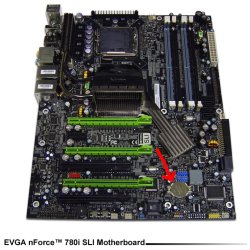
Is this your board?

EVGAsli.jpg

Red arrow points to the CMOS battery.
 

My Computer

Computer type
PC/Desktop
Computer Manufacturer/Model Number
Lenovo IdeaCenter 450
OS
Windows 10 Pro X64
CPU
Intel Quad Core i7-4770 @ 3.4Ghz
Memory
16.0GB PC3-12800 DDR3 SDRAM 1600 MHz
Graphics Card(s)
Intel Integrated HD Graphics
Sound Card
Realtek HD Audio
Monitor(s) Displays
HP 22" LCD
Screen Resolution
1680 x 1050
Hard Drives
250GB Samsung EVO SATA-3 SSD
2TB Seagate ST2000DM001 SATA-2
1.5TB Seagate ST3150041AS SATA
Keyboard
Dell USB
Mouse
Lenovo USB
Internet Speed
Cable via Road Runner 3MB Upload, 30MB Download
Antivirus
Windows Defender, MBAM Pro, MBAE
Browser
Seamonkey
Other Info
UEFI/GPT
PLDS DVD-RW DH16AERSH
I'm pretty sure that that's what my board is, and I had a feeling that that silver circle was it (though I only saw it in pictures).

I have a video card on the bottom green slot, and I think it's covering up the CMOS battery. I don't know exactly how to unplug the video card.
 

My Computer

OS
Windows 7 Ultimate x64
Okay so I guess my motherboard ISNT the 780i. Though it looks exactly like the one in the above picture, after taking out my video cards, the CMOS battery is in a different spot than where it is in the picture.
 

My Computer

OS
Windows 7 Ultimate x64
Okay I did what you said, got the cheksum error, went into setup, loaded defaults, saved and restarted. But now on the screen that I got the cheksum error, now there's a 'Floppy disk(s) fail (40)' error.
 

My Computer

OS
Windows 7 Ultimate x64
You probably do not have a floppy drive. Go into BIOS Setup again and disable the floppy A: drive.
 

My Computer

Computer type
PC/Desktop
Computer Manufacturer/Model Number
Lenovo IdeaCenter 450
OS
Windows 10 Pro X64
CPU
Intel Quad Core i7-4770 @ 3.4Ghz
Memory
16.0GB PC3-12800 DDR3 SDRAM 1600 MHz
Graphics Card(s)
Intel Integrated HD Graphics
Sound Card
Realtek HD Audio
Monitor(s) Displays
HP 22" LCD
Screen Resolution
1680 x 1050
Hard Drives
250GB Samsung EVO SATA-3 SSD
2TB Seagate ST2000DM001 SATA-2
1.5TB Seagate ST3150041AS SATA
Keyboard
Dell USB
Mouse
Lenovo USB
Internet Speed
Cable via Road Runner 3MB Upload, 30MB Download
Antivirus
Windows Defender, MBAM Pro, MBAE
Browser
Seamonkey
Other Info
UEFI/GPT
PLDS DVD-RW DH16AERSH
you could also try turning off the PXE boot feature in the BIOS, if it supports turning off the feature of the network card, in addition to changing the boot sequence. try plugging your drive into a difference SATA port and make sure all eSATA drives are unplugged as well. if its skipping your drive, then it could be problems with the instal or a physical drive problem.
 

My Computer

Computer Manufacturer/Model Number
Dell D630
OS
Windows 7 Professinal x64
CPU
Intel Core 2 Duo T9300
Motherboard
ICH8 Intel
Memory
8GB DDR2 1066MHZ (4.5GB/s Bandwidth)
Graphics Card(s)
nVidia Quadro NVS 135M
Sound Card
C-Major
Screen Resolution
1400x900
Hard Drives
Seagate Momentus XT Hybrid Drive 500GB
PSU
PA-12 90Watt
Case
Stock
Cooling
Stock (after my mods cools really well)
Other Info
Network Card: NetXtreme 57xx
Now, this ain't very helpful, but I'm in a sort of similar position.

On start-up, my PC gives the old error message "PXE-E61 Media Test Failure check cable", then promptly goes on to load up my OS perfectly normally, and it runs fine. I want to get rid of that annoying message, though!

It started when I plugged in a second internal hard-drive to my machine which I'd salvaged from another computer whose GPU had packed in. The HDD itself was in perfect working order when the graphics card died, so I thought I'd just pop the HDD into my computer and salvage the data. So, I plugged in the HDD and was presented with this error message, "PXE-E61 Media Test Failure check cable". So I switched off the machine and removed the hard-drive then booted up again, thinking "Oh well, never mind." But I still got the same error message, after which the computer continues to boot up just fine!

Not that it's particularly life-threatening, but how do I get rid of this blasted error message?! :mad:
 

My Computer

Computer Manufacturer/Model Number
Fujitsu P9900 0-Watt
OS
Windows 7 Professional x64 SP 1
CPU
Intel Core i5 - 3.2 GHz - Dual Core
Motherboard
D2912 - μBTX
Memory
4 GB
Graphics Card(s)
Asus Radeon HD 6770 1 GB
Sound Card
Realtek ALC663
Monitor(s) Displays
Fujitsu SL 3230T 23" LCD TFT
Screen Resolution
1920 x 1080
Hard Drives
500 GB Seagate / 500 GB Western Digital external HDD.
PSU
Corsair CX500
Keyboard
Fujitsu KB400 PS/2
Mouse
Fujitsu OPT FSC BC
Internet Speed
54 Kb/ps
Other Info
Windows Experience Index Score: 5.9 |

Processor: 7.1 |
Memory: 5.9 |
Graphics: 7.3 |
Gaming Graphics 7.3 |
Primary Hard Disk: 5.9
Please disregard my last post, it's solved! :D

I went into BIOS and reset the boot order to default. Simple solution to a simple problem. If only the real problems could be sorted so easily.
 

My Computer

Computer Manufacturer/Model Number
Fujitsu P9900 0-Watt
OS
Windows 7 Professional x64 SP 1
CPU
Intel Core i5 - 3.2 GHz - Dual Core
Motherboard
D2912 - μBTX
Memory
4 GB
Graphics Card(s)
Asus Radeon HD 6770 1 GB
Sound Card
Realtek ALC663
Monitor(s) Displays
Fujitsu SL 3230T 23" LCD TFT
Screen Resolution
1920 x 1080
Hard Drives
500 GB Seagate / 500 GB Western Digital external HDD.
PSU
Corsair CX500
Keyboard
Fujitsu KB400 PS/2
Mouse
Fujitsu OPT FSC BC
Internet Speed
54 Kb/ps
Other Info
Windows Experience Index Score: 5.9 |

Processor: 7.1 |
Memory: 5.9 |
Graphics: 7.3 |
Gaming Graphics 7.3 |
Primary Hard Disk: 5.9
I'm still having trouble with mine. :/
 

My Computer

OS
Windows 7 Ultimate x64
es0terik, please start a new thread fully describing your problem, Also fill out your System Specs from User CP.

Add a link to this thread if you think the problem is the same.
 

My Computer

Computer type
PC/Desktop
Computer Manufacturer/Model Number
Lenovo IdeaCenter 450
OS
Windows 10 Pro X64
CPU
Intel Quad Core i7-4770 @ 3.4Ghz
Memory
16.0GB PC3-12800 DDR3 SDRAM 1600 MHz
Graphics Card(s)
Intel Integrated HD Graphics
Sound Card
Realtek HD Audio
Monitor(s) Displays
HP 22" LCD
Screen Resolution
1680 x 1050
Hard Drives
250GB Samsung EVO SATA-3 SSD
2TB Seagate ST2000DM001 SATA-2
1.5TB Seagate ST3150041AS SATA
Keyboard
Dell USB
Mouse
Lenovo USB
Internet Speed
Cable via Road Runner 3MB Upload, 30MB Download
Antivirus
Windows Defender, MBAM Pro, MBAE
Browser
Seamonkey
Other Info
UEFI/GPT
PLDS DVD-RW DH16AERSH
Remove any floppy drive by unplugging its cable and disabling it in BIOS.

Set OD to boot first, HD second. Check all cable connections and condition.

Download, burn to CD and boot the HD maker's diagnostics/Repair extended CD scan to see if it finds fault with your HD and can repair it: HD Diagnostic

If not, see if you can access System Recovery Options to run Startup Repair.
 
Back
Top