Can't boot from HD or Win 7 Recovery, can boot from Ubuntu

A2Bob

New member
Local time
12:29 AM
Messages
5
I have a MSI 970A-G46 motherboard.
I can't boot from hard disk with Win 7 Ultimate nor from a windows 7 recovery dvd.
If I move the hard drive to another PC, it boots fine.
If I put the DVD in another PC's dvd drive, it can be accessed.
This machine will boot from an Ubuntu dvd and I can then access the HD directories and the recovery dvd.
What do I need to do?

Help and thanks
 

My Computer My Computer

At a glance

Win 7 Home Premium 64AMD Phenom II X4 95516gb DDR 1600GeForce 630
Computer type
PC/Desktop
Computer Manufacturer/Model Number
Custom build
OS
Win 7 Home Premium 64
CPU
AMD Phenom II X4 955
Motherboard
MSI 970A-G46
Memory
16gb DDR 1600
Graphics Card(s)
GeForce 630
Hard Drives
Seagate 500 GB
Browser
Chrome
Hi there.

Does it show any error message when it doesn't boot from your hard disk? Have you tried to put in the HDD from your other PC as well?
 

My Computer My Computer

At a glance

Windows 10 Pro
Computer type
Laptop
Computer Manufacturer/Model Number
Lenovo E450
OS
Windows 10 Pro
Hello A2Bob. Welcome to the forum.

The first thing that comes to mind is that there is something funky going on in the BIOS settings of the problem machine. A setting that interferes with Windows but not Linux.
So my first course of action would be to Restore BIOS Defaults.
(Just note the SATA Controller setting - if it is in AHCI Mode now then be sure it is in AHCI Mode after the reset. Or try it both ways - IDE and AHCI)
 

My Computer My Computer

At a glance

Windows 7 64 Bit Home Premium SP1i7-3820GSkill F3-14900CL9Q - 16GBEVGA GeForce GTX660 - Driver 352.86
Computer type
PC/Desktop
Computer Manufacturer/Model Number
Home Built - Jan 2013
OS
Windows 7 64 Bit Home Premium SP1
CPU
i7-3820
Motherboard
Asus P9X79-PRO - Bios 4608
Memory
GSkill F3-14900CL9Q - 16GB
Graphics Card(s)
EVGA GeForce GTX660 - Driver 352.86
Sound Card
On board Realtek ALC898
Monitor(s) Displays
Acer S271HL
Screen Resolution
1920 x 1080
Hard Drives
#1- Samsung 840 Pro Series
#2- Western Digital WD1002FAEX Sata3 Black
#3- Western Digital WD1002FAEX Sata3 Black
PSU
Corsair CMPSU-850TX-V2 - 850 watt (by Seasonic)
Case
Corsair Obsidian 550D
Cooling
Standard 3 120mm case fans, Cooler Master Hyper 212 EVO
Keyboard
MS KC-0405
Mouse
Intellimouse 5-button
Internet Speed
56 Mbits/Sec (on a good day)
Antivirus
Avast & Malwarebytes
Browser
Firefox
Other Info
Asus DVD - DRW-24B1ST 24X
Thanks for replying.
1. There is no error message when I try to boot from the HDD. It freezes at the window with the message "Windows is starting" underneath the 4 color Windows flag.
2. I get the same results when I install another (known good) HDD from another machine.
3. The BIOS defaults have been restored with no effect on the problem.
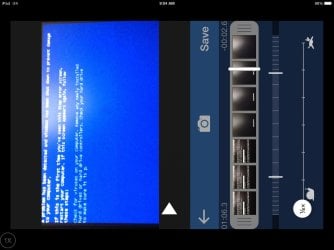
4. I tried changing the SATA mode from IDE to AHCI. The result was a blue screen that shows for a fraction of a second and the machine re-enters the boot process loop. I was able to freeze the blue screen using a slo-mo video cam app. The blue screen message screen capture is attached.

thanks
 

Attachments

  • IMG_4404.jpg
    IMG_4404.jpg
    172.3 KB · Views: 3

My Computer My Computer

At a glance

Win 7 Home Premium 64AMD Phenom II X4 95516gb DDR 1600GeForce 630
Computer type
PC/Desktop
Computer Manufacturer/Model Number
Custom build
OS
Win 7 Home Premium 64
CPU
AMD Phenom II X4 955
Motherboard
MSI 970A-G46
Memory
16gb DDR 1600
Graphics Card(s)
GeForce 630
Hard Drives
Seagate 500 GB
Browser
Chrome
That's good. No problem with BIOS settings, and it seems obvious you installed in AHCI mode.

What I didn't realize was that this is a freeze during the Windows startup. That changes things.
(Keep in mind that "Boot" refers to the BIOS system start. Your machine must "Boot" before it can even begin to find and load an OS.)

The point in Windows startup where the 'flags' come together is where your hardware is being initialized (in Windows) and drivers are being accessed. So that indicates that there is a problem with a piece of hardware or it's driver.

Have you made any changes to your system lately? Have you updated any drivers?
 

My Computer My Computer

At a glance

Windows 7 64 Bit Home Premium SP1i7-3820GSkill F3-14900CL9Q - 16GBEVGA GeForce GTX660 - Driver 352.86
Computer type
PC/Desktop
Computer Manufacturer/Model Number
Home Built - Jan 2013
OS
Windows 7 64 Bit Home Premium SP1
CPU
i7-3820
Motherboard
Asus P9X79-PRO - Bios 4608
Memory
GSkill F3-14900CL9Q - 16GB
Graphics Card(s)
EVGA GeForce GTX660 - Driver 352.86
Sound Card
On board Realtek ALC898
Monitor(s) Displays
Acer S271HL
Screen Resolution
1920 x 1080
Hard Drives
#1- Samsung 840 Pro Series
#2- Western Digital WD1002FAEX Sata3 Black
#3- Western Digital WD1002FAEX Sata3 Black
PSU
Corsair CMPSU-850TX-V2 - 850 watt (by Seasonic)
Case
Corsair Obsidian 550D
Cooling
Standard 3 120mm case fans, Cooler Master Hyper 212 EVO
Keyboard
MS KC-0405
Mouse
Intellimouse 5-button
Internet Speed
56 Mbits/Sec (on a good day)
Antivirus
Avast & Malwarebytes
Browser
Firefox
Other Info
Asus DVD - DRW-24B1ST 24X
A little history: I was having trouble with my Dell desktop locking up intermittently, requiring a reboot. I ran anti virus and malware programs and didn't find any serious threats. I came to the conclusion that I had bad memory or the motherboard was going. I decided to buy a used machine to either harvest parts or replace the Dell. So, I bought someone's custom build with the specs I listed in my original post. It had Windows Ultimate installed (nothing else) and booted fine. Here's where things get murky, I don't remember exactly the order I performed things. I believe the first thing I did was to make a recovery DVD on the custom machine. Then I installed the HDD from the Dell into the custom machine and download and installed the MSI drivers. It ran, but exhibited the same problems as the Dell. So, I deduced that it wasn't a hardware problem with the Dell. So I put Dell HDD back in the Dell and did an image restore, which seemed to work. I also did a clean install on the Dell, so that works OK now.

Now to the current problem. I put the HDD from the custom machine back into the custom machine and that's where we are now. Won't boot windows, will boot from Ubuntu DVD.

thanks
 

My Computer My Computer

At a glance

Win 7 Home Premium 64AMD Phenom II X4 95516gb DDR 1600GeForce 630
Computer type
PC/Desktop
Computer Manufacturer/Model Number
Custom build
OS
Win 7 Home Premium 64
CPU
AMD Phenom II X4 955
Motherboard
MSI 970A-G46
Memory
16gb DDR 1600
Graphics Card(s)
GeForce 630
Hard Drives
Seagate 500 GB
Browser
Chrome

My Computer My Computer

At a glance

Windows 7 64 Bit Home Premium SP1i7-3820GSkill F3-14900CL9Q - 16GBEVGA GeForce GTX660 - Driver 352.86
Computer type
PC/Desktop
Computer Manufacturer/Model Number
Home Built - Jan 2013
OS
Windows 7 64 Bit Home Premium SP1
CPU
i7-3820
Motherboard
Asus P9X79-PRO - Bios 4608
Memory
GSkill F3-14900CL9Q - 16GB
Graphics Card(s)
EVGA GeForce GTX660 - Driver 352.86
Sound Card
On board Realtek ALC898
Monitor(s) Displays
Acer S271HL
Screen Resolution
1920 x 1080
Hard Drives
#1- Samsung 840 Pro Series
#2- Western Digital WD1002FAEX Sata3 Black
#3- Western Digital WD1002FAEX Sata3 Black
PSU
Corsair CMPSU-850TX-V2 - 850 watt (by Seasonic)
Case
Corsair Obsidian 550D
Cooling
Standard 3 120mm case fans, Cooler Master Hyper 212 EVO
Keyboard
MS KC-0405
Mouse
Intellimouse 5-button
Internet Speed
56 Mbits/Sec (on a good day)
Antivirus
Avast & Malwarebytes
Browser
Firefox
Other Info
Asus DVD - DRW-24B1ST 24X
I tried startup repair with the recovery disk I made before the mess up. It goes thru the loading files bit and stops at the last file and just sits there (I've let it sit for hours).

The custom came with Win Ultimate, but with no disc. He said he lost it (yeh, right). I can try to do a clean install with the Windows Home Premium that came with the Dell. Don't know if that will work.

Would it help if I put the Hdd from the custom into the Dell, download and install the Msi drivers and then reinstall in the custom?

Thanks again for your time.
 

My Computer My Computer

At a glance

Win 7 Home Premium 64AMD Phenom II X4 95516gb DDR 1600GeForce 630
Computer type
PC/Desktop
Computer Manufacturer/Model Number
Custom build
OS
Win 7 Home Premium 64
CPU
AMD Phenom II X4 955
Motherboard
MSI 970A-G46
Memory
16gb DDR 1600
Graphics Card(s)
GeForce 630
Hard Drives
Seagate 500 GB
Browser
Chrome
I don't think so. The drivers will not install in a system that does not have the hardware those drivers are for. You would get a "device not found" message.

Does the custom PC have a Windows Ultimate Key? Could be on a sticker on the case.
If so you could download and install an Ultimate ISO and use the key to activate it.

You could install Home Premium to see if you can get Windows to run on that system at all. If it does you would have the option of upgrading the install to Ultimate if you have a key.
 

My Computer My Computer

At a glance

Windows 7 64 Bit Home Premium SP1i7-3820GSkill F3-14900CL9Q - 16GBEVGA GeForce GTX660 - Driver 352.86
Computer type
PC/Desktop
Computer Manufacturer/Model Number
Home Built - Jan 2013
OS
Windows 7 64 Bit Home Premium SP1
CPU
i7-3820
Motherboard
Asus P9X79-PRO - Bios 4608
Memory
GSkill F3-14900CL9Q - 16GB
Graphics Card(s)
EVGA GeForce GTX660 - Driver 352.86
Sound Card
On board Realtek ALC898
Monitor(s) Displays
Acer S271HL
Screen Resolution
1920 x 1080
Hard Drives
#1- Samsung 840 Pro Series
#2- Western Digital WD1002FAEX Sata3 Black
#3- Western Digital WD1002FAEX Sata3 Black
PSU
Corsair CMPSU-850TX-V2 - 850 watt (by Seasonic)
Case
Corsair Obsidian 550D
Cooling
Standard 3 120mm case fans, Cooler Master Hyper 212 EVO
Keyboard
MS KC-0405
Mouse
Intellimouse 5-button
Internet Speed
56 Mbits/Sec (on a good day)
Antivirus
Avast & Malwarebytes
Browser
Firefox
Other Info
Asus DVD - DRW-24B1ST 24X
OK, thanks for your help. I'll re-post if I find a way out of this.
 

My Computer My Computer

At a glance

Win 7 Home Premium 64AMD Phenom II X4 95516gb DDR 1600GeForce 630
Computer type
PC/Desktop
Computer Manufacturer/Model Number
Custom build
OS
Win 7 Home Premium 64
CPU
AMD Phenom II X4 955
Motherboard
MSI 970A-G46
Memory
16gb DDR 1600
Graphics Card(s)
GeForce 630
Hard Drives
Seagate 500 GB
Browser
Chrome
Back
Top