Cant boot from the right HDD.

toughguy5

New member
Local time
12:04 AM
Messages
10
Ok the problem iam having is i am not really sure how the sata drives work, i know ide's but sata's i dont quite understand. my system is home built and i just added 2 more harddrives for a total of 4 and they are as follows: WD320Gig IDE this HDD has the operating system on it. WD320Gig SATA, this drive holds my backed up programs. WD160Gig SATA, this one holds my Documents. WD 80Gig SATA this one holds music and movies. the problem iam having is when the comp boots up i have to keep changing the boot selector to boot from the WD320 "IDE" drive all the time otherwise the comp does not boot up. i tried to change the settings in the bios but it doenst work for me, i am assuming i am doing something wrong can somebody point me in the right direction. Thanks In Advance.
 
Last edited:

My Computer

Computer Manufacturer/Model Number
Home Built
OS
Windows 7 64-bit
CPU
Intel Pent 4 Dou-core E8200 2.66 @3.20 Ghz
Motherboard
Gigabyte GA-EP45T-UD3LR
Memory
4-Gig ViperDDR3 1333Mhz
Graphics Card(s)
NVIDIA GeForce 9600 GSO
Sound Card
Creative crap
Monitor(s) Displays
SyncMaster932b HD
Screen Resolution
1280 x 1024
Hard Drives
One IDE HDD, and 3 Sata drives. 1 Ide CD/DVD Burners, 1 DVD SATA Burner and I card Reader.
PSU
550 watt
Case
The destroyer
Cooling
Mega Fans
Keyboard
Sony
Mouse
Microsoft Mouse
Internet Speed
12 Meg Fios.
Welcome toughguy5 :)

I think there you will have to set the jumpers for both IDE Drives. Set the Jumper (Pins) to Master on WD320GB (Operating System) IDE than set the jumper on 2nd WD320GB IDE to Slave. Both SATA HDD's would not have any jumpers settings so just plug them in. From Bio's try Reset to Defaults and restart computer and see if this works. Im not sure about the exact settings either coz i have not used several drives at same time.
 

My Computer

Computer type
PC/Desktop
Computer Manufacturer/Model Number
Self Built
OS
Windows 10 Pro
CPU
Core i5 9600K
Motherboard
ASUS ROG Strix Z390-F Gaming
Memory
Corsair Vengeance Pro 2x 8GB (16GB) 3200MHz DDR4
Graphics Card(s)
MSI GTX 1070 Gaming X 8GB
Sound Card
ASRock A-Style Purity Sound
Monitor(s) Displays
ASUS VX239H IPS
Screen Resolution
1920x1080
Hard Drives
XPG SPECTRIX S40G 2566GB M.2 NVMe | Patriot P210 512GB SSD | Seagate BarraCuda 4TB 5400RPM
PSU
Thermaltake Smart 600w RGB 80Plus
Case
NZXT H500 with 3x Corsair HD120 RGB w/Node Pro
Cooling
Cryorig H7
Keyboard
Corsair K70 RapidFire RGB (Cherry MX Speed)
Mouse
Logitech G402 Hyperion Fury
Internet Speed
20MB Cable Broadband
Browser
Chrome
Other Info
Corsair MM300 Extended Anti-Fray Mouse Pad | Edifier C2 2.1ch Sound System | XBOX One S Controller | XBOX 360 Wireless Controller for Windows | APC SUA1000i Smart-UPS | PS4 Slim 500GB [Region 1 - USA]
i tried to change the settings in the bios but it doesn't work for me,

Hi toughguy and welcome to the forum

When you tried to change the setting in the BIOS did you save the changes?
or are you asking for help to make the changes??
 

My Computer

Computer Manufacturer/Model Number
Something I threw together
OS
Windows 7 Ultimate x64
CPU
Intel Core i7-2600K
Motherboard
Asus P8P67
Memory
16 GB G Skill F3-10666 CL9D-4GBRL
Graphics Card(s)
ATI Radeon HD 6870
Sound Card
ATI Radeon HDMI / Realtek ALC892
Monitor(s) Displays
2 x 22" standard monitors / LG32LC56v TV to watch films
Screen Resolution
1920 x1080
Hard Drives
2 x OCZ Vertex2 111.79GB
3 x Samsung103SJ
1 x Samsung103UJ
1 x WD3200BEVT
1 x Hitachi5K320-160
PSU
Thermaltake Toughpower Cable Management 750W
Case
Antec 300
Cooling
Noctua NH-U12P SE2 and 5 120mm Case fans
Keyboard
Microsoft Comfort Curve Keyboard 2000
Mouse
Hama M3110 / Logitech M305
Internet Speed
16000
Other Info
I have also used Fedora, Suse, Ubuntu Linux
And all other Windows from 95 to date except ME
Welcome toughguy5 :)

I think there you will have to set the jumpers for both IDE Drives. Set the Jumper (Pins) to Master on WD320GB (Operating System) IDE than set the jumper on 2nd WD320GB IDE to Slave. Both SATA HDD's would not have any jumpers settings so just plug them in. From Bio's try Reset to Defaults and restart computer and see if this works. Im not sure about the exact settings either coz i have not used several drives at same time.


thanks Boogieboy but this didnt work, do i need to set up a raid configuration?
 

My Computer

Computer Manufacturer/Model Number
Home Built
OS
Windows 7 64-bit
CPU
Intel Pent 4 Dou-core E8200 2.66 @3.20 Ghz
Motherboard
Gigabyte GA-EP45T-UD3LR
Memory
4-Gig ViperDDR3 1333Mhz
Graphics Card(s)
NVIDIA GeForce 9600 GSO
Sound Card
Creative crap
Monitor(s) Displays
SyncMaster932b HD
Screen Resolution
1280 x 1024
Hard Drives
One IDE HDD, and 3 Sata drives. 1 Ide CD/DVD Burners, 1 DVD SATA Burner and I card Reader.
PSU
550 watt
Case
The destroyer
Cooling
Mega Fans
Keyboard
Sony
Mouse
Microsoft Mouse
Internet Speed
12 Meg Fios.
i tried to change the settings in the bios but it doesn't work for me,

Hi toughguy and welcome to the forum

When you tried to change the setting in the BIOS did you save the changes?
or are you asking for help to make the changes??

thanks pooch, yes i did save the changes and they are correct in the bios, but i have to hit F12 everytime to make the comp boot off the WD320 Ide drive to boot into windows, Do i need to set up a Raid config to use the sata drives?
 

My Computer

Computer Manufacturer/Model Number
Home Built
OS
Windows 7 64-bit
CPU
Intel Pent 4 Dou-core E8200 2.66 @3.20 Ghz
Motherboard
Gigabyte GA-EP45T-UD3LR
Memory
4-Gig ViperDDR3 1333Mhz
Graphics Card(s)
NVIDIA GeForce 9600 GSO
Sound Card
Creative crap
Monitor(s) Displays
SyncMaster932b HD
Screen Resolution
1280 x 1024
Hard Drives
One IDE HDD, and 3 Sata drives. 1 Ide CD/DVD Burners, 1 DVD SATA Burner and I card Reader.
PSU
550 watt
Case
The destroyer
Cooling
Mega Fans
Keyboard
Sony
Mouse
Microsoft Mouse
Internet Speed
12 Meg Fios.
i tried to change the settings in the bios but it doesn't work for me,

Hi toughguy and welcome to the forum

When you tried to change the setting in the BIOS did you save the changes?
or are you asking for help to make the changes??

thanks pooch, yes i did save the changes and they are correct in the bios, but i have to hit F12 everytime to make the comp boot off the WD320 Ide drive to boot into windows, Do i need to set up a Raid config to use the sata drives?
No that would not be what you are trying to do
 

My Computer

Computer Manufacturer/Model Number
Something I threw together
OS
Windows 7 Ultimate x64
CPU
Intel Core i7-2600K
Motherboard
Asus P8P67
Memory
16 GB G Skill F3-10666 CL9D-4GBRL
Graphics Card(s)
ATI Radeon HD 6870
Sound Card
ATI Radeon HDMI / Realtek ALC892
Monitor(s) Displays
2 x 22" standard monitors / LG32LC56v TV to watch films
Screen Resolution
1920 x1080
Hard Drives
2 x OCZ Vertex2 111.79GB
3 x Samsung103SJ
1 x Samsung103UJ
1 x WD3200BEVT
1 x Hitachi5K320-160
PSU
Thermaltake Toughpower Cable Management 750W
Case
Antec 300
Cooling
Noctua NH-U12P SE2 and 5 120mm Case fans
Keyboard
Microsoft Comfort Curve Keyboard 2000
Mouse
Hama M3110 / Logitech M305
Internet Speed
16000
Other Info
I have also used Fedora, Suse, Ubuntu Linux
And all other Windows from 95 to date except ME
Just a thought, if you have enough space to back up you data and free up a SATA drive you could copy / clone your C drive onto a SATA disc 80 gig should be plenty and it will also sort your start up problems
 

My Computer

Computer Manufacturer/Model Number
Something I threw together
OS
Windows 7 Ultimate x64
CPU
Intel Core i7-2600K
Motherboard
Asus P8P67
Memory
16 GB G Skill F3-10666 CL9D-4GBRL
Graphics Card(s)
ATI Radeon HD 6870
Sound Card
ATI Radeon HDMI / Realtek ALC892
Monitor(s) Displays
2 x 22" standard monitors / LG32LC56v TV to watch films
Screen Resolution
1920 x1080
Hard Drives
2 x OCZ Vertex2 111.79GB
3 x Samsung103SJ
1 x Samsung103UJ
1 x WD3200BEVT
1 x Hitachi5K320-160
PSU
Thermaltake Toughpower Cable Management 750W
Case
Antec 300
Cooling
Noctua NH-U12P SE2 and 5 120mm Case fans
Keyboard
Microsoft Comfort Curve Keyboard 2000
Mouse
Hama M3110 / Logitech M305
Internet Speed
16000
Other Info
I have also used Fedora, Suse, Ubuntu Linux
And all other Windows from 95 to date except ME
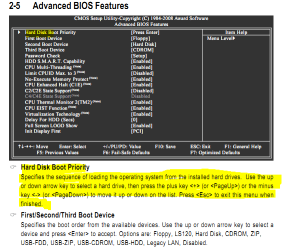
When you get to here in the bios,

bootorder.PNG

does it open a new screen that allows you to choose which hard drive to set as the boot drive?

Also for the boot order if you haven't try setting it as follows,

1. Hard Disk
2. CDROM
3. Disabled (assuming you don't have a floppy drive)
 

My Computer

Computer type
PC/Desktop
Computer Manufacturer/Model Number
Me
OS
Win 7 Ultimate x64
CPU
FX-8350 @ 4.6 GHz so far
Motherboard
Asus M5A97 EVO
Memory
ADATA XPG V1 Series Black 8GB DDR3 1600
Graphics Card(s)
Sapphire R9 270x Dual-X
Sound Card
Xonar DGX w/ Corsair Vengence 1300
Monitor(s) Displays
Acer S232HL Abid
Screen Resolution
1920x1080
Hard Drives
120 GB OCZ Vertex 3
500 GB Seagate 7200.12
PSU
Antec Earthwatts 650W Green
Case
Antec Three Hundred
Cooling
Cooler Master 212 EVO
Keyboard
Logitech G510
Mouse
Logitech G500s
Internet Speed
35000/3000
When you get to here in the bios,

View attachment 147187

does it open a new screen that allows you to choose which hard drive to set as the boot drive?

Also for the boot order if you haven't try setting it as follows,

1. Hard Disk
2. CDROM
3. Disabled (assuming you don't have a floppy drive)

Thanks Stormy13, i have done this too and when it reboots i get the BOOTMGR thing and then i hit ctrl =alt =del button, now that i think about it when i reinstalled windows 3 days ago it said during this install windows took about 100 meg to write some file was it the MBR? could that be the problem?
 

My Computer

Computer Manufacturer/Model Number
Home Built
OS
Windows 7 64-bit
CPU
Intel Pent 4 Dou-core E8200 2.66 @3.20 Ghz
Motherboard
Gigabyte GA-EP45T-UD3LR
Memory
4-Gig ViperDDR3 1333Mhz
Graphics Card(s)
NVIDIA GeForce 9600 GSO
Sound Card
Creative crap
Monitor(s) Displays
SyncMaster932b HD
Screen Resolution
1280 x 1024
Hard Drives
One IDE HDD, and 3 Sata drives. 1 Ide CD/DVD Burners, 1 DVD SATA Burner and I card Reader.
PSU
550 watt
Case
The destroyer
Cooling
Mega Fans
Keyboard
Sony
Mouse
Microsoft Mouse
Internet Speed
12 Meg Fios.
ok, here is a new problem, if i reboot the comp without the windows 7 cd in the drive i get this error BOOTMGR IS MISSING, IF I PUT THE WIN 7 CD IN THE DRIVE and reboot i am in windows. WTF is going on here????!!!! i need help.....................
 

My Computer

Computer Manufacturer/Model Number
Home Built
OS
Windows 7 64-bit
CPU
Intel Pent 4 Dou-core E8200 2.66 @3.20 Ghz
Motherboard
Gigabyte GA-EP45T-UD3LR
Memory
4-Gig ViperDDR3 1333Mhz
Graphics Card(s)
NVIDIA GeForce 9600 GSO
Sound Card
Creative crap
Monitor(s) Displays
SyncMaster932b HD
Screen Resolution
1280 x 1024
Hard Drives
One IDE HDD, and 3 Sata drives. 1 Ide CD/DVD Burners, 1 DVD SATA Burner and I card Reader.
PSU
550 watt
Case
The destroyer
Cooling
Mega Fans
Keyboard
Sony
Mouse
Microsoft Mouse
Internet Speed
12 Meg Fios.

My Computer

Computer Manufacturer/Model Number
Something I threw together
OS
Windows 7 Ultimate x64
CPU
Intel Core i7-2600K
Motherboard
Asus P8P67
Memory
16 GB G Skill F3-10666 CL9D-4GBRL
Graphics Card(s)
ATI Radeon HD 6870
Sound Card
ATI Radeon HDMI / Realtek ALC892
Monitor(s) Displays
2 x 22" standard monitors / LG32LC56v TV to watch films
Screen Resolution
1920 x1080
Hard Drives
2 x OCZ Vertex2 111.79GB
3 x Samsung103SJ
1 x Samsung103UJ
1 x WD3200BEVT
1 x Hitachi5K320-160
PSU
Thermaltake Toughpower Cable Management 750W
Case
Antec 300
Cooling
Noctua NH-U12P SE2 and 5 120mm Case fans
Keyboard
Microsoft Comfort Curve Keyboard 2000
Mouse
Hama M3110 / Logitech M305
Internet Speed
16000
Other Info
I have also used Fedora, Suse, Ubuntu Linux
And all other Windows from 95 to date except ME
ok i just trie this one:
Get your Vista installation DVD and pop it into your drive.
- Then restart your computer.
- Press a key when you are prompted.
- Select a language, a time, a currency, and a keyboard or another input method, and then click Next
- Click Repair your computer
- Click the operating system that you want to repair, and then click Next
- In the System Recovery Options dialog box, click Command Prompt
- Type bootrec /rebuildbcd and then press ENTER
• If Bootrec runs successfully, it will present you with the installation path of a Windows directory. To add the entry to the BCD store, type Yes . A confirmation message appears that indicates the entry was added successfully.
• If Bootrec cannot locate any missing Windows installations, you must remove the BCD store, and then you must re-create it. To do this, type the following commands in the order shown below: (Remember to press ENTER after each command)
bcdedit /export C:\BCD_Backup= when i get here it says System cannot find file
ren c:\boot\bcd bcd.old
bootrec /rebuildbcd
- Restart the computer.

it found 0 windows installation, i also just found out where the bootmgr file is located on my M drive which is a sata drive.

but i can boot up to 7 with my windows 7 cd in the drive!!!!!!!!!!!???

I have never had this problem in my life with computers!!!?!?!?!?!
 
Last edited:

My Computer

Computer Manufacturer/Model Number
Home Built
OS
Windows 7 64-bit
CPU
Intel Pent 4 Dou-core E8200 2.66 @3.20 Ghz
Motherboard
Gigabyte GA-EP45T-UD3LR
Memory
4-Gig ViperDDR3 1333Mhz
Graphics Card(s)
NVIDIA GeForce 9600 GSO
Sound Card
Creative crap
Monitor(s) Displays
SyncMaster932b HD
Screen Resolution
1280 x 1024
Hard Drives
One IDE HDD, and 3 Sata drives. 1 Ide CD/DVD Burners, 1 DVD SATA Burner and I card Reader.
PSU
550 watt
Case
The destroyer
Cooling
Mega Fans
Keyboard
Sony
Mouse
Microsoft Mouse
Internet Speed
12 Meg Fios.
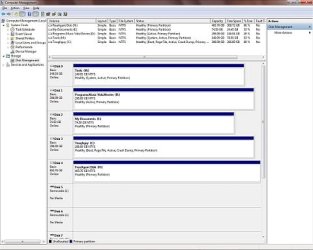
Post a snip of your Disk Mangement, make sure it shows the 'Active, System, Boot,...' information.

Sounds like Win7 put the boot files on a different HDD. As pooch mentioned, Startup Repair should fix it.

It's a good practice to unplug all other drives except the one your installing to when installing the OS.

Also agree that you should put the OS on a SATA drive.

You don't need RAID.

The 100 MB partition is the 'System Reserved' with the boot files. Look for this partition in your Disk Management.
Start button > right click 'Computer' > Manage > when the window opens click 'Disk Management'.

Win7 installer will look for a partition marked 'Active' or the drive in Port0.

Edit:
Try Startup Repair from the Win7 installer disk/USB memory stick.
Follow the tutorial pooch posted.

To be sure the boot files get in the right drive, unplug all other HDDs, then run Startup Repair three seperate times with re-boots between each run.
 

My Computer

Computer type
PC/Desktop
Computer Manufacturer/Model Number
76~2.0
OS
Windows 7 Ult x64 - SP1/ Windows 8 Pro x64
CPU
Intel Core i5-3570K 4.6GHz
Motherboard
Gigabyte GA-Z77X UD3H, f18
Memory
8GB (2X4GB) DDR3 1600 Corsair Vengeance CL8 1.5v
Graphics Card(s)
Sapphire HD 7770 Vapor-X OC 1GB DDR5
Sound Card
Onboard VIA VT2021
Monitor(s) Displays
22" LCD Dell
Screen Resolution
1680x1050
Hard Drives
Samsung 840Pro 128GB SSD,
Seagate Barracuda 500GB SATA2 7200rpm 32MB cache, Seagate Barracuda 1TB SATA2 7200rpm 32MB cache,
PSU
Corsair HX650W
Case
Cooler Master Storm Scout
Cooling
Corsair H80 2x12cm Noctua NF P12 , 2x14cm case fans
Keyboard
Logitech Wave
Mouse
CM Sentinel
Internet Speed
Dismal
Antivirus
Avast
Browser
Opera Next
Other Info
Haswell laptop: HP Envy 17t-j, i7-4700MQ, GeForce 740M 2GB DDR3, 17.3" Full HD 1920x1080, 16GB RAM, Samsung 840 Pro 128GB, 1TB Hitachi 7200 HDD,
Desktop: eSATA ports,
External eSATA Seagate 500GB SATA2 7200rpm,
External WD USB 500GB

My Computers

System One System Two

  • Computer type
    PC/Desktop
    OS
    7 X64
    CPU
    i5 8400
    Motherboard
    gigabyte b365m ds3h
    Memory
    2x8gb 3200mhz
    Hard Drives
    various
    PSU
    pure power 11 400w cm
    Case
    Coolermaster
    Cooling
    cryorig m9i
  • Computer type
    PC/Desktop
    OS
    7x64
    CPU
    g5400
    Motherboard
    ga b365m ds3h
    Memory
    8gb ddr4 2400
    PSU
    xfx pro 450w
here is my Comp Management :Comp Management.jpg
 

My Computer

Computer Manufacturer/Model Number
Home Built
OS
Windows 7 64-bit
CPU
Intel Pent 4 Dou-core E8200 2.66 @3.20 Ghz
Motherboard
Gigabyte GA-EP45T-UD3LR
Memory
4-Gig ViperDDR3 1333Mhz
Graphics Card(s)
NVIDIA GeForce 9600 GSO
Sound Card
Creative crap
Monitor(s) Displays
SyncMaster932b HD
Screen Resolution
1280 x 1024
Hard Drives
One IDE HDD, and 3 Sata drives. 1 Ide CD/DVD Burners, 1 DVD SATA Burner and I card Reader.
PSU
550 watt
Case
The destroyer
Cooling
Mega Fans
Keyboard
Sony
Mouse
Microsoft Mouse
Internet Speed
12 Meg Fios.
Post a snip of your Disk Mangement, make sure it shows the 'Active, System, Boot,...' information.

Sounds like Win7 put the boot files on a different HDD. As pooch mentioned, Startup Repair should fix it.

It's a good practice to unplug all other drives except the one your installing to when installing the OS.

Also agree that you should put the OS on a SATA drive.

You don't need RAID.

The 100 MB partition is the 'System Reserved' with the boot files. Look for this partition in your Disk Management.
Start button > right click 'Computer' > Manage > when the window opens click 'Disk Management'.

Win7 installer will look for a partition marked 'Active' or the drive in Port0.

Edit:
Try Startup Repair from the Win7 installer disk/USB memory stick.
Follow the tutorial pooch posted.

To be sure the boot files get in the right drive, unplug all other HDDs, then run Startup Repair three seperate times with re-boots between each run.
i will try this one now: To be sure the boot files get in the right drive, unplug all other HDDs, then run Startup Repair three seperate times with re-boots between each run
 

My Computer

Computer Manufacturer/Model Number
Home Built
OS
Windows 7 64-bit
CPU
Intel Pent 4 Dou-core E8200 2.66 @3.20 Ghz
Motherboard
Gigabyte GA-EP45T-UD3LR
Memory
4-Gig ViperDDR3 1333Mhz
Graphics Card(s)
NVIDIA GeForce 9600 GSO
Sound Card
Creative crap
Monitor(s) Displays
SyncMaster932b HD
Screen Resolution
1280 x 1024
Hard Drives
One IDE HDD, and 3 Sata drives. 1 Ide CD/DVD Burners, 1 DVD SATA Burner and I card Reader.
PSU
550 watt
Case
The destroyer
Cooling
Mega Fans
Keyboard
Sony
Mouse
Microsoft Mouse
Internet Speed
12 Meg Fios.
The snip is too small to read, can you just snip the boxes in the center and re-post?
 

My Computer

Computer type
PC/Desktop
Computer Manufacturer/Model Number
76~2.0
OS
Windows 7 Ult x64 - SP1/ Windows 8 Pro x64
CPU
Intel Core i5-3570K 4.6GHz
Motherboard
Gigabyte GA-Z77X UD3H, f18
Memory
8GB (2X4GB) DDR3 1600 Corsair Vengeance CL8 1.5v
Graphics Card(s)
Sapphire HD 7770 Vapor-X OC 1GB DDR5
Sound Card
Onboard VIA VT2021
Monitor(s) Displays
22" LCD Dell
Screen Resolution
1680x1050
Hard Drives
Samsung 840Pro 128GB SSD,
Seagate Barracuda 500GB SATA2 7200rpm 32MB cache, Seagate Barracuda 1TB SATA2 7200rpm 32MB cache,
PSU
Corsair HX650W
Case
Cooler Master Storm Scout
Cooling
Corsair H80 2x12cm Noctua NF P12 , 2x14cm case fans
Keyboard
Logitech Wave
Mouse
CM Sentinel
Internet Speed
Dismal
Antivirus
Avast
Browser
Opera Next
Other Info
Haswell laptop: HP Envy 17t-j, i7-4700MQ, GeForce 740M 2GB DDR3, 17.3" Full HD 1920x1080, 16GB RAM, Samsung 840 Pro 128GB, 1TB Hitachi 7200 HDD,
Desktop: eSATA ports,
External eSATA Seagate 500GB SATA2 7200rpm,
External WD USB 500GB
The snip is too small to read, can you just snip the boxes in the center and re-post?

thank you DAVE76, it worked!!!!!!!

"To be sure the boot files get in the right drive, unplug all other HDDs, then run Startup Repair three seperate times with re-boots between each run" IT WORKED !!!!!!!


i removed the 3 sata drives and went into windows 7 and repaired 3 times and it worked great, then i reconnected the 3 sata drives and i can boot with out the windows cd. i dont know how to thank you, but thank you very much.

It sure beats the 25 TIMES i reinstalled windows 7 starting sunday morning and finishing monday morning, christ i'll never do that again.
 

My Computer

Computer Manufacturer/Model Number
Home Built
OS
Windows 7 64-bit
CPU
Intel Pent 4 Dou-core E8200 2.66 @3.20 Ghz
Motherboard
Gigabyte GA-EP45T-UD3LR
Memory
4-Gig ViperDDR3 1333Mhz
Graphics Card(s)
NVIDIA GeForce 9600 GSO
Sound Card
Creative crap
Monitor(s) Displays
SyncMaster932b HD
Screen Resolution
1280 x 1024
Hard Drives
One IDE HDD, and 3 Sata drives. 1 Ide CD/DVD Burners, 1 DVD SATA Burner and I card Reader.
PSU
550 watt
Case
The destroyer
Cooling
Mega Fans
Keyboard
Sony
Mouse
Microsoft Mouse
Internet Speed
12 Meg Fios.
You're welcome.

Glad you got it working.

There are some great tutorials here on Seven Forums, for just about anything you want to do.
All with great tips and questions answered in the thread.
 

My Computer

Computer type
PC/Desktop
Computer Manufacturer/Model Number
76~2.0
OS
Windows 7 Ult x64 - SP1/ Windows 8 Pro x64
CPU
Intel Core i5-3570K 4.6GHz
Motherboard
Gigabyte GA-Z77X UD3H, f18
Memory
8GB (2X4GB) DDR3 1600 Corsair Vengeance CL8 1.5v
Graphics Card(s)
Sapphire HD 7770 Vapor-X OC 1GB DDR5
Sound Card
Onboard VIA VT2021
Monitor(s) Displays
22" LCD Dell
Screen Resolution
1680x1050
Hard Drives
Samsung 840Pro 128GB SSD,
Seagate Barracuda 500GB SATA2 7200rpm 32MB cache, Seagate Barracuda 1TB SATA2 7200rpm 32MB cache,
PSU
Corsair HX650W
Case
Cooler Master Storm Scout
Cooling
Corsair H80 2x12cm Noctua NF P12 , 2x14cm case fans
Keyboard
Logitech Wave
Mouse
CM Sentinel
Internet Speed
Dismal
Antivirus
Avast
Browser
Opera Next
Other Info
Haswell laptop: HP Envy 17t-j, i7-4700MQ, GeForce 740M 2GB DDR3, 17.3" Full HD 1920x1080, 16GB RAM, Samsung 840 Pro 128GB, 1TB Hitachi 7200 HDD,
Desktop: eSATA ports,
External eSATA Seagate 500GB SATA2 7200rpm,
External WD USB 500GB
Back
Top