Can't boot into recovery partition

iduntknowstuff

New member
Local time
1:53 PM
Messages
1
Sorry if I psted this in the wrong place, I'm a newbie here. Anyways, my parents asked me to reinstall windows 7 on their laptop. I've tried several times to boot into the recovery partition by pressing f11 at boot up, but it just continues to load windows. I've tried pressing esc, then f11, but that doesn't work, either. Finally, I've tried pressing f8 before windows starts and selecting repair your computer, but it gives me an error message saying a required device that's needed isn't there! How can I fix this?

Additional details:
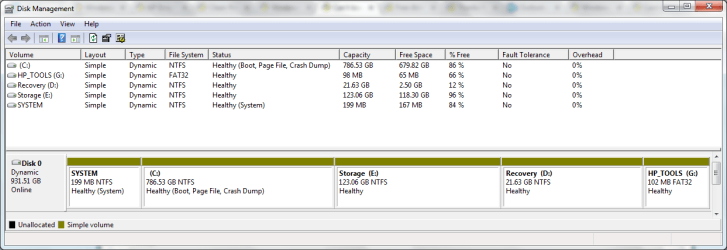
I've partitioned it a little, and now every partition for some reason is a simple volume instead of primary partition.

Capture.JPG
 

My Computer My Computer

Computer Manufacturer/Model Number
Toshiba Satellite CX55
OS
Windows 7 Ultimate 64 bit
CPU
Intel Celeron
Memory
1.86 GB
Screen Resolution
1366x768x32@60Hz
Hard Drives
250 GB SATA
I have not done much with Toshiba laptops, but try the F10 & the F12 key at boot up also.
 

My Computer My Computer

Computer type
PC/Desktop
Computer Manufacturer/Model Number
Built them myself, Science Experiments !
OS
Win7 Enterprise, Win7 x86 (Ult 7600), Win7 x64 Ult 7600, TechNet RTM on AMD x64 (2.8Ghz)
CPU
AMD fx8350 4ghz, AMD-32 2400mhz, AMD-64 3200mhz, AMDx64 2.8G
Motherboard
SIS 755, ECS-K8M890M-M (Ult 7600), GigaByte & others
Memory
2gb, 4gb on the Ult 7600, 4gb on Technet RTM, 32gb on FX8350
Graphics Card(s)
Draw my own Graphics, several nVidia cards
Sound Card
on motherboard
Monitor(s) Displays
19" flat scr, 28" I-Inc widescr,22" Emprex Widescr, 23" Acer
Screen Resolution
1280 x 1024, 1440 x 900, 1920 x 1080
Hard Drives
6 pata Ide HD's & 2 Sata HD's
added 80gb external on Ult 7600 computer,
numerous extra 1tb, 2TB, 3Tb SATA HD's
A collection of ext HD Docks w/ HDs
PSU
430w, 550w, 600w, 700, 800, etc
Case
All Generic Full Towers
Cooling
Open Air & a few fans, some w/ colored LEDs
Keyboard
Compaq & Dell recycled from GoodWill
Mouse
Made in China Optical Wired Mouse
Internet Speed
Fast Cable InterNet
Antivirus
AVG Free on 24 different Desktops, NO Problems!
Browser
IE 8 is preferred, but use FireFox sometimes
Other Info
Linksys Routers, switches, & Hubs
Too Many USB Flash Drives to count, Biggest is 64GB !
Eight computers in my home network.
Sixteen computers at my business network.
Linked via TeamViewer !
Lots of old used spare computer parts everywhere!
Not surprised you can't use fkey to access recovery app.

You seem to have created a dynamic drive. :confused:

First thing to do is convert it back to a Basic drive.

You will need Partition Wizard 4 boot disc to do that.

When you have done that - you need to make the recovery partition Primary.

You might then be able to start the recovery program by marking the recov partition Active and restarting the lappie.

What make and model is their laptop?
 

My Computers My Computers

System One System Two

  • Computer type
    PC/Desktop
    OS
    7 X64
    CPU
    i5 8400
    Motherboard
    gigabyte b365m ds3h
    Memory
    2x8gb 3200mhz
    Hard Drives
    various
    PSU
    pure power 11 400w cm
    Case
    Coolermaster
    Cooling
    cryorig m9i
  • Computer type
    PC/Desktop
    OS
    7x64
    CPU
    g5400
    Motherboard
    ga b365m ds3h
    Memory
    8gb ddr4 2400
    PSU
    xfx pro 450w
Also your system spec's show Toshiba Satellite CX55
Toshiba does not have that model.

could you update your system spec's so that others can help you.
outside of SIW2's suggestion.

rich

Additionally, you did make your recovery DVD's that should have been created when
the laptop was first setup?

Another good reason that the recovery DVD's are so important when things go to hell
in a handbasket. :D
 

My Computer My Computer

Computer type
Laptop
Computer Manufacturer/Model Number
Toshiba Laptop Qosimo X870
OS
Windows 7 Pro x64 SP1
CPU
Intel Core I7
Motherboard
Toshiba Qosmio
Memory
16 Gigs
Graphics Card(s)
NVIDIA GeForce GTX 670M
Monitor(s) Displays
17.7" laptop
Screen Resolution
1600 x 900
Hard Drives
256 Gig SanDisk SSD for C
256 Gig Intel SSD for D
Internet Speed
50/25 FIOS
Antivirus
Vipre (all you can eat for 10 machines)
Browser
IE and FF
Other Info
I have dos 6.22, wfwg 3.11, win98, 2000 and xp VHD's available for testing. MS's Virtual PC works great.
partition wizard 4.2 free.zip - Windows Live

Highlight the HD then from Disk tab Convert to Basic Disk.

You may have to delete one partition first to allow conversion to Basic. If you need more than four partitions, you'll have to convert the fourth (use a data partition) to Logical so you can add subpartitions to it.

Recovery must be Primary, then try it's hotkey to see if it will still run. If not, use PW to mark it Active, restart to see if it runs.
 
Last edited:
Model looks to be a HP/Compaq,
As partition 5 is named HP_Tools.
 

My Computer My Computer

OS
ME/XP/Vista/Win7
Looks like an HP who typically configure with all 4 allowable primary partitions. Someone has added a 5th partition G: and accepted the dynamic disk change requirement.
If you want to stay with primary partitions you need to get rid of one partition as well as do the dynamic to basic disk conversion.

The simplest solution is to
1) backup G:
2) Delete G: making it unallocated
3) Resize C: back into the G: space
4) Use Partition Wizard 4.2 to convert disk back to basic
5) Ensure all partitions are set to primary.

Hopefully then your recovery partition will function as intended.

Then use an external USB HDD for File Backup. It's not good to have backup on a partition of the same drive anyway. If the drive dies so does your backup.
 

My Computer My Computer

Computer type
PC/Desktop
Computer Manufacturer/Model Number
Own build
OS
Windows 7x64 Home Premium SP1
CPU
Intel i7 2600k
Motherboard
ASUS P8Z68 Deluxe
Memory
G.Skill Ripjaws (DDR3-1600) 2x4GB
Graphics Card(s)
Nvidia GeForce GTS 450; Intel HD Graphics 3000(GT2+)
Monitor(s) Displays
Dell Ultrasharp IPS panel U2311H, Samsung SyncMaster P2350
Screen Resolution
1920x1080
Hard Drives
Samsung 850 Pro SSD 256GB, Samsung SSD 840 120GB, Seagates 1TB Barracuda ST31000528AS x2
PSU
Seasonic M12II 520W
Case
Lian Li Lancool PC-K60
Cooling
Case: 1x120mm, 3x140mm CPU: Hyper 212+
Keyboard
Logitech MK520 (wireless)
Mouse
Logitech MK520
Internet Speed
6-7 Mbps
Antivirus
Norton Security Premium, Malwarebytes on 2 (MSE on 3rd PC)
Browser
FireFox
Other Info
Audio: Logitech Z523 2.1
hello.


I know this is an old post and would love to know if this resolution would work for my situation. I think we have made the same mistake. The last operating system I know inside and out no longer is supported anymore (Windows XP).
 

Attachments

  • diskmanager.png
    diskmanager.png
    25.4 KB · Views: 2

My Computer My Computer

Computer type
Laptop
Computer Manufacturer/Model Number
HP 15 ENVY notebook
OS
Rhode Island
CPU
intel i7-4700MQ
Memory
8 GB
Graphics Card(s)
GeForce GT 740M
Hard Drives
Toshiba MQ01ABD SCSI
Antivirus
McAfee
Browser
Chrome
You have created a 5th partition and made your HDD dynamic. So to convert back to a basic (primary) HDD you can look at the tutorial
http://www.sevenforums.com/tutorials/26829-convert-dynamic-disk-basic-disk.html
Using Partition Wizard 4.2 is your best option IMO. The download link is in the tutorial.
You should make sure you have backed up critical user data before performing any disk partition operation.
 

My Computer My Computer

Computer type
PC/Desktop
Computer Manufacturer/Model Number
Own build
OS
Windows 7x64 Home Premium SP1
CPU
Intel i7 2600k
Motherboard
ASUS P8Z68 Deluxe
Memory
G.Skill Ripjaws (DDR3-1600) 2x4GB
Graphics Card(s)
Nvidia GeForce GTS 450; Intel HD Graphics 3000(GT2+)
Monitor(s) Displays
Dell Ultrasharp IPS panel U2311H, Samsung SyncMaster P2350
Screen Resolution
1920x1080
Hard Drives
Samsung 850 Pro SSD 256GB, Samsung SSD 840 120GB, Seagates 1TB Barracuda ST31000528AS x2
PSU
Seasonic M12II 520W
Case
Lian Li Lancool PC-K60
Cooling
Case: 1x120mm, 3x140mm CPU: Hyper 212+
Keyboard
Logitech MK520 (wireless)
Mouse
Logitech MK520
Internet Speed
6-7 Mbps
Antivirus
Norton Security Premium, Malwarebytes on 2 (MSE on 3rd PC)
Browser
FireFox
Other Info
Audio: Logitech Z523 2.1
Apparently you ignored the warning message you got ?

Never heard of Rhode Island .... Is that some new operating system ? Hope it`s free :)
I don't understand.
 

My Computer My Computer

Computer type
PC/Desktop
Computer Manufacturer/Model Number
Own build
OS
Windows 7x64 Home Premium SP1
CPU
Intel i7 2600k
Motherboard
ASUS P8Z68 Deluxe
Memory
G.Skill Ripjaws (DDR3-1600) 2x4GB
Graphics Card(s)
Nvidia GeForce GTS 450; Intel HD Graphics 3000(GT2+)
Monitor(s) Displays
Dell Ultrasharp IPS panel U2311H, Samsung SyncMaster P2350
Screen Resolution
1920x1080
Hard Drives
Samsung 850 Pro SSD 256GB, Samsung SSD 840 120GB, Seagates 1TB Barracuda ST31000528AS x2
PSU
Seasonic M12II 520W
Case
Lian Li Lancool PC-K60
Cooling
Case: 1x120mm, 3x140mm CPU: Hyper 212+
Keyboard
Logitech MK520 (wireless)
Mouse
Logitech MK520
Internet Speed
6-7 Mbps
Antivirus
Norton Security Premium, Malwarebytes on 2 (MSE on 3rd PC)
Browser
FireFox
Other Info
Audio: Logitech Z523 2.1
Don`t understand what ? He has Rhode Island listed as his OS :)
 

My Computer My Computer

Computer type
PC/Desktop
Computer Manufacturer/Model Number
Skylake Special #666
OS
Windows 10 Pro x64
CPU
Intel Core i7 6700K
Motherboard
Asus Sabertooth Z170 Mark 1
Memory
GSkill TridentZ RGB 16GB 3600 16-16-16-36
Graphics Card(s)
EVGA GTX 980 Ti SC x2
Sound Card
Realtek High Definition
Monitor(s) Displays
AOC G2460PG
Screen Resolution
1920 x 1080 144Hz
Hard Drives
Samsung 860 Pro 256GB, Seagate Barracuda 4TB x2
PSU
EVGA 1000 P2, EVGA White Custom Braided Cables
Case
Corsair Vengeance C70 Gunmetal Black
Cooling
Corsair H100i v2, Corsair ML120 x2, Thermal Grizzly Kryonaut
Keyboard
Logitech G910 Orion Spectrum
Mouse
Logitech G700s
Internet Speed
Verizon Fios Quantum Gateway 75/75
Antivirus
Windows Defender, Malwarebytes Free 3.8.3
Browser
Chrome
Other Info
Corsair SP120 x4, LG Blu-ray Drive, Durabrand HT-395 100 Watt Dolby Digital Amp, Corsair H2100 Wireless 7.1 Headset
Back
Top