Can't boot into safe mode

Cmate

New member
Local time
2:08 PM
Messages
18
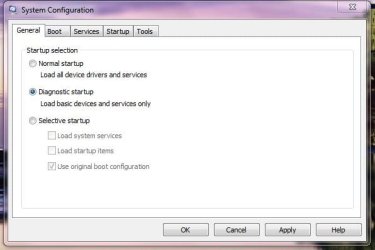
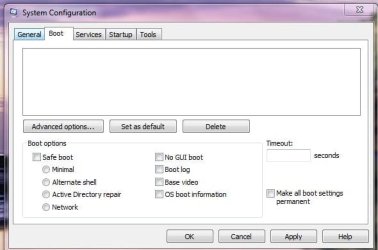
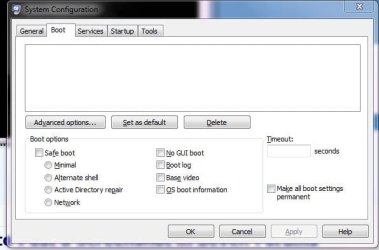
If I hit the f8 key while booting, my motherboard (Asus M4a78-EM) brings up a boot device menu. In msconfig all the safe mode boot options are not available and there is no OS listed in the box. I'm on Win7 Home premium. I haven't activated it yet, if that makes a difference. Any ideas?
 

Attachments
  • Capture.JPG
    Capture.JPG
    33.5 KB · Views: 629

My Computer

OS
MS Windows 7 Home Premium 64-bit
CPU
AMD Athlon 7750 Black Edition Kuma 65nm Technology
Motherboard
ASUSTeK Computer INC. M4A78-EM (AM2)
Memory
Crucial Ballistix 8GB (4 x 2GB) 240-Pin DDR2 SDRAM DDR2 800
Graphics Card(s)
ATI Radeon HD 3200 Graphics (ASUStek Computer Inc)
Sound Card
M-Audio Delta Audiophile
Monitor(s) Displays
DELL E207WFP
Screen Resolution
1680x1050
Hard Drives
391GB SAMSUNG SAMSUNG HD403LJ SATA Device (IDE)
244GB Western Digital WDC WD2500AAKS-22B3A0 (IDE)
488GB Western Digital WDC WD5000AACS-00ZUB0 SATA (IDE)
Hello Cmate, and welcome to Seven Forums.

You should be able to check the Safe Boot option in your screenshot above to be able to boot into Safe Mode afterwards.
 

My Computer

Computer type
PC/Desktop
Computer Manufacturer/Model Number
Self built custom
OS
64-bit Windows 11 Pro for Workstations
CPU
Intel i7-8700K OC'd to 5 GHz
Motherboard
ASUS ROG Maximus XI Formula Z390
Memory
64 GB (4x16GB) G.SKILL TridentZ RGB DDR4 3600 MHz
Graphics Card(s)
ASUS ROG-STRIX-GTX1080TI-O11G-GAMING
Sound Card
Integrated
Monitor(s) Displays
2 x Samsung Odyssey G7 27"
Screen Resolution
2560x1440
Hard Drives
1TB Samsung 990 PRO M.2,
4TB Samsung 990 PRO PRO M.2,
TerraMaster F8 SSD Plus NAS
PSU
Seasonic Prime Titanium 850W
Case
Thermaltake Core P3
Cooling
Corsair Hydro H115i
Keyboard
Logitech wireless K800
Mouse
Logitech MX Master 4
Internet Speed
2 Gb/s Download and 100 Mb/s Upload
Antivirus
Malwarebyte Anti-Malware Premium
Browser
Google Chrome
Other Info
Logitech Z625 speaker system,
Logitech BRIO 4K Pro webcam,
HP Color LaserJet Pro MFP M477fdn,
APC SMART-UPS RT 1000 XL - SURT1000XLI,
Galaxy S23 Plus phone
Hello Cmate, and welcome to Seven Forums.

You should be able to check the Safe Boot option in your screenshot above to be able to boot into Safe Mode afterwards.
Thanks for the quick replies, guys!

Hitting f8 on my mother board brings up a bios boot device menu.
Tried many times (before-after beep etc).


Nothing in the boot tab of msconfig is available i.e. "clickable" tried running from an elevated command prompt-no go.

I'm stumped!
 

Attachments

  • Capture.JPG
    Capture.JPG
    33.5 KB · Views: 217

My Computer

OS
MS Windows 7 Home Premium 64-bit
CPU
AMD Athlon 7750 Black Edition Kuma 65nm Technology
Motherboard
ASUSTeK Computer INC. M4A78-EM (AM2)
Memory
Crucial Ballistix 8GB (4 x 2GB) 240-Pin DDR2 SDRAM DDR2 800
Graphics Card(s)
ATI Radeon HD 3200 Graphics (ASUStek Computer Inc)
Sound Card
M-Audio Delta Audiophile
Monitor(s) Displays
DELL E207WFP
Screen Resolution
1680x1050
Hard Drives
391GB SAMSUNG SAMSUNG HD403LJ SATA Device (IDE)
244GB Western Digital WDC WD2500AAKS-22B3A0 (IDE)
488GB Western Digital WDC WD5000AACS-00ZUB0 SATA (IDE)
Read what Brink posted,about safe boot, then look at your screen shot, its there. Read the tutorial, also.

Check safe boot.
 

My Computer

Computer type
PC/Desktop
Computer Manufacturer/Model Number
Dell XPS 420
OS
Windows 10, Home Clean Install
CPU
Intel Core2 processsor Q8200(2.33Ghz 1333FSB) Quad Core Tech
Motherboard
Dell
Memory
6 gb
Graphics Card(s)
ATI Radeon 256MB HD3650
Sound Card
Intergrated 7.1 Channel Audio
Monitor(s) Displays
Dell SP2009W 20"
Hard Drives
640 GB Serial ATA Hard drive
Cooling
Fan
Keyboard
Dell USB Keyboard
Mouse
Dell Premium Optical USB
Internet Speed
DSL 2.85
Read what Brink posted,about safe boot, then look at your screen shot, its there. Read the tutorial, also.

Check safe boot.
Clicking it does nothing. Everything in the box is "greyed out"

"Nothing in the boot tab of msconfig is available i.e. "clickable" tried running from an elevated command prompt-no go."
 

My Computer

OS
MS Windows 7 Home Premium 64-bit
CPU
AMD Athlon 7750 Black Edition Kuma 65nm Technology
Motherboard
ASUSTeK Computer INC. M4A78-EM (AM2)
Memory
Crucial Ballistix 8GB (4 x 2GB) 240-Pin DDR2 SDRAM DDR2 800
Graphics Card(s)
ATI Radeon HD 3200 Graphics (ASUStek Computer Inc)
Sound Card
M-Audio Delta Audiophile
Monitor(s) Displays
DELL E207WFP
Screen Resolution
1680x1050
Hard Drives
391GB SAMSUNG SAMSUNG HD403LJ SATA Device (IDE)
244GB Western Digital WDC WD2500AAKS-22B3A0 (IDE)
488GB Western Digital WDC WD5000AACS-00ZUB0 SATA (IDE)
What are the listings on the Boot Device Menu accessed by tapping F8 at Startup?
 
What are the listings on the Boot Device Menu accessed by tapping F8 at Startup?

optical drive
HDD
HDD
Usb device

It is a bios screen to change boot device priority. System then tries to boot to the device you choose.
 

My Computer

OS
MS Windows 7 Home Premium 64-bit
CPU
AMD Athlon 7750 Black Edition Kuma 65nm Technology
Motherboard
ASUSTeK Computer INC. M4A78-EM (AM2)
Memory
Crucial Ballistix 8GB (4 x 2GB) 240-Pin DDR2 SDRAM DDR2 800
Graphics Card(s)
ATI Radeon HD 3200 Graphics (ASUStek Computer Inc)
Sound Card
M-Audio Delta Audiophile
Monitor(s) Displays
DELL E207WFP
Screen Resolution
1680x1050
Hard Drives
391GB SAMSUNG SAMSUNG HD403LJ SATA Device (IDE)
244GB Western Digital WDC WD2500AAKS-22B3A0 (IDE)
488GB Western Digital WDC WD5000AACS-00ZUB0 SATA (IDE)
Hmmm. Try booting the WIn7 HDD from the menu and then tapping F8 to see if you get Advanced Boot Options.

THe mobo should not be able to eliminate Advanced boot options accessibility by tapping F8 at bootup since its a Windows function, so try tapping F8 after you actually boot the HD on that menu.
 
If I hit the f8 key while booting, my motherboard (Asus M4a78-EM) brings up a boot device menu. In msconfig all the safe mode boot options are not available and there is no OS listed in the box. I'm on Win7 Home premium. I haven't activated it yet, if that makes a difference. Any ideas?

With my Asus P6T Deluxe, the same thing happens.

However, I can get into safe mode from there. Select the boot device you want (the normal boot drive will be the default), press the return key, and immediately press F8 again.

If it works for me, it doesn't require superhuman reflexes.
 

My Computer

Computer Manufacturer/Model Number
homegrown
OS
Windows 7 Pro X64 SP1
CPU
Intel Core I7-3930k
Motherboard
Asus P9X79 Pro
Memory
16 GB Gskill DDR3-2133
Graphics Card(s)
eVGA GTX680
Sound Card
Creative X-Fi Titanium
Monitor(s) Displays
As PA246Q
Screen Resolution
1920 X 1200
Hard Drives
Corsair Force GT, 120 GB
WDC 1.5TB Caviar Black
PSU
PCP&C Silencer 750 Crossfire
Case
Silverstone FT02
Cooling
Noctua NH-D14
Keyboard
cheap Logitech USB
Mouse
Microsoft Intellimouse Explorer (old optical) USB
Internet Speed
6Mb cable
Other Info
Pioneer BDR-205
Samsung SH-203B
Monsoon 5.1 speakers
Bingo! Thanks guys, that worked.
@bobkn You weren't kidding when you said immediately...:shock:

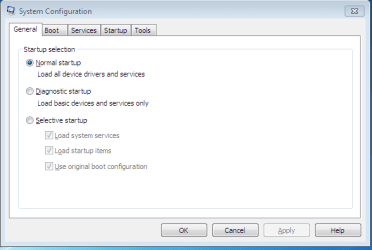
Any idea why I'm locked out of the boot tab of msconfig?

Am I correct in assuming that windows should be listed in the box of the boot tab?
 

Attachments

  • I_CAN_click_here.JPG
    I_CAN_click_here.JPG
    30 KB · Views: 141
  • I_CAN'T_click_here.JPG
    I_CAN'T_click_here.JPG
    32.4 KB · Views: 115
Last edited:

My Computer

OS
MS Windows 7 Home Premium 64-bit
CPU
AMD Athlon 7750 Black Edition Kuma 65nm Technology
Motherboard
ASUSTeK Computer INC. M4A78-EM (AM2)
Memory
Crucial Ballistix 8GB (4 x 2GB) 240-Pin DDR2 SDRAM DDR2 800
Graphics Card(s)
ATI Radeon HD 3200 Graphics (ASUStek Computer Inc)
Sound Card
M-Audio Delta Audiophile
Monitor(s) Displays
DELL E207WFP
Screen Resolution
1680x1050
Hard Drives
391GB SAMSUNG SAMSUNG HD403LJ SATA Device (IDE)
244GB Western Digital WDC WD2500AAKS-22B3A0 (IDE)
488GB Western Digital WDC WD5000AACS-00ZUB0 SATA (IDE)

That's how it normally is. My pics were meant to be an example of how I can click normally in all tabs except the boot tab.None of the buttons in the boot tab are clickable, all the rest of the tabs work normally.
 

My Computer

OS
MS Windows 7 Home Premium 64-bit
CPU
AMD Athlon 7750 Black Edition Kuma 65nm Technology
Motherboard
ASUSTeK Computer INC. M4A78-EM (AM2)
Memory
Crucial Ballistix 8GB (4 x 2GB) 240-Pin DDR2 SDRAM DDR2 800
Graphics Card(s)
ATI Radeon HD 3200 Graphics (ASUStek Computer Inc)
Sound Card
M-Audio Delta Audiophile
Monitor(s) Displays
DELL E207WFP
Screen Resolution
1680x1050
Hard Drives
391GB SAMSUNG SAMSUNG HD403LJ SATA Device (IDE)
244GB Western Digital WDC WD2500AAKS-22B3A0 (IDE)
488GB Western Digital WDC WD5000AACS-00ZUB0 SATA (IDE)
I'm having a similar issue as the original poster - I installed a new ATI driver and fubared windows (7) so I can't boot. However, when I hit F8 all I get is a list of boot drives with no option to Safe Boot.

Even if I immediately start hitting F8 after selecting the boot drive (an SSD drive if that helps) it only brings up a list of peripherals and my only option is "Press ESC to boot normally" or somesuch with an 8 sec countdown timer before it carries on. The next screen that appears is the one where have the option to try and repair the volume (while fails) or boot normally. And it doesn't matter how fast you hit F8 after that you cannot bring up the Safe Boot screen.

It's an Asus i7 motherboard and I'm hoping someone has found a workaround to get into safe boot with them.


Thanks,

MJX.
 

My Computer

OS
Windows 7
Boot the Windows 7 DVD Repair console or Repair CD, let it run any offered repair.

If that doesn't start it up reboot into DVD/CD, click through to Recovery Tools list to System Restore to before the change was made that caused Win7 to not boot.

http://www.sevenforums.com/tutorials/2083-system-repair-disc-create.html
http://www.sevenforums.com/performance-maintenance/51100-repair-cd-system-repair-disk.html

Tried both of those options. The DVD could not repair the problem and for some strange reason it says there are no System Restore points on the drive, though I know it's made them.
 

My Computer

OS
Windows 7
I believe on that mobo you first have to choose the HD to boot at the F8 prompt, then tap F8 again as the HD tries to boot to interrupt it to enter Advanced Boot tools menu and Safe Modes.

F8 is used as the one-time BIOS boot menu, and then it is used by Windows to access Advanced Boot Tools menu.
 
I believe on that mobo you first have to choose the HD to boot at the F8 prompt, then tap F8 again as the HD tries to boot to interrupt it to enter Advanced Boot tools menu and Safe Modes.

F8 is used as the one-time BIOS boot menu, and then it is used by Windows to access Advanced Boot Tools menu.

Yeah, I've been trying this over and over and it will not bring up the safe boot menu...
 

My Computer

OS
Windows 7
Start another topic titled "How do I enter Safe Mode on Asusi7 mobo?" or contact Asus tech support to find out exactly how to boot Safe Mode.

You may have borked your OS which includes the Adv Boot Tools at F8.

Do you need to copy out files in case it requires a clean reinstall from boot or running the Recovery partition or disks? http://www.sevenforums.com/tutorials/93347-copy-paste-windows-recovery-console.html

http://www.sevenforums.com/tutorials/91339-ssd-hdd-optimize-windows-reinstallation.html

http://www.sevenforums.com/tutorials/1649-clean-install-windows-7-a.html
 
Back
Top