Can't boot into XP

Nikolay

Hello
Power User
Local time
4:14 PM
Messages
381
Location
Massachusetts
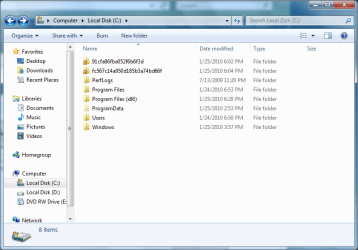
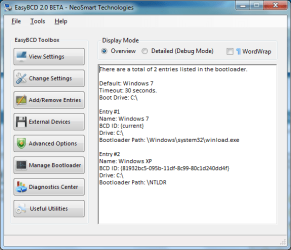
I'm dual booting 7 with XP with 7 installed first. There is no ntldr, NTDETECT, or boot.ini in my root folder. When I try to boot into XP, I get a missing ntldr error. I don't know why I don't have those files in my root directory, I rewrote the 7 boot loader.
 

Attachments
  • easybcd.png
    easybcd.png
    22.1 KB · Views: 10
  • root.png
    root.png
    33.5 KB · Views: 9

My Computer

Computer Manufacturer/Model Number
Started out as an AST180
OS
Windows 7 Ultimate x64 | Windows XP Pro x86 | Windows Vista Ultimate x86
CPU
AMD Athlon 64 X2 Dual Core 5200 2.7 GHz
Motherboard
Acer EM61SM/EM61PM
Memory
3G RAM
Graphics Card(s)
ATI HD Radeon 4670
Screen Resolution
1280x1024
Hard Drives
Western Digital Caviar Black WD1001FALS 1TB 7200 RPM 32MB Cache, 160 GB Seagate
PSU
Corsair 450VX 450W
Keyboard
Microsoft Media Pro 3000
Mouse
Logitech MX310
I'm dual booting 7 with XP with 7 installed first. There is no ntldr, NTDETECT, or boot.ini in my root folder. When I try to boot into XP, I get a missing ntldr error. I don't know why I don't have those files in my root directory, I rewrote the 7 boot loader.
Hello, Nilolay!

Which partition was "Active" when you installed XP?
 

My Computer

OS
...
In Easybcd 2.0 , click Add/Remove entries.

Delete the XP entry.

Use Easy to add a new XP entry and let it autoconfigure.
 

My Computers

System One System Two

  • Computer type
    PC/Desktop
    OS
    7 X64
    CPU
    i5 8400
    Motherboard
    gigabyte b365m ds3h
    Memory
    2x8gb 3200mhz
    Hard Drives
    various
    PSU
    pure power 11 400w cm
    Case
    Coolermaster
    Cooling
    cryorig m9i
  • Computer type
    PC/Desktop
    OS
    7x64
    CPU
    g5400
    Motherboard
    ga b365m ds3h
    Memory
    8gb ddr4 2400
    PSU
    xfx pro 450w
Which partition was "Active" when you installed XP?

I took your advice and made the XP partition active before I installed XP and made 7 the active partition after that.

In Easybcd 2.0 , click Add/Remove entries.

Delete the XP entry.

Use Easy to add a new XP entry and let it autoconfigure.

I'm pretty sure I already tried that but it can't hurt to try again.
 

My Computer

Computer Manufacturer/Model Number
Started out as an AST180
OS
Windows 7 Ultimate x64 | Windows XP Pro x86 | Windows Vista Ultimate x86
CPU
AMD Athlon 64 X2 Dual Core 5200 2.7 GHz
Motherboard
Acer EM61SM/EM61PM
Memory
3G RAM
Graphics Card(s)
ATI HD Radeon 4670
Screen Resolution
1280x1024
Hard Drives
Western Digital Caviar Black WD1001FALS 1TB 7200 RPM 32MB Cache, 160 GB Seagate
PSU
Corsair 450VX 450W
Keyboard
Microsoft Media Pro 3000
Mouse
Logitech MX310
Which partition was "Active" when you installed XP?
I took your advice and made the XP partition active before I installed XP and made 7 the active partition after that.

In Easybcd 2.0 , click Add/Remove entries.

Delete the XP entry.

Use Easy to add a new XP entry and let it autoconfigure.
I'm pretty sure I already tried that but it can't hurt to try again.
You are fine. If you can get the autoconfigure to work, that would do the job quickly!

If not, if you still have trouble, you can easily copy the necessary files and create the NTLDR entry, so let me know.

Cheers!
Robert
 

My Computer

OS
...
The autoconfigure worked. Thanks. :)
 

My Computer

Computer Manufacturer/Model Number
Started out as an AST180
OS
Windows 7 Ultimate x64 | Windows XP Pro x86 | Windows Vista Ultimate x86
CPU
AMD Athlon 64 X2 Dual Core 5200 2.7 GHz
Motherboard
Acer EM61SM/EM61PM
Memory
3G RAM
Graphics Card(s)
ATI HD Radeon 4670
Screen Resolution
1280x1024
Hard Drives
Western Digital Caviar Black WD1001FALS 1TB 7200 RPM 32MB Cache, 160 GB Seagate
PSU
Corsair 450VX 450W
Keyboard
Microsoft Media Pro 3000
Mouse
Logitech MX310
Back
Top