Solved Can't boot my Pc after checking the box under Maximum memory

Marianix

New member
Local time
7:23 AM
Messages
35
I was just finding some tweak at youtube and i came upon this
I did this before but nothing happend but my mind said run as administrator then boom restarted the pc and then after the loading screen nothing

Need an easy fix plz help
 

My Computer

Computer type
PC/Desktop
Computer Manufacturer/Model Number
Custom built
OS
Windows 7 pro 32bit
CPU
AMD A4 6300
Motherboard
MSI A68HM-E33 V2
Memory
Kingston DDR3
Hard Drives
Seagate 500GB
Antivirus
Avast
Browser
Chrome

My Computer

Computer type
PC/Desktop
Computer Manufacturer/Model Number
medionl/Aspire 6930G/acer x55a
OS
W7 home premium 32bit/W7HP 64bit/w10 tp insider ring
CPU
E5300 dual core
Motherboard
medion MS7366
Memory
3gb
Graphics Card(s)
Nvidia Geforce 7100 Nforce 630i
Monitor(s) Displays
avixc
Internet Speed
n (isp resticted to 72)
Antivirus
mse/pands
Browser
palemoon
Other Info
Belkin Fd7050 n USB using Railink RT2870 drivers, more upto date
Didnt work
I even go as far reseting the bios and nothing happend
And now my pc wont POST
 

My Computer

Computer type
PC/Desktop
Computer Manufacturer/Model Number
Custom built
OS
Windows 7 pro 32bit
CPU
AMD A4 6300
Motherboard
MSI A68HM-E33 V2
Memory
Kingston DDR3
Hard Drives
Seagate 500GB
Antivirus
Avast
Browser
Chrome
Windows Vista/ 7/8/8.1/10 keep a regular backup of the registry handy in case you need to overwrite a corrupted registry. By default, the RegIdleBackup task runs every 10 days, so that’s as far back as you would lose if you replaced the current registry with the automatically backed-up files. You can find the backed-up registry files in \Windows\System32\config\RegBack folder.


Please boot your computer with Windows Setup Media and from Windows Recovery Environment start the Command Prompt.

Please type below command into Command Prompt and press Enter key.

Code:
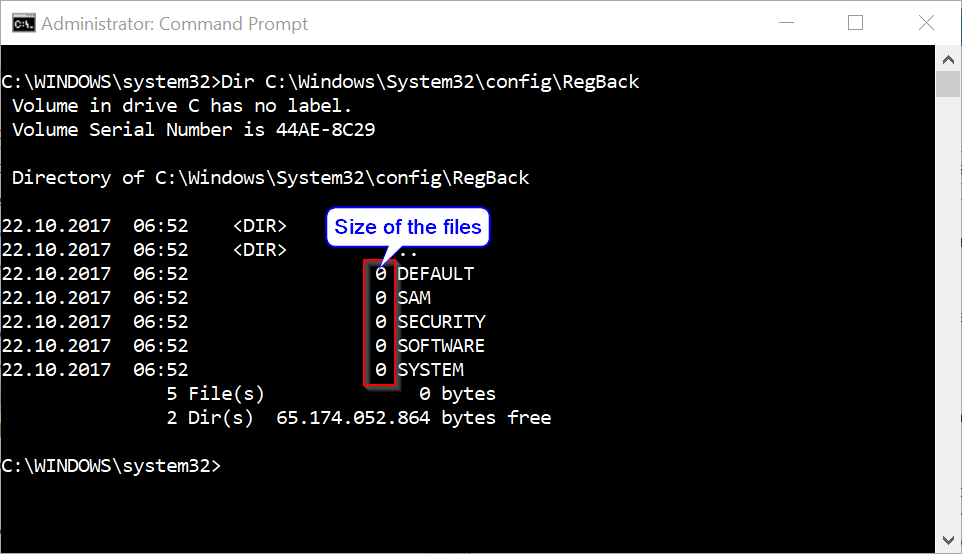
 Dir C:\Windows\System32\config\RegBack


Above command will list files stored within RegBack folder and there file size, make sure files are not zero size if they are do not follow below instructions.

akBT8zC.png


Please replace partition letter C: with Windows installed partition letter. When computer boots into Windows Recovery Environment (WinRE) environment the drive letter assign to Windows partition may not be C: drive letter because Windows 7, 8 , 8.1 and 10 creates a separate system partition when it's installed from scratch. The system partition contains boot files WinRE assigns the system partition the C: drive letter and the Windows installed partition will be assign any other drive letter usually D: drive letter is assign to Windows installed partition. The Bcdedit /enum | find "osdevice" command can be use to find out the drive letter of the Windows installed partition the output of the Bcdedit command is similar to this osdevice partition=D:. The drive letter after partition= is the drive letter of the Windows partition.

Please type below commands into Command Prompt and for each command you have typed press Enter key.


Code:
Ren  C:\windows\system32\config\SAM         SAM.BAK

Ren  C:\windows\system32\config\SYSTEM      SYSTEM.BAK

Ren  C:\windows\system32\config\SECURITY    SECURITY.BAK

Ren  C:\windows\system32\config\DEFAULT     DEFAULT.BAK

Ren  C:\windows\system32\config\SOFTWARE    SOFTWARE.BAK


Copy  C:\Windows\System32\config\RegBack\SAM         C:\windows\system32\config

Copy  C:\Windows\System32\config\RegBack\SYSTEM      C:\windows\system32\config

Copy  C:\Windows\System32\config\RegBack\SECURITY    C:\windows\system32\config

Copy  C:\Windows\System32\config\RegBack\DEFAULT     C:\windows\system32\config

Copy  C:\Windows\System32\config\RegBack\SOFTWARE    C:\windows\system32\config


This procedure assumes that Windows Vista/7/8/8.1/10 is installed to the C:\ partition. Make sure to replace C:\ drive letter to the appropriate Windows OS installed partition drive letter if it is a different location.


Above commands renames the registry files at their existing location, and then copies the registry files from the RegBack folder to the C:\Windows\System32\Config folder.

 

My Computer

Computer type
PC/Desktop
Computer Manufacturer/Model Number
Custom Build
OS
Windows 10 Pro x64
CPU
Intel Core i5 6600
Motherboard
Gigabyte Technology Z170M-D3H-CF (U3E1)
Memory
Corsair Vengeance LPX 16GB 2666MHz DDR4
Graphics Card(s)
AMD Radeon R9 380 Series
Hard Drives
SSD
HDD
Antivirus
Eset Smart Security
Browser
Mozila Firefox
If i move my hard disk to another pc will it come up with the same result?
 

My Computer

Computer type
PC/Desktop
Computer Manufacturer/Model Number
Custom built
OS
Windows 7 pro 32bit
CPU
AMD A4 6300
Motherboard
MSI A68HM-E33 V2
Memory
Kingston DDR3
Hard Drives
Seagate 500GB
Antivirus
Avast
Browser
Chrome
If i move my hard disk to another pc will it come up with the same result?
Yes you can use File Explorer (Windows Explorer) from working computer to rename and restore registry hives.
 

My Computer

Computer type
PC/Desktop
Computer Manufacturer/Model Number
Custom Build
OS
Windows 10 Pro x64
CPU
Intel Core i5 6600
Motherboard
Gigabyte Technology Z170M-D3H-CF (U3E1)
Memory
Corsair Vengeance LPX 16GB 2666MHz DDR4
Graphics Card(s)
AMD Radeon R9 380 Series
Hard Drives
SSD
HDD
Antivirus
Eset Smart Security
Browser
Mozila Firefox
So is this a nice solution?
 

My Computer

Computer type
PC/Desktop
Computer Manufacturer/Model Number
Custom built
OS
Windows 7 pro 32bit
CPU
AMD A4 6300
Motherboard
MSI A68HM-E33 V2
Memory
Kingston DDR3
Hard Drives
Seagate 500GB
Antivirus
Avast
Browser
Chrome
Will the problem still be there?
 

My Computer

Computer type
PC/Desktop
Computer Manufacturer/Model Number
Custom built
OS
Windows 7 pro 32bit
CPU
AMD A4 6300
Motherboard
MSI A68HM-E33 V2
Memory
Kingston DDR3
Hard Drives
Seagate 500GB
Antivirus
Avast
Browser
Chrome
It is like you are using System Restore tool to restore registry hives to a date where Windows were working without any problems.
 

My Computer

Computer type
PC/Desktop
Computer Manufacturer/Model Number
Custom Build
OS
Windows 10 Pro x64
CPU
Intel Core i5 6600
Motherboard
Gigabyte Technology Z170M-D3H-CF (U3E1)
Memory
Corsair Vengeance LPX 16GB 2666MHz DDR4
Graphics Card(s)
AMD Radeon R9 380 Series
Hard Drives
SSD
HDD
Antivirus
Eset Smart Security
Browser
Mozila Firefox
I will try that

Also my pc wont post
 

My Computer

Computer type
PC/Desktop
Computer Manufacturer/Model Number
Custom built
OS
Windows 7 pro 32bit
CPU
AMD A4 6300
Motherboard
MSI A68HM-E33 V2
Memory
Kingston DDR3
Hard Drives
Seagate 500GB
Antivirus
Avast
Browser
Chrome
Restoring registry hives from backup may resolve your PC boot problem.
 

My Computer

Computer type
PC/Desktop
Computer Manufacturer/Model Number
Custom Build
OS
Windows 10 Pro x64
CPU
Intel Core i5 6600
Motherboard
Gigabyte Technology Z170M-D3H-CF (U3E1)
Memory
Corsair Vengeance LPX 16GB 2666MHz DDR4
Graphics Card(s)
AMD Radeon R9 380 Series
Hard Drives
SSD
HDD
Antivirus
Eset Smart Security
Browser
Mozila Firefox
I mean the motherboard logo wont show up
 

My Computer

Computer type
PC/Desktop
Computer Manufacturer/Model Number
Custom built
OS
Windows 7 pro 32bit
CPU
AMD A4 6300
Motherboard
MSI A68HM-E33 V2
Memory
Kingston DDR3
Hard Drives
Seagate 500GB
Antivirus
Avast
Browser
Chrome
Does the PC power on?

Does the PC power switch light is on?

Does the PC fans turning?

If the computer passes the POST, the computer may give a single beep (some computers may beep twice) as it starts and continue to boot. However, if the computer fails the POST, the computer will either not beep or generate a beep code that tells the user the source of the problem. Can you tell us if the computer generates beep code and how many they are?
 

My Computer

Computer type
PC/Desktop
Computer Manufacturer/Model Number
Custom Build
OS
Windows 10 Pro x64
CPU
Intel Core i5 6600
Motherboard
Gigabyte Technology Z170M-D3H-CF (U3E1)
Memory
Corsair Vengeance LPX 16GB 2666MHz DDR4
Graphics Card(s)
AMD Radeon R9 380 Series
Hard Drives
SSD
HDD
Antivirus
Eset Smart Security
Browser
Mozila Firefox
I dont hear a beep but the pc fans spin power lights on and my pc is on
 

My Computer

Computer type
PC/Desktop
Computer Manufacturer/Model Number
Custom built
OS
Windows 7 pro 32bit
CPU
AMD A4 6300
Motherboard
MSI A68HM-E33 V2
Memory
Kingston DDR3
Hard Drives
Seagate 500GB
Antivirus
Avast
Browser
Chrome

My Computer

Computer type
PC/Desktop
Computer Manufacturer/Model Number
Custom Build
OS
Windows 10 Pro x64
CPU
Intel Core i5 6600
Motherboard
Gigabyte Technology Z170M-D3H-CF (U3E1)
Memory
Corsair Vengeance LPX 16GB 2666MHz DDR4
Graphics Card(s)
AMD Radeon R9 380 Series
Hard Drives
SSD
HDD
Antivirus
Eset Smart Security
Browser
Mozila Firefox
Just did and nothing happens
 

My Computer

Computer type
PC/Desktop
Computer Manufacturer/Model Number
Custom built
OS
Windows 7 pro 32bit
CPU
AMD A4 6300
Motherboard
MSI A68HM-E33 V2
Memory
Kingston DDR3
Hard Drives
Seagate 500GB
Antivirus
Avast
Browser
Chrome
Reset the RAM modules by reconnecting the RAM modules.
Blow off any loose dust or debris from the RAM using canned air. Hold the module by its edges.
Clean the contacts using a soft cloth that does not leave fibers behind, such as a lens cleaning cloth slightly moistened with rubbing alcohol.
 

My Computer

Computer type
PC/Desktop
Computer Manufacturer/Model Number
Custom Build
OS
Windows 10 Pro x64
CPU
Intel Core i5 6600
Motherboard
Gigabyte Technology Z170M-D3H-CF (U3E1)
Memory
Corsair Vengeance LPX 16GB 2666MHz DDR4
Graphics Card(s)
AMD Radeon R9 380 Series
Hard Drives
SSD
HDD
Antivirus
Eset Smart Security
Browser
Mozila Firefox
Ill try that tomorrow thx for the answer
 

My Computer

Computer type
PC/Desktop
Computer Manufacturer/Model Number
Custom built
OS
Windows 7 pro 32bit
CPU
AMD A4 6300
Motherboard
MSI A68HM-E33 V2
Memory
Kingston DDR3
Hard Drives
Seagate 500GB
Antivirus
Avast
Browser
Chrome
But it is not a guarantee fix
 

My Computer

Computer type
PC/Desktop
Computer Manufacturer/Model Number
Custom built
OS
Windows 7 pro 32bit
CPU
AMD A4 6300
Motherboard
MSI A68HM-E33 V2
Memory
Kingston DDR3
Hard Drives
Seagate 500GB
Antivirus
Avast
Browser
Chrome
We don't know why your computer is not booting but it does look like its hardware problem to find out which we need to test all the computer components one at time.

You can also try below suggestions.

Reseat the memory to see if any difference. If no change-try with one stick of memory, then the other to determine which one is bad, or if both need replacing.


Please try a hard reset and see if it works.

1. Power off your laptop
2. Remove the a/c adapter, battery and everything that is attached to your laptop.
3. Hold the 'POWER 'button down on your laptop for about 15 seconds.
4. Plug in the a/c power supply (without battery) and power on.
 

My Computer

Computer type
PC/Desktop
Computer Manufacturer/Model Number
Custom Build
OS
Windows 10 Pro x64
CPU
Intel Core i5 6600
Motherboard
Gigabyte Technology Z170M-D3H-CF (U3E1)
Memory
Corsair Vengeance LPX 16GB 2666MHz DDR4
Graphics Card(s)
AMD Radeon R9 380 Series
Hard Drives
SSD
HDD
Antivirus
Eset Smart Security
Browser
Mozila Firefox
Back
Top