cant boot to my xp after install 7

qwildz

New member
Local time
10:37 AM
Messages
4
Location
Indonesia
can anybody help me?
i have 3 partition. there is xp on first, xp on second, and data on third.
first is C. second is E, and third is D.
then i deleted my xp on first partition. i deleted it cause i want to install win7.

after the installation is complete, i never get boot menu, in my mind, usually if there are os on other partitions, win 7 will add this on boot menu.

then i try to add xp on bootmenu with easybcd, i set xp on drive e in the settings.
after reboot. the menu is appears, but when i select xp to boot there is a message "NTLDR is missing" :shock:

i know about it.. i try to copy NTLDR, NTDETECT.COM to my xp partition. but it not work.. :cry: i worried.

then i try to "bootsect /nt52 e:".. it not work too..
can anybody help me resolve this problem.. sorry for my bad english :o
 

My Computer My Computer

At a glance

XP, 7Intel C2D4GBmobile intel 4 series
Computer Manufacturer/Model Number
HP DV4 Pavilion
OS
XP, 7
CPU
Intel C2D
Memory
4GB
Graphics Card(s)
mobile intel 4 series
Sound Card
idt
Monitor(s) Displays
lcd 14"
Screen Resolution
1280x800
Hard Drives
toshiba 320gb
Internet Speed
3mbps
Download EasyBCD 2 and install in windows 7 .
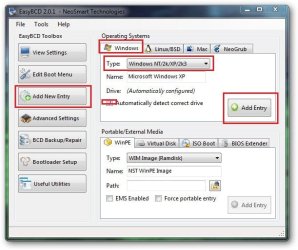
Run it . Click on add new entry, Windows tab is selected by default ... just change the type to Windows xp, if the other default settings are like the screenshot attached, let it remain such. Now click on add entry, accept , and when done, restart your computer.
 

Attachments

  • sshot-2.jpg
    sshot-2.jpg
    49.8 KB · Views: 17

My Computer My Computer

At a glance

Microsoft Windows 10 Pro Insider Preview 64-bitIntel(R) Core(TM) i3-4130 CPU @ 3.40GHzCorsair Vengence 4GB x2 (8.00GB Dual-Channel ...2047MB GeForce GTS 450 (ZOTAC International)
Computer type
PC/Desktop
Computer Manufacturer/Model Number
Self Assembled
OS
Microsoft Windows 10 Pro Insider Preview 64-bit
CPU
Intel(R) Core(TM) i3-4130 CPU @ 3.40GHz
Motherboard
Gigabyte Technology Co., Ltd. B85M-D3H
Memory
Corsair Vengence 4GB x2 (8.00GB Dual-Channel DDR3 @ 798MHz)
Graphics Card(s)
2047MB GeForce GTS 450 (ZOTAC International)
Sound Card
Onboard (Realtek High Definition Audio)
Monitor(s) Displays
LG Flatron E2040T
Screen Resolution
1600x900
Hard Drives
Western Digital 1 TB
Seagate 500 GB
PSU
Corsair VS550
Case
Cooler Master K380
Cooling
Cooler Master Seidon 120V Plus
Keyboard
Logitech MK260r
Mouse
Logitech MK260r
Internet Speed
PMPL Broadband
Antivirus
Windows Defender + MBAM
Browser
Firefox
Other Info
Dell Studio 15" Laptop
Alternative way

At first, make your system reserved partition visible in disk management (Right click, and then give it a drive letter , say "S").

Now download xpbtfiles.zip , extract the three files, and copy them in "S" .

Open an Elevated Command Prompt ,

Type bcdedit /create {ntldr} /d "Windows XP" hit enter
Type bcdedit /set {ntldr} device boot hit enter
Type bcdedit /set {ntldr} path \ntldr hit enter
Type bcdedit /displayorder {ntldr} /addlast hit enter .

Close the command prompt, and restart computer.

I learned this process of fixing windows 7 bootloader by reading the older posts of SIW2 :D
 
Last edited:

My Computer My Computer

At a glance

Microsoft Windows 10 Pro Insider Preview 64-bitIntel(R) Core(TM) i3-4130 CPU @ 3.40GHzCorsair Vengence 4GB x2 (8.00GB Dual-Channel ...2047MB GeForce GTS 450 (ZOTAC International)
Computer type
PC/Desktop
Computer Manufacturer/Model Number
Self Assembled
OS
Microsoft Windows 10 Pro Insider Preview 64-bit
CPU
Intel(R) Core(TM) i3-4130 CPU @ 3.40GHz
Motherboard
Gigabyte Technology Co., Ltd. B85M-D3H
Memory
Corsair Vengence 4GB x2 (8.00GB Dual-Channel DDR3 @ 798MHz)
Graphics Card(s)
2047MB GeForce GTS 450 (ZOTAC International)
Sound Card
Onboard (Realtek High Definition Audio)
Monitor(s) Displays
LG Flatron E2040T
Screen Resolution
1600x900
Hard Drives
Western Digital 1 TB
Seagate 500 GB
PSU
Corsair VS550
Case
Cooler Master K380
Cooling
Cooler Master Seidon 120V Plus
Keyboard
Logitech MK260r
Mouse
Logitech MK260r
Internet Speed
PMPL Broadband
Antivirus
Windows Defender + MBAM
Browser
Firefox
Other Info
Dell Studio 15" Laptop
Type bcdedit /create {ntldr} /d "Windows XP" hit enter
Type bcdedit /set {ntldr} device boot hit enter
Type bcdedit /set {ntldr} path \ntldr hit enter
Type bcdedit /displayorder {ntldr} /addlast hit enter .
.
does not need changed?
 

My Computer My Computer

At a glance

XP, 7Intel C2D4GBmobile intel 4 series
Computer Manufacturer/Model Number
HP DV4 Pavilion
OS
XP, 7
CPU
Intel C2D
Memory
4GB
Graphics Card(s)
mobile intel 4 series
Sound Card
idt
Monitor(s) Displays
lcd 14"
Screen Resolution
1280x800
Hard Drives
toshiba 320gb
Internet Speed
3mbps
Type bcdedit /create {ntldr} /d "Windows XP" hit enter
Type bcdedit /set {ntldr} device boot hit enter
Type bcdedit /set {ntldr} path \ntldr hit enter
Type bcdedit /displayorder {ntldr} /addlast hit enter .
.
does not need changed?
Just copy and paste in the command prompt... and hit enter after every line :)
 

My Computer My Computer

At a glance

Microsoft Windows 10 Pro Insider Preview 64-bitIntel(R) Core(TM) i3-4130 CPU @ 3.40GHzCorsair Vengence 4GB x2 (8.00GB Dual-Channel ...2047MB GeForce GTS 450 (ZOTAC International)
Computer type
PC/Desktop
Computer Manufacturer/Model Number
Self Assembled
OS
Microsoft Windows 10 Pro Insider Preview 64-bit
CPU
Intel(R) Core(TM) i3-4130 CPU @ 3.40GHz
Motherboard
Gigabyte Technology Co., Ltd. B85M-D3H
Memory
Corsair Vengence 4GB x2 (8.00GB Dual-Channel DDR3 @ 798MHz)
Graphics Card(s)
2047MB GeForce GTS 450 (ZOTAC International)
Sound Card
Onboard (Realtek High Definition Audio)
Monitor(s) Displays
LG Flatron E2040T
Screen Resolution
1600x900
Hard Drives
Western Digital 1 TB
Seagate 500 GB
PSU
Corsair VS550
Case
Cooler Master K380
Cooling
Cooler Master Seidon 120V Plus
Keyboard
Logitech MK260r
Mouse
Logitech MK260r
Internet Speed
PMPL Broadband
Antivirus
Windows Defender + MBAM
Browser
Firefox
Other Info
Dell Studio 15" Laptop
weew.. thx very much Arc.. your solution is work.. :D
 

My Computer My Computer

At a glance

XP, 7Intel C2D4GBmobile intel 4 series
Computer Manufacturer/Model Number
HP DV4 Pavilion
OS
XP, 7
CPU
Intel C2D
Memory
4GB
Graphics Card(s)
mobile intel 4 series
Sound Card
idt
Monitor(s) Displays
lcd 14"
Screen Resolution
1280x800
Hard Drives
toshiba 320gb
Internet Speed
3mbps

My Computer My Computer

At a glance

Microsoft Windows 10 Pro Insider Preview 64-bitIntel(R) Core(TM) i3-4130 CPU @ 3.40GHzCorsair Vengence 4GB x2 (8.00GB Dual-Channel ...2047MB GeForce GTS 450 (ZOTAC International)
Computer type
PC/Desktop
Computer Manufacturer/Model Number
Self Assembled
OS
Microsoft Windows 10 Pro Insider Preview 64-bit
CPU
Intel(R) Core(TM) i3-4130 CPU @ 3.40GHz
Motherboard
Gigabyte Technology Co., Ltd. B85M-D3H
Memory
Corsair Vengence 4GB x2 (8.00GB Dual-Channel DDR3 @ 798MHz)
Graphics Card(s)
2047MB GeForce GTS 450 (ZOTAC International)
Sound Card
Onboard (Realtek High Definition Audio)
Monitor(s) Displays
LG Flatron E2040T
Screen Resolution
1600x900
Hard Drives
Western Digital 1 TB
Seagate 500 GB
PSU
Corsair VS550
Case
Cooler Master K380
Cooling
Cooler Master Seidon 120V Plus
Keyboard
Logitech MK260r
Mouse
Logitech MK260r
Internet Speed
PMPL Broadband
Antivirus
Windows Defender + MBAM
Browser
Firefox
Other Info
Dell Studio 15" Laptop
Back
Top