Can't boot Windows without IDE present and Windows disc in drive.

Asterix68

New member
Local time
10:22 PM
Messages
7
Location
Scotland (no, it's NOT in England!)
Ok, my problem started when I installed my first Sata drive. I installed Windows Vista and had no problems other than it wouldn't boot without the original IDE drive. I noticed there was a bootsect file on the IDE. Removing the drive or the file resulted in a "insert system disk" message on boot. I left it as is because at least it still worked. I decided to do a dual boot with Windows 7 installed on a separate 1tb Sata. This time I removed the IDE, installed the new Sata and on powering up, the PC didn't recognise the Sata drives. Installing the IDE as master and installing my IDE CD-ROM drive was the only way to get the bios to see all drives. Windows 7 (original disc) install took ages to start and took ages to expand files. Once installed I had a dual boot and selecting either OS all goes well. Now, when I remove the Windows 7 disc I get the "insert system disk" message again. With the CD in, it goes to the "press any key to boot from CD" message, I do nothing and I get the dual boot option.

I understood all Windows versions after XP has SATA drivers so why isn't my SATA drives recognised unless there are IDE present? Needing the Windows CD in has puzzled me because it doesn't read anything off it in order to boot. I'm not interested in setting up RAID / mirror / striping etc. I just want a simple SATA setup that boots on its own. I want to remove all IDE drives.

I have 2 on board SATA controllers and 1 PCI SATA card with two ports. My Motherboard is a Foxconn P4M900-7MB.

Are you all scratching your heads? :p
 

My Computer My Computer

At a glance

Windows 7P4 3.0GHZ2gb DDR2 2x1gbGeForce 8600gs 512mb
Computer Manufacturer/Model Number
Self build
OS
Windows 7
CPU
P4 3.0GHZ
Motherboard
Foxconn p4m900-7mb
Memory
2gb DDR2 2x1gb
Graphics Card(s)
GeForce 8600gs 512mb
Sound Card
on board
Monitor(s) Displays
i-INC iH252
Hard Drives
1tb sata / 640gb Sata / 500gb Sata / 80gb Ide
PSU
650 W
Case
Systemax Venture
Cooling
Akasa AK-955
Hello Asterix68, welcome to Seven Forums!


Will you please post a snip/screen-shot of the entire disk management drive map with a full description as to which drive is which, so we can see what you have going on as there may be a fairly simple way to resolve the situation.

In the Windows start menu right click computer and click manage, in the left pane of the "Computer Management" window that opens click disk management and post a snip of that.

How to Upload and Post a Screenshot and File in Seven Forums
 

My Computer My Computer

At a glance

W 7 64-bit UltimateIntel Q9550 Yorkfield8GB Dominator 8500C5DATI : XFX 5870
Computer Manufacturer/Model Number
* BFK Customs *
OS
W 7 64-bit Ultimate
CPU
Intel Q9550 Yorkfield
Motherboard
ASUS P5Q Pro
Memory
8GB Dominator 8500C5D
Graphics Card(s)
ATI : XFX 5870
Sound Card
Realtek HD Audio 7-1
Monitor(s) Displays
1x 47" LCD HDMI & 3x 26" LCD HDMI
Screen Resolution
1920x1080P & 1920x1200
Hard Drives
1x 80GB Intel X25-M G2 SSD : 1x 500GB & 1x 640GB WD Caviar Black(s)
PSU
Corsair 620HX
Case
Cooler Master RC-690
Cooling
Tuniq Tower 120, 2x 140mm and 3x 120mm case fans
Keyboard
Microsoft 500
Mouse
Razer Diamondback 3G
Internet Speed
14 Mb/s
Other Info
1x Koutech 3Gb/s SATA HDD Hot Swap Rack
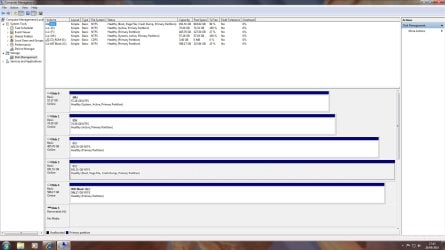
Hi, Bare Foot Kid, thanks for the quick reply. As you can see from the pic I need one IDE per SATA or the system won't boot. Obviously the smaller drives and one CD drive are the IDE ones. Drive (D) is the only one with a BOOTSECT.BAK file on it.

Cheers.
 

Attachments

  • Drive Map.jpg
    Drive Map.jpg
    170.2 KB · Views: 68

My Computer My Computer

At a glance

Windows 7P4 3.0GHZ2gb DDR2 2x1gbGeForce 8600gs 512mb
Computer Manufacturer/Model Number
Self build
OS
Windows 7
CPU
P4 3.0GHZ
Motherboard
Foxconn p4m900-7mb
Memory
2gb DDR2 2x1gb
Graphics Card(s)
GeForce 8600gs 512mb
Sound Card
on board
Monitor(s) Displays
i-INC iH252
Hard Drives
1tb sata / 640gb Sata / 500gb Sata / 80gb Ide
PSU
650 W
Case
Systemax Venture
Cooling
Akasa AK-955
So using the partition letters what is on which partition, I can tell Windows 7 is C: and that is the one you are booted to, is Vista M:?


You had Vista installed and then instaled Windows 7 and now have a dual boot?
 

My Computer My Computer

At a glance

W 7 64-bit UltimateIntel Q9550 Yorkfield8GB Dominator 8500C5DATI : XFX 5870
Computer Manufacturer/Model Number
* BFK Customs *
OS
W 7 64-bit Ultimate
CPU
Intel Q9550 Yorkfield
Motherboard
ASUS P5Q Pro
Memory
8GB Dominator 8500C5D
Graphics Card(s)
ATI : XFX 5870
Sound Card
Realtek HD Audio 7-1
Monitor(s) Displays
1x 47" LCD HDMI & 3x 26" LCD HDMI
Screen Resolution
1920x1080P & 1920x1200
Hard Drives
1x 80GB Intel X25-M G2 SSD : 1x 500GB & 1x 640GB WD Caviar Black(s)
PSU
Corsair 620HX
Case
Cooler Master RC-690
Cooling
Tuniq Tower 120, 2x 140mm and 3x 120mm case fans
Keyboard
Microsoft 500
Mouse
Razer Diamondback 3G
Internet Speed
14 Mb/s
Other Info
1x Koutech 3Gb/s SATA HDD Hot Swap Rack
Vista is the (F) drive, Windows 7 is on (C) drive. A dual boot and all drives are physical, no partitions.
 

My Computer My Computer

At a glance

Windows 7P4 3.0GHZ2gb DDR2 2x1gbGeForce 8600gs 512mb
Computer Manufacturer/Model Number
Self build
OS
Windows 7
CPU
P4 3.0GHZ
Motherboard
Foxconn p4m900-7mb
Memory
2gb DDR2 2x1gb
Graphics Card(s)
GeForce 8600gs 512mb
Sound Card
on board
Monitor(s) Displays
i-INC iH252
Hard Drives
1tb sata / 640gb Sata / 500gb Sata / 80gb Ide
PSU
650 W
Case
Systemax Venture
Cooling
Akasa AK-955
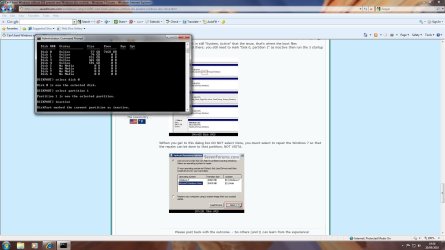
Here's what I would do.


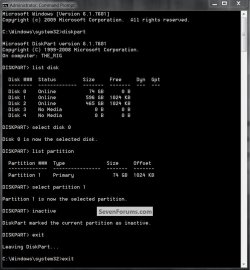
First, open an elevated command prompt in Windows 7 and mark both "Disk 0, partition 1" and "Disk 1, partition 1" as inactive (see my snip below for how) then in the same command window mark "Disk 3, partition 1" as active; then run the 3 separate startup repairs with the restarts described in this tutorial at the link below to make the Windows 7 partition an "System, Active" so that the boot files will be created to that partition; that should sort your issue.

Startup Repair - Run 3 Separate Times


Please feel free to post back with any questions you may have and to keep us informed as to your progress.

click to enlarge
Inactive2.jpg
 

My Computer My Computer

At a glance

W 7 64-bit UltimateIntel Q9550 Yorkfield8GB Dominator 8500C5DATI : XFX 5870
Computer Manufacturer/Model Number
* BFK Customs *
OS
W 7 64-bit Ultimate
CPU
Intel Q9550 Yorkfield
Motherboard
ASUS P5Q Pro
Memory
8GB Dominator 8500C5D
Graphics Card(s)
ATI : XFX 5870
Sound Card
Realtek HD Audio 7-1
Monitor(s) Displays
1x 47" LCD HDMI & 3x 26" LCD HDMI
Screen Resolution
1920x1080P & 1920x1200
Hard Drives
1x 80GB Intel X25-M G2 SSD : 1x 500GB & 1x 640GB WD Caviar Black(s)
PSU
Corsair 620HX
Case
Cooler Master RC-690
Cooling
Tuniq Tower 120, 2x 140mm and 3x 120mm case fans
Keyboard
Microsoft 500
Mouse
Razer Diamondback 3G
Internet Speed
14 Mb/s
Other Info
1x Koutech 3Gb/s SATA HDD Hot Swap Rack
Thanks for everything so far. I followed your advice exactly and here's what happened.

During the first startup repair, in the system recovery options it detected no drives. There is the load drivers option but not knowing what to look for or where to find them I just clicked next and did the repair. The second time both Windows installations were found, Windows 7 under drive F and Vista drive C (The opposite of my drive management pic). I selected F and did the repair. No problems were found but I still got the 'disk boot failure.....' so tried a third time. Again no problem found but still a disk boot failure. I've had to insert the Windows 7 disc in the IDE drive so I could get back here. Strange.

The other thing is, even if this fixed the problem I'd still have the same thing all over again should I re-install due to the IDE's having to be present right from the start.
 

My Computer My Computer

At a glance

Windows 7P4 3.0GHZ2gb DDR2 2x1gbGeForce 8600gs 512mb
Computer Manufacturer/Model Number
Self build
OS
Windows 7
CPU
P4 3.0GHZ
Motherboard
Foxconn p4m900-7mb
Memory
2gb DDR2 2x1gb
Graphics Card(s)
GeForce 8600gs 512mb
Sound Card
on board
Monitor(s) Displays
i-INC iH252
Hard Drives
1tb sata / 640gb Sata / 500gb Sata / 80gb Ide
PSU
650 W
Case
Systemax Venture
Cooling
Akasa AK-955
Post another disk management snip please.
 

My Computer My Computer

At a glance

W 7 64-bit UltimateIntel Q9550 Yorkfield8GB Dominator 8500C5DATI : XFX 5870
Computer Manufacturer/Model Number
* BFK Customs *
OS
W 7 64-bit Ultimate
CPU
Intel Q9550 Yorkfield
Motherboard
ASUS P5Q Pro
Memory
8GB Dominator 8500C5D
Graphics Card(s)
ATI : XFX 5870
Sound Card
Realtek HD Audio 7-1
Monitor(s) Displays
1x 47" LCD HDMI & 3x 26" LCD HDMI
Screen Resolution
1920x1080P & 1920x1200
Hard Drives
1x 80GB Intel X25-M G2 SSD : 1x 500GB & 1x 640GB WD Caviar Black(s)
PSU
Corsair 620HX
Case
Cooler Master RC-690
Cooling
Tuniq Tower 120, 2x 140mm and 3x 120mm case fans
Keyboard
Microsoft 500
Mouse
Razer Diamondback 3G
Internet Speed
14 Mb/s
Other Info
1x Koutech 3Gb/s SATA HDD Hot Swap Rack
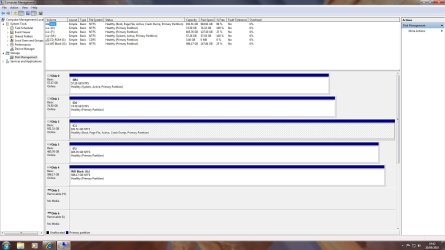
Here it is again.
 

Attachments

  • Drive Map 2.jpg
    Drive Map 2.jpg
    172.6 KB · Views: 24

My Computer My Computer

At a glance

Windows 7P4 3.0GHZ2gb DDR2 2x1gbGeForce 8600gs 512mb
Computer Manufacturer/Model Number
Self build
OS
Windows 7
CPU
P4 3.0GHZ
Motherboard
Foxconn p4m900-7mb
Memory
2gb DDR2 2x1gb
Graphics Card(s)
GeForce 8600gs 512mb
Sound Card
on board
Monitor(s) Displays
i-INC iH252
Hard Drives
1tb sata / 640gb Sata / 500gb Sata / 80gb Ide
PSU
650 W
Case
Systemax Venture
Cooling
Akasa AK-955
OK, as you can see M: is still "System, Active" that the issue, that's where the boot files are and there is no OS there; you still need to mark "Disk 0, partition 1" as inactive then run the 3 startup repairs.
123.jpg

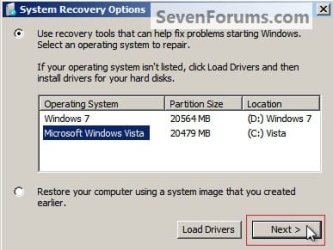
When you get to this dialog box DO NOT select Vista, you must select to repair the Windows 7 so that the repairs can be done to that partition, NOT VISTA and you must run it 3 separate times with a system restart between each repair.
OS Select.jpg
 

My Computer My Computer

At a glance

W 7 64-bit UltimateIntel Q9550 Yorkfield8GB Dominator 8500C5DATI : XFX 5870
Computer Manufacturer/Model Number
* BFK Customs *
OS
W 7 64-bit Ultimate
CPU
Intel Q9550 Yorkfield
Motherboard
ASUS P5Q Pro
Memory
8GB Dominator 8500C5D
Graphics Card(s)
ATI : XFX 5870
Sound Card
Realtek HD Audio 7-1
Monitor(s) Displays
1x 47" LCD HDMI & 3x 26" LCD HDMI
Screen Resolution
1920x1080P & 1920x1200
Hard Drives
1x 80GB Intel X25-M G2 SSD : 1x 500GB & 1x 640GB WD Caviar Black(s)
PSU
Corsair 620HX
Case
Cooler Master RC-690
Cooling
Tuniq Tower 120, 2x 140mm and 3x 120mm case fans
Keyboard
Microsoft 500
Mouse
Razer Diamondback 3G
Internet Speed
14 Mb/s
Other Info
1x Koutech 3Gb/s SATA HDD Hot Swap Rack
Here is a snip of the command prompt window showing Disc 0 as inactive. I did this already but I will go and do the repair again, see what happens. See you soon.
 

Attachments

  • diskpart 1.jpg
    diskpart 1.jpg
    153.6 KB · Views: 13

My Computer My Computer

At a glance

Windows 7P4 3.0GHZ2gb DDR2 2x1gbGeForce 8600gs 512mb
Computer Manufacturer/Model Number
Self build
OS
Windows 7
CPU
P4 3.0GHZ
Motherboard
Foxconn p4m900-7mb
Memory
2gb DDR2 2x1gb
Graphics Card(s)
GeForce 8600gs 512mb
Sound Card
on board
Monitor(s) Displays
i-INC iH252
Hard Drives
1tb sata / 640gb Sata / 500gb Sata / 80gb Ide
PSU
650 W
Case
Systemax Venture
Cooling
Akasa AK-955
You may have to disconnect that Hard Disk Drive (HDD) to get this done successfully but give it one more go with it connected because that'll be better if it works.


Disk 1, partition 1 stayed as "System, Active" because the repairs weren't completed. ;)
 

My Computer My Computer

At a glance

W 7 64-bit UltimateIntel Q9550 Yorkfield8GB Dominator 8500C5DATI : XFX 5870
Computer Manufacturer/Model Number
* BFK Customs *
OS
W 7 64-bit Ultimate
CPU
Intel Q9550 Yorkfield
Motherboard
ASUS P5Q Pro
Memory
8GB Dominator 8500C5D
Graphics Card(s)
ATI : XFX 5870
Sound Card
Realtek HD Audio 7-1
Monitor(s) Displays
1x 47" LCD HDMI & 3x 26" LCD HDMI
Screen Resolution
1920x1080P & 1920x1200
Hard Drives
1x 80GB Intel X25-M G2 SSD : 1x 500GB & 1x 640GB WD Caviar Black(s)
PSU
Corsair 620HX
Case
Cooler Master RC-690
Cooling
Tuniq Tower 120, 2x 140mm and 3x 120mm case fans
Keyboard
Microsoft 500
Mouse
Razer Diamondback 3G
Internet Speed
14 Mb/s
Other Info
1x Koutech 3Gb/s SATA HDD Hot Swap Rack
Another 3 starup repairs later and Disk manager still says Disk 0 as active. Still can't boot up without Windows disc in drive.

Disconnecting the Hard Drive is my main goal as I want rid of the IDE drives but so far without them, I can't boot windows regardless of the Windows disc in the drive or not.

I'll report back tomorrow, after I've removed IDE's, with details and hopefully photo's of my post screens so that you can see what I see.

Thanks for your help and patience so far.

Laurie.
 
Last edited:

My Computer My Computer

At a glance

Windows 7P4 3.0GHZ2gb DDR2 2x1gbGeForce 8600gs 512mb
Computer Manufacturer/Model Number
Self build
OS
Windows 7
CPU
P4 3.0GHZ
Motherboard
Foxconn p4m900-7mb
Memory
2gb DDR2 2x1gb
Graphics Card(s)
GeForce 8600gs 512mb
Sound Card
on board
Monitor(s) Displays
i-INC iH252
Hard Drives
1tb sata / 640gb Sata / 500gb Sata / 80gb Ide
PSU
650 W
Case
Systemax Venture
Cooling
Akasa AK-955
As long as the Windows 7 partition is still Active, disconnect the IDE drive 0 and run the 3 startup repairs.
 

My Computer My Computer

At a glance

W 7 64-bit UltimateIntel Q9550 Yorkfield8GB Dominator 8500C5DATI : XFX 5870
Computer Manufacturer/Model Number
* BFK Customs *
OS
W 7 64-bit Ultimate
CPU
Intel Q9550 Yorkfield
Motherboard
ASUS P5Q Pro
Memory
8GB Dominator 8500C5D
Graphics Card(s)
ATI : XFX 5870
Sound Card
Realtek HD Audio 7-1
Monitor(s) Displays
1x 47" LCD HDMI & 3x 26" LCD HDMI
Screen Resolution
1920x1080P & 1920x1200
Hard Drives
1x 80GB Intel X25-M G2 SSD : 1x 500GB & 1x 640GB WD Caviar Black(s)
PSU
Corsair 620HX
Case
Cooler Master RC-690
Cooling
Tuniq Tower 120, 2x 140mm and 3x 120mm case fans
Keyboard
Microsoft 500
Mouse
Razer Diamondback 3G
Internet Speed
14 Mb/s
Other Info
1x Koutech 3Gb/s SATA HDD Hot Swap Rack
If you want to get rid of the IDE anyway, then unplug it and plug the WIn7 HD into it, boot DVD to mark Win7 HD active with DISKPART, then run Startup Repair x3.

This may recover only the Win7 boot. If so, would you like to use a cleaner Dual Boot method using the BIOS boot order for Win7 and then boot Vista when desired by tapping the one-time BIOS boot menu key during bootup? If so, we can give you the steps to also recover the MBR into Vista so it becomes independent like Win7.
 
Back
Top