DocFireTyve
New member
Cant browse WD elements external hdd, now it show but access denied
hello
so i was just using my Western Digital elements 500gb external hard drive and formated it using "WBFS manager" transferd a game to it, and plugged it in my "nintendo wii" and everything was working as it should.
but now that i plugged it back into my computer i cant browse it through "my computer" but it shows in "safe removal" and is stated as an external HDD there.
so the computer recognize it, and i get the sound when i plug it into the usb port.
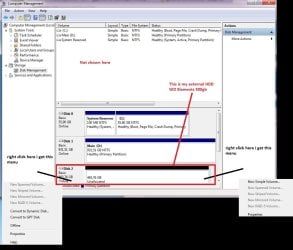
i did a quick search on google to try and find a solution, and the guy said to look in "disk management" to give it a letter, but it wont show in the list were i do that, but the list below shows it (look at the picture and you will understand what im trying to say).
so any suggestions on how i can fix it so i can browse? dosent mather if i have to format it, but the only way i know how to is through "my computer" but as it wont show there i cant do this. also i dont have another computer, but if that might help solving the issue i can head over to my brother and use his.
Edit: i havent tried any of the options in the picture and most of them are grayedout anyway.
reason for this is i dont want to delete or risk breaking anything unless i have too.
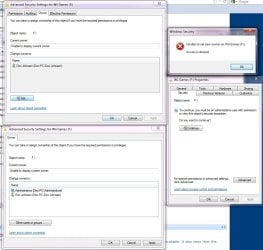
Edit 2: Evox94's suggestion made the HDD show in my computer and were it dident before, but now i get access denied whenever i try to do anything. (look at the 4th post for the new problem)
Edit 3: Now the HDD shows in my computer and were it dident before(in the first picture) but i have no access to do anything with it, after using the solution in the 5th post in this topic, i was allowed to do a disk check atleast, and im running it now, however it is taking forever.
does this means it found some errors? since its a 500gb hdd without files(should be clean as i formated it with evox94's methode)
thanks in advance
- Doc
hello
so i was just using my Western Digital elements 500gb external hard drive and formated it using "WBFS manager" transferd a game to it, and plugged it in my "nintendo wii" and everything was working as it should.
but now that i plugged it back into my computer i cant browse it through "my computer" but it shows in "safe removal" and is stated as an external HDD there.
so the computer recognize it, and i get the sound when i plug it into the usb port.
i did a quick search on google to try and find a solution, and the guy said to look in "disk management" to give it a letter, but it wont show in the list were i do that, but the list below shows it (look at the picture and you will understand what im trying to say).
so any suggestions on how i can fix it so i can browse? dosent mather if i have to format it, but the only way i know how to is through "my computer" but as it wont show there i cant do this. also i dont have another computer, but if that might help solving the issue i can head over to my brother and use his.
Edit: i havent tried any of the options in the picture and most of them are grayedout anyway.
reason for this is i dont want to delete or risk breaking anything unless i have too.
Edit 2: Evox94's suggestion made the HDD show in my computer and were it dident before, but now i get access denied whenever i try to do anything. (look at the 4th post for the new problem)
Edit 3: Now the HDD shows in my computer and were it dident before(in the first picture) but i have no access to do anything with it, after using the solution in the 5th post in this topic, i was allowed to do a disk check atleast, and im running it now, however it is taking forever.
does this means it found some errors? since its a 500gb hdd without files(should be clean as i formated it with evox94's methode)
thanks in advance
- Doc
Attachments
Last edited:
My Computer
- Computer Manufacturer/Model Number
- MSI
- OS
- windows 7 Ultimate 64bit
- CPU
- Inter i5 2320
- Motherboard
- MS-7680
- Memory
- 8192MB
- Graphics Card(s)
- NVIDIA Geforce GTS 450
- Monitor(s) Displays
- Generic PnP
- Screen Resolution
- 1920 x 1080 (60Hz)
- Hard Drives
- SSD for OS
HDD for storage