JavaScript is disabled. For a better experience, please enable JavaScript in your browser before proceeding.
You are using an out of date browser. It may not display this or other websites correctly.
You should upgrade or use an
alternative browser .
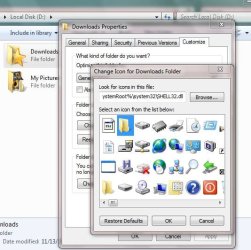
as the title states. there is one icon for my supplementary internet download local.
I set it on XP, when i reformatted to 7, the customization carried over for that drive.
screens:
FUUUuuuuuuuuuuu
not a big deal i guess. i just dont know why it wont change. Every other file i tried works without a problem. I took ownership, and all the basics, its just stubborn.
any takers?
Computer Manufacturer/Model Number eMachines W3502 OS Windows 7 Ultimate x32 CPU Intel Celeron D 3.2 Ghz 533 fsb (LGA 775) Motherboard Intel D101GGC Memory 1 GB (2x512MB) PC-3200 DDR @ 200Mhz Graphics Card(s) Nvidia GeForce 9400GT- 1GB Sound Card Sound Blaster X-Fi Xtreame Gamer Monitor(s) Displays 19" LCD HDtv Screen Resolution 1360x768 @ 60Htz Hard Drives SeaGate Barracuda 750GB PSU stock (idk) Case The busted remains of the stock case Cooling Dust cooled, waitwut? Keyboard Stock. Missing a few keys. Mouse Logitech LX8 5-btn mouse (wireless) Internet Speed TWC 10Mb Other Info Keeps going, and going, and going.......
Righteous Dude
Guru
VIP
SF Team
Possible it is in use, so won't allow the change? Have you tried to change it in safe mode?
Computer type PC/Desktop OS Windows 10 Home x64 CPU INTEL Core i5-750 Quad-Core 3.37GHz Motherboard ASUS P7P55D Memory HyperX Fury Black Series 8GB (2 x 4GB) 1866Mhz Graphics Card(s) EVGA GeForce GTX 750 Superclocked 1GB 128-Bit GDDR5 Monitor(s) Displays LG 32MA68HY 32" IPS Screen Resolution 1920 x 1080 Hard Drives Samsung 840 Evo 120GB, SEAGATE 500GB Barracuda® 7200.12, SATA 3 Gb/s, 7200 RPM, 16MB cache PSU ANTEC TruePower New TP-550, 80 PLUS, 550W Case ANTEC Three Hundred Illusion Cooling COOLER MASTER Hyper 212 Plus, 4 x 120mm 1 x 140mm Noctua's Internet Speed 85 + Mbps Antivirus Avast Browser Vivaldi
is a ****
Guru
VIP
Thread Starter
Possible it is in use, so won't allow the change? Have you tried to change it in safe mode?
that, i haven't done. i think anyway. I tried deleting it from libraries, explorer pins, and everywhere else it happens to pop up, so it
wouldn't be "in use". I'll give the safe mode thing a try. thanks for the suggestion.
Computer Manufacturer/Model Number eMachines W3502 OS Windows 7 Ultimate x32 CPU Intel Celeron D 3.2 Ghz 533 fsb (LGA 775) Motherboard Intel D101GGC Memory 1 GB (2x512MB) PC-3200 DDR @ 200Mhz Graphics Card(s) Nvidia GeForce 9400GT- 1GB Sound Card Sound Blaster X-Fi Xtreame Gamer Monitor(s) Displays 19" LCD HDtv Screen Resolution 1360x768 @ 60Htz Hard Drives SeaGate Barracuda 750GB PSU stock (idk) Case The busted remains of the stock case Cooling Dust cooled, waitwut? Keyboard Stock. Missing a few keys. Mouse Logitech LX8 5-btn mouse (wireless) Internet Speed TWC 10Mb Other Info Keeps going, and going, and going.......