JavaScript is disabled. For a better experience, please enable JavaScript in your browser before proceeding.
You are using an out of date browser. It may not display this or other websites correctly.
You should upgrade or use an
alternative browser .
Can't change advanced settings from "802.11d" to "wireless mode"
Can't change advanced settings from "802.11d" to "wireless mode"
Windows 7 32-bit Windows Vista Home Premium 32-bit SP2 3.00 GB GeForce 210 PC/Desktop Acer Windows 7 32-bit Windows Vista Home Premium 32-bit SP2 Model G33T-AM (Socket 775) 3.00 GB GeForce 210 1024MB NVIDIA GeForce 210 (MSI) Samsung Version CQ18 1920x1080 Intel Core 2 Quad Q6600 Not sure Not sure In the 30's (average amongst all temperature readings) Factory model Factory model Good. :) None at this point in time, considering McAfee sometime soon Firefox
Windows 7 Ultimate 64-bit, Windows 8.1 64-bit...
PC/Desktop Customs, Dell, Gateway, HP, Toshiba, Acer, ASUS Windows 7 Ultimate 64-bit, Windows 8.1 64-bit, Mac OS X 10.10, Linux Mint 17, Windows 10 Pro TP Microsoft Microsoft
New member
Thread Starter
Anyone know about switching primary computers w home networking?
Windows 7 32-bit Windows Vista Home Premium 32-bit SP2 3.00 GB GeForce 210 PC/Desktop Acer Windows 7 32-bit Windows Vista Home Premium 32-bit SP2 Model G33T-AM (Socket 775) 3.00 GB GeForce 210 1024MB NVIDIA GeForce 210 (MSI) Samsung Version CQ18 1920x1080 Intel Core 2 Quad Q6600 Not sure Not sure In the 30's (average amongst all temperature readings) Factory model Factory model Good. :) None at this point in time, considering McAfee sometime soon Firefox
I just want to help!
Guru
VIP
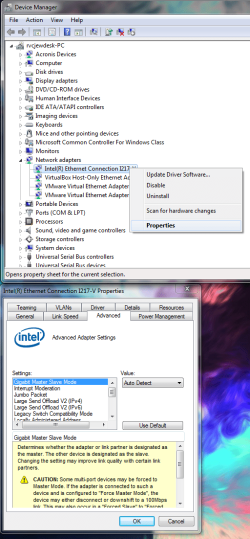
First stop making new threads for the same topic please. Now you need to post a pic of your device manger showing what your network adapter is and what advanced settings it has that you are trying to change. Like this:
network advanced.png
84.8 KB
· Views: 1
10 Pro x64 Ryzen 9 3900X 64GB(4x16GB) DDR4 EVGA 1080ti FTW3 PC/Desktop Custom 10 Pro x64 Ryzen 9 3900X Asrock x370 Tachi 64GB(4x16GB) DDR4 EVGA 1080ti FTW3 ASUS Xonar Essence STX (V4 Bursons), ODAC rev B, NFB-11, O2 3xASUS PB278Q/R, Optoma HD142X 3x1440p, 1080p 512GB 850 EVO(OS, Programs) AX760 Fractal Define R5 NH-D15S Massdrop Ctrl with Box Navy's G903, Alioth XXL Mat 280/40 MBAM, ESET Canary 64 Bit I also own a Thinkpad P50 Xeon 4K, X220T, X1C5
New member
Thread Starter
I have stopped posting new threads guys.
Windows 7 32-bit Windows Vista Home Premium 32-bit SP2 3.00 GB GeForce 210 PC/Desktop Acer Windows 7 32-bit Windows Vista Home Premium 32-bit SP2 Model G33T-AM (Socket 775) 3.00 GB GeForce 210 1024MB NVIDIA GeForce 210 (MSI) Samsung Version CQ18 1920x1080 Intel Core 2 Quad Q6600 Not sure Not sure In the 30's (average amongst all temperature readings) Factory model Factory model Good. :) None at this point in time, considering McAfee sometime soon Firefox
New member
Thread Starter
What do I have to do exactly after I publish snapshot?
Windows 7 32-bit Windows Vista Home Premium 32-bit SP2 3.00 GB GeForce 210 PC/Desktop Acer Windows 7 32-bit Windows Vista Home Premium 32-bit SP2 Model G33T-AM (Socket 775) 3.00 GB GeForce 210 1024MB NVIDIA GeForce 210 (MSI) Samsung Version CQ18 1920x1080 Intel Core 2 Quad Q6600 Not sure Not sure In the 30's (average amongst all temperature readings) Factory model Factory model Good. :) None at this point in time, considering McAfee sometime soon Firefox
New member
Guru
Gold Member
VIP
Windows 7 Ultimate x64 SP1 AMD Phenom 2 1090T 2x8GB Kingston HyperX Fury Black 1600Mhz Unga... MSI GTX 970 Gaming 4G PC/Desktop Custom Build Windows 7 Ultimate x64 SP1 AMD Phenom 2 1090T Gigabyte GA-890FXA-UD5 2x8GB Kingston HyperX Fury Black 1600Mhz Unganged MSI GTX 970 Gaming 4G Realtek On-Board HD 7.1 Audio / Logitech G35 3xAcer GD245HQ 1920x1080 Samsung 850 Pro 512GB SSD - OS / HighPower 1000W Cooler Master HAF 932 Noctua NH-D14 Logitech G19 Logitech G500 100/4 Mbit Cable (100GB quota) ZoneAlarm Extreme Security / MBAM Pro / MBAE Free / SAS Free IE 11 - Firefox - Chrome Logitech F710/ G27/ G940/ Z5500 // TrackIR 5 // Nvidia 3D Surround Vision
New member
Thread Starter
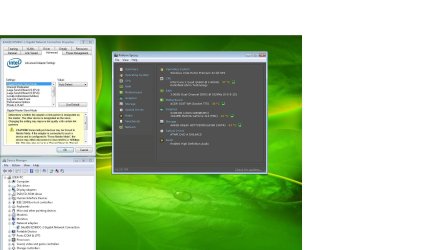
Untitled.jpg
144.4 KB
· Views: 2
Windows 7 32-bit Windows Vista Home Premium 32-bit SP2 3.00 GB GeForce 210 PC/Desktop Acer Windows 7 32-bit Windows Vista Home Premium 32-bit SP2 Model G33T-AM (Socket 775) 3.00 GB GeForce 210 1024MB NVIDIA GeForce 210 (MSI) Samsung Version CQ18 1920x1080 Intel Core 2 Quad Q6600 Not sure Not sure In the 30's (average amongst all temperature readings) Factory model Factory model Good. :) None at this point in time, considering McAfee sometime soon Firefox
New member
Thread Starter
Windows 7 32-bit Windows Vista Home Premium 32-bit SP2 3.00 GB GeForce 210 PC/Desktop Acer Windows 7 32-bit Windows Vista Home Premium 32-bit SP2 Model G33T-AM (Socket 775) 3.00 GB GeForce 210 1024MB NVIDIA GeForce 210 (MSI) Samsung Version CQ18 1920x1080 Intel Core 2 Quad Q6600 Not sure Not sure In the 30's (average amongst all temperature readings) Factory model Factory model Good. :) None at this point in time, considering McAfee sometime soon Firefox