
- Local time
- 5:10 PM
- Messages
- 37
2 Issues 1. I cant change the balance of my speakers with my USB soundcard, 2. Random crackles.[/B]
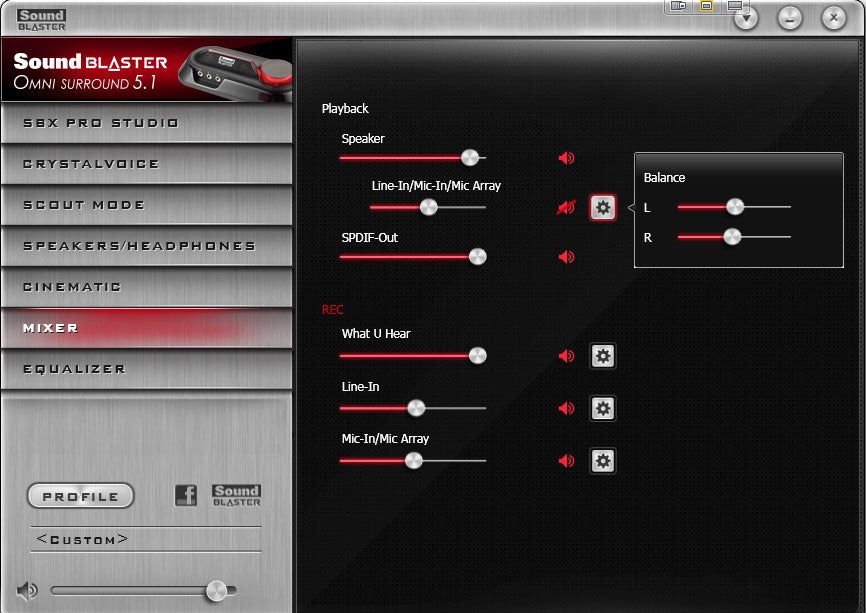
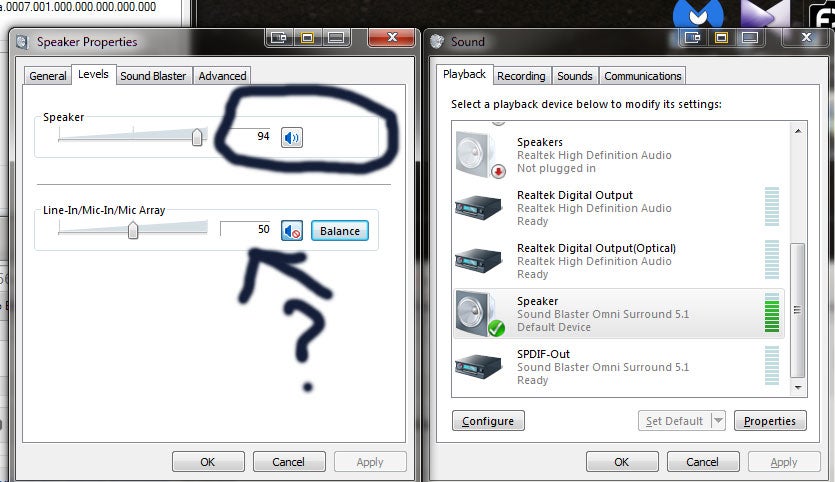
So It seems that when I open the Omni control Panel click Mixer, The Balance bar only works for the Line-In/Mic-in/array, it does not work for the speaker, instead it just controls the volume. My theory is that Creative for some odd reason even thought it shows as 2.1 speakers the system views it as 1 speaker.
I tried the following programs to control the balance externally:
NirCmd: only controlled volume
Volumouse: acts like it is going to work, but after spending hours trying to get various configurations to work it might sporadically function, still pops full screen games. Scroll wheel still is sent to the application in focus, not the audio control.
Sound Control: Only controls volume
Volume2: only controlled volume, when you edit balance it brings the volume to 0
IndieVolume: not tested, but many users on the web say it does not work with 64bit , that may have changed.
This is what I see:
Ironically... Winamp seems to control the balance without any problem whats so ever. But I use spotify mainly now and it its a pain to not be able to control the volume levels.
Would appreciate the help.
So It seems that when I open the Omni control Panel click Mixer, The Balance bar only works for the Line-In/Mic-in/array, it does not work for the speaker, instead it just controls the volume. My theory is that Creative for some odd reason even thought it shows as 2.1 speakers the system views it as 1 speaker.
I tried the following programs to control the balance externally:
NirCmd: only controlled volume
Volumouse: acts like it is going to work, but after spending hours trying to get various configurations to work it might sporadically function, still pops full screen games. Scroll wheel still is sent to the application in focus, not the audio control.
Sound Control: Only controls volume
Volume2: only controlled volume, when you edit balance it brings the volume to 0
IndieVolume: not tested, but many users on the web say it does not work with 64bit , that may have changed.
This is what I see:
Ironically... Winamp seems to control the balance without any problem whats so ever. But I use spotify mainly now and it its a pain to not be able to control the volume levels.
Would appreciate the help.
My Computer
At a glance
Windows 7 Ultimatei7-930 @3.99ghzG.Skill 6GBTitan
- OS
- Windows 7 Ultimate
- CPU
- i7-930 @3.99ghz
- Motherboard
- Gigabyte X58-UD5
- Memory
- G.Skill 6GB
- Graphics Card(s)
- Titan
- Sound Card
- onboard
- Monitor(s) Displays
- Dell 30"
- Screen Resolution
- 2560x1600 surround
- Hard Drives
- 4 1.5 TB seagate HD
- PSU
- Corsair HX750
