
Can't change Computer name

aleksa069

New member
Local time
6:00 PM
Messages
2
Hi guy this is my first post here! I have very unusual problem whit my computer name.
Last time I reinstall the computer, I left it to stand in the middle installation( I was on a party :)).When I get back on my screen was a dialog box where I need to put the serial number. BUT before that I should enter my username right? But that never happened.
Windows put this username for me: "dfgfghjfguiyabfdytuy"
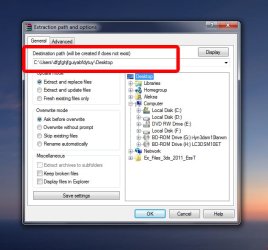
I tried everything but it just won't work.I changed computer name to ''Workstation'' but when I try to, for example, extract some file to my desktop in Winrar (and in every other program) it says : ''C:\Users\dfgfghjfguiyabfdytuy\Desktop'' for the destination folder.
So please if someone knows the solution to my problem I would be very grateful to him.(it won't work when I right click in my computer, go to properties and under tab ''computer name'' change settings). I will post screen shot to help you!
Thanks!!!!!!!
 

Attachments
  • Can't change PC name.jpg
    Can't change PC name.jpg
    70 KB · Views: 100

My Computer

OS
Windows 7 ultimate x64
It sounds like somebody typed in that gibberish for your user name when you weren't looking. Even if you go into user accounts and change it, ''C:\Users\dfgfghjfguiyabfdytuy\ will never change. Your user name will change everywhere else its displayed, like the welcome screen, but your user folder name won't. To get around that you would have to create a new user, transfer all your documents and pictures, etc to the new user account, and then delete the old user account.
 

My Computer

Computer type
PC/Desktop
Computer Manufacturer/Model Number
Home Built
OS
Windows 10 Education 64 bit
CPU
AMD Phenom II X4 980 Black Edition Deneb 3.7GHz
Motherboard
Asus M4N68T-M V2 µATX Motherboard
Memory
8GB 4GBx2 Kingston PC10600 DDR3 1333 Memory
Graphics Card(s)
Zotac NVIDIA Geforce GT640 2 Gig DDR3 PCIe
Sound Card
VIA VT1708s High Definition Audio 8-channel Onboard
Monitor(s) Displays
22" LG E2242 1080p and 2 19" I-INC AG191D
Screen Resolution
1280x1024 - 1920x1080 - 1280x1024
Hard Drives
Crucial M100 256 GB SSD and 500 GB WD Blue SATA
PSU
Thermaltake TR 620
Case
Power Up Black ATX Mid-Tower Case
Cooling
Stock heatsink and fan
Keyboard
Logitech Wireless K350 Wave
Mouse
Logitech Wireless M570 Trackman Wheel
Internet Speed
80 Mbps Down 30 Mbps Up
Antivirus
Windows Defender
Browser
Internet Explorer 11
Other Info
HP DVD1040e Lightscribe - External USB2
It seams that I changed the name correctly and I think that alphanumeric answer is the right one.Thanks you guy for your help!!!
 

My Computer

OS
Windows 7 ultimate x64
It's no big deal changing your name from Control Panel=>User Accounts=>Modify you're name...

I did it and the C:\users\user, remains in the users folder, but all changed to the name i decided to...the logon screen changed, programs paid took the new user name...etc....i was amaze it goes that fast to spread the new user name choosen in all the system. In particular knowing how UAC and restrictions are on folders and files.

So, i don't mind a little C:\users\user...folder name.
And where all my personal files are under librairies & homegroup , are my new account named.
Well the best is to create a new account then delete the old one.
 
Last edited:

My Computer

Computer type
PC/Desktop
Computer Manufacturer/Model Number
Custom Build
OS
Windows 7 Professional SP1 - x64 [Non-UEFI Boot]
CPU
Ivy Bridge Core i5 3570K (Delidded)
Motherboard
Asus P8Z77-V LE PLUS
Memory
G.Skill "Ares" DDR3 PC3-12800 - 1600MHz (16Gb)
Graphics Card(s)
Asus Dual-RX480-O4G
Sound Card
Creative Sound Blaster Z w/5.1 sound system
Monitor(s) Displays
Asus IPS 23"
Screen Resolution
16/9
Hard Drives
Internal:
500Go Sata 6Gb/s (x2)
500Go Sata 3Gb/s (x2)
SSD 60Go Sata 6Gb/s
PSU
In Win C 900W Series 80+ Platinum
Case
Thermaltake Chaser A71
Cooling
Custom Water Cooling Loop
Keyboard
Cooler Master QuickFire XTi
Mouse
Razer Imperator 2012 (4G)
Antivirus
MSE
Browser
IE 11.0.xxx Rtm
Other Info
"Raid0" with Intel Smart Response Technology (HDD/SSD)
Back
Top