Solved cant change how updates install

sdowney717

New member
Power User
VIP
Local time
7:34 PM
Messages
705
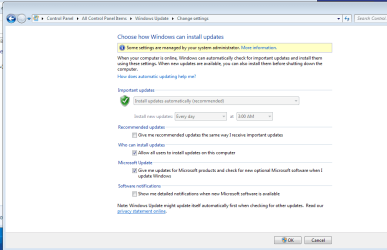
was able earlier today. after lots of updates and reboot cant.

pc is in my private home.
 

Attachments

  • wu.PNG
    wu.PNG
    20.3 KB · Views: 0

My Computer

OS
Windows 7 Ultimate x64
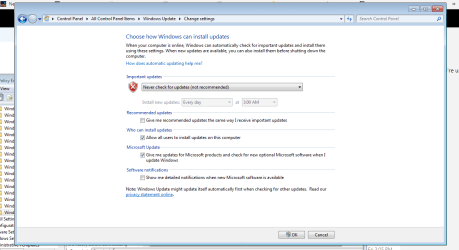
this allows me to select settings again. but lost setting never check for updates.
so anyone know how put it as new install?

never seen message before settings managed by local admin. if that was not true, then would be as before.
ReplyIn reply to Mr.NeverEatAlone's post on February 14, 2013
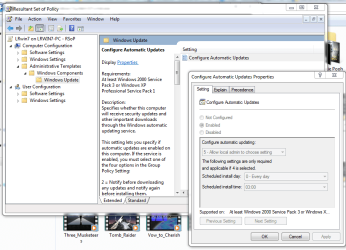
Srinivas KR is alright, but it's not going to unblock you if you already have some GPO in place

Start Group policy Editor as he suggested,
Navigate to Computer Configuration -> Administrative Templates -> Windows Components -> Windows Updates
Open node Configure Automatic Updates

Select Enabled
Select 5 - Allow Local Admin to choose settings
Under scheduled install select any value.
cant change windows update settings even though I am the - Microsoft Community
 

My Computer

OS
Windows 7 Ultimate x64
Hi sdowney717,

please use>> run<< and type the following
rsop.msc

this will list all current policies

if you see any you do not recognise delete them.

note
malware can also cause this suggest you run an AV scan.


Roy
 

My Computer

Computer type
PC/Desktop
Computer Manufacturer/Model Number
medionl/Aspire 6930G/acer x55a
OS
W7 home premium 32bit/W7HP 64bit/w10 tp insider ring
CPU
E5300 dual core
Motherboard
medion MS7366
Memory
3gb
Graphics Card(s)
Nvidia Geforce 7100 Nforce 630i
Monitor(s) Displays
avixc
Internet Speed
n (isp resticted to 72)
Antivirus
mse/pands
Browser
palemoon
Other Info
Belkin Fd7050 n USB using Railink RT2870 drivers, more upto date
Hi sdowney717,

please use>> run<< and type the following
rsop.msc

this will list all current policies

if you see any you do not recognise delete them.

note
malware can also cause this suggest you run an AV scan.


Roy
hi, this is a fresh install, newly formatted. was updating.

i loaded the rsop in an admin cmd prompt terminal, but options are greyed out.


This page looks similar to the group policy editor I ran on this same setting and had to set it manually to be able to mod how windows updates. Group policy was able to make changes. If I undo the change I made with gpedit.msc, it will revert to not being modifiable how updates are installed.

what to do, anything?
here is another discussion on this problem.
Unable to change Windows Update settingsSOME SETTINGS ARE - Microsoft Community
 

Attachments

  • rsop1.PNG
    rsop1.PNG
    47.6 KB · Views: 0

My Computer

OS
Windows 7 Ultimate x64
This time, when I cleared the policy I had earlier modified, it went back to normal.
So maybe one of those many updates broke and then another fixed something.
 

Attachments

  • updates setting fixed.PNG
    updates setting fixed.PNG
    26.8 KB · Views: 1

My Computer

OS
Windows 7 Ultimate x64
Back
Top