
Can't change iTunes icon

crash187

Banned
Local time
9:01 AM
Messages
12
Location
Chi_town Areas
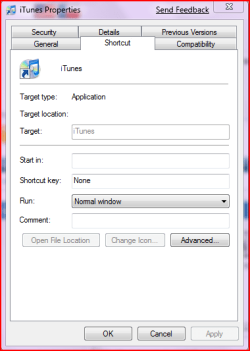
Hey i have an issue im trying to change my itunes icon on my superbar but when i go to change it the change icon button is locked
Capture.PNG
 

My Computer

Computer Manufacturer/Model Number
Lenovo Y430 Ideapad
OS
Windows 7 & Vista Ultimate
CPU
Intel Duo Core 2 @ 2.0Ghz
Memory
3GB ram
Can you place the shortcut on the desktop and then change the icon from there and pin it back to the Taskbar?
 

My Computer

Computer Manufacturer/Model Number
Home Brew
OS
Windows 7 Ultimate Vista Ultimate x64
CPU
Core 2 Duo E8500 3.16Ghz @ 3.8Ghz
Motherboard
eVGA 750i FTW
Memory
2x2Gigs Patriot PC2-6400 LL
Graphics Card(s)
Inno3D GeForce GTX260 216 SP
Monitor(s) Displays
ASUS VW222U 22" 2ms Response time
Screen Resolution
1680x1050
Hard Drives
SATA 150GB
SATA II 250GB
USB IDE 750GB Ext.
PSU
HYTEC 600W & Thermaltake 650W Toughpower Power Exp
Case
Thermaltake Armor LCS (Liquid Cooling System)
Cooling
Liquid Cooling System
Keyboard
Logitech G15 Gaming Keyboard
Mouse
Logitech G9 Gaming Mouse
Can you place the shortcut on the desktop and then change the icon from there and pin it back to the Taskbar?

No i get the same thing it also does the same for my office 2007 icons
 

My Computer

Computer Manufacturer/Model Number
Lenovo Y430 Ideapad
OS
Windows 7 & Vista Ultimate
CPU
Intel Duo Core 2 @ 2.0Ghz
Memory
3GB ram
I'm having the same problem with Office icons and the new Itunes icon. I've tried taking ownership and changing permission but that didn't work. Frustrating little problem...
 

My Computer

OS
Windows 7
Hmm a suggestion would be is deleting it the icon from you desktop, and going to the itunes program files folder. Then right clicking the .exe and click copy- then pasting it as a "shortcut" then it might work I dunno thats what i've heard. So best of luck and get back if you have any luck with that! =P

-Kukag
 

My Computer

Computer Manufacturer/Model Number
Custom
OS
Windows 7
CPU
AMD Phenom II X4 940 3.0 Stock
Motherboard
Gigabyte GA-MA78GM-S2H
Memory
G.SKILL DDR2 800 PI Black 4GB+Corsair XMS2 Xtrm Gaming 2GB
Graphics Card(s)
ASUS EN8800GT TOP (Fact OC)
Monitor(s) Displays
Optiquest 20" Flatscreen
Screen Resolution
1680x1050
Hard Drives
Seagate 3.5' 7200RPM 750GB HDD
PSU
Antec NeoHE 550W
Cooling
Stock AMD Phenom HSF
Keyboard
Logitech G15
Internet Speed
Charter HighSpeed 10 Down / 5 Up
Hmm a suggestion would be is deleting it the icon from you desktop, and going to the itunes program files folder. Then right clicking the .exe and click copy- then pasting it as a "shortcut" then it might work I dunno thats what i've heard. So best of luck and get back if you have any luck with that! =P

-Kukag

Problem solved; that did it for both ms office and itunes! You rock.
 

My Computer

OS
Windows 7
Awesome =P really happy to help!

Remember +rep when you feel its neccessary! =D

Good luck,
Kukag
 

My Computer

Computer Manufacturer/Model Number
Custom
OS
Windows 7
CPU
AMD Phenom II X4 940 3.0 Stock
Motherboard
Gigabyte GA-MA78GM-S2H
Memory
G.SKILL DDR2 800 PI Black 4GB+Corsair XMS2 Xtrm Gaming 2GB
Graphics Card(s)
ASUS EN8800GT TOP (Fact OC)
Monitor(s) Displays
Optiquest 20" Flatscreen
Screen Resolution
1680x1050
Hard Drives
Seagate 3.5' 7200RPM 750GB HDD
PSU
Antec NeoHE 550W
Cooling
Stock AMD Phenom HSF
Keyboard
Logitech G15
Internet Speed
Charter HighSpeed 10 Down / 5 Up
hii, im having this exact same problem right now. i want to change my icons but some wont work. the "change icon" button is unavailable and so is the show location. this is happening to itunes and skype and those are the icons i want to change. ive read your instructions Kukag but im not familiar with many things so how do i find the .exe file? this has been bugging me for a longgg time and help is appreciated!
 

My Computer

Computer Manufacturer/Model Number
Sony vaio fw
OS
windows 7
Memory
4 GB
nevermind, i got it :D
 

My Computer

Computer Manufacturer/Model Number
Sony vaio fw
OS
windows 7
Memory
4 GB
Hi Guys, Its not working for me.. I have changed all the itunes icons to the one i want, yet everytime I open iTunes it still has that ugly iTunes10 blue one in the taskbar! how do I change it so it will come up in the taskbar??
 

My Computer

OS
Windows 7 Home Premium 64bit Build 7600
CPU
Intel i7
Motherboard
GIGABYTE X58A-UD3R
Memory
6G DDR3
Graphics Card(s)
ATI
Case
ZALMAN
Cooling
FANS!
Keyboard
Razer Lycosa
Mouse
Razer Deathadder
Back
Top