Can't change Office 2010 Language Pack

inteligence82

New member
Local time
7:01 PM
Messages
5
I currently have Spanish as my interface language, but i want to change it to English, i have already downloaded the necessary Language Interface Pack (LIP) from the Microsoft Download Page, already downloaded 2 times, and does not work at all !
Please i need an answer, as soon as possible.

Thanks, :D
 

My Computer My Computer

OS
Windows 7 Ultimate 32-bit
CPU
AMD Turion(tm) 64 X2 Mobile Technology TL-58
Motherboard
Dell Inc. 0KY766
Memory
1919 MB (2 GB)
Sound Card
Speakers / Headphones (SigmaTel)
Screen Resolution
1280 X 800 - 32 bit
Hard Drives
C: 148 GB
You may have to uninstall office and re-install it with english as the language. Are you wanting to change the "system" language to english (for everything on the computer?)

Installing the language pack does not make it active, try the following page for instructions on how to change the active language.

http://www.intowindows.com/how-to-change-office-2010-display-language/
 

My Computer My Computer

Computer Manufacturer/Model Number
Black_Box (homebuilt)
OS
windows 7 RTM x64
CPU
Phenom II 965 Quad Core 3.4Ghz
Motherboard
Asus M4A79T Deluxe
Memory
Mushkin Blackline 8GB (4x2gb)
Graphics Card(s)
XFX Radeon 5970 Black Edition
Sound Card
onboard
Monitor(s) Displays
Dell 2408WPF-main Dell E248WFP-secondary
Screen Resolution
1920x1200-main 1920x1200-secondary
Hard Drives
OCZ Vertex Limited Edition 100GB (OS)
x1 WD Black Edition 500GB drive (Storage)
PSU
XFX 850w Black Edition (Modular)
Case
Mountian Mods H2go
Cooling
CoolITSystems ECO A.L.C.
Keyboard
Logitech MX 5500 wireless keyboard
Mouse
Razor Copperhead
Internet Speed
16Mb down/2Mb up Wowway Cable Internet
You may have to uninstall office and re-install it with english as the language. Are you wanting to change the "system" language to english (for everything on the computer?)

Installing the language pack does not make it active, try the following page for instructions on how to change the active language.

How To Change Office 2010 Display Language

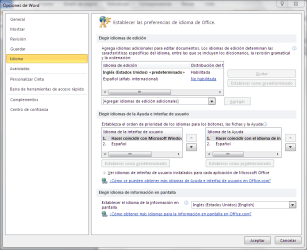
Thanks for the fast answer, and no, i don't want to change the whole system language, i just want to change office application's interface language, i already checked your link, but i have a problem, i don't have different language options to choose from, I will attach a screenshot so you can see which are my options.

Thanks again :D
 

Attachments

  • screen lang..PNG
    screen lang..PNG
    32.1 KB · Views: 2,843

My Computer My Computer

OS
Windows 7 Ultimate 32-bit
CPU
AMD Turion(tm) 64 X2 Mobile Technology TL-58
Motherboard
Dell Inc. 0KY766
Memory
1919 MB (2 GB)
Sound Card
Speakers / Headphones (SigmaTel)
Screen Resolution
1280 X 800 - 32 bit
Hard Drives
C: 148 GB

My Computer My Computer

OS
Windows 7 Ultimate 32-bit
CPU
AMD Turion(tm) 64 X2 Mobile Technology TL-58
Motherboard
Dell Inc. 0KY766
Memory
1919 MB (2 GB)
Sound Card
Speakers / Headphones (SigmaTel)
Screen Resolution
1280 X 800 - 32 bit
Hard Drives
C: 148 GB
Issue resolved

****** UPDATE ******
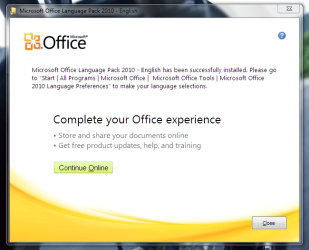
Yes, it did work, Thanks a lot. :D
Some screens of the result.
 

Attachments

  • screen lang2.PNG
    screen lang2.PNG
    39.9 KB · Views: 422
  • screen lang3.PNG
    screen lang3.PNG
    27.9 KB · Views: 592

My Computer My Computer

OS
Windows 7 Ultimate 32-bit
CPU
AMD Turion(tm) 64 X2 Mobile Technology TL-58
Motherboard
Dell Inc. 0KY766
Memory
1919 MB (2 GB)
Sound Card
Speakers / Headphones (SigmaTel)
Screen Resolution
1280 X 800 - 32 bit
Hard Drives
C: 148 GB
Back
Top