Can't change screen resolution back to 1366*768 on Windows 7 Ultimate

Ashemarine

New member
Local time
8:44 AM
Messages
2
Location
New Delhi, India
Hey guys,
I'm sorry to post yet another thread about this problem, but having gone through all the ones posted (and resolved) so far, I'm convinced my laptop has developed some other problem than the ones people have listed so far.
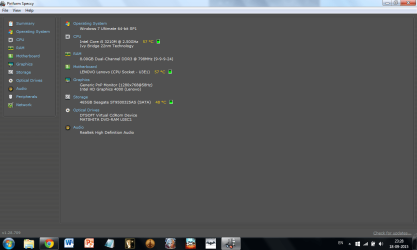
Basically, what happened is that my Lenovo Z580 laptop (15.6 inch screen) running Windows 7 Ultimate SP1, which usually runs at a screen resolution of 1366*768 suddenly switched to 1280*800 following a system restart. There is a vertical black bar on the right side of the screen, and there is no option to increase the screen resolution beyond 1280*800 (I am currently using 1280*768, but it's still terrible). I have updated my graphics driver several times now (Generic PnP Monitor, Intel HD 4000 Graphics), but to no avail. Anyone have any idea what might be wrong with my system? Would a system restore help (the problem started after I restarted my laptop following an iTunes update)?
Any help is much appreciated!
 

Attachments

  • 2.png
    2.png
    42.8 KB · Views: 2
  • 3.png
    3.png
    39.7 KB · Views: 3

My Computer My Computer

At a glance

Windows 7 Ultimate 64-bit SP1Intel Core i5 3210M @ 2.50GHz Ivy Bridge 22nm...8 GB DDR3Intel HD Graphics 4000 (Lenovo)
Computer type
Laptop
Computer Manufacturer/Model Number
Lenovo Z580
OS
Windows 7 Ultimate 64-bit SP1
CPU
Intel Core i5 3210M @ 2.50GHz Ivy Bridge 22nm Technology
Motherboard
LENOVO Lenovo (CPU Socket - U3E1)
Memory
8 GB DDR3
Graphics Card(s)
Intel HD Graphics 4000 (Lenovo)
Sound Card
Realtek High Definition Audio
Monitor(s) Displays
Generic PnP Monitor on Intel HD Graphics 4000
Screen Resolution
1366*768
Hard Drives
466GB Seagate ST9500325AS (SATA)
Keyboard
Integrated PS/2 Keyboard
Mouse
Microsoft USB Dual Receiver Wireless Mouse
Internet Speed
4 MB/S
Antivirus
Avast Free Antivirus
Browser
Google Chrome
Do you have different options available under the first tab labeled Display? Is it showing the correct type or is there something else there?
Try clicking detect and see if anything changes in the display description.
You say you installed drivers for a generic PnP display, that is not what you have. Maybe download the driver from Lenovo website for that exact laptop model.

Download Lenovo drivers here
Laptops and netbooks :: IdeaPad Z Series laptops :: IdeaPad Z580 - Lenovo Support (US)
 

My Computer My Computer

At a glance

Microsoft Windows 7 Ultimate 64-bit 7601 Mult...AMD FX(tm)-6100 Six-Core Processor4.00 GBAMD Radeon HD 6450
Computer type
PC/Desktop
Computer Manufacturer/Model Number
custom build
OS
Microsoft Windows 7 Ultimate 64-bit 7601 Multiprocessor Free Service Pack 1
CPU
AMD FX(tm)-6100 Six-Core Processor
Motherboard
ASUSTeK Computer INC. M5A78L-M LX PLUS
Memory
4.00 GB
Graphics Card(s)
AMD Radeon HD 6450
Sound Card
(1) AMD High Definition Audio Device (2) Realtek High Defi
Monitor(s) Displays
Toshiba 47ZV650U 47" LCD 240Hz
Screen Resolution
1920 x 1080 x 32 bits (4294967296 colors) @ 60 Hz
Hard Drives
(1) HDT722516DLA380 ATA Device (2) Hitachi HDS721025CLA382 ATA Device (3) ST4000VN000-1H4168 ATA Device (4) Generic STORAGE DEVICE USB Device (5) Generic STORAGE DEVICE USB Device (6) Generic STORAGE DEVICE USB Device (7) Generic STORAGE
PSU
Corsair CX430M
Case
WMI (Waste Management Incorporated)
Cooling
Yes, it's very cool.
Keyboard
Bluetooth KB & Mousepad
Internet Speed
Fios 15/5 and it sucks when Verizon is throttling it down
Antivirus
Avast, MSE and Malwarebytes
Browser
Firefox v.41.0.2 and IE 11
Other Info
2 years old and so far this rig still kicks butt
Thanks for the quick response!

No, I don't really have any other options under Display; clicking detect tells me that this is the only display ("Another display not detected").
I think I wasn't very clear before; what I meant was that the monitor attached to my laptop is a Generic PnP monitor, but the graphics card is the internal Intel HD 4000 (Lenovo). I already tried downloading the latest version of the driver for the graphics card, but to no avail. Any idea what else the problem could be?
 

My Computer My Computer

At a glance

Windows 7 Ultimate 64-bit SP1Intel Core i5 3210M @ 2.50GHz Ivy Bridge 22nm...8 GB DDR3Intel HD Graphics 4000 (Lenovo)
Computer type
Laptop
Computer Manufacturer/Model Number
Lenovo Z580
OS
Windows 7 Ultimate 64-bit SP1
CPU
Intel Core i5 3210M @ 2.50GHz Ivy Bridge 22nm Technology
Motherboard
LENOVO Lenovo (CPU Socket - U3E1)
Memory
8 GB DDR3
Graphics Card(s)
Intel HD Graphics 4000 (Lenovo)
Sound Card
Realtek High Definition Audio
Monitor(s) Displays
Generic PnP Monitor on Intel HD Graphics 4000
Screen Resolution
1366*768
Hard Drives
466GB Seagate ST9500325AS (SATA)
Keyboard
Integrated PS/2 Keyboard
Mouse
Microsoft USB Dual Receiver Wireless Mouse
Internet Speed
4 MB/S
Antivirus
Avast Free Antivirus
Browser
Google Chrome
I guess Intel has a special software to manage the display settings. See if aspect ratio is correct.
 

My Computer My Computer

At a glance

Windows 7 Ultimate x64 SP1AMD Phenom 2 1090T2x8GB Kingston HyperX Fury Black 1600Mhz Unga...MSI GTX 970 Gaming 4G
Computer type
PC/Desktop
Computer Manufacturer/Model Number
Custom Build
OS
Windows 7 Ultimate x64 SP1
CPU
AMD Phenom 2 1090T
Motherboard
Gigabyte GA-890FXA-UD5
Memory
2x8GB Kingston HyperX Fury Black 1600Mhz Unganged
Graphics Card(s)
MSI GTX 970 Gaming 4G
Sound Card
Realtek On-Board HD 7.1 Audio / Logitech G35
Monitor(s) Displays
3xAcer GD245HQ
Screen Resolution
1920x1080
Hard Drives
Samsung 850 Pro 512GB SSD - OS /
WD Caviar Black SATA 3 - 1 TBx2 - Dynamic RAID 0 /
WD Caviar Green SATA 2 - 640GBx2 - Dynamic RAID 0 /
WD Caviar Green SATA 2 - 640GB - Internal Backup /
Seagate Barracude SATA 3 - 3TB - External Backup/ Sync
PSU
HighPower 1000W
Case
Cooler Master HAF 932
Cooling
Noctua NH-D14
Keyboard
Logitech G19
Mouse
Logitech G500
Internet Speed
100/4 Mbit Cable (100GB quota)
Antivirus
ZoneAlarm Extreme Security / MBAM Pro / MBAE Free / SAS Free
Browser
IE 11 - Firefox - Chrome
Other Info
Logitech F710/ G27/ G940/ Z5500 // TrackIR 5 // Nvidia 3D Surround Vision
Ashemarine, you are not being very clear. Your display named in your control panel settings window calls it a MOBILE PC DISPLAY not a Generic Pnp Monitor. Are you connecting to an external monitor or using the display physically attached to the laptop? Let's get things unscrewed about that first. If you have the right display type selected which is also dependent on the correct driver being in place(probably not a Generic PnP Monitor driver) then you should have the required settings as found in the hardware manual for that laptop, see the attached image.You do not have an Intel graphics card, you have integrated onboard graphics chipset made by Intel. Don't download the Intel graphics card driver, use the one from Lenovo like I showed you in post #2
 
Last edited:

My Computer My Computer

At a glance

Microsoft Windows 7 Ultimate 64-bit 7601 Mult...AMD FX(tm)-6100 Six-Core Processor4.00 GBAMD Radeon HD 6450
Computer type
PC/Desktop
Computer Manufacturer/Model Number
custom build
OS
Microsoft Windows 7 Ultimate 64-bit 7601 Multiprocessor Free Service Pack 1
CPU
AMD FX(tm)-6100 Six-Core Processor
Motherboard
ASUSTeK Computer INC. M5A78L-M LX PLUS
Memory
4.00 GB
Graphics Card(s)
AMD Radeon HD 6450
Sound Card
(1) AMD High Definition Audio Device (2) Realtek High Defi
Monitor(s) Displays
Toshiba 47ZV650U 47" LCD 240Hz
Screen Resolution
1920 x 1080 x 32 bits (4294967296 colors) @ 60 Hz
Hard Drives
(1) HDT722516DLA380 ATA Device (2) Hitachi HDS721025CLA382 ATA Device (3) ST4000VN000-1H4168 ATA Device (4) Generic STORAGE DEVICE USB Device (5) Generic STORAGE DEVICE USB Device (6) Generic STORAGE DEVICE USB Device (7) Generic STORAGE
PSU
Corsair CX430M
Case
WMI (Waste Management Incorporated)
Cooling
Yes, it's very cool.
Keyboard
Bluetooth KB & Mousepad
Internet Speed
Fios 15/5 and it sucks when Verizon is throttling it down
Antivirus
Avast, MSE and Malwarebytes
Browser
Firefox v.41.0.2 and IE 11
Other Info
2 years old and so far this rig still kicks butt
Back
Top