
Solved Can't change screen resolution

Yala

New member
Local time
3:25 PM
Messages
2
Hi everybody. I have Windows 7 starter edition. Last night while I was installing updates my screen resolution changed to 800 X 600 all by itself. I tried to adjust the resolution in the control panel but there is no option for that anymore. It just say Default monitor on, and I can't change it.
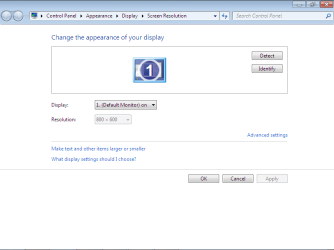
Resolution.png

I must add that my update installation was interrupted due to bad internet connection. Do you think that might have something to do with it.

If you have any suggestions it would be much appreciated. Please keep it in Laymans terms since I am not very computer savy:D

Thanks

Yala
 

My Computer

OS
Windows Starter 32 bit

My Computer

Computer type
PC/Desktop
Computer Manufacturer/Model Number
Dell XPS 420
OS
Windows 10, Home Clean Install
CPU
Intel Core2 processsor Q8200(2.33Ghz 1333FSB) Quad Core Tech
Motherboard
Dell
Memory
6 gb
Graphics Card(s)
ATI Radeon 256MB HD3650
Sound Card
Intergrated 7.1 Channel Audio
Monitor(s) Displays
Dell SP2009W 20"
Hard Drives
640 GB Serial ATA Hard drive
Cooling
Fan
Keyboard
Dell USB Keyboard
Mouse
Dell Premium Optical USB
Internet Speed
DSL 2.85
And when did you install the os?I mean maybe you haven't installed the driver or update or reinstall the driver.
 

My Computer

OS
windows 7
Thank you Rich. It worked perfect. I didn't even knew that function existed.

Cheers.
 

My Computer

OS
Windows Starter 32 bit
Thats wondeful, glad to be of help.
 

My Computer

Computer type
PC/Desktop
Computer Manufacturer/Model Number
Dell XPS 420
OS
Windows 10, Home Clean Install
CPU
Intel Core2 processsor Q8200(2.33Ghz 1333FSB) Quad Core Tech
Motherboard
Dell
Memory
6 gb
Graphics Card(s)
ATI Radeon 256MB HD3650
Sound Card
Intergrated 7.1 Channel Audio
Monitor(s) Displays
Dell SP2009W 20"
Hard Drives
640 GB Serial ATA Hard drive
Cooling
Fan
Keyboard
Dell USB Keyboard
Mouse
Dell Premium Optical USB
Internet Speed
DSL 2.85
Back
Top