JavaScript is disabled. For a better experience, please enable JavaScript in your browser before proceeding.
You are using an out of date browser. It may not display this or other websites correctly.
You should upgrade or use an
alternative browser .
cant change to 60 HZ, problem!
I have big problem, can't change to 60 Hz refresh rate
When i click 60 Hz, and click ok, its still 59 Hz..
I really have to do it, because of few games, any solution?
Computer Manufacturer/Model Number rtm OS 7 CPU e5200 Motherboard p43de 1.6 Memory Kingston 3x1 ddr2 667 Graphics Card(s) 4830 Sound Card audigy se Monitor(s) Displays dell 22 Screen Resolution native Hard Drives seagate ST00418AS PSU carbon 430w Case 6-years old Cooling stock Keyboard a4tech Mouse a4tech Internet Speed 2mb
Have you read the 50+ other threads on this? Please use the search feature. If you still have any issues, then post a reply to this thread.
Computer Manufacturer/Model Number Black_Box (homebuilt) OS windows 7 RTM x64 CPU Phenom II 965 Quad Core 3.4Ghz Motherboard Asus M4A79T Deluxe Memory Mushkin Blackline 8GB (4x2gb) Graphics Card(s) XFX Radeon 5970 Black Edition Sound Card onboard Monitor(s) Displays Dell 2408WPF-main Dell E248WFP-secondary Screen Resolution 1920x1200-main 1920x1200-secondary Hard Drives OCZ Vertex Limited Edition 100GB (OS) PSU XFX 850w Black Edition (Modular) Case Mountian Mods H2go Cooling CoolITSystems ECO A.L.C. Keyboard Logitech MX 5500 wireless keyboard Mouse Razor Copperhead Internet Speed 16Mb down/2Mb up Wowway Cable Internet
New member
Member
Thread Starter
Computer Manufacturer/Model Number rtm OS 7 CPU e5200 Motherboard p43de 1.6 Memory Kingston 3x1 ddr2 667 Graphics Card(s) 4830 Sound Card audigy se Monitor(s) Displays dell 22 Screen Resolution native Hard Drives seagate ST00418AS PSU carbon 430w Case 6-years old Cooling stock Keyboard a4tech Mouse a4tech Internet Speed 2mb
i didnt find solution for it, there are only nvidia users , i have same problem as him
http://www.sevenforums.com/427473-post291.html , so does someone solved it, its really ridiculous...............
IMO it makes zero difference what so ever. Windows 7 rounds the number down to 59hz Vista rounded up to 60Hz, it's that simple. Even the "so called" fixes for this make no difference at all.
You can of course use this tutorial to try and set the refresh rate to 60hz but it will probably just change back as soon as you restart and even if the setting holds it will make no difference at all. :sarc:
http://www.sevenforums.com/tutorials/33641-screen-refresh-rate-custom-nvidia-brand.html
Computer type PC/Desktop Computer Manufacturer/Model Number Home built OS Windows 7 Ult, Windows 8.1 Pro, CPU Q9650-4.275GHz, E8600 4.5GHz, E6750-3.8GHz Motherboard Evga 780i FTW Memory G.Skill PC2 9600 1200Mhz 5 5 5 15 2T Graphics Card(s) GTX480 Sound Card Asus Xonar D2 Monitor(s) Displays HannsG Screen Resolution 1680X1050 Hard Drives GSkill Phoenix Pro 120GB SSD PSU ThermalTake Toughpower 1000Watt modular Case ThermalTake XaserV Cooling Xigmatek S1283 Keyboard Logitech G15 Mouse Logitech G9 Internet Speed T1
New member
Member
Thread Starter
but i read that it must be 60 hz to be able to turn on vsync on Pro Evolution Soccer 2010.
Computer Manufacturer/Model Number rtm OS 7 CPU e5200 Motherboard p43de 1.6 Memory Kingston 3x1 ddr2 667 Graphics Card(s) 4830 Sound Card audigy se Monitor(s) Displays dell 22 Screen Resolution native Hard Drives seagate ST00418AS PSU carbon 430w Case 6-years old Cooling stock Keyboard a4tech Mouse a4tech Internet Speed 2mb
rynio, please fill out your System Specs, it really does help others to help you
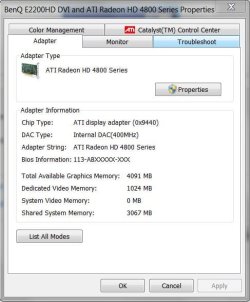
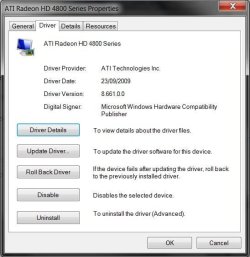
What driver version for the ATI 4800 series card do you have installed?
I'd suggest that you download the latest from
ATI Support site.
Capture.JPG
45.5 KB
· Views: 34
Capture1.JPG
46.2 KB
· Views: 20
OS XP Pro/Vista Ultimate (64)/Windows 7 Ultimate Signature Edition(64) CPU Core 2 Duo E8500 @ stock Motherboard Gigabyte EP45-UD3R Memory 8Gb (4 X 2Gb) Corsair Dominator 1066Mhz DDR2 Graphics Card(s) XFX ATI Radeon 4870 1Gb Sound Card Onboard 7.1 Monitor(s) Displays BenQ E2200Hd, Asus VW161D, HP L1506 Screen Resolution 1920 X 1080 Hard Drives Seagate 7200.12 500Gb PSU CoolerMaster 650 EPD Case Thermaltake Cooling 2 X Noctua 120mm's, Stock Intel Keyboard Logitech Mouse Logitech
New member
Member
Thread Starter
i have the latest ati drivers 9.11 and windows 7 rtm 7600, still don't know how to fix it..
Computer Manufacturer/Model Number rtm OS 7 CPU e5200 Motherboard p43de 1.6 Memory Kingston 3x1 ddr2 667 Graphics Card(s) 4830 Sound Card audigy se Monitor(s) Displays dell 22 Screen Resolution native Hard Drives seagate ST00418AS PSU carbon 430w Case 6-years old Cooling stock Keyboard a4tech Mouse a4tech Internet Speed 2mb
Not sure if there is any other way to fix this, but this is what I did, and it worked with Windows 7 64 bit and ATI 4870 running CCC 9.9
Click Start (Windows symbol)
type gpedit.msc into the search bar
navigate to: User Configuration, Administrative Templates, System, Driver Installation
Double click Code Signing For Device Drivers
Check the Enabled radio button
under Options, select Ignore in the drop down box
Reboot
Re-install CCC 9.11
I'm now running 9.10 with no problems
OS XP Pro/Vista Ultimate (64)/Windows 7 Ultimate Signature Edition(64) CPU Core 2 Duo E8500 @ stock Motherboard Gigabyte EP45-UD3R Memory 8Gb (4 X 2Gb) Corsair Dominator 1066Mhz DDR2 Graphics Card(s) XFX ATI Radeon 4870 1Gb Sound Card Onboard 7.1 Monitor(s) Displays BenQ E2200Hd, Asus VW161D, HP L1506 Screen Resolution 1920 X 1080 Hard Drives Seagate 7200.12 500Gb PSU CoolerMaster 650 EPD Case Thermaltake Cooling 2 X Noctua 120mm's, Stock Intel Keyboard Logitech Mouse Logitech
Old School
Guru
Gold Member
VIP
Do you have the driver for your monitor installed? That made a difference for mine.
Computer Manufacturer/Model Number DIY OS W7x64 Pro, SuSe 12.1/** W7 x64 Pro, XP MCE CPU Phenom II 1090T w/Noctua NH-D14 /**4400+ X2 w/CM Hyper TX 3 Motherboard ASRock 890FX Deluxe 4/**A8N-SLI Memory 2 x 2GB Patriot PGS34g1600LLKA/**4x1GB Corsair VS Graphics Card(s) EVGA GTX460 SC/**EVGA 8800GTS Sound Card Asus Xonar D2X/**Xonar D1 Monitor(s) Displays Acer X233H, Dell E152FPc /**LG M237-WD Screen Resolution 1920x1080 & 1024x768/**1980x1080 Hard Drives WDC 2TB, 1.5TB, 1TB, 500GB,Seagate 500GB , Maxtor 80GB /**500GB Seagate & WDC 1TB Black PSU CM RS600 w/ APC BX1000G/**Antec 500 TP w/ APC BX1000 Case HAF922/**Antec 1040IIB Cooling 3x200mm, 1x140 and 1x120mm/**5x80mm fans Keyboard Logitech Media USB/**Saitek Eclipse Mouse Cordless Trackman Wheel/**Ditto Internet Speed 3.3Mbps Other Info SB 560 5.1 w/ Sennheiser RS140/**Creative T20 speakers, Dvico FusionHDTV7 Gold RT, Cisco E3000, HP 5510V AIO, Linksys E3000, Belkin F5U237 hub and **F5D8055 adapter
New member
Member
Thread Starter
i have driver on my monitor.
Orpheous i ignored signing for device drivers while i had catalyst 9.11 and restart computer and reinstalled catalyst 9.11, and still same, no results.
Computer Manufacturer/Model Number rtm OS 7 CPU e5200 Motherboard p43de 1.6 Memory Kingston 3x1 ddr2 667 Graphics Card(s) 4830 Sound Card audigy se Monitor(s) Displays dell 22 Screen Resolution native Hard Drives seagate ST00418AS PSU carbon 430w Case 6-years old Cooling stock Keyboard a4tech Mouse a4tech Internet Speed 2mb
Sorry it didn't help, it worked for me
OS XP Pro/Vista Ultimate (64)/Windows 7 Ultimate Signature Edition(64) CPU Core 2 Duo E8500 @ stock Motherboard Gigabyte EP45-UD3R Memory 8Gb (4 X 2Gb) Corsair Dominator 1066Mhz DDR2 Graphics Card(s) XFX ATI Radeon 4870 1Gb Sound Card Onboard 7.1 Monitor(s) Displays BenQ E2200Hd, Asus VW161D, HP L1506 Screen Resolution 1920 X 1080 Hard Drives Seagate 7200.12 500Gb PSU CoolerMaster 650 EPD Case Thermaltake Cooling 2 X Noctua 120mm's, Stock Intel Keyboard Logitech Mouse Logitech
New member
Guru
Gold Member
VIP
Computer type PC/Desktop Computer Manufacturer/Model Number Custom built by me. OS Windows 10 Pro CPU Intel Core i7-4770K (3.5Ghz) Motherboard Gigabyte G1 Sniper 5 (F10 Bios) Memory 32 gig Corsair Dominator Platinum (4x8Gig) Graphics Card(s) Sapphire Tri-X R9 Fury Sound Card Soundblaster ZXR Monitor(s) Displays NEC PA242W 24" LCD Monitor Screen Resolution 1920 x 1200 Hard Drives Primary - Samsung 850 Pro (512gig), Samsung 840 Pro (256gig), 2TB WD Caviar Black. PSU EVGA Supernova 1000 G2 Case Cooler Master HAF X Cooling Corsair H100i with Corsair Air Series SP120 Quiet Fans Keyboard Logitech Wireless Wave Mouse Logitech Performance MX Internet Speed High Speed Cable Antivirus Norton Security Browser IE11 Other Info Memory Timings - 1866MHz @ 9-9-9-27-1T @ 1.5 volts
The ATI 9.12 driver package seems to have fixed the 59Hz on my system with a 5870 card. It now reads 60Hz and matches what is in the CCC.
Computer Manufacturer/Model Number Self built OS Windows 7 professional 64 bit CPU ATI 965 quad core Motherboard M4A79T Delux Memory 8 gigs of corsair dominator DDR3 Graphics Card(s) ATI 5870 Sound Card On board Monitor(s) Displays Samsung T260HD Hard Drives 2 each 300 gig sata velociraptors PSU Thermaltake 1000W Toughpower Case Antec 900 Cooling ATI standard cooler
New member
Guru
Gold Member
VIP
Well I just upgraded to the 9.12 drivers and checked to see if Windows was still showing 59Hz and it does, even though the drivers themselves read 60.
Not an issue here. I was just curious to see what these drivers did and wasn't surprised to see they had no effect.
Again, this is a Win 7 OS issue, especially since the video drivers themselves read the refresh rate of the monitor as 60Hz.
At any rate that's my two cents and i'm not stressing over the situation since I personally don't suffer any i'll effects in any apps or games.
Peace
Computer type PC/Desktop Computer Manufacturer/Model Number Custom built by me. OS Windows 10 Pro CPU Intel Core i7-4770K (3.5Ghz) Motherboard Gigabyte G1 Sniper 5 (F10 Bios) Memory 32 gig Corsair Dominator Platinum (4x8Gig) Graphics Card(s) Sapphire Tri-X R9 Fury Sound Card Soundblaster ZXR Monitor(s) Displays NEC PA242W 24" LCD Monitor Screen Resolution 1920 x 1200 Hard Drives Primary - Samsung 850 Pro (512gig), Samsung 840 Pro (256gig), 2TB WD Caviar Black. PSU EVGA Supernova 1000 G2 Case Cooler Master HAF X Cooling Corsair H100i with Corsair Air Series SP120 Quiet Fans Keyboard Logitech Wireless Wave Mouse Logitech Performance MX Internet Speed High Speed Cable Antivirus Norton Security Browser IE11 Other Info Memory Timings - 1866MHz @ 9-9-9-27-1T @ 1.5 volts
For NVDIA USER!
Go On Nvidia Panel
Then go Resolution
Set on 720p then change it to 60 hz
After creat a Custom Resolution
Make sure to put at the MAx possible resolution or the resolution of your Choice
Make Sure to Click Manual Unstead of Automatic Very Important !
Then Click to Apply it shoud work
Restart Or stay on Your Desktop and Enjoy ! Piece
Computer Manufacturer/Model Number I built myself OS Windows 7 Pro 64 bit English CPU Intel i 7 920, Nehalm 2.66 Ghz Cloacked at 3.0 Ghz Motherboard Asus Pt6 Deluxe v2 Memory OCZ Gold 12GB ddr3, PC3 12800 Graphics Card(s) EVGA nvidia GTX 280 Superclocked Sound Card Soundmax Integrated HD 7.1 Studio quality Monitor(s) Displays Samsung T240 HD 1080, 24 inch, 60 Hz, 4ms Hard Drives WD velocyraptor 10 000/rpm 150 g PSU Razer Mamba Mouse, Razer Lycosy Keyboard, Razer Megalondon Case Antec Twelve Hundred ATX Cooling Artic Cooling i7 Heatsink Fan