
Can't communicate with primary DNS

SkinyJim

New member
Local time
9:41 AM
Messages
25
Location
New Zealand
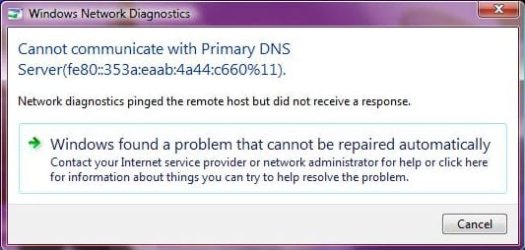
Hey guys. My girlfriend came to me with a computer problem. She can't use the wireless internet around home. I did some poking around and came up with the following information.

(see attatched jpeg)

and this from the command prompt

Wireless LAN adapter Wireless Network Connection:

Connection-specific DNS Suffix . : mshome.net
Description . . . . . . . . . . . : Intel(R) PRO/Wireless 3945ABG Network Con
nection
Physical Address. . . . . . . . . : 00-1C-BF-6C-D2-A5
DHCP Enabled. . . . . . . . . . . : Yes
Autoconfiguration Enabled . . . . : Yes
Link-local IPv6 Address . . . . . : fe80::dc0b:ee89:208d:25c7%11(Preferred)
Autoconfiguration IPv4 Address. . : 169.254.37.199(Preferred)
Subnet Mask . . . . . . . . . . . : 255.255.0.0
Default Gateway . . . . . . . . . :
DHCPv6 IAID . . . . . . . . . . . : 184556407
DHCPv6 Client DUID. . . . . . . . : 00-01-00-01-0F-6B-3D-06-00-1B-24-4C-AC-29

DNS Servers . . . . . . . . . . . : fe80::353a:eaab:4a44:c660%11
NetBIOS over Tcpip. . . . . . . . : Enabled
Connection-specific DNS Suffix Search List :
mshome.net

But considering I'm a networking retard, I have no idea what to do with this information. There is no communication to the internet or the router. Can anyone please help me out here?
 

Attachments
  • Internet Problem.jpg
    Internet Problem.jpg
    23.8 KB · Views: 22

My Computer

Computer Manufacturer/Model Number
Original HP M7199a, being refurbished
OS
Windows 7 Ultimate x64 Build 7600
CPU
Intel Pentium Dual Core E6500 (2.93Ghz)
Motherboard
Asus P5G41T-M LX
Memory
4GB Kingston DDR3 1333MHz
Graphics Card(s)
Onboard Intel something
Sound Card
-
Hard Drives
200Gb SATA
PSU
400W (stock)
Case
HP M7199a Chassis
Cooling
Stock
Keyboard
N/A
Mouse
Logitech MX 1000
Internet Speed
Slow
Hi SkinyJim, it looks to me like this machine is not picking up the Default Gateway for some reason. This can happen for a few reasons like bad driver or a router in need of a firmware update or something is blocking the gateway like an A/V software. You can try to enter the gateway manually in your ipv4 properties on the problem machine. You can get the gateway info from one of your other machines by doing an ipconfig at the command prompt or the routers set up page.
 

My Computer

Computer type
PC/Desktop
Computer Manufacturer/Model Number
Home built
OS
Windows 7 Ult, Windows 8.1 Pro,
CPU
Q9650-4.275GHz, E8600 4.5GHz, E6750-3.8GHz
Motherboard
Evga 780i FTW
Memory
G.Skill PC2 9600 1200Mhz 5 5 5 15 2T
Graphics Card(s)
GTX480
Sound Card
Asus Xonar D2
Monitor(s) Displays
HannsG
Screen Resolution
1680X1050
Hard Drives
GSkill Phoenix Pro 120GB SSD
PSU
ThermalTake Toughpower 1000Watt modular
Case
ThermalTake XaserV
Cooling
Xigmatek S1283
Keyboard
Logitech G15
Mouse
Logitech G9
Internet Speed
T1
Hey guys. My girlfriend came to me with a computer problem. She can't use the wireless internet around home. I did some poking around and came up with the following information.

(see attatched jpeg)

and this from the command prompt

Wireless LAN adapter Wireless Network Connection:

Connection-specific DNS Suffix . : mshome.net
Description . . . . . . . . . . . : Intel(R) PRO/Wireless 3945ABG Network Con
nection
Physical Address. . . . . . . . . : 00-1C-BF-6C-D2-A5
DHCP Enabled. . . . . . . . . . . : Yes
Autoconfiguration Enabled . . . . : Yes
Link-local IPv6 Address . . . . . : fe80::dc0b:ee89:208d:25c7%11(Preferred)
Autoconfiguration IPv4 Address. . : 169.254.37.199(Preferred)
Subnet Mask . . . . . . . . . . . : 255.255.0.0
Default Gateway . . . . . . . . . :
DHCPv6 IAID . . . . . . . . . . . : 184556407
DHCPv6 Client DUID. . . . . . . . : 00-01-00-01-0F-6B-3D-06-00-1B-24-4C-AC-29

DNS Servers . . . . . . . . . . . : fe80::353a:eaab:4a44:c660%11
NetBIOS over Tcpip. . . . . . . . : Enabled
Connection-specific DNS Suffix Search List :
mshome.net

But considering I'm a networking retard, I have no idea what to do with this information. There is no communication to the internet or the router. Can anyone please help me out here?


If this is a "vista" laptop try setting the IP to a fixed address and then see if that connects to the wifi. Might have something to do with the DHCP flags. There is a MS reg edit fix for this. If that is the prob.....Fixed IP working or not?
Here's the link if the Fixed IP works: http://support.microsoft.com/kb/928233
 
Last edited:

My Computer

OS
all windows and tiger
Back
Top