Can't connect to NAS

archiewood

New member
Local time
9:59 AM
Messages
6
Only been running 7100 for a few days, so I apologise in advance if I've missed something stupid (I've been through a couple of dozen related threads though).

My NAS and PC are on a wired network in the same workgroup, and I can ping the NAS from the PC and access its config page on a browser. If I try to access it from explorer or map it as a network drive I get "cannot access <name>...0x80004005 Unspecified Error." (I've looked up the error code but can't see any relevant results)

The result is the same whether I use the netbios name or the IP of the NAS. My network is set to home, I have media sharing turned on, I don't have the live ID assistant installed, and the result is the same with windows firewall on or off. Can anyone help please?
 
Last edited:

My Computer

Computer Manufacturer/Model Number
Toshiba Satellite M30
OS
Win7
CPU
1.7Ghz Pentium M
Memory
768
Graphics Card(s)
Radeon 9700 Mob
Sound Card
Realtek A97 onboard
Screen Resolution
1280x800
Hard Drives
60GB Samsung ATA-100
Internet Speed
20Mb/s
Only been running 7100 for a few days, so I apologise in advance if I've missed something stupid.

My NAS and PC are on a wired network in the same workgroup, and I can ping the NAS from the PC and access its config page on a browser. If I try to access it from explorer or map it as a network drive I get "cannot access <name>...0x80004005 Unspecified Error." (I've looked up the error code but can't see any relevant results)

The result is the same whether I use the netbios name or the IP of the NAS. My network is set to home, I have media sharing turned on, I don't have the live ID assistant installed, and the result is the same with windows firewall on or off. Can anyone help please?

When you say "My network is set to home" do you mean a homegroup network in win7 7100 ? Not a business work network? Is network discovery set to ON ?
Do you have any other computers on the network, if so what OS's

" Doc "
 

My Computer

Computer type
PC/Desktop
Computer Manufacturer/Model Number
Built them myself, Science Experiments !
OS
Win7 Enterprise, Win7 x86 (Ult 7600), Win7 x64 Ult 7600, TechNet RTM on AMD x64 (2.8Ghz)
CPU
AMD fx8350 4ghz, AMD-32 2400mhz, AMD-64 3200mhz, AMDx64 2.8G
Motherboard
SIS 755, ECS-K8M890M-M (Ult 7600), GigaByte & others
Memory
2gb, 4gb on the Ult 7600, 4gb on Technet RTM, 32gb on FX8350
Graphics Card(s)
Draw my own Graphics, several nVidia cards
Sound Card
on motherboard
Monitor(s) Displays
19" flat scr, 28" I-Inc widescr,22" Emprex Widescr, 23" Acer
Screen Resolution
1280 x 1024, 1440 x 900, 1920 x 1080
Hard Drives
6 pata Ide HD's & 2 Sata HD's
added 80gb external on Ult 7600 computer,
numerous extra 1tb, 2TB, 3Tb SATA HD's
A collection of ext HD Docks w/ HDs
PSU
430w, 550w, 600w, 700, 800, etc
Case
All Generic Full Towers
Cooling
Open Air & a few fans, some w/ colored LEDs
Keyboard
Compaq & Dell recycled from GoodWill
Mouse
Made in China Optical Wired Mouse
Internet Speed
Fast Cable InterNet
Antivirus
AVG Free on 24 different Desktops, NO Problems!
Browser
IE 8 is preferred, but use FireFox sometimes
Other Info
Linksys Routers, switches, & Hubs
Too Many USB Flash Drives to count, Biggest is 64GB !
Eight computers in my home network.
Sixteen computers at my business network.
Linked via TeamViewer !
Lots of old used spare computer parts everywhere!
When you say "My network is set to home" do you mean a homegroup network in win7 7100 ? Not a business work network? Is network discovery set to ON ?
Do you have any other computers on the network, if so what OS's

" Doc "
I mean the network is set as a home rather than public/business network. I removed the homegroup.

There is an XP machine on the network, but I can't see that either. FWIW, my PC and the NAS are wired, using a wireless router as a switch, but the XP machine is wireless.

I thought network discovery was on but no; I've turned it on and the NAS now appears, but I still can't access it. Now the error is 'the network path was not found'.
 

My Computer

Computer Manufacturer/Model Number
Toshiba Satellite M30
OS
Win7
CPU
1.7Ghz Pentium M
Memory
768
Graphics Card(s)
Radeon 9700 Mob
Sound Card
Realtek A97 onboard
Screen Resolution
1280x800
Hard Drives
60GB Samsung ATA-100
Internet Speed
20Mb/s
That's a start. I have not connected to a NAS, yet. So I will learn something here. I'm glad you removed the homegroup as it only plays well with other win7 boxes.

Do you have some folders set on the XP machine as shared ?

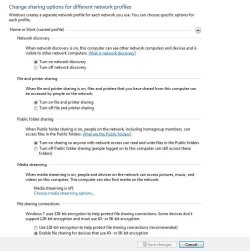
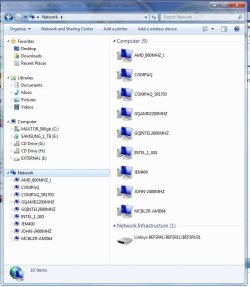
Here is a snip of my wired net options on my win7 box.
 

Attachments

  • network_options.JPG
    network_options.JPG
    73.4 KB · Views: 242
  • NetWork_Computers.JPG
    NetWork_Computers.JPG
    67 KB · Views: 169

My Computer

Computer type
PC/Desktop
Computer Manufacturer/Model Number
Built them myself, Science Experiments !
OS
Win7 Enterprise, Win7 x86 (Ult 7600), Win7 x64 Ult 7600, TechNet RTM on AMD x64 (2.8Ghz)
CPU
AMD fx8350 4ghz, AMD-32 2400mhz, AMD-64 3200mhz, AMDx64 2.8G
Motherboard
SIS 755, ECS-K8M890M-M (Ult 7600), GigaByte & others
Memory
2gb, 4gb on the Ult 7600, 4gb on Technet RTM, 32gb on FX8350
Graphics Card(s)
Draw my own Graphics, several nVidia cards
Sound Card
on motherboard
Monitor(s) Displays
19" flat scr, 28" I-Inc widescr,22" Emprex Widescr, 23" Acer
Screen Resolution
1280 x 1024, 1440 x 900, 1920 x 1080
Hard Drives
6 pata Ide HD's & 2 Sata HD's
added 80gb external on Ult 7600 computer,
numerous extra 1tb, 2TB, 3Tb SATA HD's
A collection of ext HD Docks w/ HDs
PSU
430w, 550w, 600w, 700, 800, etc
Case
All Generic Full Towers
Cooling
Open Air & a few fans, some w/ colored LEDs
Keyboard
Compaq & Dell recycled from GoodWill
Mouse
Made in China Optical Wired Mouse
Internet Speed
Fast Cable InterNet
Antivirus
AVG Free on 24 different Desktops, NO Problems!
Browser
IE 8 is preferred, but use FireFox sometimes
Other Info
Linksys Routers, switches, & Hubs
Too Many USB Flash Drives to count, Biggest is 64GB !
Eight computers in my home network.
Sixteen computers at my business network.
Linked via TeamViewer !
Lots of old used spare computer parts everywhere!
That's a start. I have not connected to a NAS, yet. So I will learn something here. I'm glad you removed the homegroup as it only plays well with other win7 boxes.

Do you have some folders set on the XP machine as shared ?

Here is a snip of my wired net options on my win7 box.

OK, I mirrored your options on my machine, and it still doesn't work. However, there's an odd part: every time I open the adv. sharing settings, 'turn off network discovery' is ALWAYS selected. I turn it on, save it, close the window, open sharing settings again, and 'turn off network discovery' is selected. Is there some policy that would affect this?

To answer the other question, yes there's a shared folder on the XP machine, and the XP machine is visible to my PC but is inaccessible in the same way as the NAS is. The XP machine can access the NAS.
 

My Computer

Computer Manufacturer/Model Number
Toshiba Satellite M30
OS
Win7
CPU
1.7Ghz Pentium M
Memory
768
Graphics Card(s)
Radeon 9700 Mob
Sound Card
Realtek A97 onboard
Screen Resolution
1280x800
Hard Drives
60GB Samsung ATA-100
Internet Speed
20Mb/s
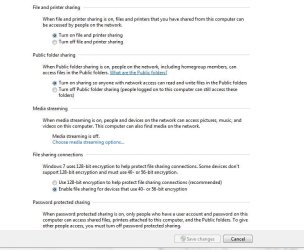
Just realized the snip did not get the bottom 2 items in advanced sharing :o

Not sure if those 2 will make that big of a difference ?
 

Attachments

  • Network_Options2.JPG
    Network_Options2.JPG
    60.1 KB · Views: 187

My Computer

Computer type
PC/Desktop
Computer Manufacturer/Model Number
Built them myself, Science Experiments !
OS
Win7 Enterprise, Win7 x86 (Ult 7600), Win7 x64 Ult 7600, TechNet RTM on AMD x64 (2.8Ghz)
CPU
AMD fx8350 4ghz, AMD-32 2400mhz, AMD-64 3200mhz, AMDx64 2.8G
Motherboard
SIS 755, ECS-K8M890M-M (Ult 7600), GigaByte & others
Memory
2gb, 4gb on the Ult 7600, 4gb on Technet RTM, 32gb on FX8350
Graphics Card(s)
Draw my own Graphics, several nVidia cards
Sound Card
on motherboard
Monitor(s) Displays
19" flat scr, 28" I-Inc widescr,22" Emprex Widescr, 23" Acer
Screen Resolution
1280 x 1024, 1440 x 900, 1920 x 1080
Hard Drives
6 pata Ide HD's & 2 Sata HD's
added 80gb external on Ult 7600 computer,
numerous extra 1tb, 2TB, 3Tb SATA HD's
A collection of ext HD Docks w/ HDs
PSU
430w, 550w, 600w, 700, 800, etc
Case
All Generic Full Towers
Cooling
Open Air & a few fans, some w/ colored LEDs
Keyboard
Compaq & Dell recycled from GoodWill
Mouse
Made in China Optical Wired Mouse
Internet Speed
Fast Cable InterNet
Antivirus
AVG Free on 24 different Desktops, NO Problems!
Browser
IE 8 is preferred, but use FireFox sometimes
Other Info
Linksys Routers, switches, & Hubs
Too Many USB Flash Drives to count, Biggest is 64GB !
Eight computers in my home network.
Sixteen computers at my business network.
Linked via TeamViewer !
Lots of old used spare computer parts everywhere!
Save changes at bottom
 

Attachments

  • Save_Changes.JPG
    Save_Changes.JPG
    10.8 KB · Views: 16

My Computer

Computer type
PC/Desktop
Computer Manufacturer/Model Number
Built them myself, Science Experiments !
OS
Win7 Enterprise, Win7 x86 (Ult 7600), Win7 x64 Ult 7600, TechNet RTM on AMD x64 (2.8Ghz)
CPU
AMD fx8350 4ghz, AMD-32 2400mhz, AMD-64 3200mhz, AMDx64 2.8G
Motherboard
SIS 755, ECS-K8M890M-M (Ult 7600), GigaByte & others
Memory
2gb, 4gb on the Ult 7600, 4gb on Technet RTM, 32gb on FX8350
Graphics Card(s)
Draw my own Graphics, several nVidia cards
Sound Card
on motherboard
Monitor(s) Displays
19" flat scr, 28" I-Inc widescr,22" Emprex Widescr, 23" Acer
Screen Resolution
1280 x 1024, 1440 x 900, 1920 x 1080
Hard Drives
6 pata Ide HD's & 2 Sata HD's
added 80gb external on Ult 7600 computer,
numerous extra 1tb, 2TB, 3Tb SATA HD's
A collection of ext HD Docks w/ HDs
PSU
430w, 550w, 600w, 700, 800, etc
Case
All Generic Full Towers
Cooling
Open Air & a few fans, some w/ colored LEDs
Keyboard
Compaq & Dell recycled from GoodWill
Mouse
Made in China Optical Wired Mouse
Internet Speed
Fast Cable InterNet
Antivirus
AVG Free on 24 different Desktops, NO Problems!
Browser
IE 8 is preferred, but use FireFox sometimes
Other Info
Linksys Routers, switches, & Hubs
Too Many USB Flash Drives to count, Biggest is 64GB !
Eight computers in my home network.
Sixteen computers at my business network.
Linked via TeamViewer !
Lots of old used spare computer parts everywhere!
They're both the same as mine, anyway. Just to be sure I restarted, and the network discovery setting is still resetting itself.
 

My Computer

Computer Manufacturer/Model Number
Toshiba Satellite M30
OS
Win7
CPU
1.7Ghz Pentium M
Memory
768
Graphics Card(s)
Radeon 9700 Mob
Sound Card
Realtek A97 onboard
Screen Resolution
1280x800
Hard Drives
60GB Samsung ATA-100
Internet Speed
20Mb/s
It's getting late night here. I need to go to bed. I will check this thread in the morning to see if anybody else joined in to give their opinion.
Please try to add your specs & any helpful aditional info.

" Doc "
 

Attachments

  • MySystemSpecs.JPG
    MySystemSpecs.JPG
    10.2 KB · Views: 1,684
  • User_Control_Panel_Arrow.JPG
    User_Control_Panel_Arrow.JPG
    12.3 KB · Views: 1,683

My Computer

Computer type
PC/Desktop
Computer Manufacturer/Model Number
Built them myself, Science Experiments !
OS
Win7 Enterprise, Win7 x86 (Ult 7600), Win7 x64 Ult 7600, TechNet RTM on AMD x64 (2.8Ghz)
CPU
AMD fx8350 4ghz, AMD-32 2400mhz, AMD-64 3200mhz, AMDx64 2.8G
Motherboard
SIS 755, ECS-K8M890M-M (Ult 7600), GigaByte & others
Memory
2gb, 4gb on the Ult 7600, 4gb on Technet RTM, 32gb on FX8350
Graphics Card(s)
Draw my own Graphics, several nVidia cards
Sound Card
on motherboard
Monitor(s) Displays
19" flat scr, 28" I-Inc widescr,22" Emprex Widescr, 23" Acer
Screen Resolution
1280 x 1024, 1440 x 900, 1920 x 1080
Hard Drives
6 pata Ide HD's & 2 Sata HD's
added 80gb external on Ult 7600 computer,
numerous extra 1tb, 2TB, 3Tb SATA HD's
A collection of ext HD Docks w/ HDs
PSU
430w, 550w, 600w, 700, 800, etc
Case
All Generic Full Towers
Cooling
Open Air & a few fans, some w/ colored LEDs
Keyboard
Compaq & Dell recycled from GoodWill
Mouse
Made in China Optical Wired Mouse
Internet Speed
Fast Cable InterNet
Antivirus
AVG Free on 24 different Desktops, NO Problems!
Browser
IE 8 is preferred, but use FireFox sometimes
Other Info
Linksys Routers, switches, & Hubs
Too Many USB Flash Drives to count, Biggest is 64GB !
Eight computers in my home network.
Sixteen computers at my business network.
Linked via TeamViewer !
Lots of old used spare computer parts everywhere!
I added my specs, but I can't think of anything else that might be relevant.
 

My Computer

Computer Manufacturer/Model Number
Toshiba Satellite M30
OS
Win7
CPU
1.7Ghz Pentium M
Memory
768
Graphics Card(s)
Radeon 9700 Mob
Sound Card
Realtek A97 onboard
Screen Resolution
1280x800
Hard Drives
60GB Samsung ATA-100
Internet Speed
20Mb/s
I've got a little more info now. I've been corresponding with Freecom support for a few days but they don't support win7 officially yet, so we're not really getting anywhere.

Interesting thing though - I am able to access the root of the drive and map network drives to it if I use wireless (I'm on a laptop), but not if I use cable. I've tried rebooting with wireless turned off and a cable connected but I can't do anything with the drive (except see it under 'network' in wexplorer), or with the network drives I mapped to it when I was using wireless (it gives a permissions error).

Freecom also suggested I try mapping drives to it using different credentials, trying my windows login details and those for the drive's web interface (can't think why that would work), but that didn't work either.

This is really annoying - 54Mbps access is just not fast enough, and I don't understand why the NIC I use makes any difference.
 

My Computer

Computer Manufacturer/Model Number
Toshiba Satellite M30
OS
Win7
CPU
1.7Ghz Pentium M
Memory
768
Graphics Card(s)
Radeon 9700 Mob
Sound Card
Realtek A97 onboard
Screen Resolution
1280x800
Hard Drives
60GB Samsung ATA-100
Internet Speed
20Mb/s
Most NASes are stripped-out *NIX boxes running some variant of samba, and samba is an imperfect beast. However, the fact that you seem to get better results through wireless is intriguing.

The way to troubleshoot these sorts of network interoperability problems is with a packet sniffer. If you haven't used one before, think of it as a tape recorder for the network. You press "record", reproduce the failure, press "stop", and then analyse the recording at your leisure to understand what's going on. If you can generate such a capture ("recording") and upload it here, I or someone else might be able to help.

Suggested procedure:
1) Download and install Wireshark (www.wireshark.com) on the affected machine.
2) Start a capture on the wireless interface (3rd or 4th button from the left on the toolbar from memory).
3) Initiate a (successful?) connection attempt.
4) Stop, save, zip, and upload the successful capture file, which we're going to compare to...

5) Deactivate the wifi interface if you have to. (in order to force usage of the wired one)
6) Start another wireshark capture, this time on the wired network interface.
7) Repro the failure to connect.
8) Stop, save, zip, and upload the "failed" capture file.


==============================
EDIT: I just read the thread in more detail and noticed that you reported the same issue when trying to connect to shares on the XP machine. In that case, it'll be even better if you go through the procedure above while connecting from Win7 to XP - leaves out the additional samba variables.
 

My Computer

Computer Manufacturer/Model Number
Multiple machines in various stages of decomposition.
OS
Win7x64
Back
Top