Can't Connect to the Internet

cbeth

New member
Local time
4:30 AM
Messages
8
Please forgive me, I'm really not very computer-savvy, so I may ask dumb questions.

Here's the situation: About a week ago, I was suddenly unable to connect to our wireless Internet from my laptop. Our desktop is still connected (I believe it is physically connected, not wireless) as is my brother's wireless laptop, but not my iPod Touch. However, my laptop CAN connect to the neighbor's unsecured router and my iPod can connect on my college campus. Because of this, I have no idea if it's the computer or the Internet.

I've tried resetting the modem and router (unplugging, waiting, and replugging) but that did nothing. My brother typically handles computer issues, but he doesn't want to be bothered and refuses to look into it. I'm going absolutely insane! The signal is strong, it just won't connect.

I'd be incredibly grateful for any advice!!
 

My Computer My Computer

OS
Windows 7 64-bit
What security measures are employed with your wireless?
 

My Computer My Computer

Computer Manufacturer/Model Number
Pugh Technologies
OS
W7 Professional x64
CPU
AMD Athlon II X3 445 Rana 3.10 GHz
Motherboard
MSI 870A-G54
Memory
PNY XLR DDR3 1600 4x2GB
Graphics Card(s)
NVIDIA GeForce GTS 450 (fermi) 1GB GDDR5
Sound Card
Realtek ALC892 onboard
Monitor(s) Displays
ASUS VE205t, Viewsonic VX2035WM
Screen Resolution
1600x900, 1600x1050
Hard Drives
977GB Hitachi Hitachi HDS721010CLA332
244GB Western Digital WDC WD2500AAJS-65B4A0
488GB Western Digital WDC WD5000AAJS-00A8B0
488GB Western Digital WDC WD5000AAKS-00UU3A0
PSU
Antec EarthWatts EA650 650W
Case
ThermalTake Armor A90 Mid Tower
Cooling
3x 120mm in, 1x 120mm & 200mm out, self built hydro-cooler
Keyboard
Logitec 55
Mouse
Razer Deathadder
Internet Speed
20 Mbps D/L, 9 Mbps U/L
I believe it is WPA2-PSK, if that makes sense.
 

My Computer My Computer

OS
Windows 7 64-bit
Hi cbeth, welcome to the forums :)

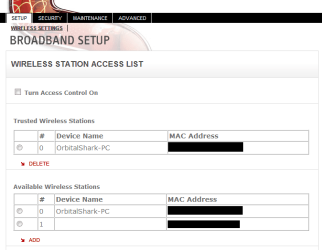
Can you access the router home-page from another computer? You need to look into the Wireless Access settings to make sure that your MAC address hasn't been accidentally locked out.

Access List.PNG

Make sure that there's no tick on the 'Use access control' and that your machine is not in the top bottom list.

   Note
To access your router home-page just open up your internet browser and type 192.168.0.1 (typical address). If not, you will have to read your router documentation for access to the home-page.


OS
 

My Computer My Computer

Computer Manufacturer/Model Number
Compaq Desktop
OS
Windows 7 Ultimate x64
CPU
AMD Sempron Dual Core
Memory
3GB
Graphics Card(s)
NVIDIA GeForce 6150SE nForce 430
Screen Resolution
1024x768
Hard Drives
150GB Sata
I put in 192.168.0.1 and it Authentication Required and asks for a user name and password. Is that normal? I'll have to wait and speak with my brother about either A) getting the user name and password or B) getting the correct address.
 

My Computer My Computer

OS
Windows 7 64-bit
That's the correct result. May I ask who your ISP is?
 

My Computer My Computer

Computer Manufacturer/Model Number
Compaq Desktop
OS
Windows 7 Ultimate x64
CPU
AMD Sempron Dual Core
Memory
3GB
Graphics Card(s)
NVIDIA GeForce 6150SE nForce 430
Screen Resolution
1024x768
Hard Drives
150GB Sata
That would be my cable company, correct? (Sorry, like I said, I don't know much about this sort of thing)

It's Wide Open West
 

My Computer My Computer

OS
Windows 7 64-bit
do you know the make & model of the router? I may be able to help you access the home-page :)
 

My Computer My Computer

Computer Manufacturer/Model Number
Compaq Desktop
OS
Windows 7 Ultimate x64
CPU
AMD Sempron Dual Core
Memory
3GB
Graphics Card(s)
NVIDIA GeForce 6150SE nForce 430
Screen Resolution
1024x768
Hard Drives
150GB Sata
I believe it is Linksys Model WRT54G-TM
 

My Computer My Computer

OS
Windows 7 64-bit
Try leaving the Username blank, and 'Admin' as the password...
 

My Computer My Computer

Computer Manufacturer/Model Number
Compaq Desktop
OS
Windows 7 Ultimate x64
CPU
AMD Sempron Dual Core
Memory
3GB
Graphics Card(s)
NVIDIA GeForce 6150SE nForce 430
Screen Resolution
1024x768
Hard Drives
150GB Sata
Thanks, that got me in!

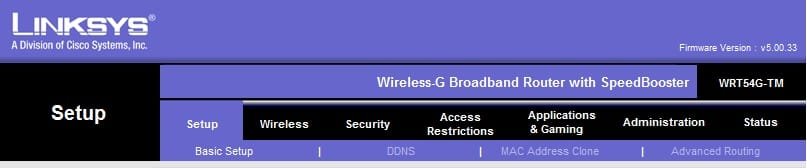
I'm not sure where I should be looking. Here's what the menu at the top of the screen looks like.
 

Attachments

  • Untitled1.jpg
    Untitled1.jpg
    16.5 KB · Views: 4

My Computer My Computer

OS
Windows 7 64-bit
Have a look under 'Access Restrictions'
 

My Computer My Computer

Computer Manufacturer/Model Number
Compaq Desktop
OS
Windows 7 Ultimate x64
CPU
AMD Sempron Dual Core
Memory
3GB
Graphics Card(s)
NVIDIA GeForce 6150SE nForce 430
Screen Resolution
1024x768
Hard Drives
150GB Sata
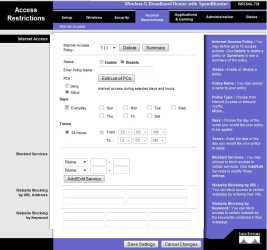
Ok, here's what I have.

Do I want to change the status to Enable?
 

Attachments

  • Untitled2.jpg
    Untitled2.jpg
    69.6 KB · Views: 3

My Computer My Computer

OS
Windows 7 64-bit
The status is 'Disabled' which is a good thing, no need to have that page open anymore.

Next, try deleting the Network from your Laptop with the issue. Open the 'Network and Sharing Center' and click 'Manage Wireless Networks' then click on the Network you're trying to connect to, then click 'Remove'.

Now you will be able to retry connecting to the network and all credentials (on the laptop side) will be reset.
   Note
Don't worry nothing within the router will be affected


OS
 

My Computer My Computer

Computer Manufacturer/Model Number
Compaq Desktop
OS
Windows 7 Ultimate x64
CPU
AMD Sempron Dual Core
Memory
3GB
Graphics Card(s)
NVIDIA GeForce 6150SE nForce 430
Screen Resolution
1024x768
Hard Drives
150GB Sata
That seems to have done the trick!

Thanks so much, Orbital Shark!!
 

My Computer My Computer

OS
Windows 7 64-bit
That seems to have done the trick!

Thanks so much, Orbital Shark!!

Excellent :D

Keep us posted if you get any more issues and please enjoy the rest of the forums :)
 

My Computer My Computer

Computer Manufacturer/Model Number
Compaq Desktop
OS
Windows 7 Ultimate x64
CPU
AMD Sempron Dual Core
Memory
3GB
Graphics Card(s)
NVIDIA GeForce 6150SE nForce 430
Screen Resolution
1024x768
Hard Drives
150GB Sata
Psh. I go to bed and you sneak in and solve the issue? :P ;)

Nice work, OS. Glad everything is working now :)
 

My Computer My Computer

Computer Manufacturer/Model Number
Pugh Technologies
OS
W7 Professional x64
CPU
AMD Athlon II X3 445 Rana 3.10 GHz
Motherboard
MSI 870A-G54
Memory
PNY XLR DDR3 1600 4x2GB
Graphics Card(s)
NVIDIA GeForce GTS 450 (fermi) 1GB GDDR5
Sound Card
Realtek ALC892 onboard
Monitor(s) Displays
ASUS VE205t, Viewsonic VX2035WM
Screen Resolution
1600x900, 1600x1050
Hard Drives
977GB Hitachi Hitachi HDS721010CLA332
244GB Western Digital WDC WD2500AAJS-65B4A0
488GB Western Digital WDC WD5000AAJS-00A8B0
488GB Western Digital WDC WD5000AAKS-00UU3A0
PSU
Antec EarthWatts EA650 650W
Case
ThermalTake Armor A90 Mid Tower
Cooling
3x 120mm in, 1x 120mm & 200mm out, self built hydro-cooler
Keyboard
Logitec 55
Mouse
Razer Deathadder
Internet Speed
20 Mbps D/L, 9 Mbps U/L
:roflmao: Cheers Patrick :)
 

My Computer My Computer

Computer Manufacturer/Model Number
Compaq Desktop
OS
Windows 7 Ultimate x64
CPU
AMD Sempron Dual Core
Memory
3GB
Graphics Card(s)
NVIDIA GeForce 6150SE nForce 430
Screen Resolution
1024x768
Hard Drives
150GB Sata
Back
Top