
Solved Cant connect vista pc and Win7 pc to internet via switch

LexiLeigh

New member
Local time
7:48 PM
Messages
5
Im having a serious problem over here. I have been at this for 3 days to no avail. I'll try to cover this as thouroughly as possible.

I just moved in with my parents again and, I brought my PC. I built it myself so there is no manufacturer. I have been trying to connect my mother's office pc and my gaming pc to the internet. I was using a linksys switch but for some reason I cant get internet on both pcs at the same time. It is always one or the other, No matter how many configurations Ive tried for the plugs, no matter how many times I've reset everything.

My pc is vista (don't say anythingm I know. I haven't had the money to upgrade). Mom's is Win7 Professional 64bit. On my moms network map, it sees my pc, the switch, the modem, and a weird unknown. Ive tried so many things I cant even remember them all to list them, but they are all beginner level solutions. I even bought a new router, a netgear 5 port 1/100m.

If I plug my pc in and reset the modemm I get internet but mom wont. Mom only gets internet when shes plugged in alone then reset.

It's such a strange problem, and I'm at my wits end, Any suggestions?

The current details on my profile and attached are of my mom's pc. Heather.

Oh and I forgot to mention I have cable internet via Charter.
 

Attachments
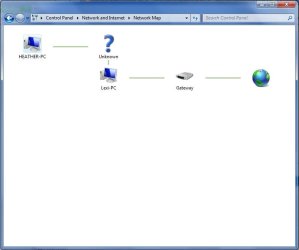
  • Untitled.jpg
    Untitled.jpg
    23.4 KB · Views: 14
  • DxDiag.txt
    DxDiag.txt
    23.2 KB · Views: 12
Last edited:

My Computer My Computer

At a glance

Windows 7 Professional 64bitIntel Core2 Quad CPU Q8200 @2.33GHz4gb
Computer Manufacturer/Model Number
Dell
OS
Windows 7 Professional 64bit
CPU
Intel Core2 Quad CPU Q8200 @2.33GHz
Memory
4gb
What type of internet connection from your ISP do you have....cable, DSL, ADSL? What type of hardware setup do you have...ie...modem to router to switch? Are you using the right cables to make connections....although I hear that the new modems and routers can tell the difference and set accordingly.
 

My Computer My Computer

At a glance

Windows 7 Ultimate 64 bitAMD Phenom II X4 965 Black EditionGSkill 4 X 2 GB PC 8500XFX Radeon HD 6790 D
Computer Manufacturer/Model Number
Custom built
OS
Windows 7 Ultimate 64 bit
CPU
AMD Phenom II X4 965 Black Edition
Motherboard
Gigabyte GA-MA790X-DS4
Memory
GSkill 4 X 2 GB PC 8500
Graphics Card(s)
XFX Radeon HD 6790 D
Sound Card
On board RealTek HD
Monitor(s) Displays
Dual monitors:Samsung SyncMaster S20B300
Screen Resolution
1600 X 900
Hard Drives
Seagate Barracuda 1TB (primary)
Seagate Barracuda 2 X 320 GB
PSU
Ultra X4 750 watt fully modular
Case
Thermaltake Overseer RX 1 full tower
Cooling
Core-Contact 92 mm CPU Cooler
Keyboard
Logitech G510
Mouse
Razor DeathAdder
Internet Speed
50/5 Mbps UL/DL
Other Info
Optical: Super Muliti DVD burner w/lightscribe, Hauppauge WinTV HVR-1800
I edited my post already. I noticed I left that out. I'm using cable via charter. I'm connecting from a motorolla modem to a netgear switch, then from that to the 2 pcs and a gaming console. I'm pretty sure I'm using the right cables. They all worked before. I cant remember their exact version.
 

My Computer My Computer

At a glance

Windows 7 Professional 64bitIntel Core2 Quad CPU Q8200 @2.33GHz4gb
Computer Manufacturer/Model Number
Dell
OS
Windows 7 Professional 64bit
CPU
Intel Core2 Quad CPU Q8200 @2.33GHz
Memory
4gb
Anyone? I really appreciate any suggestions. Mom works online and I cant do anything in the house if we can't get my pc online at the same time.
 

My Computer My Computer

At a glance

Windows 7 Professional 64bitIntel Core2 Quad CPU Q8200 @2.33GHz4gb
Computer Manufacturer/Model Number
Dell
OS
Windows 7 Professional 64bit
CPU
Intel Core2 Quad CPU Q8200 @2.33GHz
Memory
4gb
You need a Router, not a Switch. Your ISP will only give you one IP address unless you pay extra for the 2nd PC. A router will give each PC its own IP address on a private network (yours) and the router will use the IP address from your ISP. What is the model of the Netgear Switch?

Jim :geek:
 

My Computer My Computer

At a glance

Windows 8.1 Pro w/Media Center 64bit, Windows...Phenom II X6 1100TCrucial Balistic 8gb DDR3-1866 CL9MSI R6850 Cyclone IGD5 PE
Computer type
PC/Desktop
Computer Manufacturer/Model Number
Home Built
OS
Windows 8.1 Pro w/Media Center 64bit, Windows 7 HP 64bit
CPU
Phenom II X6 1100T
Motherboard
ASUS M5A99X EVO
Memory
Crucial Balistic 8gb DDR3-1866 CL9
Graphics Card(s)
MSI R6850 Cyclone IGD5 PE
Sound Card
On Board
Monitor(s) Displays
ASUS VE258Q 25" LED with DVI-HDMI-DisplayPort
Screen Resolution
1920 x 1080
Hard Drives
Two WD Cavier Black 2TB Sata III, WD My Book Essential 2TB USB 3.0
PSU
Seasonic X650 80 Plus GOLD Modular
Case
Corsair 400R
Cooling
Antec Kuhler H2O 620, Two 120mm and four 140mm
Keyboard
Logitech K120
Mouse
Logitech Marble Mouse USB, Logitech Precision Game Pad
Internet Speed
15MB
Antivirus
Norton IS 2013, Malwarebytes Pro Beta 2
Browser
IE-11, FF-27
Other Info
APC UPS ES 750, Netgear WNR3500L Gigabit & Wireless N Router with SamKnows Test Program, Motorola SB6120 Gigabit Cable Modem. Brother HL-2170W Laser Printer, Epson V300 Scanner
You need a Router, not a Switch. Your ISP will only give you one IP address unless you pay extra for the 2nd PC. A router will give each PC its own IP address on a private network (yours) and the router will use the IP address from your ISP. What is the model of the Netgear Switch?

Jim :geek:

Hmmm. Thst's interesting. Okay. It's a Netgear 5-Port 10/100 Fast Ethernet Switch FS605.

I dont really have much money. :( Any suggestions of a router equal to or under 30 dollars?

Thanks for your response. :)
 

My Computer My Computer

At a glance

Windows 7 Professional 64bitIntel Core2 Quad CPU Q8200 @2.33GHz4gb
Computer Manufacturer/Model Number
Dell
OS
Windows 7 Professional 64bit
CPU
Intel Core2 Quad CPU Q8200 @2.33GHz
Memory
4gb

My Computer My Computer

At a glance

Windows 8.1 Pro w/Media Center 64bit, Windows...Phenom II X6 1100TCrucial Balistic 8gb DDR3-1866 CL9MSI R6850 Cyclone IGD5 PE
Computer type
PC/Desktop
Computer Manufacturer/Model Number
Home Built
OS
Windows 8.1 Pro w/Media Center 64bit, Windows 7 HP 64bit
CPU
Phenom II X6 1100T
Motherboard
ASUS M5A99X EVO
Memory
Crucial Balistic 8gb DDR3-1866 CL9
Graphics Card(s)
MSI R6850 Cyclone IGD5 PE
Sound Card
On Board
Monitor(s) Displays
ASUS VE258Q 25" LED with DVI-HDMI-DisplayPort
Screen Resolution
1920 x 1080
Hard Drives
Two WD Cavier Black 2TB Sata III, WD My Book Essential 2TB USB 3.0
PSU
Seasonic X650 80 Plus GOLD Modular
Case
Corsair 400R
Cooling
Antec Kuhler H2O 620, Two 120mm and four 140mm
Keyboard
Logitech K120
Mouse
Logitech Marble Mouse USB, Logitech Precision Game Pad
Internet Speed
15MB
Antivirus
Norton IS 2013, Malwarebytes Pro Beta 2
Browser
IE-11, FF-27
Other Info
APC UPS ES 750, Netgear WNR3500L Gigabit & Wireless N Router with SamKnows Test Program, Motorola SB6120 Gigabit Cable Modem. Brother HL-2170W Laser Printer, Epson V300 Scanner
Thanks! :)
 

My Computer My Computer

At a glance

Windows 7 Professional 64bitIntel Core2 Quad CPU Q8200 @2.33GHz4gb
Computer Manufacturer/Model Number
Dell
OS
Windows 7 Professional 64bit
CPU
Intel Core2 Quad CPU Q8200 @2.33GHz
Memory
4gb
So true, no router = no DHCP so no IP's will be assigned to the other computers without a router. Modem>router>switch.
 

My Computer My Computer

At a glance

Windows 7 Ult, Windows 8.1 Pro,Q9650-4.275GHz, E8600 4.5GHz, E6750-3.8GHzG.Skill PC2 9600 1200Mhz 5 5 5 15 2TGTX480
Computer type
PC/Desktop
Computer Manufacturer/Model Number
Home built
OS
Windows 7 Ult, Windows 8.1 Pro,
CPU
Q9650-4.275GHz, E8600 4.5GHz, E6750-3.8GHz
Motherboard
Evga 780i FTW
Memory
G.Skill PC2 9600 1200Mhz 5 5 5 15 2T
Graphics Card(s)
GTX480
Sound Card
Asus Xonar D2
Monitor(s) Displays
HannsG
Screen Resolution
1680X1050
Hard Drives
GSkill Phoenix Pro 120GB SSD
PSU
ThermalTake Toughpower 1000Watt modular
Case
ThermalTake XaserV
Cooling
Xigmatek S1283
Keyboard
Logitech G15
Mouse
Logitech G9
Internet Speed
T1
Back
Top