cant connect windows 7 pro to sbs 2003 server - error code 0x0000232B

mffk

New member
Local time
9:52 PM
Messages
6
I have not a great deal of network experience and am trying to connect a workstation with windows 7 pro to sbs 2003 server at my workplace. I have connected workstations with XP pro with no problem by changing membership of the computer name from workgroup to Domain.

Windows 7 Pro will not allow the change from workgoup to domain. I have tried setting IP Address both using Obtain IP Address automatically, and also setting them manually in network properties. This works for XP Pro using IP addresses for gateway and server from ipconfig /all. I have tried setting IP Addresses in 7 Pro but it does not work.

Error message is as follows:

The following error occurred when DNS was queried for the service location (SRV) resource record used to locate an Active Directory Domain Controller (AD DC) for domain "MIRACLEFLIGHTSFORKIDS.local":
The error was: "DNS name does not exist."
(error code 0x0000232B RCODE_NAME_ERROR)
The query was for the SRV record for _ldap._tcp.dc._msdcs.MIRACLEFLIGHTSFORKIDS.local
Common causes of this error include the following:
- The DNS SRV records required to locate a AD DC for the domain are not registered in DNS. These records are registered with a DNS server automatically when a AD DC is added to a domain. They are updated by the AD DC at set intervals. This computer is configured to use DNS servers with the following IP addresses:
192.168.1.1
- One or more of the following zones do not include delegation to its child zone:
MIRACLEFLIGHTSFORKIDS.local
local
 

My Computer My Computer

Computer type
PC/Desktop
OS
windows 7 pro 64 bit

My Computer My Computer

Computer Manufacturer/Model Number
Custom Built
OS
Windows 7 Ultimate 32-Bit & Windows 7 Ultimate 64-Bit
CPU
Intel Core i7 CPU 950 @ 3.07GHz
Motherboard
ASUS P6T DELUXE V2
Memory
OCZ 6GB (3 x 2GB) 240-Pin DDR3 SDRAM DDR3 1600 OCZ3X1600R2
Graphics Card(s)
ATI Radeon HD 5700 Series
Sound Card
OnBoard
Hard Drives
WD6400AACS-00M3B0 (640GB SATA )
PSU
CORSAIR 850w
Case
NZXT LEXA
Cooling
Intel Stock Heatsink Fan
Keyboard
Microsoft Wireless Laser Keyboard 7000
Mouse
Microsoft Wireless Laser Mouse 7000
I have not a great deal of network experience and am trying to connect a workstation with windows 7 pro to sbs 2003 server at my workplace. I have connected workstations with XP pro with no problem by changing membership of the computer name from workgroup to Domain.

Windows 7 Pro will not allow the change from workgoup to domain. I have tried setting IP Address both using Obtain IP Address automatically, and also setting them manually in network properties. This works for XP Pro using IP addresses for gateway and server from ipconfig /all. I have tried setting IP Addresses in 7 Pro but it does not work.

Error message is as follows:

The following error occurred when DNS was queried for the service location (SRV) resource record used to locate an Active Directory Domain Controller (AD DC) for domain "MIRACLEFLIGHTSFORKIDS.local":
The error was: "DNS name does not exist."
(error code 0x0000232B RCODE_NAME_ERROR)
The query was for the SRV record for _ldap._tcp.dc._msdcs.MIRACLEFLIGHTSFORKIDS.local
Common causes of this error include the following:
- The DNS SRV records required to locate a AD DC for the domain are not registered in DNS. These records are registered with a DNS server automatically when a AD DC is added to a domain. They are updated by the AD DC at set intervals. This computer is configured to use DNS servers with the following IP addresses:
192.168.1.1
- One or more of the following zones do not include delegation to its child zone:
MIRACLEFLIGHTSFORKIDS.local
local


Can you please follow this tutorial and post back your ipconfig settings on the Windows 7 machine.

http://www.sevenforums.com/network-sharing/144365-network-posting-tips.html

You need to make sure that the DNS server settings on each workstation goes to the server when joining Active Directory. For example on my Windows Server 2012 machine I have the primary DNS as the server IP and the secondary DNS as my router.

DNS_server.PNG

May I also ask, do you know where your DHCP server is installed if any?

Many Thanks,
Josh! :)
 

My Computer My Computer

Computer type
PC/Desktop
Computer Manufacturer/Model Number
Custom Built
OS
Windows 7 Professional x64 SP1 ; Windows Server 2012 R2 Standard
CPU
Intel Core i5 2400 @ 3.10GHz
Motherboard
Foxconn H67MP-S/-V/H67MP
Memory
8.0GB DDR3 @ 665MHz (2GBx4)
Graphics Card(s)
AMD Radeon HD 6870
Sound Card
Realtek High Definition Audio
Monitor(s) Displays
AOC 2243W & SMB1930NW
Screen Resolution
1440x900 & 1920x1080
Hard Drives
977GB Seagate ST31000524AS ATA Drive (SATA)
250GB WD iSCSI attached Drive
PSU
750W Gaming PSU
Case
Novatech Night
Cooling
Fan
Keyboard
Dell Standard PS/2 Keyboard
Mouse
R.A.T 07 Gaming Mouse
Internet Speed
Download: 10 Mbps Ping: 30ms Upload: 0.81 Mbps
Browser
Google Chrome
Other Info
Optiarc DVD RW AD-5260S ATA Device
I have not a great deal of network experience and am trying to connect a workstation with windows 7 pro to sbs 2003 server at my workplace. I have connected workstations with XP pro with no problem by changing membership of the computer name from workgroup to Domain.

Windows 7 Pro will not allow the change from workgoup to domain. I have tried setting IP Address both using Obtain IP Address automatically, and also setting them manually in network properties. This works for XP Pro using IP addresses for gateway and server from ipconfig /all. I have tried setting IP Addresses in 7 Pro but it does not work.

Error message is as follows:

The following error occurred when DNS was queried for the service location (SRV) resource record used to locate an Active Directory Domain Controller (AD DC) for domain "MIRACLEFLIGHTSFORKIDS.local":
The error was: "DNS name does not exist."
(error code 0x0000232B RCODE_NAME_ERROR)
The query was for the SRV record for _ldap._tcp.dc._msdcs.MIRACLEFLIGHTSFORKIDS.local
Common causes of this error include the following:
- The DNS SRV records required to locate a AD DC for the domain are not registered in DNS. These records are registered with a DNS server automatically when a AD DC is added to a domain. They are updated by the AD DC at set intervals. This computer is configured to use DNS servers with the following IP addresses:
192.168.1.1
- One or more of the following zones do not include delegation to its child zone:
MIRACLEFLIGHTSFORKIDS.local
local

Besides using the correct DNS servers it may be required that this machine or User name needs to be added to the Active Directory of the Server in order to be added to the Domain.

It may also require that you make adjustments to the Local Security Policy, specifically the lanman server settings and the encryption on the Windows 7 machine needs adjustments before it can be joined to an older server such as Windows Server 03.

The following link will show you the adjustments to make on the Windows 7 machine. :)
Solved W2K3 Server can access W8 W8 computer cant see W2K server
 

My Computer My Computer

Computer type
PC/Desktop
Computer Manufacturer/Model Number
Home built
OS
Windows 7 Ult, Windows 8.1 Pro,
CPU
Q9650-4.275GHz, E8600 4.5GHz, E6750-3.8GHz
Motherboard
Evga 780i FTW
Memory
G.Skill PC2 9600 1200Mhz 5 5 5 15 2T
Graphics Card(s)
GTX480
Sound Card
Asus Xonar D2
Monitor(s) Displays
HannsG
Screen Resolution
1680X1050
Hard Drives
GSkill Phoenix Pro 120GB SSD
PSU
ThermalTake Toughpower 1000Watt modular
Case
ThermalTake XaserV
Cooling
Xigmatek S1283
Keyboard
Logitech G15
Mouse
Logitech G9
Internet Speed
T1
sorry for late reply, changed settings in Local Policies settings as suggested including disabling 128 bit encryption. Rebooted, same problem. Any more suggestions about settings that may need changing in Admin tools? The new user name I created for windows 7 pro machine work on a XP Pro machine that connects to sbs 2003 no problem.
 

My Computer My Computer

Computer type
PC/Desktop
OS
windows 7 pro 64 bit
sorry for late reply, changed settings in Local Policies settings as suggested including disabling 128 bit encryption. Rebooted, same problem. Any more suggestions about settings that may need changing in Admin tools? The new user name I created for windows 7 pro machine work on a XP Pro machine that connects to sbs 2003 no problem.

For this particular error message try this on the workstation, add ONLY the domain internal DNS server on the NIC and nothing else. Then run ipconfig /flushdns and ipconfig /register DNS on the client and try again to join it.

OR, If you are trying to add a Windows 7 machine to a domain over a WAN link and are getting the 0x0000232B DNS error, try adding the IP address of your DC as a WINS server.

There is also an update that may help. :)
http://support.microsoft.com/kb/926505
 

My Computer My Computer

Computer type
PC/Desktop
Computer Manufacturer/Model Number
Home built
OS
Windows 7 Ult, Windows 8.1 Pro,
CPU
Q9650-4.275GHz, E8600 4.5GHz, E6750-3.8GHz
Motherboard
Evga 780i FTW
Memory
G.Skill PC2 9600 1200Mhz 5 5 5 15 2T
Graphics Card(s)
GTX480
Sound Card
Asus Xonar D2
Monitor(s) Displays
HannsG
Screen Resolution
1680X1050
Hard Drives
GSkill Phoenix Pro 120GB SSD
PSU
ThermalTake Toughpower 1000Watt modular
Case
ThermalTake XaserV
Cooling
Xigmatek S1283
Keyboard
Logitech G15
Mouse
Logitech G9
Internet Speed
T1
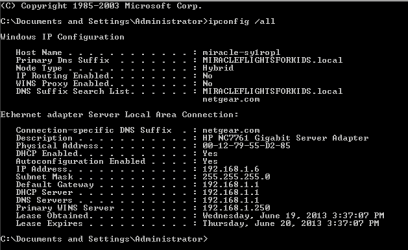
ipconfig settings

ipconfig /all of sbs2003 server is:
server ipconfig.PNG

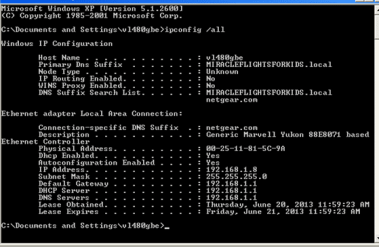
xp pro ipconfig /all is:
xp pro ipconfig.PNG

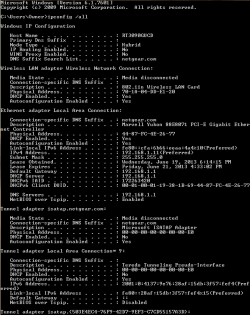
iopconfig /all windows 7 pro that is not recognizing domain is:
7 pro ipconfig.PNG

Using the Properties dialog box of network settings I have set the network ip address settings of default gateway & the preferred server to 192.168.1.1 of windows 7 pro machine. Still get the same error message.

I have also tried ipconfig /flushdns & ipconfig /registerdns. This changed all the ip addresses and no one could connect to the server until I set the server machine addresses back to that as posted above, then all the windows xp pro workstations could once again connect to domain MIRACLEFLIGHTSFORKIDS.local, but not the windows 7 pro machine. Any clues as what I could try next?
 

My Computer My Computer

Computer type
PC/Desktop
OS
windows 7 pro 64 bit
ipconfig /flushdns command

I have another question, as i mentioned I am inexperienced with networking so I may have done the ipconfig /flushdns & registerdns on the wrong machine - I did it on the server machine, not the workstation. Is this why everyone was bumped off the server? Or put another way, if I do a ipconfig /flushdns and /registerdns on the workstation / client will it only affect that machine or will it take down the server again?
 

My Computer My Computer

Computer type
PC/Desktop
OS
windows 7 pro 64 bit
The noticeable issue that you have here is that the DNS server of the machines is not going to the server. On each machine please set the following DNS servers by following this tutorial - http://www.sevenforums.com/tutorials/15037-dns-addressing-how-change-windows-7-a.html

Preferred DNS Server:192.168.1.6

Alternative DNS Server:192.168.1.1

   Note
You may choose to not add the alternative DNS server however please be advised that unless your 2003 server has NAT routing protocol installed then the devices joining the domain will not be able to connect to the internet. If you want them to connect to the internet I would strongly recommend placing the above alternate DNS server to the machines


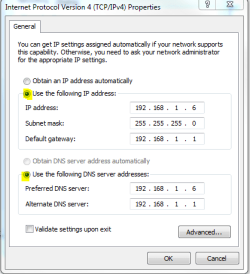
Also could you please make sure that your Windows 2003 Server has a static IP address by following the same tutorial but setting the following IP address stack (Use the IP addresses in the image):

ip.PNG

After setting that simply press ok and then close all over prompts. Now please retry connecting devices to the domain

Hope This Helps,
Josh! :)
 
Last edited:

My Computer My Computer

Computer type
PC/Desktop
Computer Manufacturer/Model Number
Custom Built
OS
Windows 7 Professional x64 SP1 ; Windows Server 2012 R2 Standard
CPU
Intel Core i5 2400 @ 3.10GHz
Motherboard
Foxconn H67MP-S/-V/H67MP
Memory
8.0GB DDR3 @ 665MHz (2GBx4)
Graphics Card(s)
AMD Radeon HD 6870
Sound Card
Realtek High Definition Audio
Monitor(s) Displays
AOC 2243W & SMB1930NW
Screen Resolution
1440x900 & 1920x1080
Hard Drives
977GB Seagate ST31000524AS ATA Drive (SATA)
250GB WD iSCSI attached Drive
PSU
750W Gaming PSU
Case
Novatech Night
Cooling
Fan
Keyboard
Dell Standard PS/2 Keyboard
Mouse
R.A.T 07 Gaming Mouse
Internet Speed
Download: 10 Mbps Ping: 30ms Upload: 0.81 Mbps
Browser
Google Chrome
Other Info
Optiarc DVD RW AD-5260S ATA Device
I have another question, as i mentioned I am inexperienced with networking so I may have done the ipconfig /flushdns & registerdns on the wrong machine - I did it on the server machine, not the workstation. Is this why everyone was bumped off the server? Or put another way, if I do a ipconfig /flushdns and /registerdns on the workstation / client will it only affect that machine or will it take down the server again?

Do not worry about the flush DNS since this would most likely not resolve your issue. Based on the evidence you have presented the above solution should fix your issue and allow the machines to join the domain

Josh :)
 

My Computer My Computer

Computer type
PC/Desktop
Computer Manufacturer/Model Number
Custom Built
OS
Windows 7 Professional x64 SP1 ; Windows Server 2012 R2 Standard
CPU
Intel Core i5 2400 @ 3.10GHz
Motherboard
Foxconn H67MP-S/-V/H67MP
Memory
8.0GB DDR3 @ 665MHz (2GBx4)
Graphics Card(s)
AMD Radeon HD 6870
Sound Card
Realtek High Definition Audio
Monitor(s) Displays
AOC 2243W & SMB1930NW
Screen Resolution
1440x900 & 1920x1080
Hard Drives
977GB Seagate ST31000524AS ATA Drive (SATA)
250GB WD iSCSI attached Drive
PSU
750W Gaming PSU
Case
Novatech Night
Cooling
Fan
Keyboard
Dell Standard PS/2 Keyboard
Mouse
R.A.T 07 Gaming Mouse
Internet Speed
Download: 10 Mbps Ping: 30ms Upload: 0.81 Mbps
Browser
Google Chrome
Other Info
Optiarc DVD RW AD-5260S ATA Device
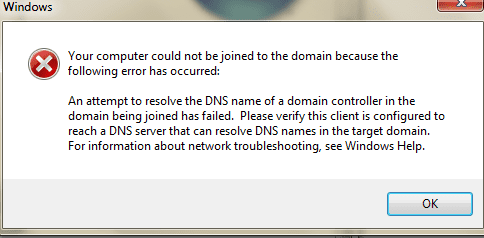
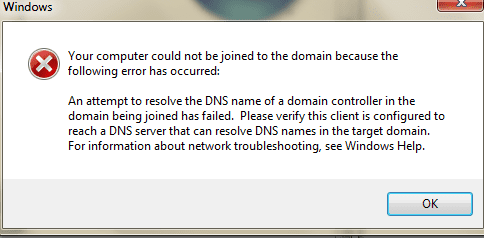
latest attempt to connect

after ipconfig /flushdns and ipconfig /registerdns on client machine, and adding alternate dns server I still cannot connect. i get the following error message:
dns error.PNG

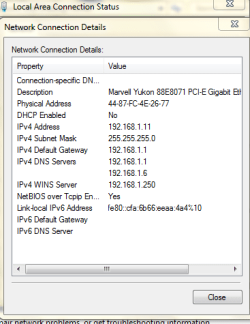
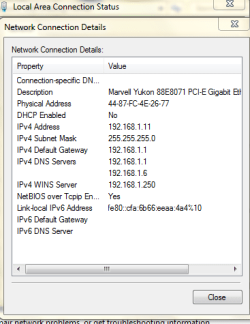
current network settings on client machine:

network connection.PNG
 

My Computer My Computer

Computer type
PC/Desktop
OS
windows 7 pro 64 bit
after flushdns and register dns, and setting alternate dns server to 192.168.1.6 i still cannot connect

dns error.PNG
network connection.PNG
 

My Computer My Computer

Computer type
PC/Desktop
OS
windows 7 pro 64 bit
You need to change your DNS servers around so that 192.168.1.6 is the preferred one and that 192.168.1.1 is the alternate DNS server

Josh
 

My Computer My Computer

Computer type
PC/Desktop
Computer Manufacturer/Model Number
Custom Built
OS
Windows 7 Professional x64 SP1 ; Windows Server 2012 R2 Standard
CPU
Intel Core i5 2400 @ 3.10GHz
Motherboard
Foxconn H67MP-S/-V/H67MP
Memory
8.0GB DDR3 @ 665MHz (2GBx4)
Graphics Card(s)
AMD Radeon HD 6870
Sound Card
Realtek High Definition Audio
Monitor(s) Displays
AOC 2243W & SMB1930NW
Screen Resolution
1440x900 & 1920x1080
Hard Drives
977GB Seagate ST31000524AS ATA Drive (SATA)
250GB WD iSCSI attached Drive
PSU
750W Gaming PSU
Case
Novatech Night
Cooling
Fan
Keyboard
Dell Standard PS/2 Keyboard
Mouse
R.A.T 07 Gaming Mouse
Internet Speed
Download: 10 Mbps Ping: 30ms Upload: 0.81 Mbps
Browser
Google Chrome
Other Info
Optiarc DVD RW AD-5260S ATA Device
Back
Top