Can't connect with Live Messenger

Blackmailer

New member
Local time
2:47 PM
Messages
6
I don't know if it's the 7's failure, or the Messenger's, but I can't connect with the Live Messenger. Everything else works on the Internet, I get this result from the SpeedTest.net:

But I get the 81000306 error code from the Live Messenger since I installed the Windows 7 Beta 1 (build 7000).

I did everything I could, the Windows built-in firewall allows the Messenger, and I don't use anything else.
 

My Computer

OS
Windows 7
Try the following:

1. Open an elevated command prompt and type:

ipconfig /flushdns

Check again to see if you can connect.


and also:

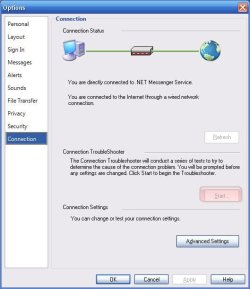
2. Open Live Messenger's Options and go to Connection menu on the left pane. Under the Connection Troubleshooter click Start and let it reset its connection settings. Check if you can connect after that.

Hope it helps
 

Attachments

  • screenshjot.jpg
    screenshjot.jpg
    36.9 KB · Views: 201

My Computer

Computer Manufacturer/Model Number
ENIAC
OS
Windows 7 RC 7100 32bit/64bit
CPU
Intel Core2Duo E4500 2.20 GHz
Motherboard
ASUS P5LD2-X/1333
Memory
2x1GB Kinsgston DDR2 800MHz
Graphics Card(s)
Nvidia 8500GT
Sound Card
Onboard High Definition Audio Device
Monitor(s) Displays
Sony Bravia 42"
Case
LINKW 2222
Cooling
Standard Intel
Keyboard
Some cheap one
Mouse
Microsoft Intellimouse something
Internet Speed
24MBps ADSL
I also tried the second one a few times before your post, but now I tried also your first suggestion, and it didn't help for me :(
 

My Computer

OS
Windows 7
Some routers (some netgear) intermittently allow connections for Windows live messenger through Vista and Windows 7.

This can be fixed by the following:

1. Start
2. Type CMD
3. Run as Admin
4. type: netsh interface tcp set global autotuninglevel=disabled
5. Press Enter, When OK comes up close CMD.

6. Live Messenger now connects and works property. (A Restart may be required)
 

My Computer

OS
Windows 7
Back
Top