Solved Can't copy from internet to Word 2010

coflyer

New member
Local time
9:16 PM
Messages
2
When I copy a part or whole web "document" & paste into Word 2010, I get the text & just empty boxes where the images should be.

Now this simple copy-paste routine has worked before in all other versions. I know it worked in Office 2007 but I can't get it to work in Office 2010. I am using Windows 7 (64 bit) and was using the same operating system with Office 2007 when it worked.

It looks as though something has changed, but despite my best efforts & ages spent Googling for a solution, nothing seems to work.
This is really inconvenient because I use this approach a good deal & it allows me to edit, & even change image position & size when I wish to do that, always crediting the source.

Does anyone have any ideas of how to accomplish this?
 

My Computer My Computer

At a glance

Windows 7 64 Bit
OS
Windows 7 64 Bit
Hi coflyer and welcome to Seven Forums. Try this.

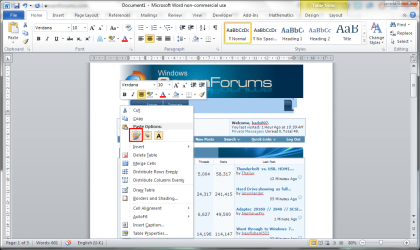
Right ckick in Word and select the Past and keep source format button.

screenshot185_2012-06-15.png
 

My Computer My Computer

At a glance

Microsoft Windows 7 Home Premium 64-bit Servi...Intel(R) Core(TM) i3 CPU M 330 @ 2.13GHz8 GB DDR3Intel(R) HD Graphics
Computer type
Laptop
Computer Manufacturer/Model Number
Hewlett-Packard/G62-107SA Notebook
OS
Microsoft Windows 7 Home Premium 64-bit Service Pack 1
CPU
Intel(R) Core(TM) i3 CPU M 330 @ 2.13GHz
Motherboard
Hewlett-Packard 1425
Memory
8 GB DDR3
Graphics Card(s)
Intel(R) HD Graphics
Sound Card
Realtek High Definition Audio
Monitor(s) Displays
Builtin
Screen Resolution
1366 x 768 x 32 bits (4294967296 colors) @ 60 Hz
Hard Drives
250 GB SATA Hard Disk Drive 7200 rpm
2TB Seagate GoFlex USB 2 Drive
1TB Iomega Prestige USB 2 Drive
1.5TB Iomega Prestige USB 2 Drive (Samsung)
2TB WD MyBook Live NAS.
Mouse
Logitech Anywhere MX
Internet Speed
152 Mbs download 10 Mbs upload
Antivirus
Norton 360
Browser
Chrome
Thank you. I can't believe that I had tried everything but that. Nice to be functional again.
 

My Computer My Computer

At a glance

Windows 7 64 Bit
OS
Windows 7 64 Bit
Glad your problem is solved coflyer.
 

My Computer My Computer

At a glance

Microsoft Windows 7 Home Premium 64-bit Servi...Intel(R) Core(TM) i3 CPU M 330 @ 2.13GHz8 GB DDR3Intel(R) HD Graphics
Computer type
Laptop
Computer Manufacturer/Model Number
Hewlett-Packard/G62-107SA Notebook
OS
Microsoft Windows 7 Home Premium 64-bit Service Pack 1
CPU
Intel(R) Core(TM) i3 CPU M 330 @ 2.13GHz
Motherboard
Hewlett-Packard 1425
Memory
8 GB DDR3
Graphics Card(s)
Intel(R) HD Graphics
Sound Card
Realtek High Definition Audio
Monitor(s) Displays
Builtin
Screen Resolution
1366 x 768 x 32 bits (4294967296 colors) @ 60 Hz
Hard Drives
250 GB SATA Hard Disk Drive 7200 rpm
2TB Seagate GoFlex USB 2 Drive
1TB Iomega Prestige USB 2 Drive
1.5TB Iomega Prestige USB 2 Drive (Samsung)
2TB WD MyBook Live NAS.
Mouse
Logitech Anywhere MX
Internet Speed
152 Mbs download 10 Mbs upload
Antivirus
Norton 360
Browser
Chrome
Back
Top