Can't create backup ( Windows 7 x64 )

lackoo

New member
Local time
11:06 PM
Messages
11
Hello.

I would like to install OpenSUSE on my computer , but before i do that i wanted to create a backup from my Windows, so i can do a system restore if anything goes wrong with the GRUB .

Unfortunately Windows can't let me to do a backup on my second hard drive ( on partiton I ) . I got an error message ( sorry , using Google translator for this one ) :

The images are not saved to disk in a drive that a computer system at boot time, and where Windows is installed
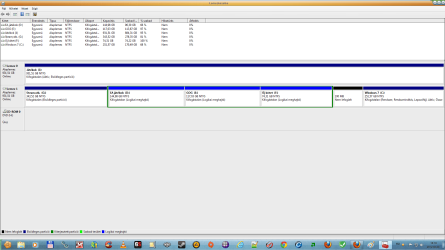
I have two hard drives .

Disk 1 : Samsung HD103UJ Ata Device ( online )

partitions :

C ( it contains the OS , active, primary partition )
D , E , F ( logical drives )
G ( primary partition )

Disk 0 : WDC WD10EALS-00Z8A0 ATA device ( online )

partitions :

I (active , primary partiton )

I see BOOTSECT , bootmgr files on both partition C and I . They also both contain a boot folder .

EasyBCD

Windows Boot Manager : partiton I
Windows Boot Loader : partition C

Now i'm confused .
 

Attachments
  • Névtelen.png
    Névtelen.png
    65.5 KB · Views: 26

My Computer

OS
Windows 7 Ultimate X64
It's not an answer to your backup problem which you need to get sorted but have you considered using VirtualBox to create a VM with OpenSuse. I have and it works well. https://www.virtualbox.org/

If you do don't use the suggested virtual disk size it is too small use 30GB.
 

My Computer

Computer type
Laptop
Computer Manufacturer/Model Number
Hewlett-Packard/G62-107SA Notebook
OS
Microsoft Windows 7 Home Premium 64-bit Service Pack 1
CPU
Intel(R) Core(TM) i3 CPU M 330 @ 2.13GHz
Motherboard
Hewlett-Packard 1425
Memory
8 GB DDR3
Graphics Card(s)
Intel(R) HD Graphics
Sound Card
Realtek High Definition Audio
Monitor(s) Displays
Builtin
Screen Resolution
1366 x 768 x 32 bits (4294967296 colors) @ 60 Hz
Hard Drives
250 GB SATA Hard Disk Drive 7200 rpm
2TB Seagate GoFlex USB 2 Drive
1TB Iomega Prestige USB 2 Drive
1.5TB Iomega Prestige USB 2 Drive (Samsung)
2TB WD MyBook Live NAS.
Mouse
Logitech Anywhere MX
Internet Speed
152 Mbs download 10 Mbs upload
Antivirus
Norton 360
Browser
Chrome
It's not an answer to your backup problem which you need to get sorted but have you considered using VirtualBox to create a VM with OpenSuse. I have and it works well. https://www.virtualbox.org/

If you do don't use the suggested virtual disk size it is too small use 30GB.

Isn't any OS slow in VirtualBox ?
 

My Computer

OS
Windows 7 Ultimate X64
It is slower than running native as it shares CPU cycles and allocates memory from the host but is usable for occasional use.

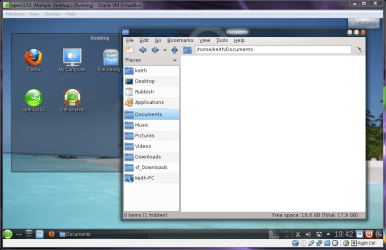
This is an image of my openSUSE VM which I created last week.

screenshot118_2012-02-20.png
 

My Computer

Computer type
Laptop
Computer Manufacturer/Model Number
Hewlett-Packard/G62-107SA Notebook
OS
Microsoft Windows 7 Home Premium 64-bit Service Pack 1
CPU
Intel(R) Core(TM) i3 CPU M 330 @ 2.13GHz
Motherboard
Hewlett-Packard 1425
Memory
8 GB DDR3
Graphics Card(s)
Intel(R) HD Graphics
Sound Card
Realtek High Definition Audio
Monitor(s) Displays
Builtin
Screen Resolution
1366 x 768 x 32 bits (4294967296 colors) @ 60 Hz
Hard Drives
250 GB SATA Hard Disk Drive 7200 rpm
2TB Seagate GoFlex USB 2 Drive
1TB Iomega Prestige USB 2 Drive
1.5TB Iomega Prestige USB 2 Drive (Samsung)
2TB WD MyBook Live NAS.
Mouse
Logitech Anywhere MX
Internet Speed
152 Mbs download 10 Mbs upload
Antivirus
Norton 360
Browser
Chrome
1. My Ubuntu runs just as fast in Virtual box as nativ. Just give the vBox enough RAM - e.g. 2GB. The beauty is that I can run Windows7 and Ubuntu in paralell - that means that I can use some of the Win7 tools when in Ubuntu (e.g. Snipping Tool)

2. If Windows 7 Imaging gives you trouble, use another imaging program - e.g. this one: http://www.sevenforums.com/tutorials/73828-imaging-free-macrium.html?ltr=I
 

My Computer

Computer Manufacturer/Model Number
HP, Dell, Gateway, Toshiba - 4 laptops and 2 desktops
OS
Vista, Windows7, Mint Mate, Zorin, Windows 8
CPU
from 1.6GHz Duo to i7
Monitor(s) Displays
2x HP w2207
Hard Drives
5x HDD, 7x SSD, 12x Externals
Keyboard
with trackball - no mices
Mouse
Trackball mice
Internet Speed
DSL 6000
I've used Ubuntu too and that also runs well. I changed because I absolutely hate the Unity desktop.
 

My Computer

Computer type
Laptop
Computer Manufacturer/Model Number
Hewlett-Packard/G62-107SA Notebook
OS
Microsoft Windows 7 Home Premium 64-bit Service Pack 1
CPU
Intel(R) Core(TM) i3 CPU M 330 @ 2.13GHz
Motherboard
Hewlett-Packard 1425
Memory
8 GB DDR3
Graphics Card(s)
Intel(R) HD Graphics
Sound Card
Realtek High Definition Audio
Monitor(s) Displays
Builtin
Screen Resolution
1366 x 768 x 32 bits (4294967296 colors) @ 60 Hz
Hard Drives
250 GB SATA Hard Disk Drive 7200 rpm
2TB Seagate GoFlex USB 2 Drive
1TB Iomega Prestige USB 2 Drive
1.5TB Iomega Prestige USB 2 Drive (Samsung)
2TB WD MyBook Live NAS.
Mouse
Logitech Anywhere MX
Internet Speed
152 Mbs download 10 Mbs upload
Antivirus
Norton 360
Browser
Chrome
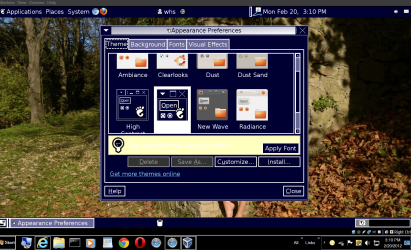
Keith, what's wrong with the desktop. I just changed it.
 

Attachments

  • 2012-02-20_1510.png
    2012-02-20_1510.png
    509.3 KB · Views: 14

My Computer

Computer Manufacturer/Model Number
HP, Dell, Gateway, Toshiba - 4 laptops and 2 desktops
OS
Vista, Windows7, Mint Mate, Zorin, Windows 8
CPU
from 1.6GHz Duo to i7
Monitor(s) Displays
2x HP w2207
Hard Drives
5x HDD, 7x SSD, 12x Externals
Keyboard
with trackball - no mices
Mouse
Trackball mice
Internet Speed
DSL 6000
The boot sequence you can change with EasyBCD. An imaging program cannot do that.
 

My Computer

Computer Manufacturer/Model Number
HP, Dell, Gateway, Toshiba - 4 laptops and 2 desktops
OS
Vista, Windows7, Mint Mate, Zorin, Windows 8
CPU
from 1.6GHz Duo to i7
Monitor(s) Displays
2x HP w2207
Hard Drives
5x HDD, 7x SSD, 12x Externals
Keyboard
with trackball - no mices
Mouse
Trackball mice
Internet Speed
DSL 6000
Keith, what's wrong with the desktop. I just changed it.

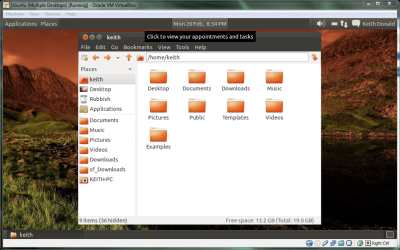
The latest version of Ubuntu doesn't give you any choice unless you also install the Gnome 3 desktop in which case you get a Classic option which is similar except it doesn't have the System dropdown. You have to dig through the applications to find the functions.

screenshot119_2012-02-20.png
 

My Computer

Computer type
Laptop
Computer Manufacturer/Model Number
Hewlett-Packard/G62-107SA Notebook
OS
Microsoft Windows 7 Home Premium 64-bit Service Pack 1
CPU
Intel(R) Core(TM) i3 CPU M 330 @ 2.13GHz
Motherboard
Hewlett-Packard 1425
Memory
8 GB DDR3
Graphics Card(s)
Intel(R) HD Graphics
Sound Card
Realtek High Definition Audio
Monitor(s) Displays
Builtin
Screen Resolution
1366 x 768 x 32 bits (4294967296 colors) @ 60 Hz
Hard Drives
250 GB SATA Hard Disk Drive 7200 rpm
2TB Seagate GoFlex USB 2 Drive
1TB Iomega Prestige USB 2 Drive
1.5TB Iomega Prestige USB 2 Drive (Samsung)
2TB WD MyBook Live NAS.
Mouse
Logitech Anywhere MX
Internet Speed
152 Mbs download 10 Mbs upload
Antivirus
Norton 360
Browser
Chrome
Hmm, nothing under System > Preferences > Appearance any more ?
 

My Computer

Computer Manufacturer/Model Number
HP, Dell, Gateway, Toshiba - 4 laptops and 2 desktops
OS
Vista, Windows7, Mint Mate, Zorin, Windows 8
CPU
from 1.6GHz Duo to i7
Monitor(s) Displays
2x HP w2207
Hard Drives
5x HDD, 7x SSD, 12x Externals
Keyboard
with trackball - no mices
Mouse
Trackball mice
Internet Speed
DSL 6000
No. It's all in there but you have to dig a bit. Most of the preferences appear under Other.
 

My Computer

Computer type
Laptop
Computer Manufacturer/Model Number
Hewlett-Packard/G62-107SA Notebook
OS
Microsoft Windows 7 Home Premium 64-bit Service Pack 1
CPU
Intel(R) Core(TM) i3 CPU M 330 @ 2.13GHz
Motherboard
Hewlett-Packard 1425
Memory
8 GB DDR3
Graphics Card(s)
Intel(R) HD Graphics
Sound Card
Realtek High Definition Audio
Monitor(s) Displays
Builtin
Screen Resolution
1366 x 768 x 32 bits (4294967296 colors) @ 60 Hz
Hard Drives
250 GB SATA Hard Disk Drive 7200 rpm
2TB Seagate GoFlex USB 2 Drive
1TB Iomega Prestige USB 2 Drive
1.5TB Iomega Prestige USB 2 Drive (Samsung)
2TB WD MyBook Live NAS.
Mouse
Logitech Anywhere MX
Internet Speed
152 Mbs download 10 Mbs upload
Antivirus
Norton 360
Browser
Chrome
Update:

Response of bcdedit:

Windows Boot Manager
--------------------
identifier {bootmgr}
device partition=I:
description Windows Boot Manager
locale hu-HU
inherit: {globalsettings}
default {current}
displayorder {current}
timeout 30
resume:yes

Windows Boot Loader
-------------------
identifier {current}
device partition=C:
path \Windows\system32\winload.exe
description Windows 7
locale hu-HU
inherit:{bootloadersettings}
osdevice partition=C:
systemroot \Windows

Resume from Hibernate
---------------------

device partition=C:
path \Windows\system32\winresume.exe
description Windows Resume Application
locale hu-HU
inherit {resumeloadersettings}
filedevice partition=C:
filepath \hiberfil.sys
debugoptionenabled No

Windows Memory Tester
---------------------
identifier {memdiag}
device partition=I:
path \boot\memtest.exe
description Windows Memory Diagnostic
locale hu-HU
inherit:{globalsettings}
badmemoryaccess:yes
 

My Computer

OS
Windows 7 Ultimate X64
Back
Top