Can't create New Folder or see files on a folder.

premanandprasad

New member
Local time
12:14 PM
Messages
5
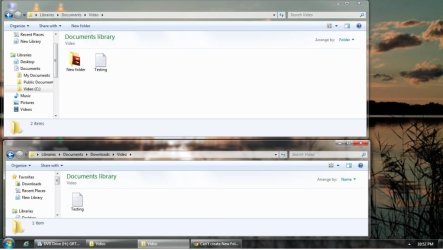
I Have a folder whose path is C:\Users\Premanand\Documents\Downloads\Video. if i open the folder through Libraries>Documents>Downloads>video i cant see any folder or files except the text files only. But when I right click on it and choose to OPEN FOLDER LOCATION there I can see all files and folders.

Let me tell you what I have tried

1-As i rename the folder to video1 i can see all the files on both the process.
2-Permission and rights are full control.
3-I am the owner of the folder.
4-I created a New folder and stored files as I rename the folder to Video, all the files disappears excepts the text files.

Friends Though i can find my files so it is not a issue, but i am curious to know why this problem arisen.

Attached a Snap for reference.
 

Attachments

  • SNAP.jpg
    SNAP.jpg
    104 KB · Views: 23

My Computer My Computer

OS
windows 7 ultimate 32bit
Hello Preman and Prasad, and welcome to Seven Forums.

While in your Documents library, double check using OPTION TWO in the tutorial below to make sure that the full path of this included "Video" folder is correct or even added to the library. Renaming the folder at it's original location may have broken it's link in the library until you correct the included folder's name as well.

http://www.sevenforums.com/tutorials/585-library-include-folder.html

Hope this helps, :)
Shawn
 

My Computer My Computer

Computer type
PC/Desktop
Computer Manufacturer/Model Number
Self built custom
OS
64-bit Windows 11 Pro for Workstations
CPU
Intel i7-8700K OC'd to 5 GHz
Motherboard
ASUS ROG Maximus XI Formula Z390
Memory
64 GB (4x16GB) G.SKILL TridentZ RGB DDR4 3600 MHz
Graphics Card(s)
ASUS ROG-STRIX-GTX1080TI-O11G-GAMING
Sound Card
Integrated
Monitor(s) Displays
2 x Samsung Odyssey G7 27"
Screen Resolution
2560x1440
Hard Drives
1TB Samsung 990 PRO M.2,
4TB Samsung 990 PRO PRO M.2,
TerraMaster F8 SSD Plus NAS
PSU
Seasonic Prime Titanium 850W
Case
Thermaltake Core P3
Cooling
Corsair Hydro H115i
Keyboard
Logitech wireless K800
Mouse
Logitech MX Master 4
Internet Speed
2 Gb/s Download and 100 Mb/s Upload
Antivirus
Malwarebyte Anti-Malware Premium
Browser
Google Chrome
Other Info
Logitech Z625 speaker system,
Logitech BRIO 4K Pro webcam,
HP Color LaserJet Pro MFP M477fdn,
APC SMART-UPS RT 1000 XL - SURT1000XLI,
Galaxy S23 Plus phone
Thanks Shawn,

By including the folder solves the problem (as I already mentioned retrieving files is not the problem). But the folder is not shown in the same place EX:old path was Libraries>Documents>Downloads>video but new path is Libraries>Documents>video. Actually it is not a problem to get the files. Will you please tell me what can be the cause of this problem. I never faced such type before even being a Sys-Admin.

Thanks..
 
Last edited:

My Computer My Computer

OS
windows 7 ultimate 32bit
Could you post another screenshot of what you are seeing now with the folder included?
 

My Computer My Computer

Computer type
PC/Desktop
Computer Manufacturer/Model Number
Self built custom
OS
64-bit Windows 11 Pro for Workstations
CPU
Intel i7-8700K OC'd to 5 GHz
Motherboard
ASUS ROG Maximus XI Formula Z390
Memory
64 GB (4x16GB) G.SKILL TridentZ RGB DDR4 3600 MHz
Graphics Card(s)
ASUS ROG-STRIX-GTX1080TI-O11G-GAMING
Sound Card
Integrated
Monitor(s) Displays
2 x Samsung Odyssey G7 27"
Screen Resolution
2560x1440
Hard Drives
1TB Samsung 990 PRO M.2,
4TB Samsung 990 PRO PRO M.2,
TerraMaster F8 SSD Plus NAS
PSU
Seasonic Prime Titanium 850W
Case
Thermaltake Core P3
Cooling
Corsair Hydro H115i
Keyboard
Logitech wireless K800
Mouse
Logitech MX Master 4
Internet Speed
2 Gb/s Download and 100 Mb/s Upload
Antivirus
Malwarebyte Anti-Malware Premium
Browser
Google Chrome
Other Info
Logitech Z625 speaker system,
Logitech BRIO 4K Pro webcam,
HP Color LaserJet Pro MFP M477fdn,
APC SMART-UPS RT 1000 XL - SURT1000XLI,
Galaxy S23 Plus phone
In the Snap the upper one is newly added as per instruction and the down one is the old one. These folders (Document, music, Program & Video) were automatically created by IDM to store different downloaded files in different folders. The Video folder is created after Installing IDM. It worked fine for a long but dunno what happened. I have been through Superusers forum too but didn't got any rightful cause. Its ok if you can guess the cause otherwise it is fine as I am not facing any problem.

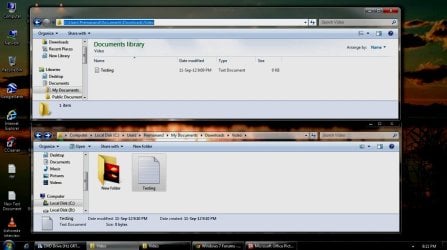
Thanks for your valuable time..
 

Attachments

  • Untitled.jpg
    Untitled.jpg
    56.7 KB · Views: 15

My Computer My Computer

OS
windows 7 ultimate 32bit
You might check in the IDM program to make sure the download path is set correctly as well.
 

My Computer My Computer

Computer type
PC/Desktop
Computer Manufacturer/Model Number
Self built custom
OS
64-bit Windows 11 Pro for Workstations
CPU
Intel i7-8700K OC'd to 5 GHz
Motherboard
ASUS ROG Maximus XI Formula Z390
Memory
64 GB (4x16GB) G.SKILL TridentZ RGB DDR4 3600 MHz
Graphics Card(s)
ASUS ROG-STRIX-GTX1080TI-O11G-GAMING
Sound Card
Integrated
Monitor(s) Displays
2 x Samsung Odyssey G7 27"
Screen Resolution
2560x1440
Hard Drives
1TB Samsung 990 PRO M.2,
4TB Samsung 990 PRO PRO M.2,
TerraMaster F8 SSD Plus NAS
PSU
Seasonic Prime Titanium 850W
Case
Thermaltake Core P3
Cooling
Corsair Hydro H115i
Keyboard
Logitech wireless K800
Mouse
Logitech MX Master 4
Internet Speed
2 Gb/s Download and 100 Mb/s Upload
Antivirus
Malwarebyte Anti-Malware Premium
Browser
Google Chrome
Other Info
Logitech Z625 speaker system,
Logitech BRIO 4K Pro webcam,
HP Color LaserJet Pro MFP M477fdn,
APC SMART-UPS RT 1000 XL - SURT1000XLI,
Galaxy S23 Plus phone
Back
Top