Solved Can't Create RAID 1 Mirror Drive on Win7 Pro, 64bit

Mtnhorse

New member
Local time
6:00 AM
Messages
3
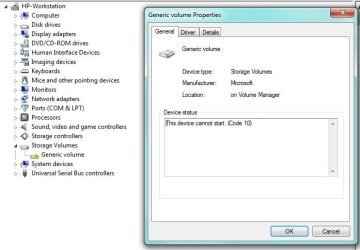
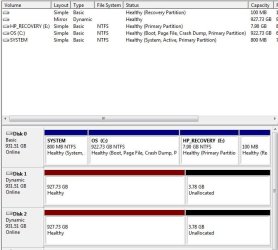
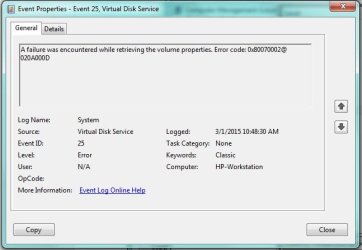
I have tried to create a RAID 1 mirror drive on my 64 bit Windows 7 Professional system. I have installed 2 additional Seagate 1Tb drives (ST1000DM003) and when I tried to Add Mirror and selected the other drive it looked like it was working but there were 2 boxes that came up that it was not formatted try later, and also that it couldn't assign the drive letter. When I tried to assign the drive letter, I get an error box with "Virtual Disk Manager" in the title and a message "The system cannot find the file specified". When I search for that I find many references but mostly with external USB drives and none of the resolutions helped. Trying to format gave a different error and failed. I found that in Device Manager under Storage Volumes there is a Generic Volume with the error "This device cannot start. (Code 10)" Both drives show up under Disk Drives with "This device is working properly." Under Disk Management both disks show Dynamic,Online and Healthy and the upper portion shows the Mirror volume. I tried to update the driver on the Generic Volume with the error and it says it is already using the best one. I went back and broke the mirror and used Diskpart to Clean both drives to start over. I created Simple volumes on both, formatted them, assigned a drive letter and was able to store files on them. I then made them both dynamic successfully and could still store and read files on them so I know the drives are good. I also tried to use EaseUS to format it and it sees the mirror volume but none of the actions (format, assign letter, etc) are available. It seems like the root of the problem is the error in Device Manager for the Storage Volume. Any Ideas?
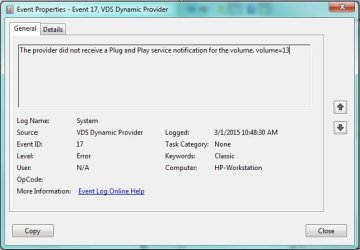
VDS Error.jpg

VDS Error2.jpg

error1.jpg

DM-view.jpg
 

My Computer My Computer

At a glance

Windows 7 Professional x64Intel Core i7-3770 @ 3.4GHz24Gb
Computer type
PC/Desktop
Computer Manufacturer/Model Number
HP
OS
Windows 7 Professional x64
CPU
Intel Core i7-3770 @ 3.4GHz
Memory
24Gb
Hard Drives
3 Seagate ST1000DM003
Antivirus
AVG
Browser
Firefox/Chrome
I believe you will have to set your sata controller in BIOS to Raid (which may keep your OS from booting unless it was installed that way) and on boot up you should see a raid screen. Hold down the Control Key and press I to enter the raid set up. set the drives up there and it should work. Make sure they are on the same controller.

I should mention that raid may cause you more problems than it is worth, and if you are doing it as a backup, Raid is not a backup and will not serve as one. You will also take a performance hit with raid 1 too.
 

My Computers My Computers

  • At a glance

    Windows 11 ProRyzen 9 5900X32GB G Skill DDR4-3600EVGA RTX 3080 FTW 3 Ultra
    Computer type
    PC/Desktop
    Computer Manufacturer/Model Number
    ALWAYS UNDER CONSTRUCTION
    OS
    Windows 11 Pro
    CPU
    Ryzen 9 5900X
    Motherboard
    Asus X570 Crosshair Viii Hero
    Memory
    32GB G Skill DDR4-3600
    Graphics Card(s)
    EVGA RTX 3080 FTW 3 Ultra
    Sound Card
    On Board/Sennheiser PC37X Headset
    Monitor(s) Displays
    3 X Asus 27"
    Screen Resolution
    2560x1440
    Hard Drives
    2 X 1 TB NVME drives
    PSU
    EVGA 850
    Case
    Phanteks Eclipse P400A
    Cooling
    EVGA 280 AIO
    Keyboard
    Logitech G510s/ Logitech G13
    Mouse
    Logitech G502
    Internet Speed
    24/1
    Antivirus
    ESET/MBAM Pro/SAS Pro
    Browser
    Chrome/ Firefox/ Edge
  • At a glance

    Windows 11 ProIntel Ultra 9 288V32 GB LPDDR5X 8533
    Computer type
    Laptop
    System Manufacturer/Model Number
    Dell 16 Plus
    OS
    Windows 11 Pro
    CPU
    Intel Ultra 9 288V
    Memory
    32 GB LPDDR5X 8533
    Monitor(s) Displays
    16" Mini-LED HDR600 Touch 90 Hz
    Screen Resolution
    2560X1600
    Hard Drives
    1 TB NVME
What is the purpose of the Raid setup ?

Are the disks just going to be used for storage ?
 
Last edited:

My Computer My Computer

At a glance

Windows 10 Pro x64Intel Core i7 6700KGSkill TridentZ RGB 16GB 3600 16-16-16-36EVGA GTX 980 Ti SC x2
Computer type
PC/Desktop
Computer Manufacturer/Model Number
Skylake Special #666
OS
Windows 10 Pro x64
CPU
Intel Core i7 6700K
Motherboard
Asus Sabertooth Z170 Mark 1
Memory
GSkill TridentZ RGB 16GB 3600 16-16-16-36
Graphics Card(s)
EVGA GTX 980 Ti SC x2
Sound Card
Realtek High Definition
Monitor(s) Displays
AOC G2460PG
Screen Resolution
1920 x 1080 144Hz
Hard Drives
Samsung 860 Pro 256GB, Seagate Barracuda 4TB x2
PSU
EVGA 1000 P2, EVGA White Custom Braided Cables
Case
Corsair Vengeance C70 Gunmetal Black
Cooling
Corsair H100i v2, Corsair ML120 x2, Thermal Grizzly Kryonaut
Keyboard
Logitech G910 Orion Spectrum
Mouse
Logitech G700s
Internet Speed
Verizon Fios Quantum Gateway 75/75
Antivirus
Windows Defender, Malwarebytes Free 3.8.3
Browser
Chrome
Other Info
Corsair SP120 x4, LG Blu-ray Drive, Durabrand HT-395 100 Watt Dolby Digital Amp, Corsair H2100 Wireless 7.1 Headset
I want to set them up as software raid vs hardware and not for the OS. It will be used as data storage for other family systems to back up to and I would do backups of it. I wanted to get the hardware redundancy of the mirror in between backups.

Thanks
Gary
 

My Computer My Computer

At a glance

Windows 7 Professional x64Intel Core i7-3770 @ 3.4GHz24Gb
Computer type
PC/Desktop
Computer Manufacturer/Model Number
HP
OS
Windows 7 Professional x64
CPU
Intel Core i7-3770 @ 3.4GHz
Memory
24Gb
Hard Drives
3 Seagate ST1000DM003
Antivirus
AVG
Browser
Firefox/Chrome
I have decided to give up on the RAID idea and create 2 simple volumes since the general feeling about RAID 1 on a workstation isn't very positive. I will still use one of the drives to backup other family systems to periodically through my home network and manually replicate that to the other drive. And to make sure it isn't compromised by a virus I will take it offline. Does anyone see a problem with that strategy?

Again I will be backing the data up to an external drive from time to time to have another copy in case the system turned to ashes.

Thanks!
Gary
 

My Computer My Computer

At a glance

Windows 7 Professional x64Intel Core i7-3770 @ 3.4GHz24Gb
Computer type
PC/Desktop
Computer Manufacturer/Model Number
HP
OS
Windows 7 Professional x64
CPU
Intel Core i7-3770 @ 3.4GHz
Memory
24Gb
Hard Drives
3 Seagate ST1000DM003
Antivirus
AVG
Browser
Firefox/Chrome
Back
Top