Can't de-install applications

Ghosty007

New member
Local time
2:13 PM
Messages
8
Hello ,

I can no longer un-install programs it's says i do not have the permissions to do so.
It say i have to contact the system admin to un-install a program but i am the only
user on the computer.

Error ( gonna try to translate it as best as i can)
The system manger has set your system so you can't execute the installer

Ruffly translated from dutch.

How do i fix this problem ?

Kind regards.
 

My Computer

Computer Manufacturer/Model Number
Packard Bell
OS
MS Windows 7 Home Premium 64-bit SP1
CPU
Intel Core 2 Quad Q8300 @ 2.50GHz
Motherboard
Packard Bell EG43M (CPU 1)
Memory
6,00 GB Dual-channel DDR2 @ 399MHz (6-6-6-18)
Graphics Card(s)
SyncMaster (1680x1050@60Hz) 1024MBGeForce GT 220 (Sapphire/P
Sound Card
Realtek High Definition Audio
Monitor(s) Displays
Samsung Syncmaster 226BW
Hard Drives
977GB Western Digital WDC WD10EADS-00M2B0 ATA Device (SATA)
PSU
750 Watts
Cooling
Not enof
can't install anymore aswell
 

My Computer

Computer Manufacturer/Model Number
Packard Bell
OS
MS Windows 7 Home Premium 64-bit SP1
CPU
Intel Core 2 Quad Q8300 @ 2.50GHz
Motherboard
Packard Bell EG43M (CPU 1)
Memory
6,00 GB Dual-channel DDR2 @ 399MHz (6-6-6-18)
Graphics Card(s)
SyncMaster (1680x1050@60Hz) 1024MBGeForce GT 220 (Sapphire/P
Sound Card
Realtek High Definition Audio
Monitor(s) Displays
Samsung Syncmaster 226BW
Hard Drives
977GB Western Digital WDC WD10EADS-00M2B0 ATA Device (SATA)
PSU
750 Watts
Cooling
Not enof
Try this and let me know if it helps...

start, run then gpedit.msc and click OK.
Go to local computer policy, computer configuration, administrator templates, windows components and finally windows installer.

On the right hand pane, "disable Windows installer" should be set to not configured or disabled.

hth
Tanya

EDIT: Some viruses are known to change this, amongst other administrative settings, like running msconfig, services.msc, regedit and task manager. I'd check they all work, and check you do not have any viruses
 

My Computer

Computer type
PC/Desktop
Computer Manufacturer/Model Number
Home Made
OS
Linux Mint 17 Cinnamon | Win 7 Ult x64
CPU
Intel I7-3770K @ 4.2ghz
Motherboard
ASRock Extreme 4
Memory
32GB G-Skill C10Q
Graphics Card(s)
EVGA GTX 670 2GB SC
Sound Card
Creative Fatality ExtremeGamer
Monitor(s) Displays
LG E2742V x 2
Screen Resolution
1920x1080
Hard Drives
256GB Vertex 4 SSD
2TB Seagate ST2000DM001
1TB Seagate ST1000DM003
PSU
Corsair HX 650
Case
HAF 932 advanced
Cooling
Corsair H100i liquid cooler
Keyboard
Logitech Wireless
Mouse
Logitech Wireless
Internet Speed
OptusNet NBN 100/40
Antivirus
Malwarebytes
Browser
Firefox 30
Other Info
Router: Sagemcom F@st 3846 Crippled by Optus.
can not find gpedit.msc on my system think you are talking for the wrong version of windows 7 :)

After i googled it
A common problem is that even though you type precisely gpedit.msc, Windows 7 cannot find gpedit.msc. The most likely cause is that you have the Home Premium edition. It's most disappointing that you only get gpedit.msc in the Ultimate, Professional (old Business) and Enterprise editions, and not in the Windows 7 Home Premium or Basic editions.

what to do next ?
 

My Computer

Computer Manufacturer/Model Number
Packard Bell
OS
MS Windows 7 Home Premium 64-bit SP1
CPU
Intel Core 2 Quad Q8300 @ 2.50GHz
Motherboard
Packard Bell EG43M (CPU 1)
Memory
6,00 GB Dual-channel DDR2 @ 399MHz (6-6-6-18)
Graphics Card(s)
SyncMaster (1680x1050@60Hz) 1024MBGeForce GT 220 (Sapphire/P
Sound Card
Realtek High Definition Audio
Monitor(s) Displays
Samsung Syncmaster 226BW
Hard Drives
977GB Western Digital WDC WD10EADS-00M2B0 ATA Device (SATA)
PSU
750 Watts
Cooling
Not enof
That's ok, all gpedit.msc does is to provide a gui interface to the registry. We can do this manually.

Make sure you create a backup of your registry or create a system restore point before you do this.

Navigate to HKLM\Software\Policies\Microsoft\Windows

If you can see a registry key called installer, then proceed, otherwise your problem is caused by something else.

If you want to look at the key, click on installer. You will see a registry value called "DisableMSI" and it will be set to 1 and/or there will be a value called "DisableUserInstalls" which will likewise be set to 1. You don't need either of these.

To remove the restriction delete the Installer registry key.
This will delete the DisableMSI/DisableuserInstalls value(s) as well as the installer key.

Reboot and see how you go.
 

My Computer

Computer type
PC/Desktop
Computer Manufacturer/Model Number
Home Made
OS
Linux Mint 17 Cinnamon | Win 7 Ult x64
CPU
Intel I7-3770K @ 4.2ghz
Motherboard
ASRock Extreme 4
Memory
32GB G-Skill C10Q
Graphics Card(s)
EVGA GTX 670 2GB SC
Sound Card
Creative Fatality ExtremeGamer
Monitor(s) Displays
LG E2742V x 2
Screen Resolution
1920x1080
Hard Drives
256GB Vertex 4 SSD
2TB Seagate ST2000DM001
1TB Seagate ST1000DM003
PSU
Corsair HX 650
Case
HAF 932 advanced
Cooling
Corsair H100i liquid cooler
Keyboard
Logitech Wireless
Mouse
Logitech Wireless
Internet Speed
OptusNet NBN 100/40
Antivirus
Malwarebytes
Browser
Firefox 30
Other Info
Router: Sagemcom F@st 3846 Crippled by Optus.
Navigate to HKLM\Software\Policies\Microsoft\Windows

whats the full path of that because i can't seem to find it .
 

My Computer

Computer Manufacturer/Model Number
Packard Bell
OS
MS Windows 7 Home Premium 64-bit SP1
CPU
Intel Core 2 Quad Q8300 @ 2.50GHz
Motherboard
Packard Bell EG43M (CPU 1)
Memory
6,00 GB Dual-channel DDR2 @ 399MHz (6-6-6-18)
Graphics Card(s)
SyncMaster (1680x1050@60Hz) 1024MBGeForce GT 220 (Sapphire/P
Sound Card
Realtek High Definition Audio
Monitor(s) Displays
Samsung Syncmaster 226BW
Hard Drives
977GB Western Digital WDC WD10EADS-00M2B0 ATA Device (SATA)
PSU
750 Watts
Cooling
Not enof
Cheers ,

but still i can not find the valeu
 

My Computer

Computer Manufacturer/Model Number
Packard Bell
OS
MS Windows 7 Home Premium 64-bit SP1
CPU
Intel Core 2 Quad Q8300 @ 2.50GHz
Motherboard
Packard Bell EG43M (CPU 1)
Memory
6,00 GB Dual-channel DDR2 @ 399MHz (6-6-6-18)
Graphics Card(s)
SyncMaster (1680x1050@60Hz) 1024MBGeForce GT 220 (Sapphire/P
Sound Card
Realtek High Definition Audio
Monitor(s) Displays
Samsung Syncmaster 226BW
Hard Drives
977GB Western Digital WDC WD10EADS-00M2B0 ATA Device (SATA)
PSU
750 Watts
Cooling
Not enof
Cheers ,

but still i can not find the valeu

As I said in my first post, if the installer registry key is not present it means that the installation of stuff is not disabled by policy. That means your problem is caused by something else.

Other things that you can check;

1. Click start, run, type services.msc and click ok. Scroll down the list of services and make sure the "Windows Installer" is set to automatic or manual (Should be on manual). If it disabled, double click it and set it to manual.

Try an install or uninstall. If OK< skip the next steps.

2. You could try and re-register the installer.
Click start, run, type cmd and click ok.
type MSIEXEC /UNREGISTER, and press enter
type MSIEXEC /REGSERVER, and press enter.
then type exit and press enter.

Try an install or uninstall. If OK skip the next steps.

3. Run Regedit again and navigate to HKEY_LOCAL_MACHINE \Software\Microsoft\Windows\CurrentVersion\Installer\InProgress

Look at the registry key and remove any entries in HKEY_LOCAL_MACHINE \System\CurrentControlSet\Control\Session Manager\PendingFileRenameOperations

Reboot and Try an install or uninstall. If OK skip the next step.

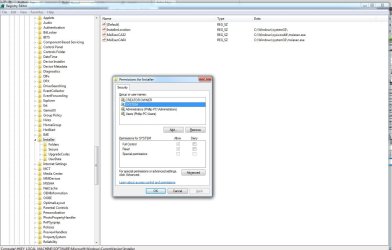
4. Run Regedit again and navigate to hkey_local_machine\software\microsoft\windows\currentversion\installer.
Right click on the installer key, left click on SYSTEM and verifiy that full control is ticked.

Look in the right pane. There should be three values there. See image below.


Hopefully one of these will solve your problem. Remember to make a registry backup and/or create a system restore point before making changes to your system.
 

Attachments

  • ghosty007.jpg
    ghosty007.jpg
    125.3 KB · Views: 12

My Computer

Computer type
PC/Desktop
Computer Manufacturer/Model Number
Home Made
OS
Linux Mint 17 Cinnamon | Win 7 Ult x64
CPU
Intel I7-3770K @ 4.2ghz
Motherboard
ASRock Extreme 4
Memory
32GB G-Skill C10Q
Graphics Card(s)
EVGA GTX 670 2GB SC
Sound Card
Creative Fatality ExtremeGamer
Monitor(s) Displays
LG E2742V x 2
Screen Resolution
1920x1080
Hard Drives
256GB Vertex 4 SSD
2TB Seagate ST2000DM001
1TB Seagate ST1000DM003
PSU
Corsair HX 650
Case
HAF 932 advanced
Cooling
Corsair H100i liquid cooler
Keyboard
Logitech Wireless
Mouse
Logitech Wireless
Internet Speed
OptusNet NBN 100/40
Antivirus
Malwarebytes
Browser
Firefox 30
Other Info
Router: Sagemcom F@st 3846 Crippled by Optus.
still no succes
 

My Computer

Computer Manufacturer/Model Number
Packard Bell
OS
MS Windows 7 Home Premium 64-bit SP1
CPU
Intel Core 2 Quad Q8300 @ 2.50GHz
Motherboard
Packard Bell EG43M (CPU 1)
Memory
6,00 GB Dual-channel DDR2 @ 399MHz (6-6-6-18)
Graphics Card(s)
SyncMaster (1680x1050@60Hz) 1024MBGeForce GT 220 (Sapphire/P
Sound Card
Realtek High Definition Audio
Monitor(s) Displays
Samsung Syncmaster 226BW
Hard Drives
977GB Western Digital WDC WD10EADS-00M2B0 ATA Device (SATA)
PSU
750 Watts
Cooling
Not enof
maybe try revo uninstaller (free); ??
 

My Computer

OS
Windows XP - Now Windows 7 Home Premium (64-bit).
Run a full scan with Malwarebytes.

Have you tweaked your Win7 or made any changes beyond normal system settings? Is this a normal retail install with no mods, or a factory preinstall?

What did you do just before the issue arose? Do you have a System Restore Point from just before that time?

Run SFC -SCANNOW Command, repeatedly if it finds problems.

Report back for more steps.
 
Update: I think that the problem is that linksys (cisco) has no x64 bit drivers for this device. To be honest, the lack of 64 bit support for PC hardware is rather astounding.


free software download
 

My Computer

OS
Windows 7 Ultimate
ill try the new tips
 

My Computer

Computer Manufacturer/Model Number
Packard Bell
OS
MS Windows 7 Home Premium 64-bit SP1
CPU
Intel Core 2 Quad Q8300 @ 2.50GHz
Motherboard
Packard Bell EG43M (CPU 1)
Memory
6,00 GB Dual-channel DDR2 @ 399MHz (6-6-6-18)
Graphics Card(s)
SyncMaster (1680x1050@60Hz) 1024MBGeForce GT 220 (Sapphire/P
Sound Card
Realtek High Definition Audio
Monitor(s) Displays
Samsung Syncmaster 226BW
Hard Drives
977GB Western Digital WDC WD10EADS-00M2B0 ATA Device (SATA)
PSU
750 Watts
Cooling
Not enof
.
Have you tweaked your Win7 or made any changes beyond normal system settings? Is this a normal retail install with no mods, or a factory preinstall?

No i did not
 

My Computer

Computer Manufacturer/Model Number
Packard Bell
OS
MS Windows 7 Home Premium 64-bit SP1
CPU
Intel Core 2 Quad Q8300 @ 2.50GHz
Motherboard
Packard Bell EG43M (CPU 1)
Memory
6,00 GB Dual-channel DDR2 @ 399MHz (6-6-6-18)
Graphics Card(s)
SyncMaster (1680x1050@60Hz) 1024MBGeForce GT 220 (Sapphire/P
Sound Card
Realtek High Definition Audio
Monitor(s) Displays
Samsung Syncmaster 226BW
Hard Drives
977GB Western Digital WDC WD10EADS-00M2B0 ATA Device (SATA)
PSU
750 Watts
Cooling
Not enof
Please answer all of the questions, complete the steps given leading up to a Repair Install.

Run a full scan with Malwarebytes.

Is this a normal retail install with no mods, or a factory preinstall?

What did you do just before the issue arose? Do you have a System Restore Point from just before that time?

Run SFC -SCANNOW Command, repeatedly if it finds problems.

Report back for more steps.


Do you have a Win7 installer with SP1 to use for repairs?
 
Back
Top