Can't delete (files on) partition.

itsMarick

New member
Local time
4:15 AM
Messages
11
Location
The Netherlands
Hey! Well, a few days ago I had a dualboot of Windows 7 and Windows XP. Later I just only wanted to have Windows 7. So I downloaded Vista Boot Manager and deleted Windows XP on the list, so now its only booting from Windows 7. But all those files of Windows XP are still left on the partition. And I have no access to delete them, not even in a save boot. Unlocker helped me a while, but I'm now stuck with 3 folders which I can't delete. I've got now 50 GB left on my HDD, and the partition of Windows XP was 200 GB, so I think you can realize I want those GB back! =P
 

My Computer

Computer Manufacturer/Model Number
Medion Akoya MD 96970
OS
Windows Vista
CPU
Intel(R) Core(TM)2 Duo CPU T5750 @ 2.00GHz
Motherboard
-
Memory
3 GB
Graphics Card(s)
NVIDIA GeForce 9300M G
Sound Card
Realtek High Definition Audio
Monitor(s) Displays
NVIDIA GeForce 9300M G
Screen Resolution
1280x800
Hard Drives
1x 320 GB (boot C)
1x 20 GB (recover files)
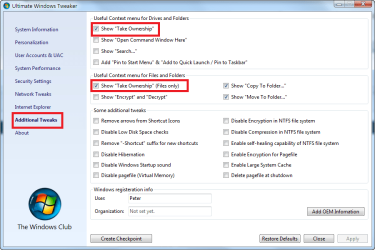
Why "can't" you delete them? What's the error message? If it's "access denied", you may have to simply take ownership of those folders so that you can override the previous installation's NTFS security descriptors.

By the way, "Unlocker" is potentially unsafe. Whatever the question, there are better answers than "Unlocker".
 

My Computer

Computer Manufacturer/Model Number
Multiple machines in various stages of decomposition.
OS
Win7x64
For an easy way to take ownership or drives, folders, or files, you can use a free app that adds a "take ownership" item to the explorer right click context menu. See screenshot below:
 

Attachments

  • 2009-09-20_122611.png
    2009-09-20_122611.png
    29.7 KB · Views: 124

My Computer

Computer Manufacturer/Model Number
HP DV8t quad
OS
Windows 7 Ultimate x64 (Retail)
CPU
i7-Q 720
Motherboard
Motherboard Chipset Intel Ibex Peak-M PM55, Intel Lynnfield
Memory
6 GB
Graphics Card(s)
nVidia GeForce GT 230M (1GB)
Sound Card
IDT High Definition Audio CODEC
Monitor(s) Displays
18.4 inch HP Infinity FHD (Samsung 184HT03-001)
Screen Resolution
1920 x 1080
Hard Drives
Hitachi 500GB 7200 rpm (x2)
Seagate FreeAgent 1.5 TB External USB (x2)
Thermaltake BlacX eSATA/USB 2.0 3.5/2.5 HD dock
Cooling
Zalman NC-2000 notebook cooling pad
Keyboard
laptop
Mouse
Logitech VX Revolution
Other Info
Backup Unit: Lenovo T61p

My Computers

System One System Two

  • Computer type
    PC/Desktop
    OS
    7 X64
    CPU
    i5 8400
    Motherboard
    gigabyte b365m ds3h
    Memory
    2x8gb 3200mhz
    Hard Drives
    various
    PSU
    pure power 11 400w cm
    Case
    Coolermaster
    Cooling
    cryorig m9i
  • Computer type
    PC/Desktop
    OS
    7x64
    CPU
    g5400
    Motherboard
    ga b365m ds3h
    Memory
    8gb ddr4 2400
    PSU
    xfx pro 450w
Take Ownership

You do not have access to these files from your current OS. The previous poster noting this as the issue is correct, but it is not necessary to use a third party app to do so.

First, certain files cannot be deleted even if you do take ownership of them as they are in use by the current OS, ie, boot manager.

Properly apply 'administators' as the owners of the folders and all subfolders (not the root), boot to safe mode, and then you can delete them. Make sure you are seeing all hidden files and folders on that drive.

Use care not to delete the wrong ones.

If on re-boot (after safe mode), your system does not boot, insert your W7 Disk and run boot repair.
 
Last edited:
  • Like
Reactions: Lee
Back
Top