
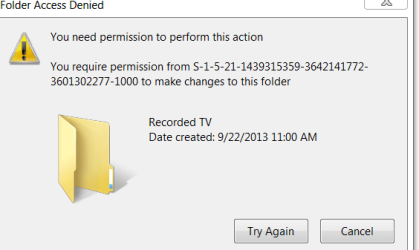
I just added a 2nd storage HDD to my HTPC and moved the MediaCenter "Recorded TV" folder and contents to the new drive. I also went into MC and pointed it to the new location. The stored recordings are there and visible in MC and on on the network. But now I can't delete the old Recorded TV folder on the original storage HDD. I get the weird message in the snip below. The folder looks empty and properties show it is not shared or anything. Also I am the admin and only user so no permissions should be necessary.
Anyone have any ideas? Is there a way to do a "master reset" of the MC setup to maybe allow me to delete this thing?
Thanks
Anyone have any ideas? Is there a way to do a "master reset" of the MC setup to maybe allow me to delete this thing?
Thanks
Attachments
My Computer
- OS
- Win 7 x64, Home Prem and Pro

