Can't delete second installation of Windows 7.

Turnyface

New member
Local time
8:30 AM
Messages
10
Here is the situation. My roommate wanted to use my computer and instead of asking me for my password, he decided to install a fresh copy of Windows 7 Ultimate on my 2nd hard drive. The problem now is that I cannot delete any of the windows folders (Windows, Users, Program Files, etc.) and it is taking up space on my drive. Also, I can't simply reformat because there are ~ 1TB of movies that I don't want to get rid of. Every time I try and edit permissions, I get a message stating "access denied." I've tried everything from unlocker to killbot to safe mode removal to trying to take ownership in cmd. Nothing works. Any suggestion?

11h3sb6.jpg
 
Last edited:

My Computer My Computer

At a glance

Windows 7 Ultimate x64
OS
Windows 7 Ultimate x64
You think you could attach a picture of your Disk Management window using the Snipping tool? Try to put labels on the partitions so we can see what is what.

Maybe you could shame your roomage into at least buying you a new hard drive!! ;)
 

My Computer My Computer

At a glance

Windows 7 x64i7-2600K8 GGTX 480
Computer Manufacturer/Model Number
Homebuilt
OS
Windows 7 x64
CPU
i7-2600K
Motherboard
Asus P8Z77-v Pro
Memory
8 G
Graphics Card(s)
GTX 480
Sound Card
Onboard
Monitor(s) Displays
LG W2753V
Screen Resolution
1920x1080
Hard Drives
Crucial M4 128 G SSD
See this article on how to do this. Download and run the .reg file and a Take Ownership selection is added to the right click context menu. Very nice:

Take Ownership Shortcut - Windows 7

Makes use of the takeown command (C:\Windows\system32\takeown.exe).
 

My Computer My Computer

At a glance

Windows 10 Pro X64Intel Quad Core i7-4770 @ 3.4Ghz16.0GB PC3-12800 DDR3 SDRAM 1600 MHzIntel Integrated HD Graphics
Computer type
PC/Desktop
Computer Manufacturer/Model Number
Lenovo IdeaCenter 450
OS
Windows 10 Pro X64
CPU
Intel Quad Core i7-4770 @ 3.4Ghz
Memory
16.0GB PC3-12800 DDR3 SDRAM 1600 MHz
Graphics Card(s)
Intel Integrated HD Graphics
Sound Card
Realtek HD Audio
Monitor(s) Displays
HP 22" LCD
Screen Resolution
1680 x 1050
Hard Drives
250GB Samsung EVO SATA-3 SSD
2TB Seagate ST2000DM001 SATA-2
1.5TB Seagate ST3150041AS SATA
Keyboard
Dell USB
Mouse
Lenovo USB
Internet Speed
Cable via Road Runner 3MB Upload, 30MB Download
Antivirus
Windows Defender, MBAM Pro, MBAE
Browser
Seamonkey
Other Info
UEFI/GPT
PLDS DVD-RW DH16AERSH
If the take ownership shortcut doesn't work to allow you to delete the Programs, Users and Windows folders, then post back a screenshot of your full Disk Mgmt drive map so we can see what complications exist.

Use the Snipping Tool in Start Menu, attaching file using paper clip in reply box.
 
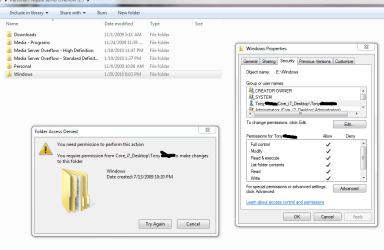
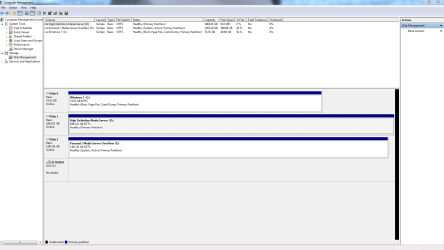
After taking ownership, I am able to remove all the folders except "Windows." When I open it up, all the sub-folders have been deleted except for "SysWOW64." I get the following error message. I've also included an image of my disk management.
 

Attachments

  • 1.PNG
    1.PNG
    36.1 KB · Views: 265
  • DM.PNG
    DM.PNG
    40.3 KB · Views: 211

My Computer My Computer

At a glance

Windows 7 Ultimate x64
OS
Windows 7 Ultimate x64
Unfortunately, your E: drive has taken the System Active flag and now holds the MBR. It needs to be recovered to Win 7.

In Disk Management, mark Win7 drive Active. Power down. Unplug E: drive. Make sure Win7 HD is first HD set to boot in BIOS, after DVD.

Boot into Win7 DVD, select Repair My Computer on second screen, click through to Recovery Tools list to run Startup Repair up to 3 separate times with reboot to rewrite the MBR to C: drive.
 
Last edited:
So I have now removed the System Active flag from my F drive and am still unable to delete the windows file. I have taken ownership with the registry modification. This is where I'm at. Any suggestions?


volsu0.jpg
 
Last edited:

My Computer My Computer

At a glance

Windows 7 Ultimate x64
OS
Windows 7 Ultimate x64
:( your roommate is incredibly annoying XD
Can't you simply boot from your second installation? (just wondering bout the obvious) Obviously, if you try to access your second hdd from you first windows installation, you will fail, due to security
 

My Computer My Computer

At a glance

Windows 7 Home Premium (64 bit)
OS
Windows 7 Home Premium (64 bit)
Ok, so now I've marked those drives as "inactive" and am still unable to delete the folder, even after a reboot. Here's a screenshot for confirmation. Any suggestions for the next step? Btw, I really appreciate the help. Thank you :)

21ajpj6.jpg
 

My Computer My Computer

At a glance

Windows 7 Ultimate x64
OS
Windows 7 Ultimate x64
:( your roommate is incredibly annoying XD
Can't you simply boot from your second installation? (just wondering bout the obvious) Obviously, if you try to access your second hdd from you first windows installation, you will fail, due to security

My C drive is a SSD. The sole reason for purchasing it was for a boot disk. Everything else is essentially for media.
 

My Computer My Computer

At a glance

Windows 7 Ultimate x64
OS
Windows 7 Ultimate x64
Heh. After some messing around, I was able to remove the windows folder. Turned out, I had to remove some unknown account in the "permissions" area of the security settings. Thanks again for all your help!
 

My Computer My Computer

At a glance

Windows 7 Ultimate x64
OS
Windows 7 Ultimate x64
Back
Top