
Solved Can't delete shortcuts in games

SquirrelTakos

New member
Power User
Local time
8:44 PM
Messages
73
Location
MI, USA
I accidentally threw in the shortcuts from the steam folder into the games folder and now I cannot delete them in any way. I am not allowed to right click them or do anything to them.

Is there any way to go into the settings or something to remove these? They're kind of annoying since they don't lead me anywhere and I can't get rid of them.

Thanks

See attachment
 

Attachments
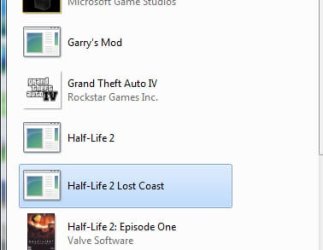
  • games.jpg
    games.jpg
    28.1 KB · Views: 29

My Computer

OS
Windows 7 Pro 64 bit
CPU
AMD Phenom II X4 925
Motherboard
Gigabyte GA-870A-UD3
Memory
2 x 4gb DDR3 1333
Graphics Card(s)
Radeon 6950 2gb
Sound Card
Onboard
Monitor(s) Displays
Samsung BX2431 (x2)
Screen Resolution
1920-1080 (x2)
Hard Drives
120GB OCZ Vertex 2 &
750GB & 250gb Seagate &
1TB Samsung
PSU
Corsair 750TX
Case
Antec 900
Cooling
Cooler Master 212
Keyboard
Logitech Illuminated Keyboard
Mouse
Razer Deathadder
Internet Speed
12 Mb
Go to,

C:\Users\Your Name\AppData\Roaming\Microsoft\Windows\Start Menu\Programs\Games

and you should be able to delete them from there. You will also have to go to Folder Options and set it to " show hidden files and folders", if you haven't already.
 

My Computer

Computer type
PC/Desktop
Computer Manufacturer/Model Number
Me
OS
Win 7 Ultimate x64
CPU
FX-8350 @ 4.6 GHz so far
Motherboard
Asus M5A97 EVO
Memory
ADATA XPG V1 Series Black 8GB DDR3 1600
Graphics Card(s)
Sapphire R9 270x Dual-X
Sound Card
Xonar DGX w/ Corsair Vengence 1300
Monitor(s) Displays
Acer S232HL Abid
Screen Resolution
1920x1080
Hard Drives
120 GB OCZ Vertex 3
500 GB Seagate 7200.12
PSU
Antec Earthwatts 650W Green
Case
Antec Three Hundred
Cooling
Cooler Master 212 EVO
Keyboard
Logitech G510
Mouse
Logitech G500s
Internet Speed
35000/3000
That will delete the shortcuts in the Startmenu/games; however, in the games Menu on the right side of the start menu, and the games folder itself, the icons remain.

The problem itself is located in the actual games folder, not the start menu.
 

My Computer

OS
Windows 7 Pro 64 bit
CPU
AMD Phenom II X4 925
Motherboard
Gigabyte GA-870A-UD3
Memory
2 x 4gb DDR3 1333
Graphics Card(s)
Radeon 6950 2gb
Sound Card
Onboard
Monitor(s) Displays
Samsung BX2431 (x2)
Screen Resolution
1920-1080 (x2)
Hard Drives
120GB OCZ Vertex 2 &
750GB & 250gb Seagate &
1TB Samsung
PSU
Corsair 750TX
Case
Antec 900
Cooling
Cooler Master 212
Keyboard
Logitech Illuminated Keyboard
Mouse
Razer Deathadder
Internet Speed
12 Mb
You could try this,

Game Explorer Editor

Haven't used it since Vista so no idea how well it will do what you want. The other way is to go to,

C:\Users\Your Name\AppData\Local\Microsoft\Windows\GameExplorer

and go through each of the folders till you get to the shortcut and see which game it is for, then delete the entire folder. Bit of a pain to do, but it will remove them from the Games Explorer.
 

My Computer

Computer type
PC/Desktop
Computer Manufacturer/Model Number
Me
OS
Win 7 Ultimate x64
CPU
FX-8350 @ 4.6 GHz so far
Motherboard
Asus M5A97 EVO
Memory
ADATA XPG V1 Series Black 8GB DDR3 1600
Graphics Card(s)
Sapphire R9 270x Dual-X
Sound Card
Xonar DGX w/ Corsair Vengence 1300
Monitor(s) Displays
Acer S232HL Abid
Screen Resolution
1920x1080
Hard Drives
120 GB OCZ Vertex 3
500 GB Seagate 7200.12
PSU
Antec Earthwatts 650W Green
Case
Antec Three Hundred
Cooling
Cooler Master 212 EVO
Keyboard
Logitech G510
Mouse
Logitech G500s
Internet Speed
35000/3000

My Computer

OS
Windows 8 Professional x64
CPU
Intel Core i7-3770K @4.5 GHz
Motherboard
Asus Sabertooth Z77
Memory
16GB G.Skill Ripjaws DDR3-1600
Graphics Card(s)
Gigabyte GeForce GTX 670 OC
Sound Card
Realtek
Monitor(s) Displays
HP 2711x 27" LED
Screen Resolution
1920 X 1080p
Hard Drives
Crucial m4 256GB SSD (system)
Seagate Barracuda XT 2TB 7200 RPM (storage)
PSU
Strider Gold Evolution ST1000-G
Case
Raven RV01
Cooling
Noctua NH-D14
Keyboard
Logitech K800
Mouse
Logitech Performance Mouse MX
Internet Speed
FIOS - 75/35 Mbps
Other Info
Pioneer black internal CD/DVD/BD read/write
Logitech Z506 5.1 speakers
--------------------------------------------------
Alienware X51/i7-3770/EVGA GTX 660ti FTW/16GB 1600/Blu-ray/2TB SATA III HD
THANK YOU so very much!

Thanks for the tutorial link!

:):):)

Araarart
June 2012
 

My Computer

Computer Manufacturer/Model Number
ASUS N61J LAPTOP
OS
Windows 7 Home Premium 64-bit
CPU
Intel Core i5-430M
Memory
4GB RAM
Sound Card
none
Cooling
none
Back
Top