Can't Delete Some Folders

steverido

New member
Member
Local time
5:21 AM
Messages
70
Hi,

I have just noticed that I can't delete 2 of my folders on one of my hard drives. It is not on the C drive. I get the following message,

This is no longer located in F:/programs/spectrasonics/sage/sage/libraries/userlibraries/convertedrexfiles. Verify the items location and try again.

I have tried rebooting in safe mode and shift delete. I have ownership of the Drive so it isn't that.

Any ideas please?
 

My Computer

OS
Windows 7 64
CPU
Intel Core 2 Q9400 Quad Core
Motherboard
EvGA 680i
Memory
OCZ Reaper - 4 x 1GB @ 800
Graphics Card(s)
2 x Evga 9400 GTX Super Super Clocked
Sound Card
Creative Soundblaster X-treme Music
Monitor(s) Displays
NEC mULTISYNC 20wgx
Screen Resolution
1680x1050
Hard Drives
4 X Seagate Barracuda 320 GB
1 X Seagate Barracuda 2 TB
1 x Seagate Barracuda 1TB
PSU
950 W PC Quiet & Cooling
Case
Antec 900
Cooling
Standard Plus Hard Drive 7 Case Fans
Keyboard
Wolf claw
Mouse
Microsoft
Internet Speed
18 MB/S
The only thing that comes to mind here is some glitch with the master file table on the drive, which shows the files as still existing when they have been deleted - I have not seen this type of error for a long time but you may want to try a chkdsk on the drive and see if any errors are shown.

if you right click on the drive and select tools there is an option there - although you may be better running the command itself from within a command prompt or even from the install DVD's command prompt.
 

My Computers

System One System Two

  • Computer type
    PC/Desktop
    Computer Manufacturer/Model Number
    ChillBlast - Custom to my design
    OS
    Windows 11 Pro x64 [Latest Release and Release Preview]
    CPU
    Ryzen 9 5950X, 3.8 - 5.2 MHz
    Motherboard
    Asus Prime X570-Pro
    Memory
    64GB [2 x 32GB] DDR4 3200MHz
    Graphics Card(s)
    4GB NVIDIA GEFORCE GTX 1650 Ti
    Sound Card
    On-board SPDIF to 5.1 System + HDMI [5.1 system]
    Monitor(s) Displays
    32" UHD 32 Bit HDR Monitor + 43" UHD 4K 32Bit HDR TV
    Screen Resolution
    2 x 3840 x 2160 @60Hz
    Hard Drives
    1TB M2 SSD OS, 500GB Fast Access SSD, 2 x 8TB Data + Various Externals from 1TB to 4TB, 10TB NAS
    PSU
    NZXT C750 80 PLUS Gold 750W Modular PSU
    Case
    Workstation Case [Matt Black]
    Cooling
    NZXT Kraken X63 280mm CPU Cooler +2x Quiet Case fans
    Keyboard
    Logitech Wireless MX Keys & K400 + others
    Mouse
    Logitech Wireless MX Master 3S
    Internet Speed
    920 MB Down 50 MB Up
    Antivirus
    BitDefender Total Security Pro
    Browser
    Chrome (always run latest Non-Beta)
    Other Info
    Also run ...
    Laptop - Quad 8GB - Windows 10 Pro x64
    Nexus 7 Android tablet x2
    Samsung 10.2" tablet
    Blackview TAB 8 4G Android Tablet c/w Keyboard
    Wacom Intuos Pro Medium Pen Pad
    Wacom Intuos Pro Small Pen Pad
    Wacom Expresskeys Remote
    Loopdeck+ Graphics Controller
    Shuttle Pro v2 Control
  • Computer type
    Laptop
    System Manufacturer/Model Number
    Dell XPS 17 10750H
    OS
    Windows 11 Pro x64 Latest RP
    CPU
    Intel I7 10750H 5.0GHz
    Motherboard
    Dell XPS
    Memory
    32GB [2x16GB] DDR4 2933 MHz
    Graphics Card(s)
    nVidia GTX1650Ti 4 GB GDDR6
    Sound Card
    Stock [Realtek] 4 Speaker
    Monitor(s) Displays
    17" IPS UHD+ Infinity Edge Touchscreen
    Screen Resolution
    3840 x 2400
    Hard Drives
    2TB M2 NVMe, 4TB External + various 500GB & 1TB External NVMe (also have access to spinner HDD from
    PSU
    Stock
    Case
    Stock XPS Aluminium & Carbon Fibre
    Cooling
    Stock - Active Fan Control
    Keyboard
    Backlit + Various Logitech
    Mouse
    Stock Track Pad + Logitech MX Trackball
    Internet Speed
    72 MB Down 18MB Up
    Browser
    Chrome
    Other Info
    Also run ...
    Laptop - Quad 8GB - Windows 10 Pro x64
    Nexus 7 Android tablet x2
    10.2" tablet
    Sony Z3 Android Smartphone
    Wacom Intuos Pro Medium Pen Pad
    Wacom Intuos Pro Small Pen Pad
    Wacom Expresskeys Remote
    Loopdeck+ Graphics Controller
    Shuttle Pro v2 Control Pad
    10TB NAS
did you try by CD MiniPe or CD like it ?
 

My Computer

OS
windows 7
Hi,

I have just noticed that I can't delete 2 of my folders on one of my hard drives. It is not on the C drive. I get the following message,

This is no longer located in F:/programs/spectrasonics/sage/sage/libraries/userlibraries/convertedrexfiles. Verify the items location and try again.

I have tried rebooting in safe mode and shift delete. I have ownership of the Drive so it isn't that.

Any ideas please?


Exactly how are you trying to delete these folders?
Windows Explorer? Command Prompt? 3rd Party software?

First blush on this I would remind you that ...

F:/programs/spectrasonics/sage/sage/libraries/userlibraries/convertedrexfiles

...cannot exist on a windows system, but...

F:\programs\spectrasonics\sage\sage\libraries\userlibraries\convertedrexfiles

... might.
 

My Computer

Computer Manufacturer/Model Number
Homebrew
OS
XP Pro SP3 X86 / Win7 Pro X86
CPU
Amd 64 x2 4200 (2.4ghz)
Motherboard
Asus M2N-MX SE Plus
Memory
Kingston DDR2 800 2gb
Graphics Card(s)
Nvidia GF-8400
Sound Card
Realtek on Motherboard
Monitor(s) Displays
Acer x-193bw
Screen Resolution
1440 x 900
Hard Drives
Western Digital 500g
PSU
350watt In-Win
Case
In-Win
Cooling
Air
Keyboard
yes
Mouse
yes
Internet Speed
5mpbs
Other Info
Also ASRock ION 330 as HTPC (on XP).
Acer Aspire as GP netbook (on XP).
First blush on this I would remind you that ...

F:/programs/spectrasonics/sage/sage/libraries/userlibraries/convertedrexfiles

...cannot exist on a windows system, but...

F:\programs\spectrasonics\sage\sage\libraries\userlibraries\convertedrexfiles

... might.

Windows transparently translate forward slashes to back slashes when it encounters them in the context of file paths. So unless you are using some stupid-broken application it should have little to no effect using either or on Windows.

However, auto complete in Explorer and Command Prompt do not work with forward slashes.
 

My Computer

Computer type
PC/Desktop
Computer Manufacturer/Model Number
Alienware Aurora ALX R4
OS
Windows 10 Pro (x64)
CPU
Intel Core i7-3930K (3.2GHz - 4.5GHz)
Motherboard
Alienware Aurora-R4 x79
Memory
4x Samsung 4GB PC3-12800 DDR3 (16GB 1600MHz)
Graphics Card(s)
Nvidia Geforce GTX 690
Sound Card
SteelSeries Siberia Elite
Monitor(s) Displays
Dell UltraSharp U3011
Screen Resolution
2560x1600
Hard Drives
Samsung 850 Pro 256 GB, Seagate 1TB Desktop Hybrid HDD, 2x Western Digital 4TB Green HDD
PSU
875W Some Dell PSU <.<
Case
Alienware Aurora ALX
Cooling
Custom Liquid Cooling (EK CPU & GPU blocks) dual EK 480RAD
Keyboard
Logitech G710+ Mechanical
Mouse
Logitech G700s
Internet Speed
Verizon Fios (50 mbps average)
Other Info
Server: Intel NUC D54250WYK: i5-4250U, 16GB, 256 GB mSATA, Windows Server 2012 R2
First blush on this I would remind you that ...

F:/programs/spectrasonics/sage/sage/libraries/userlibraries/convertedrexfiles

...cannot exist on a windows system, but...

F:\programs\spectrasonics\sage\sage\libraries\userlibraries\convertedrexfiles

... might.

Windows transparently translate forward slashes to back slashes when it encounters them in the context of file paths. So unless you are using some stupid-broken application it should have little to no effect using either or on Windows.

However, auto complete in Explorer and Command Prompt do not work with forward slashes.


And... how do we know he's not using some stupid-broken application?
 

My Computer

Computer Manufacturer/Model Number
Homebrew
OS
XP Pro SP3 X86 / Win7 Pro X86
CPU
Amd 64 x2 4200 (2.4ghz)
Motherboard
Asus M2N-MX SE Plus
Memory
Kingston DDR2 800 2gb
Graphics Card(s)
Nvidia GF-8400
Sound Card
Realtek on Motherboard
Monitor(s) Displays
Acer x-193bw
Screen Resolution
1440 x 900
Hard Drives
Western Digital 500g
PSU
350watt In-Win
Case
In-Win
Cooling
Air
Keyboard
yes
Mouse
yes
Internet Speed
5mpbs
Other Info
Also ASRock ION 330 as HTPC (on XP).
Acer Aspire as GP netbook (on XP).
Possible, but I've not seen or heard of any application barfing on forward or back slashes. Except old 16 bit applications that cannot even handle file names bigger then 8.3. I'm sure one exists...but eh.
 

My Computer

Computer type
PC/Desktop
Computer Manufacturer/Model Number
Alienware Aurora ALX R4
OS
Windows 10 Pro (x64)
CPU
Intel Core i7-3930K (3.2GHz - 4.5GHz)
Motherboard
Alienware Aurora-R4 x79
Memory
4x Samsung 4GB PC3-12800 DDR3 (16GB 1600MHz)
Graphics Card(s)
Nvidia Geforce GTX 690
Sound Card
SteelSeries Siberia Elite
Monitor(s) Displays
Dell UltraSharp U3011
Screen Resolution
2560x1600
Hard Drives
Samsung 850 Pro 256 GB, Seagate 1TB Desktop Hybrid HDD, 2x Western Digital 4TB Green HDD
PSU
875W Some Dell PSU <.<
Case
Alienware Aurora ALX
Cooling
Custom Liquid Cooling (EK CPU & GPU blocks) dual EK 480RAD
Keyboard
Logitech G710+ Mechanical
Mouse
Logitech G700s
Internet Speed
Verizon Fios (50 mbps average)
Other Info
Server: Intel NUC D54250WYK: i5-4250U, 16GB, 256 GB mSATA, Windows Server 2012 R2
Additionally, you can try these steps:

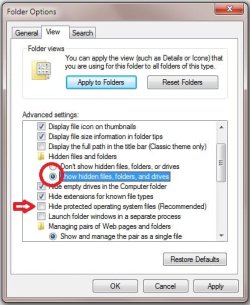
* Enable "Show hidden folders and files" and uncheck the option "Hide protected operating system files" as shown in the figure. Select Ok

Untitled.jpg

* Go to that folder which you are unable to delete. Open it you may see some hidden system files inside the folder. Go to task manager process and check if any process exists with the same name as the hidden file name in the folder.

* If yes, end the process and now try deleting the folder. Be careful while ending the process though.

♥ Cheers ♥
~ Venthan~
 

My Computer

Computer Manufacturer/Model Number
Dell Inspiron N5010
OS
Windows 7 Ultimate x64 SP1
CPU
Intel Core i3
Memory
4 GB DDR3
Screen Resolution
1366 X 768
Hard Drives
Seagate 500 GB
Internet Speed
4 MBPS
Back
Top