You are using an out of date browser. It may not display this or other websites correctly.
You should upgrade or use an
alternative browser.
Can't deleted XP mode folder
New member
Power User
VIP
i installed xp mode and then uninstalled it and now i have a folder is my C

rogram files and i cant deleted it.
Can someone help me deleted it?
- Computer type
- PC/Desktop
- Computer Manufacturer/Model Number
- Custom Build
- OS
- Windows 7 Professional 64bit
- CPU
- Intel Core i5 - 2500K @ 3.30GHz
- Motherboard
- Gigabyte Z77-HD3
- Memory
- 4GB DDR3
- Graphics Card(s)
- EVGA Nvidia GeForce GT 740 2GB DDR3
- Screen Resolution
- 1680 x 1050
- Hard Drives
- 1T Samaung HD/ 1T toshiba external drive/ 1T western digital external drive/ 2T seagate external drive/ 250gb samaung SSD
- PSU
- Antec 430W
- Keyboard
- Microsoft Wireless Keyboard 800
- Mouse
- Microsoft Wireless Mouse 1000
- Antivirus
- AVG
- Browser
- Internet Explorer
- Computer Manufacturer/Model Number
- Custom
- OS
- Windows 7 Professional x64
- CPU
- Intel i7 2600K OC'd @ 4620 MHz
- Motherboard
- Asus P8Z68-V Pro
- Memory
- 16GB GSkill Sniper 2133 Mhz (4x4GB)
- Graphics Card(s)
- EVGA GeForce GTX 480 SuperClocked+
- Sound Card
- Realtek High Definition Audio
- Monitor(s) Displays
- 2x Acer S273HLbmii 27"
- Screen Resolution
- 2 x 1920x1080
- Hard Drives
- 64GB Crucial M4 SSD
Storage: Hitachi 1TB 5400RPM, Samsung 1.5TB 5400RPM
- PSU
- Corsair HW Series 750w (modular)
- Case
- Cooler Master HAF 932 Advanced Blue Edition
- Cooling
- CM Hyper 212+ CPU cooler, 3x 230mm + 1x 140mm case fans
- Keyboard
- Logitech MK320 (wireless)
- Mouse
- Logitech MK320 (wireless)
- Internet Speed
- 30 Mb/s : 2 Mb/s
New member
Power User
VIP
Thread Starter
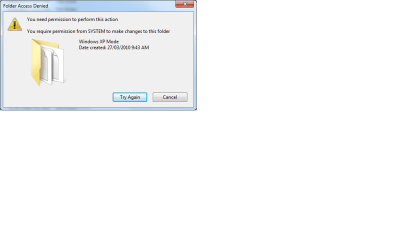
i dont see a take ownship buttons unless it coz i hid foler , i get these command when i right clip it.
Screen shot number 2 is there error message i get if i try to deleted it
and screen shot number 3 is the error message i get if i try and deleted it from desktop
-

Untitled.jpg
338 KB
· Views: 80
-
-

Untitled3.png
51.1 KB
· Views: 37
- Computer type
- PC/Desktop
- Computer Manufacturer/Model Number
- Custom Build
- OS
- Windows 7 Professional 64bit
- CPU
- Intel Core i5 - 2500K @ 3.30GHz
- Motherboard
- Gigabyte Z77-HD3
- Memory
- 4GB DDR3
- Graphics Card(s)
- EVGA Nvidia GeForce GT 740 2GB DDR3
- Screen Resolution
- 1680 x 1050
- Hard Drives
- 1T Samaung HD/ 1T toshiba external drive/ 1T western digital external drive/ 2T seagate external drive/ 250gb samaung SSD
- PSU
- Antec 430W
- Keyboard
- Microsoft Wireless Keyboard 800
- Mouse
- Microsoft Wireless Mouse 1000
- Antivirus
- AVG
- Browser
- Internet Explorer
i dont see a take ownship buttons unless it coz i hid foler , i get these command when i right clip it.
Screen shot number 2 is there error message i get if i try to deleted it
and screen shot number 3 is the error message i get if i try and deleted it from desktop
You've to download it on the tutorials forum section...search thread "take ownership"
http://www.sevenforums.com/tutorials/1911-take-ownership-shortcut.html
This will also brings you to the link of jonathan_king previous post
Last edited:
- Computer type
- PC/Desktop
- Computer Manufacturer/Model Number
- Custom Build
- OS
- Windows 7 Professional SP1 - x64 [Non-UEFI Boot]
- CPU
- Ivy Bridge Core i5 3570K (Delidded)
- Motherboard
- Asus P8Z77-V LE PLUS
- Memory
- G.Skill "Ares" DDR3 PC3-12800 - 1600MHz (16Gb)
- Graphics Card(s)
- Asus Dual-RX480-O4G
- Sound Card
- Creative Sound Blaster Z w/5.1 sound system
- Monitor(s) Displays
- Asus IPS 23"
- Screen Resolution
- 16/9
- Hard Drives
- Internal:
500Go Sata 6Gb/s (x2)
500Go Sata 3Gb/s (x2)
SSD 60Go Sata 6Gb/s
- PSU
- In Win C 900W Series 80+ Platinum
- Case
- Thermaltake Chaser A71
- Cooling
- Custom Water Cooling Loop
- Keyboard
- Cooler Master QuickFire XTi
- Mouse
- Razer Imperator 2012 (4G)
- Antivirus
- MSE
- Browser
- IE 11.0.xxx Rtm
- Other Info
- "Raid0" with Intel Smart Response Technology (HDD/SSD)
New member
Power User
VIP
Thread Starter
doesnt seem to work unless im not doing it right...
i click take owner ship and i get like a 1sec flash of command promt
- Computer type
- PC/Desktop
- Computer Manufacturer/Model Number
- Custom Build
- OS
- Windows 7 Professional 64bit
- CPU
- Intel Core i5 - 2500K @ 3.30GHz
- Motherboard
- Gigabyte Z77-HD3
- Memory
- 4GB DDR3
- Graphics Card(s)
- EVGA Nvidia GeForce GT 740 2GB DDR3
- Screen Resolution
- 1680 x 1050
- Hard Drives
- 1T Samaung HD/ 1T toshiba external drive/ 1T western digital external drive/ 2T seagate external drive/ 250gb samaung SSD
- PSU
- Antec 430W
- Keyboard
- Microsoft Wireless Keyboard 800
- Mouse
- Microsoft Wireless Mouse 1000
- Antivirus
- AVG
- Browser
- Internet Explorer
doesnt seem to work unless im not doing it right...
i click take owner ship and i get like a 1sec flash of command promt
That sounds like you're doing it right. Now try deleting the folder.
- Computer Manufacturer/Model Number
- Custom
- OS
- Windows 7 Professional x64
- CPU
- Intel i7 2600K OC'd @ 4620 MHz
- Motherboard
- Asus P8Z68-V Pro
- Memory
- 16GB GSkill Sniper 2133 Mhz (4x4GB)
- Graphics Card(s)
- EVGA GeForce GTX 480 SuperClocked+
- Sound Card
- Realtek High Definition Audio
- Monitor(s) Displays
- 2x Acer S273HLbmii 27"
- Screen Resolution
- 2 x 1920x1080
- Hard Drives
- 64GB Crucial M4 SSD
Storage: Hitachi 1TB 5400RPM, Samsung 1.5TB 5400RPM
- PSU
- Corsair HW Series 750w (modular)
- Case
- Cooler Master HAF 932 Advanced Blue Edition
- Cooling
- CM Hyper 212+ CPU cooler, 3x 230mm + 1x 140mm case fans
- Keyboard
- Logitech MK320 (wireless)
- Mouse
- Logitech MK320 (wireless)
- Internet Speed
- 30 Mb/s : 2 Mb/s
New member
Power User
VIP
Thread Starter
nope still the same error message

i cant even deleted folders inside it.
Would maybe renaming work?
- Computer type
- PC/Desktop
- Computer Manufacturer/Model Number
- Custom Build
- OS
- Windows 7 Professional 64bit
- CPU
- Intel Core i5 - 2500K @ 3.30GHz
- Motherboard
- Gigabyte Z77-HD3
- Memory
- 4GB DDR3
- Graphics Card(s)
- EVGA Nvidia GeForce GT 740 2GB DDR3
- Screen Resolution
- 1680 x 1050
- Hard Drives
- 1T Samaung HD/ 1T toshiba external drive/ 1T western digital external drive/ 2T seagate external drive/ 250gb samaung SSD
- PSU
- Antec 430W
- Keyboard
- Microsoft Wireless Keyboard 800
- Mouse
- Microsoft Wireless Mouse 1000
- Antivirus
- AVG
- Browser
- Internet Explorer
- Computer Manufacturer/Model Number
- Custom
- OS
- Windows 7 Professional x64
- CPU
- Intel i7 2600K OC'd @ 4620 MHz
- Motherboard
- Asus P8Z68-V Pro
- Memory
- 16GB GSkill Sniper 2133 Mhz (4x4GB)
- Graphics Card(s)
- EVGA GeForce GTX 480 SuperClocked+
- Sound Card
- Realtek High Definition Audio
- Monitor(s) Displays
- 2x Acer S273HLbmii 27"
- Screen Resolution
- 2 x 1920x1080
- Hard Drives
- 64GB Crucial M4 SSD
Storage: Hitachi 1TB 5400RPM, Samsung 1.5TB 5400RPM
- PSU
- Corsair HW Series 750w (modular)
- Case
- Cooler Master HAF 932 Advanced Blue Edition
- Cooling
- CM Hyper 212+ CPU cooler, 3x 230mm + 1x 140mm case fans
- Keyboard
- Logitech MK320 (wireless)
- Mouse
- Logitech MK320 (wireless)
- Internet Speed
- 30 Mb/s : 2 Mb/s
New member
Power User
VIP
Thread Starter
okay well renaming will change name but not deleted >:l i will try in safe mode after i finshe doing my Sytem image.
In the mean time i shall read that post
- Computer type
- PC/Desktop
- Computer Manufacturer/Model Number
- Custom Build
- OS
- Windows 7 Professional 64bit
- CPU
- Intel Core i5 - 2500K @ 3.30GHz
- Motherboard
- Gigabyte Z77-HD3
- Memory
- 4GB DDR3
- Graphics Card(s)
- EVGA Nvidia GeForce GT 740 2GB DDR3
- Screen Resolution
- 1680 x 1050
- Hard Drives
- 1T Samaung HD/ 1T toshiba external drive/ 1T western digital external drive/ 2T seagate external drive/ 250gb samaung SSD
- PSU
- Antec 430W
- Keyboard
- Microsoft Wireless Keyboard 800
- Mouse
- Microsoft Wireless Mouse 1000
- Antivirus
- AVG
- Browser
- Internet Explorer
Actually, try the post before booting up in safe mode. If it works, you don't have to reboot.
- Computer Manufacturer/Model Number
- Custom
- OS
- Windows 7 Professional x64
- CPU
- Intel i7 2600K OC'd @ 4620 MHz
- Motherboard
- Asus P8Z68-V Pro
- Memory
- 16GB GSkill Sniper 2133 Mhz (4x4GB)
- Graphics Card(s)
- EVGA GeForce GTX 480 SuperClocked+
- Sound Card
- Realtek High Definition Audio
- Monitor(s) Displays
- 2x Acer S273HLbmii 27"
- Screen Resolution
- 2 x 1920x1080
- Hard Drives
- 64GB Crucial M4 SSD
Storage: Hitachi 1TB 5400RPM, Samsung 1.5TB 5400RPM
- PSU
- Corsair HW Series 750w (modular)
- Case
- Cooler Master HAF 932 Advanced Blue Edition
- Cooling
- CM Hyper 212+ CPU cooler, 3x 230mm + 1x 140mm case fans
- Keyboard
- Logitech MK320 (wireless)
- Mouse
- Logitech MK320 (wireless)
- Internet Speed
- 30 Mb/s : 2 Mb/s
New member
Power User
VIP
Thread Starter
Seems to hard for a 14 year old like me to do...
i will just finishe partiting and try safe mode even tho when i press F8 it never works
- Computer type
- PC/Desktop
- Computer Manufacturer/Model Number
- Custom Build
- OS
- Windows 7 Professional 64bit
- CPU
- Intel Core i5 - 2500K @ 3.30GHz
- Motherboard
- Gigabyte Z77-HD3
- Memory
- 4GB DDR3
- Graphics Card(s)
- EVGA Nvidia GeForce GT 740 2GB DDR3
- Screen Resolution
- 1680 x 1050
- Hard Drives
- 1T Samaung HD/ 1T toshiba external drive/ 1T western digital external drive/ 2T seagate external drive/ 250gb samaung SSD
- PSU
- Antec 430W
- Keyboard
- Microsoft Wireless Keyboard 800
- Mouse
- Microsoft Wireless Mouse 1000
- Antivirus
- AVG
- Browser
- Internet Explorer
Wait, weren't you the one Greg had doing all kinds of tricks a few months ago?
- Computer Manufacturer/Model Number
- Custom
- OS
- Windows 7 Professional x64
- CPU
- Intel i7 2600K OC'd @ 4620 MHz
- Motherboard
- Asus P8Z68-V Pro
- Memory
- 16GB GSkill Sniper 2133 Mhz (4x4GB)
- Graphics Card(s)
- EVGA GeForce GTX 480 SuperClocked+
- Sound Card
- Realtek High Definition Audio
- Monitor(s) Displays
- 2x Acer S273HLbmii 27"
- Screen Resolution
- 2 x 1920x1080
- Hard Drives
- 64GB Crucial M4 SSD
Storage: Hitachi 1TB 5400RPM, Samsung 1.5TB 5400RPM
- PSU
- Corsair HW Series 750w (modular)
- Case
- Cooler Master HAF 932 Advanced Blue Edition
- Cooling
- CM Hyper 212+ CPU cooler, 3x 230mm + 1x 140mm case fans
- Keyboard
- Logitech MK320 (wireless)
- Mouse
- Logitech MK320 (wireless)
- Internet Speed
- 30 Mb/s : 2 Mb/s
New member
Power User
VIP
Thread Starter
yes

- Computer type
- PC/Desktop
- Computer Manufacturer/Model Number
- Custom Build
- OS
- Windows 7 Professional 64bit
- CPU
- Intel Core i5 - 2500K @ 3.30GHz
- Motherboard
- Gigabyte Z77-HD3
- Memory
- 4GB DDR3
- Graphics Card(s)
- EVGA Nvidia GeForce GT 740 2GB DDR3
- Screen Resolution
- 1680 x 1050
- Hard Drives
- 1T Samaung HD/ 1T toshiba external drive/ 1T western digital external drive/ 2T seagate external drive/ 250gb samaung SSD
- PSU
- Antec 430W
- Keyboard
- Microsoft Wireless Keyboard 800
- Mouse
- Microsoft Wireless Mouse 1000
- Antivirus
- AVG
- Browser
- Internet Explorer
New member
Power User
VIP
Thread Starter
im in SAFE mode now ands its not working
should i try with your take ownership?
- Computer type
- PC/Desktop
- Computer Manufacturer/Model Number
- Custom Build
- OS
- Windows 7 Professional 64bit
- CPU
- Intel Core i5 - 2500K @ 3.30GHz
- Motherboard
- Gigabyte Z77-HD3
- Memory
- 4GB DDR3
- Graphics Card(s)
- EVGA Nvidia GeForce GT 740 2GB DDR3
- Screen Resolution
- 1680 x 1050
- Hard Drives
- 1T Samaung HD/ 1T toshiba external drive/ 1T western digital external drive/ 2T seagate external drive/ 250gb samaung SSD
- PSU
- Antec 430W
- Keyboard
- Microsoft Wireless Keyboard 800
- Mouse
- Microsoft Wireless Mouse 1000
- Antivirus
- AVG
- Browser
- Internet Explorer
- Computer Manufacturer/Model Number
- Custom
- OS
- Windows 7 Professional x64
- CPU
- Intel i7 2600K OC'd @ 4620 MHz
- Motherboard
- Asus P8Z68-V Pro
- Memory
- 16GB GSkill Sniper 2133 Mhz (4x4GB)
- Graphics Card(s)
- EVGA GeForce GTX 480 SuperClocked+
- Sound Card
- Realtek High Definition Audio
- Monitor(s) Displays
- 2x Acer S273HLbmii 27"
- Screen Resolution
- 2 x 1920x1080
- Hard Drives
- 64GB Crucial M4 SSD
Storage: Hitachi 1TB 5400RPM, Samsung 1.5TB 5400RPM
- PSU
- Corsair HW Series 750w (modular)
- Case
- Cooler Master HAF 932 Advanced Blue Edition
- Cooling
- CM Hyper 212+ CPU cooler, 3x 230mm + 1x 140mm case fans
- Keyboard
- Logitech MK320 (wireless)
- Mouse
- Logitech MK320 (wireless)
- Internet Speed
- 30 Mb/s : 2 Mb/s
New member
Power User
VIP
Thread Starter
D: it worked with the take owner ship!!!
I shall rep you when i get back into my normal system
- Computer type
- PC/Desktop
- Computer Manufacturer/Model Number
- Custom Build
- OS
- Windows 7 Professional 64bit
- CPU
- Intel Core i5 - 2500K @ 3.30GHz
- Motherboard
- Gigabyte Z77-HD3
- Memory
- 4GB DDR3
- Graphics Card(s)
- EVGA Nvidia GeForce GT 740 2GB DDR3
- Screen Resolution
- 1680 x 1050
- Hard Drives
- 1T Samaung HD/ 1T toshiba external drive/ 1T western digital external drive/ 2T seagate external drive/ 250gb samaung SSD
- PSU
- Antec 430W
- Keyboard
- Microsoft Wireless Keyboard 800
- Mouse
- Microsoft Wireless Mouse 1000
- Antivirus
- AVG
- Browser
- Internet Explorer
Great, glad that worked for you. Remember that link, and use it if anyone else has the same problem.
- Computer Manufacturer/Model Number
- Custom
- OS
- Windows 7 Professional x64
- CPU
- Intel i7 2600K OC'd @ 4620 MHz
- Motherboard
- Asus P8Z68-V Pro
- Memory
- 16GB GSkill Sniper 2133 Mhz (4x4GB)
- Graphics Card(s)
- EVGA GeForce GTX 480 SuperClocked+
- Sound Card
- Realtek High Definition Audio
- Monitor(s) Displays
- 2x Acer S273HLbmii 27"
- Screen Resolution
- 2 x 1920x1080
- Hard Drives
- 64GB Crucial M4 SSD
Storage: Hitachi 1TB 5400RPM, Samsung 1.5TB 5400RPM
- PSU
- Corsair HW Series 750w (modular)
- Case
- Cooler Master HAF 932 Advanced Blue Edition
- Cooling
- CM Hyper 212+ CPU cooler, 3x 230mm + 1x 140mm case fans
- Keyboard
- Logitech MK320 (wireless)
- Mouse
- Logitech MK320 (wireless)
- Internet Speed
- 30 Mb/s : 2 Mb/s



