
PC is on domain.
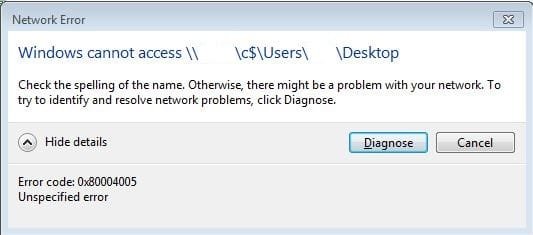
When entering path to a folder of another PC on the local network through it's administrative share i.e. "\\remotepc\c$\users\username\desktop" I get the message in the attached screen-grab.
When I enter the path to the root drive "\\remotepc\c$" I get prompted for credentials, enter the cred's and then can browse the entire drive and sub-directories.
Does anyone know why you don't get prompted when entering the sub-directory directly?
When entering path to a folder of another PC on the local network through it's administrative share i.e. "\\remotepc\c$\users\username\desktop" I get the message in the attached screen-grab.
When I enter the path to the root drive "\\remotepc\c$" I get prompted for credentials, enter the cred's and then can browse the entire drive and sub-directories.
Does anyone know why you don't get prompted when entering the sub-directory directly?
Attachments
My Computer
At a glance
Windows 7 Pro x64
- Computer type
- PC/Desktop
- OS
- Windows 7 Pro x64

